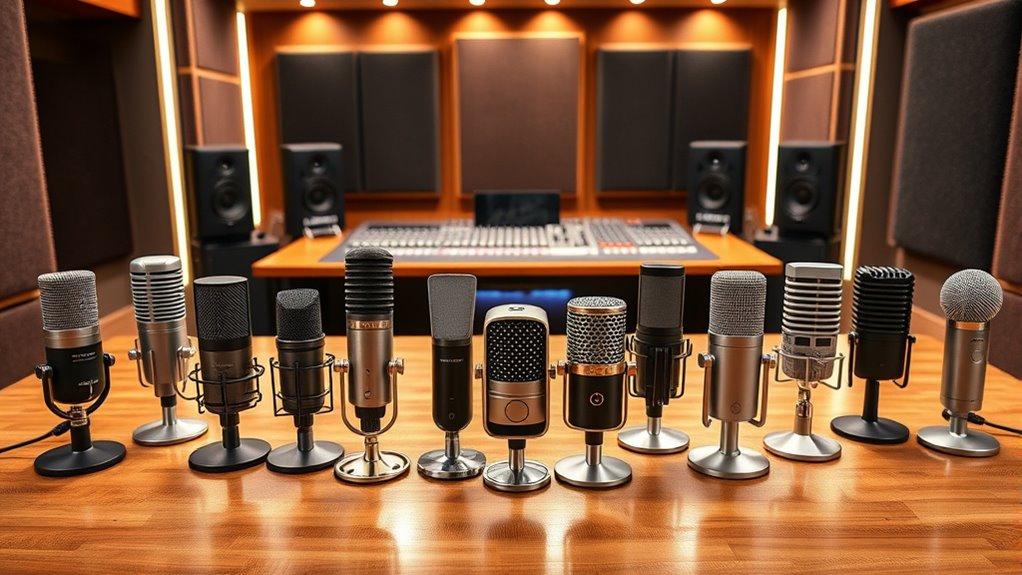

The best microphone for podcasting in this roundup is the Shure MV7+, a flexible USB-C and XLR dynamic mic for creators who want a direct-to-computer setup now and a path to more advanced audio later. The FIFINE AmpliTank K688CT is a strong value-minded alternative with both connection types, while the MAONO PD200W stands out for hosts who want wireless flexibility. The main tradeoff is between dynamic mics, which can be more forgiving in everyday rooms, and condenser mics, which can capture more room sound along with your voice. Connection options, included mounting gear, and the amount of control you want also shape the choice. Read on for how all 14 picks compare and which one fits your recording setup.

Get your wardrobe favorites delivered free with Prime
- Fast, free delivery on millions of items
- Prime Video, Amazon Music and more included
- Member-only deals all year
Complete the kit



Key Takeaways
- The amazon.com/dp/B0CTJ8BSWN?tag=aluxurylifestyle-20&ascsubtag=dc-605823″ target=”_blank” rel=”nofollow sponsored noopener”>Shure MV7+ is the most adaptable podcast pick: USB-C suits a simple computer setup, while XLR leaves room to expand into a mixer or interface.
- USB/XLR flexibility is not exclusive to premium models: the FIFINE AmpliTank K688CT and FIFINE AmpliGame AM8 also offer both connection paths, though buyers should compare kit contents and intended setup.
- Room conditions should guide the dynamic-versus-condenser choice: the lineup includes several dynamic broadcast-style mics and condenser kits that may suit quieter, better-controlled spaces.
- Included accessories can shape total setup effort: options such as the FIFINE T669 and TONOR TC310+ bundle mounting gear, while standalone microphones may require a separate support purchase.
- Similar product names do not always mean a different recording choice: the two Shure MV7+ listings and two Logitech Blue Yeti color listings appear to differ mainly by listing or finish, so compare the exact package and connection details before choosing.
| Shure MV7+ USB-C & XLR Podcast Dynamic Mic with Stand – Black |  | Best Overall | Connectivity: USB and XLR | Connectors: USB Type-C and XLR | Microphone type: Dynamic | VIEW ON AMAZON | See Our Full Breakdown |
| Maono A04 USB Microphone – 192kHz/24‑Bit Condenser Kit for PC & Podcasting |  | Best Complete USB Kit | Connectivity: USB and USB Type-C | Polar pattern: Cardioid | Sample rate / bit depth: 192kHz / 24-bit | VIEW ON AMAZON | See Our Full Breakdown |
| FIFINE AmpliTank K688CT USB/XLR Dynamic Podcast Microphone Kit | 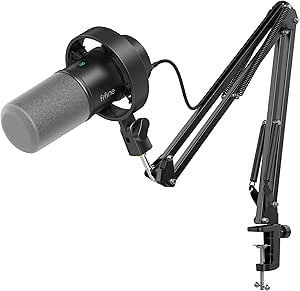 | Best Value Hybrid Dynamic Kit | Connectivity: USB and XLR | Microphone type: Dynamic | Polar pattern: Unidirectional (cardioid) | VIEW ON AMAZON | See Our Full Breakdown |
| Logitech Blue Yeti USB Microphone, Blackout |  | Best for Multi-Format Recording | Connectivity: USB | Microphone type: Tri-capsule condenser | Pickup patterns: Cardioid, omnidirectional, bidirectional, and stereo | VIEW ON AMAZON | See Our Full Breakdown |
| RØDE PodMic Cardioid Dynamic Broadcast Microphone | 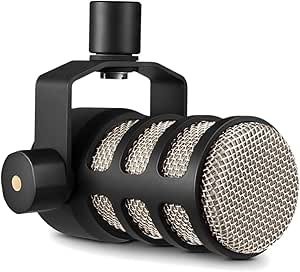 | Best XLR Broadcast Pick | Connectivity: XLR | Polar pattern: Unidirectional | Frequency range: 20 Hz–20 kHz | VIEW ON AMAZON | See Our Full Breakdown |
| Amazon Basics USB Condenser Microphone for PC |  | Best Simple Starter Mic | Connectivity: USB | Pickup pattern: Cardioid (unidirectional) | Diaphragm: 14 mm | VIEW ON AMAZON | See Our Full Breakdown |
| Logitech Blue Yeti USB Microphone, Midnight Blue |  | Best for Flexible Recording Setups | Connectivity: USB Type-A | Pickup patterns: Cardioid, omnidirectional, bidirectional, stereo | Microphone array: Three-capsule | VIEW ON AMAZON | See Our Full Breakdown |
| TONOR TC310+ USB Gaming Microphone Set with Boom Arm | 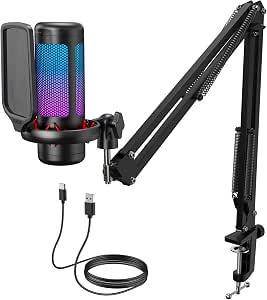 | Best All-in-One Desk Kit | Model: TC310+ | Connectivity: USB-A | Polar pattern: Unidirectional | VIEW ON AMAZON | See Our Full Breakdown |
| FIFINE AmpliGame AM8 USB/XLR Dynamic Microphone |  | Best Upgrade-Path Dynamic Mic | Connectivity: USB, XLR | Microphone type: Dynamic | Polar pattern: Unidirectional cardioid | VIEW ON AMAZON | See Our Full Breakdown |
| MAONO PD200W Hybrid Wireless Dynamic Podcast Microphone |  | Best for Wireless and Multi-Mic Recording | Connectivity: Wireless, USB, XLR | Microphone type: Dynamic | Polar pattern: Unidirectional (cardioid) | VIEW ON AMAZON | See Our Full Breakdown |
| FIFINE T669 USB Condenser Microphone Kit |  | Best Complete Kit for First-Time Podcasters | Connectivity: USB | Connectors: USB Type-A, USB Type-C | Polar pattern: Unidirectional cardioid | VIEW ON AMAZON | See Our Full Breakdown |
| ZealSound K66 USB Podcast Microphone with Noise Reduction, Gain and Mute Controls |  | Best for Multi-Device Recording | Microphone type: Condenser | Pickup pattern: Cardioid | Frequency response: 40 Hz–18 kHz | VIEW ON AMAZON | See Our Full Breakdown |
| Shure MV7+ USB-C and XLR Podcast Dynamic Microphone, Black |  | Best Premium Upgrade Path | Microphone type: Dynamic | Connectivity: USB-C, XLR | Polar pattern: Unidirectional | VIEW ON AMAZON | See Our Full Breakdown |
| FIFINE AmpliGame AM8T USB/XLR Dynamic Gaming Microphone Kit with Boom Arm |  | Best Dynamic Mic Kit for a Gaming Desk | Microphone type: Dynamic | Connectivity: USB, XLR | Polar pattern: Unidirectional cardioid | VIEW ON AMAZON | See Our Full Breakdown |
| microphone for podcasting | Connectivity | Signal-to-noise ratio | Polar pattern | Frequency response |
|---|---|---|---|---|
| Shure MV7+ USB-C & XLR Podcast | USB and XLR | 65 dB | Unidirectional | 50 Hz |
| Maono A04 USB Microphone | USB and USB Type-C | 70 dB | Cardioid | 30 Hz–16 kHz |
| FIFINE AmpliTank K688CT USB/XL | USB and XLR | 80 dB | Unidirectional (cardioid) | 50 Hz–16 kHz |
| Logitech Blue Yeti USB Microph | USB | 100 dB | — | 20 Hz–20 kHz |
| RØDE PodMic Cardioid Dynamic B | XLR | 78 dB | Unidirectional | — |
| Amazon Basics USB Condenser Mi | USB | — | — | — |
| Logitech Blue Yeti USB Microph | USB Type-A | 70 dB | — | 20 Hz–20 kHz |
| TONOR TC310+ USB Gaming Microp | USB-A | 78 dB | Unidirectional | — |
| FIFINE AmpliGame AM8 USB/XLR D | USB, XLR | 80 dB | Unidirectional cardioid | 50 Hz–16 kHz |
| MAONO PD200W Hybrid Wireless D | Wireless, USB, XLR | 82 dB | Unidirectional (cardioid) | — |
| FIFINE T669 USB Condenser Micr | USB | 78 dB | Unidirectional cardioid | 20 Hz–20 kHz |
| ZealSound K66 USB Podcast Micr | — | — | — | 40 Hz–18 kHz |
| Shure MV7+ USB-C and XLR Podca | USB-C, XLR | 60 dB | Unidirectional | 50 Hz–16 kHz |
| FIFINE AmpliGame AM8T USB/XLR | USB, XLR | 80 dB | Unidirectional cardioid | — |
More Details on Our Top Picks
Shure MV7+ USB-C & XLR Podcast Dynamic Mic with Stand – Black
The Shure MV7+ is the strongest all-round fit here for podcasters who want a microphone that can serve a simple USB setup now and an XLR studio chain later. Its real-time voice isolation, Auto Level Mode, and digital pop filter are aimed at keeping spoken audio consistent without requiring constant manual adjustments. Compared with the FIFINE AmpliTank K688CT, it adds OBS-certified integration and a customizable LED touch panel, though both offer USB and XLR connections. That flexibility comes with a larger, heavier footprint, and deeper customization relies on the MOTIV Mix app. I’d choose it over the USB-only Maono A04 when future studio expansion and hands-on voice processing matter more than an included boom-arm kit.
Pros:- USB-C and XLR connections support both beginner and studio workflows
- Voice isolation, Auto Level Mode, and digital pop filter help manage spoken audio
- LED touch panel provides mute control and level monitoring
- OBS-certified integration suits podcast and streaming setups
Cons:- At 3.6 pounds, it is heavy and may take up substantial desk or mounting space
- Full customization depends on the MOTIV Mix app
Best for: Podcast hosts who want USB simplicity today, plan to add an XLR interface later, and value onboard voice-processing tools.
Not ideal for: Podcasters with a cramped desk or buyers who want a complete boom-arm recording kit without relying on an app for customization.
- Connectivity:USB and XLR
- Connectors:USB Type-C and XLR
- Microphone type:Dynamic
- Polar pattern:Unidirectional
- Frequency response:50 Hz
- Signal-to-noise ratio:65 dB
- Weight:3.6 lb
- Enclosure material:Metal
Our verdict“Choose the MV7+ if you want a feature-rich podcast mic that can move from USB recording to an XLR studio setup.”
Maono A04 USB Microphone – 192kHz/24‑Bit Condenser Kit for PC & Podcasting
The Maono A04 makes podcast setup straightforward by bundling the condenser mic with a boom arm, shock mount, pop filter, and windscreen. Its USB plug-and-play connection avoids the interface needed by the XLR-only RØDE PodMic, while the listed 192kHz/24-bit format gives computer-based creators a high-resolution recording option. The cardioid pattern is suited to a solo speaker positioned in front of the mic, but a condenser may capture more room sound than the dynamic Shure MV7+ or FIFINE AmpliTank K688CT in a less controlled space. The A04 is also a substantial kit, and its USB-B connection may call for an adapter with some newer laptops. I’d favor it when included mounting and pop-control accessories matter more than XLR upgrade flexibility.
Pros:- Includes boom arm, shock mount, pop filter, and foam windscreen
- USB setup works without an external sound card
- Cardioid pickup focuses on a speaker positioned in front of the mic
- Supports a listed 192kHz/24-bit sample rate and bit depth
Cons:- USB-B connection may require an adapter for newer laptops
- Large, 1.35 kg kit calls for a sturdy desk
- Not compatible with Xbox consoles
Best for: New PC or Mac podcasters who want a USB condenser microphone and the main mounting and pop-control accessories in one kit.
Not ideal for: Hosts recording in noisy or echo-prone rooms, Xbox users, or buyers who want an XLR path for future studio gear.
- Connectivity:USB and USB Type-C
- Polar pattern:Cardioid
- Sample rate / bit depth:192kHz / 24-bit
- Capsule size:16 mm
- Frequency response:30 Hz–16 kHz
- Signal-to-noise ratio:70 dB
- Weight:1.35 kg
- Included accessories:Scissor arm, shock mount, pop filter, foam windscreen, and USB-A/USB-C to USB-B cable
Our verdict“Pick the A04 if you want a ready-to-mount USB podcast kit and record in a room where a condenser mic can work well.”
FIFINE AmpliTank K688CT USB/XLR Dynamic Podcast Microphone Kit
The FIFINE AmpliTank K688CT pairs a dynamic cardioid mic with both USB and XLR connections, giving podcasters a practical route from direct computer recording to an interface-based setup. Unlike the XLR-only RØDE PodMic, it can connect over USB and offers tap-to-mute, gain and volume controls, plus headphone monitoring in that mode. The included metal boom arm, shock mount, and windscreen also make it more of a starter kit than the standalone PodMic. There is a clear limitation: those mic controls are unavailable over XLR, so the USB conveniences do not carry into a more traditional chain. The clamp only fits desks under two inches thick, which can rule out some furniture. I’d choose it for flexible home podcasting, not for a control-rich XLR workflow.
Pros:- USB and XLR connections accommodate computer and interface setups
- Dynamic cardioid design helps focus pickup on a nearby speaker
- Includes a boom arm, shock mount, and windscreen
- USB mode provides mute, gain, volume, and headphone-monitoring controls
Cons:- Microphone controls are unavailable in XLR mode
- Desk clamp only fits desks under two inches thick
Best for: Home podcasters who want a dynamic mic, included mounting accessories, and the choice to record by USB or XLR.
Not ideal for: Creators who need onboard controls while using XLR, or whose desk is two inches thick or more.
- Connectivity:USB and XLR
- Microphone type:Dynamic
- Polar pattern:Unidirectional (cardioid)
- Frequency response:50 Hz–16 kHz
- Maximum SPL:130 dB
- Signal-to-noise ratio:80 dB
- Included accessories:Boom arm, shock mount, and windscreen
- Desk clamp compatibility:Desks under 2 inches thick
Our verdict“Choose the K688CT for a flexible dynamic starter kit, provided its clamp fits your desk and you do not need its controls over XLR.”
Logitech Blue Yeti USB Microphone, Blackout
The Blue Yeti suits podcasters who need one USB mic to handle more than a solo host: its four pickup patterns cover cardioid speech, two-person bidirectional recording, room capture, and stereo work. That versatility sets it apart from the focused, unidirectional RØDE PodMic and the dynamic FIFINE AmpliTank K688CT, both better matched to a single close speaker. Onboard gain, mute, pattern, and headphone-volume controls make changes accessible without reaching for recording software, and zero-latency monitoring helps a host hear the live mic feed. The tradeoff is a desktop-oriented setup and USB-only connection, so it cannot grow into an XLR chain like the Shure MV7+. Blue VO!CE processing also requires Logitech G HUB. I’d pick the Yeti for varied recording formats, not for a compact or XLR-first studio.
Pros:- Four pickup patterns support solo, interview, room, and stereo recording
- Onboard controls cover gain, mute, pattern selection, and headphone volume
- Zero-latency monitoring supports live voice checks
- USB connection offers a straightforward PC or Mac setup
Cons:- USB-only connectivity does not support an XLR studio chain
- Included stand is designed for desktop use
- Blue VO!CE effects require Logitech G HUB
Best for: Podcasters who record solo episodes, interviews, or stereo content and want several pickup patterns from one USB microphone.
Not ideal for: Hosts seeking a close-talk dynamic mic for a noisy room, an XLR upgrade path, or a compact boom-arm-centered setup.
- Connectivity:USB
- Microphone type:Tri-capsule condenser
- Pickup patterns:Cardioid, omnidirectional, bidirectional, and stereo
- Frequency response:20 Hz–20 kHz
- Sensitivity:120 dB
- Impedance:16 ohm
- Signal-to-noise ratio:100 dB
- Channels:2
Our verdict“Choose the Blue Yeti if you want pickup-pattern flexibility for multiple recording formats and are comfortable with a desktop USB setup.”
RØDE PodMic Cardioid Dynamic Broadcast Microphone
The RØDE PodMic is the focused choice for a speech-first podcast studio already built around an interface or mixer. Its dynamic cardioid design, internal pop filter, and internal shock mounting are aimed at close-miked speech, helping address plosives, room sound, and vibration without adding those parts externally. Unlike the USB-capable FIFINE AmpliTank K688CT or the Shure MV7+, this mic has no direct computer connection; a suitable XLR interface or mixer is required. That makes it less convenient for a first-time laptop setup, but it keeps the choice centered on a conventional broadcast chain. The metal body is durable, though its 937 g weight and standalone format mean buyers need to supply their own mounting and interface gear. I’d take it over the Blue Yeti for a dedicated XLR speech rig, not for pattern flexibility.
Pros:- Dynamic cardioid design is suited to close-miked spoken-word recording
- Internal pop filter helps reduce plosive sounds
- Internal shock mounting helps limit vibration
- All-metal body supports a durable studio setup
Cons:- Requires an XLR audio interface or mixer
- No USB connection for direct computer recording
- Does not include the full boom-arm kit supplied with the FIFINE K688CT
Best for: Podcast hosts with an XLR interface or mixer who want a durable, speech-focused dynamic mic for close recording.
Not ideal for: Beginners who need direct USB connection, buyers without an interface or mixer, or creators who want multiple pickup patterns.
- Connectivity:XLR
- Polar pattern:Unidirectional
- Frequency range:20 Hz–20 kHz
- Impedance:150 ohm
- Signal-to-noise ratio:78 dB
- Channels:1
- Weight:937 g
- Body material:Metal
Our verdict“Choose the PodMic if your XLR studio is ready and you want a durable mic centered on close-up podcast speech.”
Amazon Basics USB Condenser Microphone for PC
The Amazon Basics USB Condenser Microphone suits a solo podcaster who wants a direct computer connection without assembling a larger kit. Its cardioid pickup pattern favors sound from the front, while the one-tap mute gives quick control during calls or recording. Setup is simpler than the Logitech Blue Yeti, which adds multiple pickup patterns and more onboard controls but can be more than a single-host desk needs. This microphone’s adjustable stand and standard 5/8-inch mounting compatibility also leave room to change the setup later. The tradeoff is a more basic recording feature set: it is single-channel, corded, and offers no selectable patterns or headphone monitoring in the supplied details. Choose it for straightforward solo recording, not flexible interviews or multi-person setups.
Pros:- USB connection works without additional drivers.
- Cardioid pattern is suited to capturing a single speaker from the front.
- One-tap mute offers quick control while recording or on calls.
- Adjustable stand and 5/8-inch mount compatibility support different desk arrangements.
Cons:- Single-channel design is limited for multi-person recording.
- Corded USB connection ties the microphone to a computer.
- Offers fewer recording controls and pattern options than the Logitech Blue Yeti.
Best for: First-time solo podcasters recording at a computer who want plug-and-play setup and a quick mute control.
Not ideal for: Interview hosts who need multiple pickup patterns, headphone monitoring, or a microphone setup that can work without a USB cable.
- Connectivity:USB
- Pickup pattern:Cardioid (unidirectional)
- Diaphragm:14 mm
- Mute:One-tap
- Stand:360° adjustable
- Compatibility:Windows 7 or higher; Mac OS 10.10 or higher
- Weight:0.2 kg
- Dimensions:3.37 × 3.37 × 5.79 inches
Our verdict“Choose this for uncomplicated solo podcasting at a computer; pick the Blue Yeti if you need more recording patterns and onboard controls.”
Logitech Blue Yeti USB Microphone, Midnight Blue
The Logitech Blue Yeti earns its place for podcasters who record more than a single voice arrangement. Its four pickup patterns let the same USB microphone serve solo narration, face-to-face interviews, or a group seated around it; the simpler Amazon Basics model is more narrowly suited to one speaker. Gain, pattern, volume, and mute controls are available on the mic, and zero-latency headphone monitoring helps a host hear the recording as it happens. The metal enclosure and desktop stand make it a self-contained desk option, though its corded USB connection limits placement. Another tradeoff is software dependence: the listed Blue VO!CE effects require Logitech G HUB, so buyers seeking the leanest possible setup may prefer a basic plug-and-play option. Its flexibility is useful, but the extra patterns matter most when the recording format changes.
Pros:- Four pickup patterns accommodate several podcast recording arrangements.
- Onboard gain, pattern, volume, and mute controls reduce reliance on software.
- Zero-latency headphone monitoring supports real-time listening.
- Three-capsule array and metal enclosure make it a substantial desktop option.
Cons:- Corded USB connection restricts placement.
- Blue VO!CE effects require Logitech G HUB.
- Its pattern flexibility may be unnecessary for a solo host, compared with the simpler Amazon Basics microphone.
Best for: Podcast hosts who alternate between solo episodes, in-person interviews, and group conversations at a computer.
Not ideal for: Buyers who want a compact, minimal-control mic or need wireless placement away from a computer.
- Connectivity:USB Type-A
- Pickup patterns:Cardioid, omnidirectional, bidirectional, stereo
- Microphone array:Three-capsule
- Frequency response:20 Hz–20 kHz
- Signal-to-noise ratio:70 dB
- Channels:2
- Enclosure material:Metal
- Compatible devices:Headphones, personal computers
Our verdict“Choose the Blue Yeti if your podcast format varies; for a fixed solo setup, a simpler USB mic may be easier to manage.”
TONOR TC310+ USB Gaming Microphone Set with Boom Arm
The TONOR TC310+ is the practical pick for a podcaster building a desk setup from scratch: the box includes a boom arm, desk clamp, pop filter, and shock mount, rather than just the microphone. A boom arm can move the mic closer to the speaker while keeping desk space clear, a setup advantage over the desktop-stand Blue Yeti. Tap-to-mute and adjustable gain put basic controls within reach, while compatibility includes computers and PS4 or PS5. The kit’s gaming-oriented RGB lighting is optional decoration, not a podcasting advantage, and its unidirectional pickup offers less format flexibility than the Yeti’s four patterns. Check desk dimensions before buying: the clamp fits surfaces up to 2.36 inches thick, and the connection requires a suitable USB port and a fully connected Type-C plug.
Pros:- Includes boom arm, desk clamp, pop filter, shock mount, and USB cable.
- Tap-to-mute and adjustable gain provide accessible recording controls.
- Compatible with desktop computers, laptops, PS4, and PS5.
- Brightness control lets users adjust the RGB lighting.
Cons:- Desk clamp supports surfaces only up to 2.36 inches thick.
- Requires a USB 2.0 or 3.0 port and a fully connected Type-C plug.
- Unidirectional pickup is less adaptable to interviews than the Blue Yeti’s pattern options.
Best for: New podcasters who want a boom-arm desk arrangement and the main mounting accessories in one kit.
Not ideal for: Hosts with desks thicker than 2.36 inches or podcasters who need multiple pickup patterns or a portable wireless mic.
- Model:TC310+
- Connectivity:USB-A
- Polar pattern:Unidirectional
- Signal-to-noise ratio:78 dB
- Controls:Tap mute, gain, RGB effects, brightness
- Desk clamp capacity:Fits desks up to 2.36 inches thick
- Compatible devices:Desktop computers, laptops, PS4, PS5
- Included components:Microphone, pop filter, mic stand, shock mount, USB cable, manual
Our verdict“Choose the TC310+ if you want a ready-to-mount desk kit; skip it if your desk exceeds the clamp limit or you need recording-pattern flexibility.”
FIFINE AmpliGame AM8 USB/XLR Dynamic Microphone
The FIFINE AmpliGame AM8 makes the most sense for a podcaster who wants to start with USB and leave open the option of moving to an XLR recording setup. Its dynamic cardioid design focuses on a speaker in front of the mic, while USB mode adds tap-to-mute, headphone monitoring, gain control, and RGB lighting. That makes it more upgrade-oriented than the Amazon Basics USB condenser, which has a simpler connection and fewer listed controls. XLR provides a route to external audio equipment, but the required cable is not included, and the microphone’s onboard controls and lighting do not operate in XLR mode. It is a single-channel mic, so it suits a one-person desk better than flexible group recording. The AM8 prioritizes connectivity options and hands-on USB controls over the Blue Yeti’s four pickup patterns.
Pros:- USB and XLR connections support a path from computer recording to external audio equipment.
- USB mode includes tap-to-mute, headphone monitoring, and gain control.
- Unidirectional cardioid pattern is suited to a close, single-speaker setup.
- Built-in 3/8-inch and 5/8-inch threads fit common mic stands.
Cons:- XLR cable is not included.
- RGB lighting and onboard controls are unavailable in XLR mode.
- Single-channel cardioid setup is less versatile for group recording than the Blue Yeti.
Best for: Solo podcasters who want USB recording now and the option to connect through XLR equipment later.
Not ideal for: Hosts who need multiple pickup patterns, a complete XLR setup in the box, or onboard USB controls while using XLR.
- Connectivity:USB, XLR
- Microphone type:Dynamic
- Polar pattern:Unidirectional cardioid
- Frequency response:50 Hz–16 kHz
- Signal-to-noise ratio:80 dB
- Channels:1
- Stand threads:3/8 inch and 5/8 inch
- XLR cable:Not included
Our verdict“Choose the AM8 if you want a dynamic USB mic with an XLR upgrade path, but budget for the separate XLR cable and equipment.”
MAONO PD200W Hybrid Wireless Dynamic Podcast Microphone
The MAONO PD200W stands apart from the other picks with wireless, USB, and XLR connectivity, making it a fit for hosts who record away from a fixed computer or want to change their setup over time. Its dynamic cardioid design and three-stage noise cancellation are aimed at keeping attention on the speaker, while the listed support for two microphones recording to separate tracks can help with co-host sessions. That goes beyond the one-mic USB focus of the Amazon Basics model and the USB/XLR-only approach of the FIFINE AM8. Wireless operation brings freedom of placement, with a stated range up to 60 m, but the battery claim is up to 60 hours only with RGB lighting off. Buyers also need to check accessory needs: camera and Lightning accessories are sold separately. This is the most connection-flexible option here, but also a heavier, more involved setup.
Pros:- Wireless, USB, and XLR connections cover a broad range of recording setups.
- Cardioid pickup and three-stage noise cancellation are designed to reduce unwanted room sound.
- Supports two microphones recording to separate tracks.
- Wireless range is up to 60 m, with battery life up to 60 hours when RGB lighting is off.
Cons:- Camera and Lightning accessories are sold separately.
- Up to 60 hours of battery life applies with RGB lighting off.
- At 1.32 kg, it is heavier than the 0.2 kg Amazon Basics microphone.
Best for: Mobile podcasters and co-hosts who need wireless placement, multiple connection choices, or separate tracks for two microphones.
Not ideal for: Buyers seeking a lightweight, minimal solo USB setup or those who need camera or Lightning accessories included.
- Connectivity:Wireless, USB, XLR
- Microphone type:Dynamic
- Polar pattern:Unidirectional (cardioid)
- Capsule size:30 mm
- Signal-to-noise ratio:82 dB
- Maximum SPL:128 dB
- Wireless range:Up to 60 m
- Battery life:Up to 60 hours with RGB lighting off
- Weight:1.32 kg
Our verdict“Choose the PD200W if wireless placement and two-mic track separation matter more than keeping a solo podcast setup light and simple.”
FIFINE T669 USB Condenser Microphone Kit
The T669 is a practical starting point for a solo podcaster who wants a desk-mounted setup without sourcing accessories separately. Its cardioid pickup favors sound from in front of the mic, while the included boom arm, shock mount, and double-layer pop filter help with positioning and plosive control. Compared with the Shure MV7+, this is a simpler USB-only option: it plugs into compatible computers and skips the added flexibility of XLR and advanced processing. That keeps setup straightforward, but leaves less room to grow into a mixer-based recording chain. The detachable 8.2-foot USB cable offers some placement flexibility, though the mic still depends on a compatible USB host. Choose it for an affordable-feeling all-in-one setup, not for console gaming on Xbox or a studio upgrade path.
Pros:- Plug-and-play USB connection for compatible computers
- Cardioid pattern focuses pickup toward the speaker
- Includes an adjustable boom arm, shock mount, and double-layer pop filter
- Detachable 8.2-foot USB cable gives flexibility in mic placement
Cons:- USB-only connectivity offers less upgrade flexibility than the Shure MV7+ or FIFINE AM8T
- Not compatible with Xbox
- Requires a compatible computer or other USB host
Best for: First-time solo podcasters recording at a PC or laptop who want a boom arm and basic vocal accessories in one kit.
Not ideal for: Xbox users and podcasters planning to add an XLR interface, since this model is USB-only and requires a compatible host device.
- Connectivity:USB
- Connectors:USB Type-A, USB Type-C
- Polar pattern:Unidirectional cardioid
- Frequency response:20 Hz–20 kHz
- Signal-to-noise ratio:78 dB
- Cable length:8.2 ft, detachable
- Compatible devices:Laptop, desktop, PC, PS4, PS5
- Enclosure material:Metal
Our verdict“Choose the T669 if you want a straightforward computer podcast setup with the main mounting and pop-filter accessories included.”
ZealSound K66 USB Podcast Microphone with Noise Reduction, Gain and Mute Controls
The K66 suits podcasters who move between a computer, console, and compatible phone or tablet. Its included USB-C and Lightning adapters make that flexibility more practical than the computer-focused FIFINE T669, while onboard gain, monitoring, echo, and mute controls let you make quick adjustments without searching through software. Zero-latency headphone monitoring helps you hear your voice as you record. The tradeoff is that its noise reduction mode can change vocal tone, so it may not be the right choice if natural-sounding speech is your priority. Its stated frequency response is narrower than the T669’s, and the supplied information does not establish independent performance comparisons. I’d pick it for adaptable connections and direct controls, rather than as a sound-quality upgrade over more studio-oriented options like the Shure MV7+.
Pros:- USB-C and Lightning adapters support a range of compatible devices
- Built-in gain, monitoring volume, echo, and mute controls
- 3.5 mm jack supports zero-latency headphone monitoring
- Noise reduction mode offers an option for reducing common background sounds
Cons:- Noise reduction mode may alter the natural character of a voice
- 40 Hz–18 kHz stated response is narrower than the FIFINE T669’s
- The supplied product information provides no independent performance comparisons
Best for: Podcasters who record across a Windows or Mac computer, a supported console, and a compatible iPhone, iPad, or USB-C device.
Not ideal for: Voice-focused creators who want natural tone above all else or need a documented performance comparison before choosing a mic.
- Microphone type:Condenser
- Pickup pattern:Cardioid
- Frequency response:40 Hz–18 kHz
- Sampling rate:46 kHz
- Sensitivity:−45 dB ±3 dB
- Monitoring:3.5 mm headphone jack; zero-latency monitoring
- Controls:Microphone volume, monitoring volume, echo, mute
- Compatibility:Windows PC, Mac, PS4, PS5, iPhone, iPad, and USB-C devices
Our verdict“Pick the K66 if you need one USB mic with direct controls and adapters for recording on several types of compatible devices.”
Shure MV7+ USB-C and XLR Podcast Dynamic Microphone, Black
The MV7+ is the most adaptable choice here for a podcaster who may start with a computer and later move to an audio interface. Its USB-C and XLR outputs support both setups, unlike the USB-only FIFINE T669, and its Auto Level Mode helps keep vocal levels more consistent as speaking volume changes. The LED touch panel adds level monitoring and tap-to-mute, while real-time denoising and reverb provide built-in ways to shape a recording. Those features make it a stronger fit for evolving workflows, but also create more options than a beginner may need. Its 50 Hz–16 kHz response is narrower on paper than the T669’s, and it remains a single-channel, cable-connected mic. Choose it for flexible recording connections and onboard processing, not for a wireless or multi-speaker setup.
Pros:- USB-C and XLR outputs support computer and interface-based workflows
- Auto Level Mode helps maintain more consistent vocal levels
- Real-time denoising and Voice Isolation Technology support clearer speech
- LED touch panel provides level monitoring and tap-to-mute
Cons:- Requires a cable and corded power
- Single-channel design does not provide separate mic channels for multiple speakers
- More processing and connection options may be unnecessary for a basic USB-only setup
Best for: Podcast hosts who want to record over USB now and retain the option to connect through XLR equipment later.
Not ideal for: Beginners seeking a simple accessory bundle, wireless recording, or a multi-channel microphone for several speakers.
- Microphone type:Dynamic
- Connectivity:USB-C, XLR
- Polar pattern:Unidirectional
- Frequency response:50 Hz–16 kHz
- Signal-to-noise ratio:60 dB
- Channels:1
- Form factor:Handheld
- Special features:LED touch panel, mute function, Auto Level Mode, real-time denoising, reverb
Our verdict“Choose the MV7+ if you want a podcast mic that can serve a simple USB setup now and an XLR-based recording chain later.”
FIFINE AmpliGame AM8T USB/XLR Dynamic Gaming Microphone Kit with Boom Arm
The AM8T makes sense for a podcaster whose recording setup also serves gaming or streaming. Its dynamic cardioid design and USB/XLR connections give it a more flexible recording path than the USB-only T669, while the included boom arm and desk clamp put the mic in position without a separate stand purchase. Onboard gain, headphone volume, monitoring, and mute controls keep common adjustments close at hand; customizable RGB lighting can be switched off for a less showy podcast setup. The compromise is that an XLR cable is not included, so using that connection takes extra equipment. The clamp also fits desks under two inches thick, which rules out some work surfaces. Compared with the Shure MV7+, the AM8T includes more mounting hardware but has a gaming-oriented feature set and no stated auto-level or denoising modes.
Pros:- USB and XLR connectivity support both computer and interface setups
- Includes a boom arm, desk clamp, windscreen, and USB cable
- Onboard mute, gain, headphone volume, and monitoring controls
- RGB lighting can be turned off
Cons:- XLR cable is not included
- Desk clamp only fits desktops less than two inches thick
- Gaming-oriented RGB and controls may matter less to podcast-only users than the MV7+’s audio-processing features
Best for: Podcasters and streamers using a compatible computer who want a dynamic mic, included boom arm, and convenient desk controls.
Not ideal for: Users with desks two inches thick or more, or buyers who want to connect by XLR without purchasing a separate cable.
- Microphone type:Dynamic
- Connectivity:USB, XLR
- Polar pattern:Unidirectional cardioid
- Frequency range:50 Hz–16 kHz
- Signal-to-noise ratio:80 dB
- Included accessories:Boom arm stand, C-clamp, 8.2 ft USB-to-USB-C cable, windscreen
- Not included:XLR cable
- Dimensions and weight:12.6 × 4.72 × 1.97 inches; 2.6 lbs
Our verdict“Pick the AM8T if you want a dynamic USB/XLR mic with its own boom arm for a gaming or podcasting desk.”

How We Picked
I ranked these microphones around podcasting needs rather than broad gaming or computer-use claims. The main criteria were connection flexibility, microphone type and likely room fit, practical controls, included mounting accessories, and how easily a buyer can build a workable recording setup. I gave extra weight to options that support a clear path from a basic USB recording setup to a more expandable XLR system, while also recognizing that a bundled stand or boom arm can help a first-time host get recording sooner.
The ranking separates adaptable podcast-focused models from budget-friendly and convenience-led alternatives. Dynamic models with USB and XLR options generally rank higher for buyers recording spoken voice in ordinary rooms, while condenser kits remain useful for quieter spaces and buyers who want a packaged desk setup. Wireless operation, onboard controls, and bundled accessories earn attention when they solve a distinct workflow need, but they do not outweigh fit, connection needs, and setup practicality. The duplicate MV7+ and Blue Yeti listings are treated as near-identical options unless the exact listing provides different package details.
| microphone for podcasting | Microphone type | Polar pattern |
|---|---|---|
| Shure MV7+ USB-C & XLR Podcast | Dynamic | Unidirectional |
| Maono A04 USB Microphone | — | Cardioid |
| FIFINE AmpliTank K688CT USB/XL | Dynamic | Unidirectional (cardioid) |
| Logitech Blue Yeti USB Microph | Tri-capsule condenser | — |
| RØDE PodMic Cardioid Dynamic B | — | Unidirectional |
| Amazon Basics USB Condenser Mi | — | — |
| Logitech Blue Yeti USB Microph | — | — |
| TONOR TC310+ USB Gaming Microp | — | Unidirectional |
| FIFINE AmpliGame AM8 USB/XLR D | Dynamic | Unidirectional cardioid |
| MAONO PD200W Hybrid Wireless D | Dynamic | Unidirectional (cardioid) |
| FIFINE T669 USB Condenser Micr | — | Unidirectional cardioid |
| ZealSound K66 USB Podcast Micr | Condenser | — |
| Shure MV7+ USB-C and XLR Podca | Dynamic | Unidirectional |
| FIFINE AmpliGame AM8T USB/XLR | Dynamic | Unidirectional cardioid |
Factors to Consider When Choosing Microphone For Podcasting
A good podcast mic is only one part of a reliable recording chain. Before choosing, match the microphone to your room, recording habits, connection plan, and willingness to assemble accessories; these choices often matter more than a long feature list.
Match the mic type to your room
Think about what the microphone will hear besides your voice: a hard desk, nearby traffic, a computer fan, or other people in the room. Dynamic models are often a sensible starting point for untreated spaces because close speaking technique can help keep room sound less prominent. Condenser microphones can suit quieter rooms where you want a more open capture, but they may also make reflections and background noise more apparent. No microphone type can fix a loud room by itself, so moving away from reflective surfaces and reducing noise can matter more than changing models. If you share a room or record beside a computer, prioritize close placement and consistent speaking distance. Choose based on your actual recording environment, not a promise that any mic will make every room sound studio-ready.
Choose USB, XLR, or both based on your next step
USB connects directly to a computer and keeps the initial setup straightforward, which is helpful for solo hosts who record and edit on one device. XLR requires an audio interface or mixer, adding equipment and setup steps, but it can fit a multi-mic workflow or a more expandable studio. A dual USB/XLR microphone gives you a choice, though it does not remove the need for an interface when you want to use XLR. Avoid paying for connection flexibility you do not expect to use, but think ahead if you plan to add co-hosts or change your recording chain. Check which cable and accessories are included rather than assuming every kit contains what your setup needs. The simplest workable connection is often better than a more complex system left unused.
Plan for one voice or multiple speakers
For a solo show, a single directional mic can make placement and editing easier. Two or more speakers usually need separate microphones and recording channels if you want independent volume control and cleaner edits. A USB microphone may be convenient for one host but can complicate a multi-mic computer setup, depending on the software and operating system. XLR microphones paired with an interface or mixer can offer a clearer route to several inputs, though that setup takes more planning. If guests join remotely, the host’s microphone choice does not solve the guest’s audio quality; ask guests to use headphones and a close mic when possible. Decide how many voices you need to capture before buying a bundle built around a single desk position.
Budget for mounting, cables, and desk space
A microphone’s package can change how quickly you can start recording. A bundled boom arm or stand may save a separate purchase, but check whether it fits your desk, supports the mic securely, and places the capsule close to your mouth. A desk stand takes less assembly, yet it can transfer keyboard taps and desk bumps into recordings. Boom arms need room to clamp and swing, so measure around monitors, shelves, and other equipment. Also check whether the package includes the cable you need and whether the mic requires a shock mount or pop filter for your speaking style. A complete-looking kit is useful only when its parts suit your actual workspace.
Prioritize usable controls over extra features
Mute and gain controls can make recording smoother, especially when you need to pause quickly or adjust levels between takes. Headphone monitoring is valuable when it lets you catch clipping, hum, or mouth noise while recording instead of discovering it during editing. Noise-reduction features can help in some situations, but they are not a substitute for room treatment, sensible mic placement, or clean input levels. Before choosing a feature-heavy model, ask which controls you will use during a typical episode and whether they are easy to reach without causing handling noise. Simple, dependable controls can beat a longer list of features that adds friction to the recording routine. Keep your workflow in mind: a solo host, remote interviewer, and live streamer may value different controls.
Spend more only for a real workflow gain
Paying more makes sense when a microphone solves a specific problem, such as supporting both USB and XLR, fitting a multi-stage studio plan, or offering wireless placement freedom. It is harder to justify extra capability that your recording process will not use. New podcasters may get more benefit from a stable mount, headphones, and a quiet recording space than from a more advanced microphone alone. On the other hand, a host who expects to move from direct USB recording to an interface may value a model that supports both paths. Compare the complete setup you need, not just the microphone body, and account for stands, cables, interfaces, and monitoring. Choose the option that improves your real recording routine rather than the one with the longest feature list.
Frequently Asked Questions
Should I choose a USB or XLR microphone for a solo podcast?
For a solo host recording straight to a computer, USB is usually the simpler starting point because it avoids an interface or mixer. XLR makes more sense if you already own that equipment or want to build toward several microphones and independent input control. A dual USB/XLR model can keep both options available, but you still need an interface to use its XLR connection. Think about your likely setup over the next few years, not just the first recording session. If you expect to remain a one-person show, a dependable USB workflow may be all you need.
Is a dynamic microphone always better for podcasting in a noisy room?
No microphone automatically removes room noise, and dynamic designs still pick up unwanted sound if they are placed too far away or aimed poorly. They can be a practical fit for ordinary rooms when you speak close to the mic and keep its pickup pointed away from noise sources. Condenser models may work well in controlled rooms, but their sensitivity can make room reflections more noticeable. Try reducing the noise and improving placement before treating a mic change as the only fix. If you cannot control the room, favor a close-speaking setup and test the result before committing to a full recording workflow.
Do I need to buy a boom arm with my podcast microphone?
No, but a boom arm can make it easier to position the mic close to your mouth while keeping it off the desk. A desk stand may be enough for a compact setup, though desk contact can carry keyboard taps or bumps into the recording. Bundled arms are convenient, but check clamp clearance, desk thickness, reach, and whether the arm can hold the microphone securely. If you already have a compatible mount, a microphone-only package may be the better fit. Choose based on your workspace and speaking position rather than assuming every included accessory is an upgrade.
Can I use two USB microphones for a two-person podcast?
Sometimes, but recording two separate USB microphones through one computer can depend on the operating system, recording software, and how each input is synchronized. It may take extra configuration, and some setups can make separate level control harder than expected. For a regular two-person show, an interface or mixer with multiple XLR inputs can offer a more direct route to separate tracks. Remote co-hosts can instead record their own audio locally or join through a call setup suited to your workflow. Before buying two mics, check that your chosen software can record both inputs as separate, stable channels.
Are the two Shure MV7+ listings and two Blue Yeti listings different microphones?
The names supplied for this roundup describe two Shure MV7+ listings and two Logitech Blue Yeti USB listings, with the Yeti versions identified by different finishes. The model names alone do not establish a meaningful recording-performance difference. Compare the exact listing for included stand, cable, color, and any package-specific details before choosing. If those details match your needs, treat the duplicated entries as alternate listings rather than separate microphone categories. This is especially useful when comparing roundups, where the same model can appear more than once under slightly different wording.
Conclusion
For most podcast hosts who want room to grow, I recommend the Shure MV7+ as the best overall choice because it combines a straightforward USB-C route with XLR flexibility. The FIFINE AmpliTank K688CT is my best value-minded pick for buyers seeking both connection types without starting with a premium broadcast model. For a premium-leaning, established recording setup, the Shure MV7+ is also the strongest fit in this lineup; its appeal is the adaptable workflow, not a claim that every host needs its full capability. Beginners who want a direct computer connection and a supplied stand or arm can compare the FIFINE T669, TONOR TC310+, and Amazon Basics USB condenser around their room and mounting needs. For wireless placement, consider the MAONO PD200W; for a familiar USB desktop format, compare the Logitech Blue Yeti listings. The right choice comes down to your room, number of speakers, and whether you value a simple setup, a bundled kit, or an upgrade path.
Halloween Picks

Pumpkin Halloween Fog Machine with 12-Color LEDs, Bluetooth Speaker, and Remote

10-Foot Halloween Inflatable Double-Headed Dragon Archway

12.5-Foot Lighted Halloween Inflatable Archway
As an affiliate, we earn on qualifying purchases.