A wireless ergonomic mouse can make long computer sessions more comfortable, but the right choice depends on your grip, desk space, and preferred controls. I’d choose the Logitech MX Master 4 as the best overall for its feature-rich design, while the Logitech Lift stands out for its upright handshake grip and the Logitech ERGO M575S for cursor control without sweeping arm movement. The main tradeoffs are familiar mouse movement versus a vertical or trackball design, and advanced controls versus simpler, more affordable options. Hand size and the way a mouse connects to your devices matter just as much as its shape. Read on for the full comparison and a guide to choosing the right fit.

Get your wardrobe favorites delivered free with Prime
- Fast, free delivery on millions of items
- Prime Video, Amazon Music and more included
- Member-only deals all year
Key Takeaways
- The MX Master 4 and MX Master 3S favor control-rich conventional mousing; their shape is more familiar than vertical mice, but may not suit buyers seeking a pronounced upright grip.
- Logitech Lift, MX Vertical, and the vertical alternatives form a distinct comfort-first group, with upright positioning that asks for a different hand posture and movement style.
- The ERGO M575S stands apart because its trackball keeps cursor movement within the thumb, making it a strong option when desk space or arm movement is limited.
- Wireless connection options vary across this list: some models offer Bluetooth and 2.4 GHz, while simpler wireless designs may limit how flexibly they connect to multiple devices.
- Value picks trade refinement for simplicity; the TECKNET, Anker, Philips, and UGREEN options can suit focused needs, while Logitech’s higher-feature models provide more specialized controls or design choices.
| Logitech MX Master 4 Ergonomic Wireless Mouse with Haptics, Graphite |  | Best for Customization | Connectivity: Bluetooth, radio frequency, USB | Sensor: Optical | Maximum sensitivity: 8,000 DPI | VIEW ON AMAZON | See Our Full Breakdown |
| Logitech MX Master 3S Bluetooth Wireless Mouse, Graphite |  | Best for Multi-Device Work | Connectivity: Bluetooth | Sensor: Darkfield high-precision optical | Maximum sensitivity: 8,000 DPI | VIEW ON AMAZON | See Our Full Breakdown |
| Logitech Lift Vertical Ergonomic Wireless Mouse – Rose |  | Best Vertical Mouse for Small Hands | Hand orientation: Right-handed; left-hand version available | Ergonomic angle: 57 degrees | Connectivity: Bluetooth Low Energy or Logi Bolt USB receiver | VIEW ON AMAZON | See Our Full Breakdown |
| TECKNET Wireless Mouse, 2.4G Ergonomic Computer Mouse, 2600 DPI, Black | 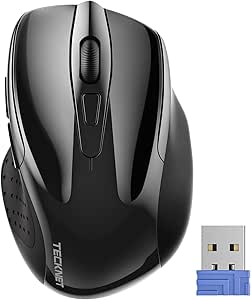 | Best for Travel and Simple Setup | Connectivity: 2.4 GHz wireless via USB-A receiver | Buttons: 6 | Hand orientation: Right-handed | VIEW ON AMAZON | See Our Full Breakdown |
| Logitech Lift Vertical Ergonomic Wireless Mouse, Graphite |  | Best Vertical Pick for a Neutral Desk Setup | Hand orientation: Right-handed | Ergonomic angle: 57 degrees | Connectivity: Bluetooth Low Energy or Logi Bolt USB receiver | VIEW ON AMAZON | See Our Full Breakdown |
| Lekvey Rechargeable Vertical Wireless Ergonomic Mouse |  | Best Rechargeable Value | Design: Right-handed vertical ergonomic | Connectivity: 2.4 GHz wireless via nano USB receiver | DPI settings: 800, 1200, 1600 | VIEW ON AMAZON | See Our Full Breakdown |
| Logitech M510 Full-Size Wireless Mouse |  | Best for Familiar, Contoured Comfort | Design: Full-size contoured, right-handed | Connectivity: 2.4 GHz wireless via USB Unifying receiver | Buttons: 7 | VIEW ON AMAZON | See Our Full Breakdown |
| Logitech MX Vertical Wireless Ergonomic Mouse |  | Best Premium Vertical Ergonomics | Design: Right-handed vertical; 57° angle | Connectivity: USB and Bluetooth Low Energy | Sensor: Optical | VIEW ON AMAZON | See Our Full Breakdown |
| Anker 2.4GHz Wireless Vertical Ergonomic Mouse |  | Best Simple Vertical Starter | Design: Right-handed vertical ergonomic | Connectivity: 2.4 GHz wireless via USB receiver | Tracking: Optical | VIEW ON AMAZON | See Our Full Breakdown |
| TECKNET Wireless Ergonomic Vertical Mouse, 4800 DPI, Bluetooth and 2.4 GHz |  | Best for Multi-Device Pairing | Design: Right-handed vertical ergonomic | Connectivity: Bluetooth 5.0/3.0 and 2.4 GHz USB-A | DPI levels: 800, 1200, 1600, 2400, 3200, 4800 | VIEW ON AMAZON | See Our Full Breakdown |
| Logitech ERGO M575S Wireless Trackball Mouse, Graphite with Blue Ball |  | Best for Minimizing Arm Movement | Connectivity: Bluetooth and USB receiver | Movement detection: Thumb-operated trackball | Hand orientation: Right-handed | VIEW ON AMAZON | See Our Full Breakdown |
| TECKNET Wireless Mouse, 2.4G Ergonomic Computer Mouse, 2600 DPI, Purple | 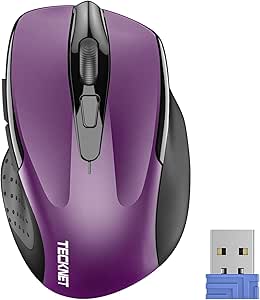 | Best Compact Conventional Pick | Connectivity: 2.4 GHz wireless via USB-A receiver | Movement detection: Optical | Hand orientation: Right-handed | VIEW ON AMAZON | See Our Full Breakdown |
| Philips SPK7628 Ergonomic Wireless Vertical Mouse |  | Best for Smaller Hands and Quiet Workspaces | Connectivity: 2.4 GHz wireless via USB-A receiver; no Bluetooth | Ergonomic angle: 57-degree vertical design | Hand orientation and size: Right-handed; designed for hand lengths up to 7 inches | VIEW ON AMAZON | See Our Full Breakdown |
| UGREEN Ergonomic Wireless Mouse – Bluetooth & 2.4GHz, Quiet Clicks |  | Best for Multi-Device Flexibility | Connectivity: Bluetooth and 2.4 GHz USB dongle | Device pairing: Up to 3 devices | Ergonomic design: Vertical hand position intended to reduce wrist rotation | VIEW ON AMAZON | See Our Full Breakdown |
| wireless ergonomic mouse | Connectivity | Buttons | Battery | Compatibility |
|---|---|---|---|---|
| Logitech MX Master 4 Ergonomic | Bluetooth, radio frequency, USB | 7 | 1 AA battery included | — |
| Logitech MX Master 3S Bluetoot | Bluetooth | 7 | Rechargeable Li-Po, 500 mAh | — |
| Logitech Lift Vertical Ergonom | Bluetooth Low Energy or Logi Bolt USB receiver | 6 | 1 AA battery | — |
| TECKNET Wireless Mouse | 2.4 GHz wireless via USB-A receiver | 6 | 1 AAA battery, not included | — |
| Logitech Lift Vertical Ergonom | Bluetooth Low Energy or Logi Bolt USB receiver | 6 | 1 AA battery | — |
| Lekvey Rechargeable Vertical W | 2.4 GHz wireless via nano USB receiver | 6 | — | Windows, Linux, Mac OS |
| Logitech M510 Full-Size Wirele | 2.4 GHz wireless via USB Unifying receiver | 7 | 2 AA batteries included | Windows, macOS, Linux, Chrome OS |
| Logitech MX Vertical Wireless | USB and Bluetooth Low Energy | 4 | — | Windows, macOS, iPadOS, Android, Chrome OS, Linux |
| Anker 2.4GHz Wireless Vertical | 2.4 GHz wireless via USB receiver | 5 | — | Laptop; Linux and Windows 10 listed |
| TECKNET Wireless Ergonomic Ver | Bluetooth 5.0/3.0 and 2.4 GHz USB-A | 6 | 2 AAA batteries, not included | Windows, Mac, Chrome, Linux |
| Logitech ERGO M575S Wireless T | Bluetooth and USB receiver | — | 1 included AA battery | Windows and macOS; computer and tablet |
| TECKNET Wireless Mouse | 2.4 GHz wireless via USB-A receiver | 6 | 2 AAA batteries, not included | Windows, Mac, Chrome OS, and Linux; Mac side-button support is unavailable |
| Philips SPK7628 Ergonomic Wire | 2.4 GHz wireless via USB-A receiver; no Bluetooth | 6, including silent left and right clicks | — | Windows, macOS, Chrome OS, Linux, and most USB-A devices |
| UGREEN Ergonomic Wireless Mous | Bluetooth and 2.4 GHz USB dongle | Reported as 5 or 6; quiet-click buttons | 1 AA battery with smart sleep mode | Windows, macOS, Linux, ChromeOS, Android, and iOS |
More Details on Our Top Picks
Logitech MX Master 4 Ergonomic Wireless Mouse with Haptics, Graphite
The MX Master 4 is the most feature-rich choice here for right-handed users who want shortcuts and feedback built into everyday work. Its customizable haptics and app-specific Actions Ring can put frequent commands close at hand, while the MagSpeed wheel handles both precise scrolling and long documents. Compared with the MX Master 3S, it adds haptic feedback and Actions Ring controls, making it a stronger fit for people who will tailor the mouse to their workflow rather than just point and scroll. The tradeoff is that advanced customization depends on Logi Options+, and the listed package does not include a charging cable. Its sculpted, right-handed shape also rules it out for left-handed users. I’d choose it for shortcut-heavy work, not for a simple, software-free setup.
Pros:- Customizable haptic feedback and app-specific Actions Ring shortcuts
- MagSpeed wheel supports both controlled scrolling and rapid movement through long pages
- 8,000 DPI sensor tracks on glass and other surfaces
- Quiet clicks and stated battery life of up to 70 days
Cons:- Advanced customization requires Logi Options+
- Charging cable is not included
- Right-handed shape is unsuitable for left-handed users
Best for: Right-handed professionals who want customizable shortcuts and haptic feedback for repetitive tasks across apps.
Not ideal for: Left-handed users or buyers who prefer a simple mouse without companion software and want a charging cable included.
- Connectivity:Bluetooth, radio frequency, USB
- Sensor:Optical
- Maximum sensitivity:8,000 DPI
- Buttons:7
- Hand orientation:Right-handed
- Battery life:Up to 70 days
- Battery:1 AA battery included
- Color and finish:Graphite, matte
Our verdict“Choose the MX Master 4 if you want a premium, shortcut-focused right-handed mouse and are willing to configure its software features.”
Logitech MX Master 3S Bluetooth Wireless Mouse, Graphite
The MX Master 3S suits people who move between computers and want an ergonomic shape with capable scrolling, without the MX Master 4’s haptic and Actions Ring extras. It pairs with up to three devices, and its Darkfield sensor tracks on many surfaces, including glass at least 4 mm thick—a practical advantage when a desk surface is not mouse-friendly. Quiet clicks and the MagSpeed wheel make it a composed option for shared offices and long work sessions. Compared with the MX Master 4, it gives up customizable haptics and some newer workflow controls, but keeps the core multi-device and scrolling strengths. The Bluetooth-only package has no USB receiver or charging cable, so buyers who need those accessories should factor that into their setup. Some software features also depend on Logi Options+.
Pros:- Connects to and switches among up to three devices
- Darkfield sensor tracks on many surfaces, including qualifying glass
- Quiet clicks and a MagSpeed wheel suit focused work
- Rechargeable battery has a stated life of up to 70 days
Cons:- Bluetooth edition includes neither a USB receiver nor a charging cable
- Some customization and cross-computer features require Logi Options+
- Right-handed sculpted shape will not suit left-handed users
Best for: Right-handed laptop and desktop users who regularly switch among up to three devices and need reliable tracking on varied surfaces.
Not ideal for: Buyers who need a USB receiver or charging cable in the box, or want the MX Master 4’s haptics and Actions Ring.
- Connectivity:Bluetooth
- Sensor:Darkfield high-precision optical
- Maximum sensitivity:8,000 DPI
- Buttons:7
- Multi-device support:Up to 3 devices
- Battery:Rechargeable Li-Po, 500 mAh
- Claimed battery life:Up to 70 days
- Dimensions and weight:124.9 × 84.3 × 51 mm; 141 g
- Included accessories:No USB receiver or charging cable
Our verdict“Pick the MX Master 3S for multi-device work and surface flexibility if you do not need the MX Master 4’s extra haptic controls.”
Logitech Lift Vertical Ergonomic Wireless Mouse – Rose
The rose Lift is the lineup’s clearest choice for right-handed users with small to medium hands who want to try a vertical grip. Its 57-degree angle encourages a more natural wrist position than the conventional sculpted shape of the MX Master 3S, though it takes time to get used to steering a vertical mouse. The SmartWheel and six buttons add useful control without matching the MX Master 4’s deeper shortcut and haptic customization. Battery life is a major practical distinction: one AA cell is rated for up to 24 months, so this model avoids frequent charging. It can connect by Bluetooth Low Energy or Logi Bolt, but advanced button setup uses Logi Options+. I’d skip it if you have large hands or need a familiar, flat mouse shape from the start.
Pros:- 57-degree vertical angle supports a more natural wrist posture
- Rated for up to 24 months on one AA battery
- SmartWheel and customizable buttons provide practical control
- Offers Bluetooth Low Energy and Logi Bolt connectivity
Cons:- Vertical shape may feel unfamiliar compared with a conventional mouse
- Designed for small to medium right hands
- Custom button setup requires Logi Options+
Best for: Right-handed users with small to medium hands who want a vertical grip, long AA battery life, and either Bluetooth or Logi Bolt connectivity.
Not ideal for: People with large hands, left-handed users seeking this specific model, or buyers who do not want to adapt to a vertical mouse.
- Hand orientation:Right-handed; left-hand version available
- Ergonomic angle:57 degrees
- Connectivity:Bluetooth Low Energy or Logi Bolt USB receiver
- Maximum sensitivity:4,000 DPI, adjustable
- Buttons:6
- Battery:1 AA battery
- Battery life:Up to 24 months
- Dimensions and weight:108 × 70 × 71 mm; 125 g
- Color:Rose
Our verdict“Choose the rose Lift if your hands are small or medium and wrist posture matters more than a familiar mouse shape.”
TECKNET Wireless Mouse, 2.4G Ergonomic Computer Mouse, 2600 DPI, Black
This TECKNET is the straightforward, travel-friendly pick for buyers who want an ergonomic contour without a vertical learning curve or app-based setup. Its compact shape and rubber side grips make it easier to carry than the larger Logitech MX Master models, while five DPI settings let you adjust pointer speed for different tasks. The plug-and-play USB-A receiver keeps setup simple on compatible computers, but it means this mouse lacks the Bluetooth flexibility of the Lift and MX Master 3S. Its 2,600 DPI ceiling is also well below those Logitech options, which matters for users who want finer sensitivity control or glass tracking. The AAA battery is not included, and the side button is not compatible with macOS, limiting its appeal for Mac users who rely on that control.
Pros:- Compact shape is convenient for travel
- Rubber side grips add support during everyday use
- Five DPI settings range from 800 to 2,600
- USB-A receiver offers plug-and-play setup
Cons:- AAA battery is not included
- Side button is not compatible with macOS
- 2,600 DPI maximum is below the Logitech MX Master 3S and Lift
Best for: Right-handed travelers who use a computer with USB-A and want a compact, uncomplicated mouse with adjustable pointer speed.
Not ideal for: Mac users who need the side button, Bluetooth-only laptop owners, or buyers seeking high-resolution tracking and premium scroll controls.
- Connectivity:2.4 GHz wireless via USB-A receiver
- Buttons:6
- Hand orientation:Right-handed
- Maximum sensitivity:2,600 DPI
- Adjustable DPI levels:800, 1,200, 1,600, 2,000, 2,600
- Wireless range:Up to 10 m (approximately 33 ft)
- Battery life:Up to 24 months
- Battery:1 AAA battery, not included
- Dimensions:4.09 × 2.68 × 1.49 inches
Our verdict“Pick this TECKNET for a compact, receiver-based travel mouse, but choose a Logitech option for Bluetooth or more advanced tracking.”
Logitech Lift Vertical Ergonomic Wireless Mouse, Graphite
The graphite Lift brings the same compact vertical design as the rose version, but its textured grip and thumb rest make the hand position a central part of the choice. The 57-degree angle is aimed at small to medium right hands and offers a more upright alternative to the conventional shape of the MX Master 4. Both Lift models share the 4,000 DPI sensor, six buttons, and battery life of up to 24 months; choose between them by color and the listed compatibility details rather than expecting a different ergonomic design. Bluetooth Low Energy and Logi Bolt give it more connection options than the receiver-only TECKNET. The compromise is its right-handed fit and the adjustment period typical of vertical mice, plus a single AA battery rather than a rechargeable setup.
Pros:- 57-degree vertical shape and thumb rest support a more upright arm posture
- Textured grip and six customizable buttons
- Bluetooth Low Energy or Logi Bolt connectivity
- Rated for up to 24 months on one AA battery
Cons:- Right-handed design does not suit left-handed users
- Designed for small to medium hands
- Vertical grip may require an adjustment period
Best for: Right-handed users with small to medium hands who want a vertical mouse with a thumb rest and the choice of Bluetooth or Logi Bolt.
Not ideal for: Left-handed users, people with large hands, or buyers who prefer a rechargeable mouse and conventional grip.
- Hand orientation:Right-handed
- Ergonomic angle:57 degrees
- Connectivity:Bluetooth Low Energy or Logi Bolt USB receiver
- Tracking resolution:Up to 4,000 DPI, adjustable
- Buttons:6
- Battery:1 AA battery
- Battery life:Up to 24 months
- Wireless range:10 m
- Dimensions and weight:108 × 70 × 71 mm; 125 g
Our verdict“Choose the graphite Lift if you want a compact vertical grip and thumb support, and its right-handed sizing matches your hand.”
Lekvey Rechargeable Vertical Wireless Ergonomic Mouse
The Lekvey makes a practical entry point for right-handed buyers who want a vertical grip without swapping batteries. Its rechargeable battery lasts up to 150 hours, while three DPI settings cover routine browsing and office work. Compared with the battery-powered Anker 2.4GHz Wireless Vertical Ergonomic Mouse, the Lekvey saves you from keeping AAA cells on hand and adds USB-C charging. Its USB receiver makes setup straightforward, though it lacks the Bluetooth and multi-device flexibility of the TECKNET Wireless Ergonomic Vertical Mouse. Expect an adjustment period: the maker notes that getting used to the upright shape may take several days. The six buttons include page navigation, but they are not programmable, and those side buttons do not work with Mac OS. I’d choose it for basic, single-computer use rather than custom controls.
Pros:- Vertical shape is intended to support a more neutral wrist and arm position.
- Rechargeable battery is rated for up to 150 hours of use.
- Three DPI settings and page navigation buttons cover common office tasks.
- USB receiver offers plug-and-play wireless setup.
Cons:- The vertical grip may take 3–5 days to feel familiar.
- Page back and forward buttons are not compatible with Mac OS.
- Buttons are not programmable.
Best for: Right-handed office users who want a rechargeable vertical mouse for one computer and can allow a few days to adapt to its grip.
Not ideal for: Mac users who rely on side-button navigation, or buyers who need programmable buttons or Bluetooth pairing.
- Design:Right-handed vertical ergonomic
- Connectivity:2.4 GHz wireless via nano USB receiver
- DPI settings:800, 1200, 1600
- Buttons:6
- Battery life:Up to 150 hours
- Charging:USB-C
- Size and weight:5 x 3 x 2.5 inches; 3.36 ounces
- Compatibility:Windows, Linux, Mac OS
Our verdict“Choose the Lekvey if you want an affordable-feeling, rechargeable vertical design for straightforward PC work and can accept a short adjustment period.”
Logitech M510 Full-Size Wireless Mouse
The M510 is the conventional-shaped choice in this group: its full-size contoured body and soft rubber grips aim to make long everyday sessions more comfortable without asking you to learn a vertical grip. That makes it an easier adjustment than the Lekvey Rechargeable Vertical Wireless Ergonomic Mouse, though it does not offer the same upright wrist position. Its seven buttons, back and forward controls, and side-to-side scrolling give it more navigation options than the Lekvey’s six-button layout. Logitech estimates up to two years from two AA batteries, but actual life varies with use. The Unifying receiver can also connect compatible Logitech devices, which may suit a desk already using that ecosystem. The tradeoff is a right-handed shape and a laser sensor that does not work on glass or mirrors; some functions also depend on Logitech software.
Pros:- Contoured full-size shape and soft rubber grips support everyday comfort.
- Seven buttons include back and forward controls, zoom, and side-to-side scrolling.
- Unifying receiver can connect compatible Logitech mice and keyboards.
- Estimated battery life is up to two years with two AA batteries.
Cons:- Its conventional shape does not provide the upright wrist position of vertical models.
- Laser tracking does not work on glass or mirrors.
- Some functions require Logitech software, and the shape is intended for right-handed use.
Best for: Right-handed users who prefer a familiar full-size mouse shape, want extra navigation controls, and use a compatible Logitech receiver setup.
Not ideal for: Left-handed buyers, users seeking a vertical posture, or anyone who needs reliable tracking on glass or mirrors.
- Design:Full-size contoured, right-handed
- Connectivity:2.4 GHz wireless via USB Unifying receiver
- Buttons:7
- Tracking:Laser; maximum sensitivity 1000 DPI
- Wireless range:10 m
- Battery:2 AA batteries included
- Estimated battery life:Up to 2 years
- Compatibility:Windows, macOS, Linux, Chrome OS
Our verdict“Pick the M510 if you want familiar contoured comfort and useful navigation controls rather than a vertical ergonomic grip.”
Logitech MX Vertical Wireless Ergonomic Mouse
The MX Vertical is the most feature-rich dedicated vertical option here for buyers who want a pronounced ergonomic angle and fine cursor control. Its 57-degree handshake position is designed to reduce wrist pressure, while the 4000 DPI optical sensor and adjustable speed make it easier to move across large or high-resolution displays. Compared with the simpler Anker 2.4GHz Wireless Vertical Ergonomic Mouse, it adds Bluetooth Low Energy alongside USB connectivity and a rechargeable battery rated for up to four months. That convenience comes with a right-handed-only fit and just four buttons, so it is less suited to users who want more navigation controls than the Lekvey Rechargeable Vertical Wireless Ergonomic Mouse provides. I’d favor it for a desk setup where cursor precision and rechargeability matter more than button customization.
Pros:- 57-degree angle is designed to support a natural handshake position.
- 4000 DPI optical sensor with adjustable cursor speed suits precise movement and large displays.
- Rechargeable battery is rated for up to four months per charge.
- Supports USB and Bluetooth Low Energy connections.
Cons:- The shape is designed for right-handed use only.
- Four buttons provide fewer controls than the Lekvey or TECKNET vertical models.
- USB receiver location may vary.
Best for: Right-handed professionals who want a substantial vertical angle, adjustable high-sensitivity tracking, and Bluetooth or USB connectivity.
Not ideal for: Left-handed users, buyers who need numerous buttons, or people who prefer a smaller, simpler mouse with replaceable batteries.
- Design:Right-handed vertical; 57° angle
- Connectivity:USB and Bluetooth Low Energy
- Sensor:Optical
- Maximum sensitivity:4000 DPI
- Buttons:4
- Wireless range:10 m
- Battery life:Up to 4 months
- Compatibility:Windows, macOS, iPadOS, Android, Chrome OS, Linux
Our verdict“Choose the MX Vertical for a premium right-handed vertical grip with adjustable precision and rechargeable, multi-connection convenience.”
Anker 2.4GHz Wireless Vertical Ergonomic Mouse
The Anker keeps the vertical-mouse idea simple: its right-handed upright shape, five buttons, and three DPI settings cover basic browsing and office work without a complex control scheme. Compared with the rechargeable Lekvey Rechargeable Vertical Wireless Ergonomic Mouse, it relies on two AAA batteries rather than USB-C charging, and those batteries are not included. It also connects only through a USB receiver, so it cannot pair over Bluetooth like the TECKNET Wireless Ergonomic Vertical Mouse. The 800, 1200, and 1600 DPI choices let you adjust cursor speed, while next and previous buttons make web navigation easier. Its listed 5-meter range is shorter than the 10-meter range of the Lekvey, and the product description notes audible clicks. This is a straightforward first vertical mouse, not a quiet or highly connected desk hub.
Pros:- Vertical shape is designed to support a neutral handshake wrist and arm position.
- Three DPI settings allow adjustment for different cursor speeds.
- Five buttons include next and previous browsing controls.
- Power-saving mode activates after eight minutes of inactivity.
Cons:- Requires two AAA batteries, which are not included.
- Uses a USB receiver and does not support Bluetooth.
- Clicks are audible, and the listed wireless range is 5 meters.
Best for: Right-handed buyers trying a basic vertical mouse for a laptop or desktop with an available USB port.
Not ideal for: People who need Bluetooth, quiet clicks, longer wireless range, or a rechargeable battery; batteries must be purchased separately.
- Design:Right-handed vertical ergonomic
- Connectivity:2.4 GHz wireless via USB receiver
- Tracking:Optical
- DPI settings:800, 1200, 1600
- Buttons:5
- Wireless range:5 meters
- Power:2 AAA batteries required; not included
- Compatibility:Laptop; Linux and Windows 10 listed
Our verdict“Choose the Anker as a basic first vertical mouse if a USB receiver and replaceable batteries suit your setup.”
TECKNET Wireless Ergonomic Vertical Mouse, 4800 DPI, Bluetooth and 2.4 GHz
The TECKNET is the most flexible connection choice among these vertical mice: it can pair with up to three devices using Bluetooth or a 2.4 GHz USB-A receiver. Six DPI levels, reaching 4800, give more cursor-speed choices than the three settings on the Anker 2.4GHz Wireless Vertical Ergonomic Mouse, while quiet left and right clicks make shared workspaces or study sessions less distracting. Compared with the rechargeable Logitech MX Vertical, this model runs on two AAA batteries, which are not included, and its listed compatibility excludes iPadOS and Android. The shape is right-handed, and the side buttons do not work with macOS, limiting its appeal for Mac users who depend on browser navigation. I’d pick it for someone switching between computers who values pairing options over rechargeable power or universal button support.
Pros:- Connects to up to three devices through Bluetooth or a 2.4 GHz USB-A receiver.
- Six DPI settings range from 800 to 4800.
- Quiet left and right clicks suit shared desks and study areas.
- Vertical shape is designed to reduce wrist pressure.
Cons:- Two AAA batteries are required and not included.
- Designed for right-handed use only.
- Side buttons are not compatible with macOS.
Best for: Right-handed users who regularly switch among up to three Windows, Mac, Chrome, or Linux devices and want quiet main clicks.
Not ideal for: Mac users who rely on side buttons, left-handed buyers, or anyone who wants a rechargeable mouse with batteries included.
- Design:Right-handed vertical ergonomic
- Connectivity:Bluetooth 5.0/3.0 and 2.4 GHz USB-A
- DPI levels:800, 1200, 1600, 2400, 3200, 4800
- Buttons:6
- Wireless range:33 feet
- Battery:2 AAA batteries, not included
- Weight and dimensions:4.32 ounces; 4.74 x 2.49 inches
- Compatibility:Windows, Mac, Chrome, Linux
Our verdict“Choose the TECKNET if switching among several devices and quiet main clicks matter more than rechargeable power or Mac side-button support.”
Logitech ERGO M575S Wireless Trackball Mouse, Graphite with Blue Ball
The Logitech ERGO M575S suits buyers who want to control a cursor without repeatedly moving a mouse across the desk. Its thumb-operated trackball keeps the hand and forearm largely in place, a useful difference from the Philips SPK7628, which changes wrist angle with a vertical grip but still moves across the surface. That makes the M575S especially practical on a crowded desk or in a chair with limited armroom. Bluetooth and the included Logi Bolt receiver give it flexible setup options, while the included AA battery is rated for up to 18 months. The tradeoff is a right-handed, thumb-led control style that takes adjustment and may not suit left-handed users. Button customization also depends on Logi Options+ software.
Pros:- Trackball control limits hand and arm movement and works well on a small desk.
- Connects through Bluetooth or the included Logi Bolt USB receiver.
- Included AA battery is rated for up to 18 months of use.
- Sculpted shape and quiet clicks suit long work sessions and shared spaces.
Cons:- Right-handed shape and thumb-operated ball exclude some users and take adjustment.
- Customizable controls require the Logi Options+ app.
Best for: Right-handed desk users with limited mouse space who want to reduce repeated arm movement and are comfortable steering with a thumb.
Not ideal for: Left-handed users, people who prefer a conventional moving mouse, or buyers who want to customize buttons without installing software.
- Connectivity:Bluetooth and USB receiver
- Movement detection:Thumb-operated trackball
- Hand orientation:Right-handed
- Customizable buttons:3
- Maximum sensitivity:2000 DPI
- Battery:1 included AA battery
- Battery life:Up to 18 months
- Compatibility:Windows and macOS; computer and tablet
Our verdict“Choose the M575S if reducing desk movement matters more than having a familiar, ambidextrous mouse shape.”
TECKNET Wireless Mouse, 2.4G Ergonomic Computer Mouse, 2600 DPI, Purple
The TECKNET 2.4G is the conventional-mouse choice for small-to-medium hands that need a compact shape for commuting or a tight desk. Its rubber side grips and adjustable sensitivity offer more familiar control than the thumb trackball on the Logitech ERGO M575S, though the TECKNET still needs a clear surface to move across. The USB-A receiver makes setup simple, and its stated battery life can reach 24 months with power-saving use. That rating relies on two AAA batteries, which are not included, so it is less ready out of the box than the Philips SPK7628 with its included battery. This model is ergonomic in shape, but it does not offer the wrist-rotating handshake posture of a vertical mouse, and its side button does not work on Mac.
Pros:- Compact body is easy to pack and fits small-to-medium hands.
- Rubber side grips support a steadier hold.
- Five DPI settings from 800 to 2600 allow cursor speed adjustment.
- Power-saving mode is rated for up to 24 months of battery life.
Cons:- Two AAA batteries are required and are not included.
- The side button is not supported on Mac systems.
- Optical tracking does not support glass surfaces.
Best for: Travelers and laptop users with small-to-medium right hands who want a compact, familiar mouse with adjustable cursor speed.
Not ideal for: Mac users who rely on side buttons, people using glass desks, or buyers seeking a vertical grip or Bluetooth connection.
- Connectivity:2.4 GHz wireless via USB-A receiver
- Movement detection:Optical
- Hand orientation:Right-handed
- Buttons:6
- DPI:800–2600 across five settings
- Battery:2 AAA batteries, not included
- Battery life:Up to 24 months (700 hours)
- Dimensions and weight:4.09 × 1.88 × 1.49 inches; 85 g
- Compatibility:Windows, Mac, Chrome OS, and Linux; Mac side-button support is unavailable
Our verdict“Pick this TECKNET for portable, conventional mouse control, but choose a vertical model if wrist posture is your main concern.”
Philips SPK7628 Ergonomic Wireless Vertical Mouse
The Philips SPK7628 gives right-handed users a straightforward way to try a vertical grip without a bulky, feature-heavy design. Its 57-degree handshake angle is intended to reduce wrist rotation, while the shape is sized for hand lengths up to seven inches. That makes it a more targeted small-hand option than the UGREEN vertical mouse, whose listed specifications do not set the same hand-size limit. Silent main clicks and a lightweight body also suit shared offices. The compromises are a basic USB-A receiver connection with no Bluetooth, plus three fixed DPI choices rather than the UGREEN’s broader sensitivity range. Buyers with USB-C-only devices will need to supply an adapter, and left-handed users should skip this right-handed shape.
Pros:- 57-degree vertical grip is designed to encourage a more relaxed wrist position.
- Sized for small and medium hands, with a stated hand-length limit of seven inches.
- Silent left and right clicks suit shared workspaces.
- Includes a battery and receiver storage compartment.
Cons:- USB-A receiver only; Bluetooth is not available.
- USB-C devices need an adapter that is not included.
- Three DPI settings offer less adjustment than the UGREEN model.
Best for: Right-handed users with hands up to seven inches long who want a simple vertical mouse for quiet office work.
Not ideal for: Left-handed users, people who need Bluetooth or USB-C connectivity without an adapter, and buyers who want a wide DPI range.
- Connectivity:2.4 GHz wireless via USB-A receiver; no Bluetooth
- Ergonomic angle:57-degree vertical design
- Hand orientation and size:Right-handed; designed for hand lengths up to 7 inches
- DPI settings:800, 1200, and 1600
- Buttons:6, including silent left and right clicks
- Wireless range:10 meters
- Power:1 included A battery with automatic sleep mode
- Compatibility:Windows, macOS, Chrome OS, Linux, and most USB-A devices
- Warranty:12 months
Our verdict“Choose the Philips if you have a smaller right hand and want a quiet, simple vertical mouse with an included battery.”
UGREEN Ergonomic Wireless Mouse – Bluetooth & 2.4GHz, Quiet Clicks
The UGREEN ergonomic vertical mouse is the most connection-flexible pick in this group: it supports Bluetooth and 2.4 GHz wireless, with pairing for up to three devices. That makes it a better fit for switching between a computer and a tablet than the receiver-only Philips SPK7628. Its vertical hand position aims to reduce wrist rotation, and four DPI levels up to 4000 give more cursor-speed range than the Philips’s three settings. The quiet clicks suit shared rooms, while broad operating-system compatibility extends to mobile platforms. The tradeoffs are a single AA battery rather than rechargeable power and a relatively heavy 170 g body. Button count is also unclear in the supplied listings, so buyers who need a specific button layout should verify it before choosing.
Pros:- Bluetooth and 2.4 GHz connectivity support flexible setup and up to three device pairings.
- Vertical grip is designed to reduce wrist rotation.
- Four DPI levels, up to 4000, suit varied cursor-speed preferences.
- Quiet clicks and broad operating-system compatibility support shared and mixed-device workspaces.
Cons:- Uses one AA battery rather than rechargeable power.
- At 170 g, it is heavier than the compact TECKNET conventional mouse.
- Button count is reported as either five or six across listings.
Best for: People who switch among computers, tablets, or phones and want a quiet vertical mouse with both Bluetooth and receiver connectivity.
Not ideal for: Buyers who want a rechargeable mouse, a lightweight body, or certainty about the exact button count before purchase.
- Connectivity:Bluetooth and 2.4 GHz USB dongle
- Device pairing:Up to 3 devices
- Ergonomic design:Vertical hand position intended to reduce wrist rotation
- DPI levels:1000, 1600, 2000, and 4000
- Buttons:Reported as 5 or 6; quiet-click buttons
- Battery:1 AA battery with smart sleep mode
- Range:10 meters
- Weight:170 g
- Compatibility:Windows, macOS, Linux, ChromeOS, Android, and iOS
Our verdict“Choose the UGREEN if multi-device wireless flexibility matters more than a light body or rechargeable power.”

How We Picked
I compared these 14 mice through the questions that matter when choosing an ergonomic wireless pointer: how the shape supports a natural hand position, whether the control layout fits everyday tasks, and how easily the mouse can join a desk setup. I also weighed connection flexibility, adjustment options, charging or battery approach where specified, and whether the design asks users to learn a new way of moving the cursor. A claimed ergonomic shape alone did not earn a high place; it had to offer a clear reason to choose it over a conventional mouse, a vertical model, or a trackball.
The ranking favors useful fit and versatility over feature count by itself. The MX Master models lead for buyers who want a familiar mouse form with expanded controls, while the Lift and MX Vertical serve people specifically seeking an upright grip. The M575S earns a separate place for limited desk movement, and simpler models rank as targeted alternatives rather than universal upgrades. Since comfort depends on individual hand size and posture, I treat shape and movement preference as personal-fit decisions, not guarantees of relief.
| wireless ergonomic mouse | Battery life |
|---|---|
| Logitech MX Master 4 Ergonomic | Up to 70 days |
| Logitech MX Master 3S Bluetoot | — |
| Logitech Lift Vertical Ergonom | Up to 24 months |
| TECKNET Wireless Mouse | Up to 24 months |
| Logitech Lift Vertical Ergonom | Up to 24 months |
| Lekvey Rechargeable Vertical W | Up to 150 hours |
| Logitech M510 Full-Size Wirele | — |
| Logitech MX Vertical Wireless | Up to 4 months |
| Anker 2.4GHz Wireless Vertical | — |
| TECKNET Wireless Ergonomic Ver | — |
| Logitech ERGO M575S Wireless T | Up to 18 months |
| TECKNET Wireless Mouse | Up to 24 months (700 hours) |
| Philips SPK7628 Ergonomic Wire | — |
| UGREEN Ergonomic Wireless Mous | — |
Factors to Consider When Choosing Wireless Ergonomic Mouse
Before choosing, I’d settle the physical fit and movement style first; wireless features matter only after the mouse feels workable for your hand and desk. These factors can help narrow the field without relying on a feature list alone.
Choose a Grip Shape You Can Use Naturally
Ergonomic mice do not share one universal hand position. A conventional sculpted mouse keeps a familiar palm or claw grip, while a vertical mouse rotates the hand toward a handshake posture; a trackball replaces broad mouse movement with thumb control. Switching to a vertical mouse can feel unfamiliar at first, so do not assume a more upright shape will suit you simply because it is labeled ergonomic. Check the product’s dimensions against your hand and think about where your fingers rest on the buttons. If possible, try the shape before committing, especially if you have a strong preference for a particular grip. The right design is the one you can use comfortably and accurately over a full work session.
Match Movement Style to Your Desk and Work
A standard mouse needs clear surface area for cursor movement, while a trackball can stay in one place. That difference matters on a compact desk, shared workspace, or setup where the mouse pad is frequently crowded. Trackballs reduce the need to move the device, but their thumb-operated cursor control may take practice and may not appeal to every user. Vertical mice still move across the desk, even though the hand rests at a different angle. Avoid treating reduced arm movement and a more upright wrist position as the same benefit; they solve different problems. Choose based on the movement you want to change, not on a broad promise of comfort.
Check Device Switching and Wireless Options
Wireless mice in this roundup do not all offer the same connection flexibility. Bluetooth can be useful when you want to connect without occupying a USB port, while a 2.4 GHz receiver can suit a dedicated computer setup. Some models list both connection types, giving more room to adapt across devices; others are simpler, single-purpose choices. Before buying, check whether your computer has the ports or Bluetooth support the mouse requires and whether switching between devices is part of your routine. A connection option has little value if it does not match your setup. Buyers who use several computers should prioritize the actual switching features listed for a model rather than assuming every wireless mouse can move between devices conveniently.
Prioritize Controls That Fit Your Daily Tasks
Extra buttons, scroll controls, and adjustable cursor sensitivity are useful when they solve a repeat task, not just because they sound advanced. People who work across documents, browser tabs, or creative software may value extra control options more than someone who mainly points and clicks. A simpler mouse can be easier to learn and operate, while a feature-rich model may take time to configure. Consider whether you will use the added controls often enough to justify learning them and keeping them accessible. Also check which functions can be customized on your operating system and with the software you use. A thoughtful match between controls and routine can matter more than a long feature list.
Account for Size, Weight, and Carrying Needs
Full-size ergonomic mice can support a relaxed hand position at a fixed desk, but their proportions may be awkward for small hands or frequent travel. Compact or lighter designs are easier to carry, yet can ask the hand to hold a tighter grip during extended use. Look beyond a product’s broad size label: its length, width, height, and button reach all affect how it sits in your palm. If the mouse will move between home, office, and travel, factor in how easily you can pack its receiver or cable if one is included. Buyers often focus on hand posture and overlook reach to the scroll wheel and side buttons. A comfortable shape should also let you operate its main controls without stretching.
Weigh Power and Upkeep Before Paying More
Power design affects what ownership feels like after setup. Rechargeable models avoid routine battery replacement, while battery-powered mice may be simpler if you prefer swapping cells and continuing work. Check what charging method or battery type a specific model uses rather than assuming that all wireless mice share the same arrangement. Also think about upkeep: a trackball may call for occasional cleaning around the ball and socket, while a conventional optical mouse has different maintenance needs. Paying more makes sense when a model’s shape, controls, or connectivity solve a real daily problem. It is harder to justify extra features that will stay unused or a form factor you are not sure your hand will accept.
Frequently Asked Questions
Should I choose a vertical mouse or a trackball for less arm movement?
A vertical mouse changes the angle of your hand, but you still move the mouse across the desk to guide the pointer. A trackball stays in place, so cursor control comes from rolling the ball rather than moving your arm. That makes the ERGO M575S a distinct choice for a cramped workspace or when broad mouse movement is inconvenient. The tradeoff is that thumb-controlled cursor movement can take adjustment and may not suit everyone. If you want to change hand posture, start with a vertical design; if you want to reduce device travel, compare trackballs.
Is an upright mouse automatically more comfortable than a conventional ergonomic mouse?
No single shape works for every hand or task. An upright mouse offers a different hand orientation, while a sculpted conventional mouse can feel more familiar and support precise control for people who prefer the standard movement pattern. The MX Master models and the vertical options in this roundup address different preferences rather than serving as direct substitutes. Hand size, button reach, grip, and how long you work all affect the fit. If you are unsure, prioritize the shape you can hold without stretching your fingers or changing your grip repeatedly.
Do I need both Bluetooth and a 2.4 GHz receiver?
You may not need both if the mouse will stay connected to one computer. Bluetooth can keep a USB port free, while a 2.4 GHz receiver can fit setups where a dedicated wireless connection is preferred. Dual connectivity is more useful if your devices differ or you want another way to connect when one option is unavailable. Check the mouse’s listed connection methods and your computer’s ports before choosing; wireless does not mean every connection is supported. If you switch between computers, also verify whether the model supports device switching rather than assuming dual connection means effortless switching.
Are the MX Master mice a better ergonomic choice than a Logitech Lift?
They suit different priorities, so the better choice depends on the hand position you want. The MX Master line keeps a conventional mouse form and emphasizes added controls, while the Lift uses a vertical shape for a more upright grip. If you already like moving a standard mouse and want extra navigation options, an MX Master may be the closer fit. If your main reason for shopping is to try a different wrist and hand angle, the Lift is the more direct comparison. Neither shape guarantees comfort, so fit and button reach should decide between them.
What should I check before buying a wireless ergonomic mouse for small hands?
Look for the mouse’s actual dimensions and compare them with a mouse you already find comfortable. Pay particular attention to overall length, width, height, and how far your thumb must reach for side buttons. A full-size shape can make the hand stretch even when the product is described as ergonomic, while a compact mouse may feel cramped if it is too short. Vertical designs also vary in size and angle, so the word vertical does not confirm a good fit. If a retailer or manufacturer provides a sizing guide, use it; otherwise, favor clear measurements and a return option.
Conclusion
For the broadest mix of ergonomic shape and advanced everyday controls, I’d start with the Logitech MX Master 4 as the best overall pick; choose the MX Master 3S if its familiar form and control approach better match your priorities. For best value, compare the TECKNET, Anker, Philips, and UGREEN models against the connection and grip features you actually need, rather than paying for unused extras. The MX Master 4 is my best premium direction for buyers who want a feature-rich conventional mouse, while the Logitech Lift is the best starting point for beginners curious about a vertical grip. For limited desk movement, choose the ERGO M575S; for an upright alternative, compare the Lift, MX Vertical, and other vertical models by size and connectivity. Match the shape to your hand and movement preference first, then choose the controls and connection that fit your setup.
Halloween Picks

Pumpkin Halloween Fog Machine with 12-Color LEDs, Bluetooth Speaker, and Remote

3 ft. Halloween Groundbreaker Skeleton for Outdoor Decoration

JOYIN 5-Foot Halloween Animatronic Drinking Skeleton
As an affiliate, we earn on qualifying purchases.