
For most server builds, I’d start with the GLOTRENDS ST7369: its dual-port ConnectX-4 Lx design offers a practical balance of established server networking features and flexibility. The Vogzone E810-XXVDA2 and 10Gtek E810 stand out for buyers who want an Intel E810-based adapter, while the Synology E25G30-F2 is the more focused choice for compatible Synology systems. The main tradeoffs are controller and driver fit, PCIe lane requirements, SFP28 transceiver compatibility, and whether you need a vendor-specific card or a broadly usable adapter. Read on for the full breakdown and guidance on matching a card to your server and network.

Get your wardrobe favorites delivered free with Prime
- Fast, free delivery on millions of items
- Prime Video, Amazon Music and more included
- Member-only deals all year
Key Takeaways
- The controller is a bigger differentiator than the shared 25GbE headline. ConnectX-4 Lx, ConnectX-5, Intel E810, and Broadcom options can differ in driver support, offload capabilities, and fit with existing server software.
- Dual SFP28 ports are common across this group, but deployment fit is not. The Synology and QNAP cards are more compelling when their platform-specific compatibility matches your system.
- PCIe 4.0 x8 is not a detail to overlook. Cards such as the Vogzone and 10Gtek E810 need a suitable slot and enough usable lanes; a physical x8 slot may not always provide the expected bandwidth.
- Similar E810 cards are not automatically interchangeable. Vogzone, QNAP, and 10Gtek share an Intel controller family, but vendor firmware, support, and system compatibility may still distinguish them.
- Port count only helps when the network can use it. Two ports can support separate networks or link aggregation, but neither creates 50GbE to one connection without matching switch, configuration, and workload support.
| GLOTRENDS ST7369 2-Port 25GbE PCIe Network Card with ConnectX-4 Lx |  | Best for Mixed-Speed Server Networks | Controller: ConnectX-4 Lx | Ports: 2 x SFP28 | Network speeds: 25GbE, 10GbE, 1GbE | VIEW ON AMAZON | See Our Full Breakdown |
| Vogzone E810-XXVDA2 25GbE Dual SFP28 PCIe 4.0 x8 Network Adapter |  | Best for PCIe 4.0 Server Builds | Controller: Intel E810-XXVAM2 | Ports: 2 x SFP28 | Supported data rates: 1GbE, 10GbE, 25GbE | VIEW ON AMAZON | See Our Full Breakdown |
| Synology E25G30-F2 Dual-Port 25GbE SFP28 PCIe Network Adapter |  | Best for Synology Storage Servers | Model: E25G30-F2 | Ports: 2 x 25GbE SFP28 | Hardware interface: PCI Express x16 | VIEW ON AMAZON | See Our Full Breakdown |
| FebSmart BCM57414 Dual-Port 25GbE SFP28 PCIe Network Adapter |  | Best for Storage and Overlay Workloads | Chipset: Broadcom BCM57414 | Network ports: 2 x 25GbE SFP28 | Interface: PCIe 3.0 x8 | VIEW ON AMAZON | See Our Full Breakdown |
| LinksTek CX4121A Dual-Port 25GbE SFP28 Ethernet Adapter |  | Best for ConnectX-4 Lx-Based Upgrades | Controller: Mellanox ConnectX-4 Lx EN MT27711A0 | Ports: 2 x 25GbE SFP28 | Bus interface: PCIe 3.0 x8 | VIEW ON AMAZON | See Our Full Breakdown |
| Sonnet Twin25G PCIe Dual-Port 25GbE SFP28 Network Card |  | Best for a Ready-to-Connect Mac or Mixed-OS Setup | Model: G25E-2X-E3 | Ports: 2 | Interface: PCIe | VIEW ON AMAZON | See Our Full Breakdown |
| QNAP QXG-25G2SF-E810 Dual-Port 25GbE Network Card |  | Best for QNAP NAS and Aggregated Bandwidth | Controller: Intel E810-XXVAM2 | Ports: 2 | Port speeds: 10Gbps or 25Gbps per port | VIEW ON AMAZON | See Our Full Breakdown |
| HUNTION Mellanox ConnectX-5 Ex 25Gb/s Dual-Port SFP28 Ethernet Card |  | Best for RDMA and InfiniBand-Capable Workloads | Controller: Mellanox ConnectX-5 Ex | Ports: 2 × SFP28 | Data rate: 25Gbps | VIEW ON AMAZON | See Our Full Breakdown |
| 10Gtek 25Gb Ethernet Network Card, Dual SFP28, PCIe 4.0 x8, Intel E810 Controller, Supports Windows/Linux, RDMA & PXE |  | Best for Flexible Server Builds and Advanced Networking | Model and controller: E810-25G-2S-X8; Intel E810 | Ports: 2 × SFP28 | Port rates: 25GbE, 10GbE, or 1GbE per port | VIEW ON AMAZON | See Our Full Breakdown |
| Broadcom NetXtreme P225P 2-Port SFP+/SFP28 Server Adapter | 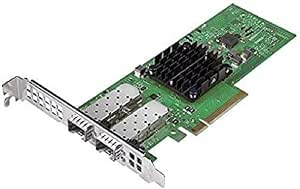 | Best for Mixed-Speed SFP Server Networks | Model: BCM957414A4142CC | Adapter type: 2-port SFP+/SFP28 server adapter | Interface: PCIe 3.0 | VIEW ON AMAZON | See Our Full Breakdown |
| 25gbe network cards for server | Ports | Operating systems | Interface | Controller |
|---|---|---|---|---|
| GLOTRENDS ST7369 2-Port 25GbE | 2 x SFP28 | — | — | ConnectX-4 Lx |
| Vogzone E810-XXVDA2 25GbE Dual | 2 x SFP28 | Windows, Windows Server, Linux, FreeBSD, VMware ESX/ESXi, UEFI | — | Intel E810-XXVAM2 |
| Synology E25G30-F2 Dual-Port 2 | 2 x 25GbE SFP28 | — | — | — |
| FebSmart BCM57414 Dual-Port 25 | — | Windows Server 2012–2025, Windows 10/11, Linux | PCIe 3.0 x8 | — |
| LinksTek CX4121A Dual-Port 25G | 2 x 25GbE SFP28 | Windows 10/11, Windows Server 2012–2025, RHEL, CentOS, FreeBSD, VMware, and other Linux-based systems | — | Mellanox ConnectX-4 Lx EN MT27711A0 |
| Sonnet Twin25G PCIe Dual-Port | 2 | macOS, Windows, Linux | PCIe | — |
| QNAP QXG-25G2SF-E810 Dual-Port | 2 | — | PCIe Gen 4; backward compatible with Gen 3 | Intel E810-XXVAM2 |
| HUNTION Mellanox ConnectX-5 Ex | 2 × SFP28 | Windows, Linux, VMware ESXi, FreeBSD, and others | PCIe 3.0 x8 | Mellanox ConnectX-5 Ex |
| 10Gtek 25Gb Ethernet Network C | 2 × SFP28 | Windows, Linux distributions, VMware ESXi, and other listed platforms | PCIe 4.0 x8 | — |
| Broadcom NetXtreme P225P 2-Por | — | — | PCIe 3.0 | — |
More Details on Our Top Picks
GLOTRENDS ST7369 2-Port 25GbE PCIe Network Card with ConnectX-4 Lx
The GLOTRENDS ST7369 makes the most sense for a server that needs two fast links but still has to connect with older 10GbE or 1GbE equipment. Its auto-negotiating SFP28 ports can ease a phased network upgrade, while RoCE and support for up to 127 SR-IOV virtual functions per port suit virtualized hosts. Compared with the Vogzone E810-XXVDA2, this card uses PCIe 3.0 x8 rather than PCIe 4.0 x8, so it is the less compelling fit for a new host where newer bus bandwidth is a priority. Its broad Windows, Linux, FreeBSD, and VMware support gives it more flexibility than the Synology-specific E25G30-F2. The tradeoff is that SFP28-compatible DAC cables or transceivers may be needed, and the listed warranty is only 30 days against manufacturer defects.
Pros:- Two SFP28 ports support 25GbE, 10GbE, and 1GbE auto-negotiation
- RoCE v1/v2 and SR-IOV support suit virtualization and data movement
- Compatible with Windows, Linux, FreeBSD, and VMware systems
- Low-profile and full-height brackets are included
Cons:- Requires a PCIe 3.0 x8 slot
- SFP28 DAC cables or transceivers may need to be sourced separately
- Listed warranty is limited to 30 days against manufacturer defects
Best for: Server owners upgrading gradually from 1GbE or 10GbE who need two SFP28 ports, virtualization features, and support across several operating systems.
Not ideal for: Buyers building around PCIe 4.0 or seeking a longer stated warranty; the card uses PCIe 3.0 x8 and lists just 30 days of defect coverage.
- Controller:ConnectX-4 Lx
- Ports:2 x SFP28
- Network speeds:25GbE, 10GbE, 1GbE
- Host interface:PCIe 3.0 x8
- RDMA:RoCE v1/v2
- SR-IOV:Up to 127 virtual functions per port
- Maximum frame size:9.6 KB jumbo frames
- Included brackets:Low-profile and full-height
Our verdict“Choose the ST7369 for a mixed-speed server that needs flexible OS support and two 25GbE links, but not for a PCIe 4.0 build or a long warranty.”
Vogzone E810-XXVDA2 25GbE Dual SFP28 PCIe 4.0 x8 Network Adapter
For a newer server platform, the Vogzone E810-XXVDA2 stands apart through its PCIe 4.0 x8 interface and Intel E810 controller. It combines two SFP28 ports with RDMA, SR-IOV, QoS, load balancing, PXE, and DPDK support, making it a flexible choice for workloads where traffic handling and virtualization matter alongside link speed. Compared with the GLOTRENDS ST7369, its newer bus interface better matches a PCIe 4.0 host, while both support 1GbE, 10GbE, and 25GbE connections. The Synology E25G30-F2 is a more purpose-built option for compatible NAS systems, but the Vogzone offers broader operating-system compatibility. Buyers must supply SFP28 adapters or cabling, and the included bracket is low-profile only.
Pros:- PCIe 4.0 x8 interface suits newer server platforms
- Two ports support 1GbE, 10GbE, and 25GbE
- Includes RDMA, SR-IOV, QoS, PXE, and DPDK support
- Three-year warranty and broad OS compatibility
Cons:- SFP28 adapters, cables, or transceivers are not included
- Package includes a low-profile bracket only
Best for: Administrators fitting a dual-port 25GbE adapter into a PCIe 4.0 server running Windows Server, Linux, FreeBSD, or VMware.
Not ideal for: Synology NAS owners who want a purpose-built, vendor-matched adapter, or buyers who need included SFP28 cabling or a full-height bracket.
- Controller:Intel E810-XXVAM2
- Ports:2 x SFP28
- Supported data rates:1GbE, 10GbE, 25GbE
- PCIe interface:PCIe 4.0 x8 (16.0 GT/s)
- RDMA:RoCEv2 and iWARP
- Virtualization and traffic features:SR-IOV, QoS, load balancing
- Operating systems:Windows, Windows Server, Linux, FreeBSD, VMware ESX/ESXi, UEFI
- Included bracket:Low-profile
Our verdict“Pick the Vogzone for a modern PCIe 4.0 host that needs two versatile SFP28 links and a broad feature set, provided you have a plan for cabling.”
Synology E25G30-F2 Dual-Port 25GbE SFP28 PCIe Network Adapter
The Synology E25G30-F2 is the clearest choice here when the 25GbE card is going into a compatible Synology system. Its two SFP28 ports support failover and load balancing, giving storage administrators ways to maintain connectivity or distribute traffic across links. That focused integration is its advantage over general-purpose cards such as the FebSmart BCM57414, which lists Windows and Linux support but is not presented as a Synology-specific adapter. The tradeoff is equally clear: this is not a flexible pick for a standard server build, and it requires DSM 7.1.1-42962 Update 5 or later. Its stated five-year warranty is longer than the one-year terms listed for FebSmart and LinksTek, but buyers outside the Synology ecosystem should look elsewhere.
Pros:- Designed for compatible Synology systems
- Two 25GbE SFP28 ports support simultaneous throughput
- Port failover and load balancing support network resilience and traffic distribution
- Five-year warranty
Cons:- Requires a compatible Synology system
- Requires DSM 7.1.1-42962 Update 5 or later
- SFP28 cabling or transceivers may be needed for the network connection
Best for: Administrators upgrading a compatible Synology storage system who want two 25GbE links with failover or load balancing.
Not ideal for: Owners of generic rack servers or Synology systems that cannot run the required DSM release; compatibility is limited to supported Synology systems.
- Model:E25G30-F2
- Ports:2 x 25GbE SFP28
- Hardware interface:PCI Express x16
- Compatible devices:Synology systems
- Network functions:Simultaneous throughput, port failover, and load balancing
- DSM requirement:DSM 7.1.1-42962 Update 5 or later
- Warranty:5 years
Our verdict“Choose the E25G30-F2 for a compatible Synology storage server that needs two 25GbE links and vendor-specific integration.”
FebSmart BCM57414 Dual-Port 25GbE SFP28 PCIe Network Adapter
The FebSmart BCM57414 earns its place for servers that need more than basic Ethernet connectivity. Its Broadcom controller supports RDMA, NVMe-oF, SMB Direct, iSER, and overlay networks, which can help fit the adapter into storage and virtualized-network designs. It also lists Ethernet speeds from 10GbE through 50GbE, though the card has two 25GbE SFP28 ports; buyers should verify the intended link mode and compatible equipment before planning around the wider speed list. Compared with the LinksTek CX4121A, FebSmart specifies a broader set of storage protocols and remote-boot options, while both use PCIe 3.0 x8. Driver installation is required, and its one-year warranty is shorter than Synology’s five-year coverage. SFP28 cables or transceivers are also separate.
Pros:- Broad storage protocol support includes NVMe-oF, iSER, SRP, and SMB Direct
- RDMA and SR-IOV support for server and virtualization workloads
- Supports NVGRE and VXLAN overlay networks
- Fits PCIe x8 or x16 slots and supports Windows and Linux
Cons:- Driver installation is required
- SFP28 cables or transceivers may need to be purchased separately
- One-year warranty is shorter than the Synology adapter’s stated coverage
Best for: Windows or Linux server administrators building storage or virtualized networks that can use RDMA, NVMe-oF, SMB Direct, or overlay support.
Not ideal for: Buyers seeking a plug-and-play card without driver setup, or anyone who needs included SFP28 cabling and a longer stated warranty.
- Chipset:Broadcom BCM57414
- Network ports:2 x 25GbE SFP28
- Interface:PCIe 3.0 x8
- Listed Ethernet speeds:10GbE, 25GbE, 40GbE, 50GbE
- Overlay networks:NVGRE, VXLAN
- Storage protocols:SRP, iSER, NFS, RDMA, SMB Direct, NVMe-oF
- Operating systems:Windows Server 2012–2025, Windows 10/11, Linux
- Bracket:Low-profile
Our verdict“Choose the FebSmart for Windows or Linux storage servers that can use its extensive RDMA and storage protocol support, and accept separate cabling and driver setup.”
LinksTek CX4121A Dual-Port 25GbE SFP28 Ethernet Adapter
The LinksTek CX4121A is a straightforward option for a server build centered on the Mellanox ConnectX-4 Lx EN controller. It provides two 25GbE SFP28 ports, RoCE, SR-IOV, and support for DAC, AOC, and transceiver connections, giving network planners several SFP28 cabling routes. Its PCIe 3.0 x8 interface and 9.6 KB jumbo-frame support put it in familiar territory alongside the GLOTRENDS ST7369, which uses the same controller family and also supports dual-port 25GbE. LinksTek lists compatibility across Windows, Linux-based systems, FreeBSD, and VMware, but its stated details are less expansive than FebSmart’s storage protocol list or Vogzone’s PCIe 4.0 feature set. The listing also gives an unspecified weight unit, so that figure is not useful for rack planning; cabling is not included.
Pros:- Two 25GbE SFP28 ports based on a Mellanox ConnectX-4 Lx EN controller
- Supports RoCE and SR-IOV
- Works with SFP28 transceivers, DAC cables, and AOC cables
- Lists compatibility across Windows, Linux, FreeBSD, and VMware
Cons:- Uses PCIe 3.0 x8 rather than PCIe 4.0 x8
- SFP28 cables or transceivers are not included
- Listed weight has no specified unit
Best for: Administrators replacing or adding a ConnectX-4 Lx-based dual-port adapter in a PCIe 3.0 server who already have compatible SFP28 cables or optics.
Not ideal for: Buyers who need PCIe 4.0, a clearly documented weight for planning, or an adapter with included SFP28 cabling.
- Controller:Mellanox ConnectX-4 Lx EN MT27711A0
- Ports:2 x 25GbE SFP28
- Bus interface:PCIe 3.0 x8
- RDMA:RoCE
- Virtualization:I/O virtualization, SR-IOV
- Remote boot:RoCE, PXE, iSCSI
- Operating systems:Windows 10/11, Windows Server 2012–2025, RHEL, CentOS, FreeBSD, VMware, and other Linux-based systems
- Maximum frame size:9.6 KB jumbo frames
Our verdict“Pick the CX4121A for a ConnectX-4 Lx-based PCIe 3.0 server when you want dual 25GbE ports and already have the matching SFP28 connection hardware.”
Sonnet Twin25G PCIe Dual-Port 25GbE SFP28 Network Card
The Sonnet Twin25G is the most straightforward pick here for a server or workstation that needs two 25GbE optical links without sourcing transceivers separately: two 25GBASE-SR SFP28 modules are included. It also falls back to 10GbE, which can ease integration with existing network equipment. Compared with the QNAP QXG-25G2SF-E810, it has fewer listed server features—QNAP specifies port aggregation, offload, and Forward Error Correction—but Sonnet’s cross-platform Mac, Windows, and Linux support makes it a useful fit for mixed environments. The tradeoff is a specific software caveat: it is not compatible with macOS 15.3.1 or 15.4. I’d choose it for included optical connectivity, but skip it if those macOS versions are required or the host lacks a PCIe slot.
Pros:- Includes two 25GBASE-SR SFP28 optical transceivers
- Supports 25GbE and backward-compatible 10GbE
- Low-profile design suits compatible compact chassis
- Lists support for macOS, Windows, and Linux
Cons:- Not compatible with macOS 15.3.1 or 15.4
- Requires a PCIe slot in the host system
- Included transceivers are optical SR modules, so they may not suit a DAC-based installation
Best for: Mac, Windows, or Linux workstation and server operators who need two 25GbE optical links and want SR transceivers included.
Not ideal for: Buyers running macOS 15.3.1 or 15.4, or systems without an available PCIe card slot.
- Model:G25E-2X-E3
- Ports:2
- Interface:PCIe
- Port speed:25Gbps; backward compatible with 10GbE
- Included transceivers:2 × 25GBASE-SR SFP28 optical
- Operating systems:macOS, Windows, Linux
- macOS limitation:Not compatible with macOS 15.3.1 or 15.4
- Warranty:2-year limited
Our verdict“Choose the Sonnet Twin25G if included optical transceivers and cross-platform support matter more than the QNAP card’s listed aggregation and offload features.”
QNAP QXG-25G2SF-E810 Dual-Port 25GbE Network Card
The QNAP QXG-25G2SF-E810 is a strong match for a QNAP NAS or server where two 25GbE ports need to work as part of a managed network setup. Its Intel E810 controller supports port aggregation for up to 50Gbps combined bandwidth, while offload and Forward Error Correction add capabilities beyond basic link speed. Compared with the Sonnet Twin25G, QNAP emphasizes NAS integration and listed networking functions rather than including optical transceivers; plan for the appropriate SFP28 connectivity separately. The card uses PCIe Gen 4 but can work in Gen 3 systems, and its x8 card is listed as compatible with x4 and x1 slots. That flexibility does not remove the need to check host compatibility, and some included brackets are intended only for selected QNAP NAS models.
Pros:- Dual ports support 10GbE or 25GbE per port
- Port aggregation supports up to 50Gbps combined bandwidth
- Includes network offload and Forward Error Correction support
- Low-profile bracket is pre-installed, with additional bracket options listed
Cons:- Requires a compatible PCIe host and system
- Some bracket options are intended only for selected QNAP NAS models
- SFP28 transceivers or cables are not listed as included
Best for: QNAP NAS owners and server administrators who want two 25GbE links, aggregation support, and QTS or QuTS hero compatibility.
Not ideal for: Buyers who need included SFP28 optics, or those using a non-QNAP chassis that depends on one of the model-specific bracket options.
- Controller:Intel E810-XXVAM2
- Ports:2
- Port speeds:10Gbps or 25Gbps per port
- Maximum combined bandwidth:Up to 50Gbps with port aggregation
- Interface:PCIe Gen 4; backward compatible with Gen 3
- Card and slot compatibility:x8 card; listed as compatible with x4 and x1 slots
- Supported systems:QNAP QTS, QuTS hero, Windows, Linux
- Warranty:3 years
Our verdict“Pick the QNAP card for a compatible NAS or server that can use aggregation and offload, rather than the Sonnet’s included SR optics.”
HUNTION Mellanox ConnectX-5 Ex 25Gb/s Dual-Port SFP28 Ethernet Card
The HUNTION card suits server builders who need more than fast Ethernet links: its ConnectX-5 Ex controller supports RDMA and InfiniBand compatibility, with SR-IOV and PXE among the listed features. Those capabilities can matter in virtualization, storage, and clustered environments, where the network adapter needs to support specific host and network functions. Compared with the 10Gtek E810 card, this model uses PCIe 3.0 x8 rather than PCIe 4.0 x8, so I’d favor 10Gtek when the newer interface and its stated operating-system list are a better fit. HUNTION includes both low-profile and full-height brackets, but driver and OS compatibility need checking before purchase. Its one-year warranty is also shorter than QNAP’s three-year coverage.
Pros:- Dual SFP28 ports support 25Gbps networking
- Lists RDMA and InfiniBand compatibility
- Supports PXE, UEFI, SR-IOV, and jumbo frames up to 9.5 KB
- Includes both low-profile and full-height brackets
Cons:- Uses PCIe 3.0 x8 rather than the 10Gtek card’s PCIe 4.0 x8
- Operating-system and driver compatibility may depend on the specific setup
- One-year warranty is shorter than QNAP’s listed three-year warranty
Best for: Administrators building Linux or virtualization servers that need dual SFP28 ports with RDMA, SR-IOV, or InfiniBand-related support.
Not ideal for: Buyers who need a PCIe Gen 4 interface, longer listed warranty coverage, or a card with host-driver compatibility already confirmed for their specific setup.
- Controller:Mellanox ConnectX-5 Ex
- Ports:2 × SFP28
- Data rate:25Gbps
- Interface:PCIe 3.0 x8
- Supported features:PXE, RDMA, UEFI, SR-IOV, 1588 PTP, jumbo frames up to 9.5 KB
- Operating systems:Windows, Linux, VMware ESXi, FreeBSD, and others
- Included brackets:Low-profile and full-height
- Warranty:1 year
Our verdict“Choose HUNTION when ConnectX-5 Ex features such as RDMA and InfiniBand compatibility matter more than PCIe Gen 4 or longer warranty coverage.”
10Gtek 25Gb Ethernet Network Card, Dual SFP28, PCIe 4.0 x8, Intel E810 Controller, Supports Windows/Linux, RDMA & PXE
The 10Gtek E810 is a flexible choice for server operators who want dual SFP28 ports, PCIe 4.0 x8, and a broad set of networking features. Its ports accept DAC, optics, or AOC modules, giving a builder more freedom than the Sonnet Twin25G, which comes with SR optical transceivers. The Intel E810-based card lists iWARP/RDMA, RoCEv2, SR-IOV, PXE, DPDK, and jumbo frames, making it better suited to configured server workloads than a basic 25GbE upgrade. It also supports 25, 10, and 1GbE per port. The tradeoff is setup: advanced functions can depend on driver and system configuration. The product data also states that it does not support MAC address pass-through, which may rule it out for some managed or virtualized environments.
Pros:- Two SFP28 ports support DAC, optical, and AOC connections
- PCIe 4.0 x8 interface with 25, 10, and 1GbE port rates
- Lists iWARP/RDMA, RoCEv2, SR-IOV, PXE, and DPDK
- Includes low-profile and full-height form-factor options
Cons:- Does not support MAC address pass-through
- Advanced features may require specific drivers and configuration
- Requires a suitable PCIe x8 host connection
Best for: Server administrators building Windows, Linux, or VMware systems who need flexible SFP28 cabling and features such as RDMA, RoCEv2, SR-IOV, or DPDK.
Not ideal for: Buyers who require MAC address pass-through or want advanced networking features without handling driver and configuration work.
- Model and controller:E810-25G-2S-X8; Intel E810
- Ports:2 × SFP28
- Port rates:25GbE, 10GbE, or 1GbE per port
- Interface:PCIe 4.0 x8
- Supported connections:DAC, optics, and AOC
- Listed features:iWARP/RDMA, RoCEv2, iSCSI, NFS, SR-IOV, PXE, DPDK, jumbo frames up to 9.5 KB
- Operating systems:Windows, Linux distributions, VMware ESXi, and other listed platforms
- Form factor:Low-profile and full-height
Our verdict“Choose the 10Gtek E810 for a configurable server build that needs flexible SFP28 media and advanced features, but skip it if MAC address pass-through is required.”
Broadcom NetXtreme P225P 2-Port SFP+/SFP28 Server Adapter
The Broadcom NetXtreme P225P is the simplest fit in this group for a server that needs two SFP+/SFP28 ports and support for multiple Ethernet speeds. Its stated range covers 1, 10, and 25GbE, which can help when connecting to a network that still has Gigabit or 10GbE equipment alongside newer 25GbE links. Compared with the QNAP QXG-25G2SF-E810, the supplied details are less specific about features such as aggregation, offload, and supported operating systems. That makes the Broadcom harder to match to a particular NAS or software stack from the product data alone. It also requires compatible SFP+/SFP28 networking equipment; no transceivers or cables are listed. I’d shortlist it for a known-compatible host and network, but verify support before treating it as a drop-in server upgrade.
Pros:- Two SFP+/SFP28 ports
- Supports listed link speeds of 1, 10, and 25GbE
- PCIe 3.0 interface for compatible hosts
Cons:- Requires compatible SFP+/SFP28 network equipment
- Product details do not specify supported operating systems or advanced networking features
- Transceivers and cables are not listed as included
Best for: Server operators with a confirmed compatible host who need two SFP+/SFP28 ports for a network containing 1GbE, 10GbE, and 25GbE connections.
Not ideal for: Buyers who need confirmed operating-system support, included transceivers, or detailed information on server features such as RDMA and aggregation.
- Model:BCM957414A4142CC
- Adapter type:2-port SFP+/SFP28 server adapter
- Interface:PCIe 3.0
- Supported link speeds:1, 10, and 25GbE
- Maximum data transfer rate:25,000Mbps
- Compatible device types:Desktop, laptop
- Weight:200g
Our verdict“Consider the Broadcom for a mixed-speed SFP server network when host compatibility is already confirmed, but prefer the QNAP or 10Gtek if you need more clearly stated platform and feature details.”

How We Picked
I compared these 10 adapters around the decisions that affect a server deployment: controller family, port configuration, stated PCIe interface, compatibility information, and the network features called out by each product. I gave more weight to a clear fit for a defined system or workload than to a feature list alone. Server buyers also need to account for drivers, firmware, transceivers, cabling, cooling, and the available slot, so those practical requirements shaped the ranking.
The order reflects how broadly useful and clearly positioned each card appears, not a claim that one controller is universally faster. The GLOTRENDS leads as a balanced dual-port ConnectX-4 Lx option; the E810 adapters rank well for buyers seeking that controller family, with differences in product and platform fit; and the Synology, QNAP, and Sonnet choices are more compelling when their ecosystem or support path matters. Cards with a narrower use case can still be the better purchase for that buyer. I would verify the exact server model, operating system, firmware, and SFP28 module compatibility before choosing any of them.
| 25gbe network cards for server | Controller | Operating systems | Interface |
|---|---|---|---|
| GLOTRENDS ST7369 2-Port 25GbE | ConnectX-4 Lx | — | — |
| Vogzone E810-XXVDA2 25GbE Dual | Intel E810-XXVAM2 | Windows, Windows Server, Linux, FreeBSD, VMware ESX/ESXi, UEFI | — |
| Synology E25G30-F2 Dual-Port 2 | — | — | — |
| FebSmart BCM57414 Dual-Port 25 | — | Windows Server 2012–2025, Windows 10/11, Linux | PCIe 3.0 x8 |
| LinksTek CX4121A Dual-Port 25G | Mellanox ConnectX-4 Lx EN MT27711A0 | Windows 10/11, Windows Server 2012–2025, RHEL, CentOS, FreeBSD, VMware, and other Linux-based systems | — |
| Sonnet Twin25G PCIe Dual-Port | — | macOS, Windows, Linux | PCIe |
| QNAP QXG-25G2SF-E810 Dual-Port | Intel E810-XXVAM2 | — | PCIe Gen 4; backward compatible with Gen 3 |
| HUNTION Mellanox ConnectX-5 Ex | Mellanox ConnectX-5 Ex | Windows, Linux, VMware ESXi, FreeBSD, and others | PCIe 3.0 x8 |
| 10Gtek 25Gb Ethernet Network C | — | Windows, Linux distributions, VMware ESXi, and other listed platforms | PCIe 4.0 x8 |
| Broadcom NetXtreme P225P 2-Por | — | — | PCIe 3.0 |
Factors to Consider When Choosing 25gbe Network Cards For Servers
A 25GbE card is only one part of a working server link. I’d match the adapter to the PCIe slot, host operating system, switch, optics or DAC, and the traffic pattern before settling on a model. These checks can prevent a card that looks right on paper from becoming a compatibility project.
Match the Controller to Your Server Software
Start with the controller and its support in your server’s operating system, hypervisor, and management tools. A familiar controller may be easier to deploy if your team already maintains its drivers and firmware, while a different family may offer features your workload needs but add validation work. Check the manufacturer’s support list for the exact card and operating-system version rather than relying only on a chipset name. Also check whether the card’s firmware can be updated using tools available in your environment. A low-friction driver path can matter more than a small spec advantage when servers must be patched and returned to service quickly.
Verify PCIe Slot Width, Generation, and Sharing
Read the server manual to confirm both the physical slot size and the electrical lane allocation. An x8 card may fit into a larger slot, yet that slot could be wired for fewer lanes or share resources with another device. PCIe generation also affects available throughput, so check the card’s interface against the slot’s actual configuration. On dense systems, riser layout and neighboring cards can limit which slots are usable. Avoid assuming that an open connector guarantees full performance; server documentation is the useful source here.
Plan the Full SFP28 Link, Not Just the Adapter
SFP28 ports need compatible modules or direct-attach cables, and the switch must support the selected connection. Check connector type, fiber type, reach, coding requirements, and supported link speeds before ordering optics. Mixing modules from different vendors can work, but compatibility depends on the switch and card, so confirm support rather than treating all SFP28 hardware as identical. Cable length and routing matter in a rack, while fiber can make more sense between racks or across longer runs. The adapter’s 25GbE capability does not by itself guarantee that the entire link will negotiate at that speed.
Choose One Port or Two Based on Traffic Design
Two ports can connect a server to separate switches, split traffic between networks, or provide a path for supported link aggregation. Those designs have different setup and failover behavior, so decide what the second port is meant to do before paying for it. Link aggregation can increase combined throughput across multiple flows, but it does not usually turn one ordinary connection into a single 50GbE path. A single-port adapter may be enough for a simple host uplink, while dual ports can help with segmentation or redundancy. Confirm that the switch configuration and server software support the arrangement you plan to use.
Check Cooling, Clearance, and Server Certification
Server airflow is not the same as airflow in a desktop case, and a network card may depend on directed chassis cooling. Check the card’s cooling guidance, bracket height, card length, and clearance around adjacent components. A compact server or a densely populated PCIe riser can make physical fit as important as port count. For systems under warranty or managed under a vendor support agreement, look for an approved card or written compatibility confirmation. A generic adapter can be suitable, but the buyer may take on more work validating firmware, thermals, and support.
Pay for Features Your Workload Can Use
RDMA, PXE boot, and hardware offloads can improve particular server tasks, but they are not automatic benefits for every deployment. RDMA requires compatible network infrastructure and software configuration; PXE matters when servers boot or provision over the network. For storage, virtualization, or high-volume data movement, check the complete path, including switch capabilities and host configuration. A premium or platform-specific adapter may make sense when it simplifies support or enables a needed function. For a basic uplink, prioritize verified compatibility and a stable driver path over features that will remain unused.
Frequently Asked Questions
Will a 25GbE SFP28 card work with my existing 10GbE switch?
It depends on the switch port and the specific adapter, optic, or cable. Some 25GbE adapters and switches support lower link rates, but that capability should be confirmed in their documentation rather than assumed from the SFP28 connector. You may need a compatible 10GbE SFP+ module or a switch port that explicitly supports 10GbE operation. The link will run at the highest speed supported by every component in the path. Check supported module coding and speed negotiation before buying if you plan to reuse existing 10GbE equipment.
Do I need PCIe 4.0 x8 for a dual-port 25GbE card?
Not every adapter in this roundup has the same PCIe requirements, so use the exact product specification as your starting point. A dual-port card can need a suitable lane count to serve both ports at high throughput, particularly when both are active. A slot’s physical size does not tell you how many electrical lanes it provides, and older PCIe generations have less bandwidth per lane. Review your server’s slot map and account for lane sharing with storage or accelerator cards. If the slot is constrained, check the card’s documented behavior rather than expecting full performance from an unsuitable connection.
Can I use two 25GbE ports for one 50Gbps connection?
Usually, two ports do not combine into a single 50Gbps connection for an ordinary application. Link aggregation can raise total capacity across multiple flows and can support certain redundancy designs, but one flow may remain limited to one link. A single 50Gbps path generally calls for a matching higher-speed interface and network infrastructure. The right setup depends on your switch, server operating system, and application. Choose dual ports for traffic separation, resilience, or multi-flow capacity only when those functions match your network design.
Should I choose an Intel E810, Mellanox ConnectX, or Broadcom card?
There is no controller family that is the right choice for every server. Compare driver and firmware support for your operating system, required offloads, management workflow, and compatibility with your switch and software stack. The E810-based products in this roundup are a sensible group to examine if that controller family fits your environment; ConnectX options may suit buyers already using Mellanox tooling, while the Broadcom adapter can make sense where Broadcom support is preferred. Check the exact card model rather than relying on chipset reputation alone. Existing fleet standards often make deployment and maintenance easier than introducing a new controller family.
Is a vendor-specific card a safer choice than a generic adapter?
A vendor-specific card can be the safer fit when the server or storage system maker lists it as supported and you want a clear support path. That advantage matters for managed systems, firmware updates, and warranty-related troubleshooting. A generic adapter may offer broader flexibility, but you should verify the exact system, driver, and firmware support yourself. Platform-specific compatibility does not automatically make a card better for unrelated servers. Choose based on where the card will run and who needs to support it after installation.
Conclusion
For a broad server deployment, my best overall choice is the GLOTRENDS ST7369, thanks to its dual-port ConnectX-4 Lx design and balanced role in this group. I’d treat the 10Gtek E810 as a best-value-style pick for buyers who want an Intel E810 adapter and can verify its fit, while the Sonnet Twin25G is my best premium-oriented choice for buyers who prioritize a defined vendor product and support path. For beginners managing a compatible Synology system, the E25G30-F2 is the clearest platform-focused route; outside that ecosystem, confirm support before choosing it. For specific needs, look to the Vogzone or QNAP E810 options when their controller and system fit are confirmed, the HUNTION for a ConnectX-5 Ex preference, and the Broadcom P225P or FebSmart BCM57414 when Broadcom-based hardware suits your environment. Whichever card you choose, verify the server slot, driver, switch, and SFP28 cabling as one complete link.