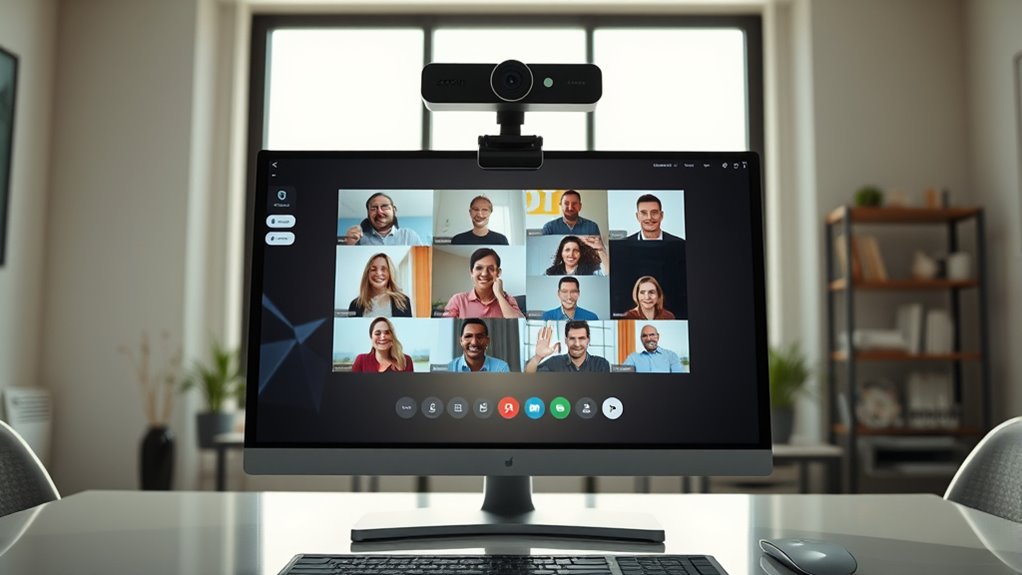

If you’re looking for the best webcams for Zoom meetings, you’re likely balancing image quality, ease of use, and affordability. The Logitech C920e stands out as a top overall choice thanks to its reliable 1080p video and built-in microphone. The Anker PowerConf C200 offers 2K resolution and AI noise canceling, making it ideal for professional environments. Meanwhile, the EMEET C60E provides 4K streaming with wide-angle and telephoto lenses for those who want high detail and flexibility. The main tradeoffs revolve around resolution, price, and features like privacy covers or autofocus. Keep reading for a full breakdown to find your perfect fit.

Get your wardrobe favorites delivered free with Prime
- Fast, free delivery on millions of items
- Prime Video, Amazon Music and more included
- Member-only deals all year
Complete the kit



Key Takeaways
- Top webcams combine high resolution (1080p or higher) with reliable autofocus for clear, professional-looking video.
- Built-in microphones with noise cancellation are essential for seamless audio during meetings.
- Privacy features like physical covers or shutters remain a key consideration for security-minded users.
- More advanced models like 4K webcams are beneficial for detailed visuals but come at a higher cost and require better hardware.
- Ease of setup and compatibility with platforms like Zoom and Microsoft Teams influence usability and overall value.





| webcams for zoom meeting | Compatibility | Resolution | Connectivity |
|---|---|---|---|
| Logitech C920e HD 1080p Webcam | Zoom, Microsoft Teams, Windows 11 | 1080p HD | — |
| Anker PowerConf C200 2K Webcam | Windows 7 or later, macOS 10.11+ | 2K Ultra-Clear | USB 2.0 Type-A |
| EMEET C60E Dual-Camera 4K Webc | Windows 10/11, macOS 10.14+ | — | — |
| Logitech Brio 101 Full HD 1080 | Zoom, Teams, Google Meet, Nintendo Switch 2 | Full HD 1080p | USB-A |
| Logitech C920x HD Pro Webcam | Windows, Mac, Nintendo Switch 2 | Full HD 1080p/30fps | — |
| 1080P HD Webcam with Noise-Can | — | 1080P HD | USB 2.0/3.0/3.1, OTG |
| NexiGo N930AF Webcam with Micr | Windows, Mac, Linux, Chrome OS, Ubuntu, Switch | 1080p HD | USB |
| Logitech C920S HD Pro Webcam | PC, Mac, Laptop, Tablet, Xbox | — | — |
| NexiGo N60 1080P Webcam with M | USB 2.0/3.0, Mac OS X 10.7+, Windows 7/8/10/11, Linux, Chrome OS, Ubuntu | 1920 x 1080 at 30fps | — |
| Webcam 1080P with Microphone & | — | 1080p | USB |
| EMEET C960 1080p Webcam with D | — | — | USB Type-A with A-to-C adapter |
| 4K Webcam for PC & Mac with Au | Windows, macOS, Linux | — | — |
| EMEET 1080P Webcam with Microp | Windows 10/11, macOS, Linux, Android TV | 1920 x 1080p | — |
| Acer 1080p Webcam with Noise C | — | — | USB |
More Details on Our Top Picks
Logitech C920e HD 1080p Webcam with Microphone, Privacy Cover, and Compatibility for Zoom and Microsoft Teams
The Logitech C920e stands out for delivering consistently sharp 1080p video with automatic light correction, making it ideal for professional settings. Unlike the Logitech Brio 101, which offers 1080p but with fewer advanced features, the C920e provides a dependable, plug-and-play experience with dual omnidirectional microphones for clear audio. Its fixed 78° field of view suits typical conference rooms but may be less flexible for wide or close-up shots. While lacking a zoom feature, its compatibility with Zoom and Teams and the privacy cover enhance security. The main tradeoff is its fixed view and USB dependency, limiting mobility. This webcam makes the most sense for users who prioritize consistent video quality and security in regular meetings.
Pros:- High-quality 1080p video with automatic light correction
- Clear audio with dual omnidirectional microphones
- Privacy cover for added security
- Certified for Zoom and Microsoft Teams
Cons:- Fixed 78° field of view may not suit all needs
- Requires USB connection, limiting portability
- No built-in zoom feature
Best for: Professionals who need a reliable, high-quality webcam for daily video calls and conferencing in an office or home setting.
Not ideal for: Content creators or streamers who require adjustable zoom or wider angles for dynamic content production.
- Resolution:1080p HD
- Field of View:78°
- Microphones:Dual omnidirectional microphones
- Privacy Cover:Yes
- Compatibility:Zoom, Microsoft Teams, Windows 11
- Mounting Options:Adjustable clip, 1/4″ threads for tripod
Our verdict“This webcam is perfect for professionals seeking dependable, high-quality video calls with security features.”
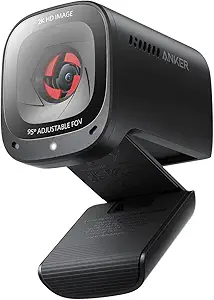
Anker PowerConf C200 2K Webcam, Computer Camera with AI Noise Canceling Mics and Privacy Cover
The Anker PowerConf C200 offers 2K resolution, resulting in sharper images than many 1080p models like the Logitech C920x. Its AI noise-canceling microphones outperform basic built-in mics, providing clearer audio even in noisy environments. Multiple adjustable viewing angles—65°, 78°, and 95°—offer greater flexibility than fixed-angle webcams, but require software for adjustment, which might add complexity. While the resolution is higher, it doesn’t support zoom in 4K or 2K modes, which could be a drawback for users needing close-up framing. Its low-light performance helps in dim rooms, but the price may be a barrier for some. This pick suits users who want customizable angles and crisp video at a higher resolution.
Pros:- Sharp 2K resolution for clear images
- Effective AI noise-canceling microphones
- Multiple adjustable viewing angles
- Good low-light performance
Cons:- Requires software for angle adjustments
- Price may be higher than basic webcams
- No zoom support in 4K/2K modes
Best for: Remote workers or presenters who need sharp 2K quality and adjustable views for versatile meeting setups.
Not ideal for: Budget-conscious users or those seeking a simple, plug-and-play webcam without extra software or adjustable views.
- Resolution:2K Ultra-Clear
- Microphone:AI Noise Canceling Mics
- Adjustable FOV:65°, 78°, 95°
- Privacy Cover:Built-in sliding cover
- Compatibility:Windows 7 or later, macOS 10.11+
- Connectivity:USB 2.0 Type-A
Our verdict“This webcam is best for those who prioritize image clarity and flexible viewing options for professional or streaming use.”
EMEET C60E Dual-Camera 4K Webcam for Streaming with Wide-Angle and Telephoto Lenses
The EMEET C60E pushes the boundaries with dual 4K sensors, offering both wide-angle and telephoto views for immersive meetings or streaming. Its two sensors enable versatile shots, but zooming in at 4K often isn’t supported, limiting close-up framing, especially at 60FPS. The 11X hybrid zoom and PDAF autofocus make it ideal for dynamic content, yet USB 2.0 connectivity might restrict compatibility with older devices. RGB lighting adds aesthetic flair, although its primary appeal is for users who need both panoramic and close-up shots in a single device. The remote control and software integration provide convenience, but the device’s complexity might overwhelm casual users. It’s a good fit for streamers or presenters needing flexible camera angles and high resolution.
Pros:- Dual 4K sensors for wide and close-up views
- Up to 11X hybrid zoom with autofocus
- Vibrant RGB lighting for aesthetic appeal
- Remote and software control for flexibility
Cons:- Zoom not supported in 4K at 60FPS or YUY2 modes
- Requires USB 2.0, limiting compatibility on some systems
- Limited details on price and user reviews
Best for: Content creators, streamers, or professionals who want dual perspectives and high-resolution footage for engaging presentations.
Not ideal for: Basic users or those with older computers relying on USB 2.0, who need simple plug-and-play functionality.
- Sensor:1/2.8″ CMOS 4K
- Zoom:Up to 11X hybrid zoom
- Autofocus:PDAF autofocus
- Lighting:RGB lighting
- Microphones:2 omnidirectional microphones
- Compatibility:Windows 10/11, macOS 10.14+
Our verdict“Ideal for content creators needing versatile, high-resolution dual perspectives with flexible control options.”
Logitech Brio 101 Full HD 1080p Webcam for Meetings, Streaming, Desktop, Laptop, PC – Built-in Mic, Shutter, Works with Zoom, Microsoft Teams, Nintendo Switch 2’s GameChat Mode, USB-A, Black
The Logitech Brio 101 offers solid 1080p video quality with auto-light balance and a privacy shutter, making it a practical choice for everyday meetings. Compared with higher-end models like the Logitech C920x, it sacrifices some advanced features but remains reliable for standard use. Its compatibility with platforms like Nintendo Switch 2’s GameChat mode broadens its appeal. Its use of recycled plastic indicates eco-conscious design, though the absence of a privacy shutter in some variants is a concern. The main limitation is its reliance on USB-A, which could be a drawback for users with newer USB-C devices. This camera fits well for users seeking dependable basic HD quality without extra bells and whistles.
Pros:- Reliable 1080p video quality
- Built-in privacy shutter for security
- Compatible with multiple platforms including Nintendo Switch 2
- Eco-friendly recycled plastic material
Cons:- Limited to USB-A connection, no USB-C support
- Basic features with no advanced customization
- No mention of higher frame rates at 1080p
Best for: Budget-conscious professionals or students who need a reliable webcam for regular video calls on multiple platforms.
Not ideal for: Power users or streamers who want higher resolutions, advanced controls, or USB-C connectivity.
- Resolution:Full HD 1080p
- Connectivity:USB-A
- Built-in Microphone:Yes
- Privacy Shutter:Yes
- Auto-Light Balance:Yes
- Compatibility:Zoom, Teams, Google Meet, Nintendo Switch 2
Our verdict“A dependable, budget-friendly webcam suitable for everyday use and standard meetings.”
Logitech C920x HD Pro Webcam – Full HD 1080p/30fps, Stereo Audio, Light Correction, Black
The Logitech C920x HD Pro excels in delivering vibrant 1080p video at 30fps, with a five-element glass lens that ensures sharp images. Its autofocus and automatic light correction perform well in varied lighting, making it suitable for streaming or professional calls. While it lacks a privacy shutter, the inclusion of stereo microphones captures natural sound, which is a step up from basic mono mics. It’s compatible with all major platforms, including Nintendo Switch 2’s GameChat mode, and is ideal for users who prioritize visual quality over advanced features. The main drawback is its 30fps limit at full resolution, which can affect motion smoothness in fast-paced content. This model makes sense for users who want high-quality video at an affordable price for regular meetings.
Pros:- Crisp, vibrant 1080p video at 30fps
- Five-element glass lens for sharp images
- Autofocus and automatic light correction
- Stereo microphones for natural sound
Cons:- No built-in privacy shutter
- Limited to 30fps at maximum resolution
- Basic features without advanced customization
Best for: Streamers, content creators, or professionals seeking high-quality 1080p video with vibrant colors and good audio.
Not ideal for: Users needing higher frame rates for fast motion or those requiring privacy shutters for security.
- Resolution:Full HD 1080p/30fps
- Lens:Five-element glass lens
- Focus:HD autofocus
- Microphone:Stereo
- Light Correction:Automatic
- Compatibility:Windows, Mac, Nintendo Switch 2
Our verdict“This webcam offers excellent visual quality and natural audio for users who prioritize clarity in video calls and streaming.”
1080P HD Webcam with Noise-Canceling Mic, Auto Light Correction, Privacy Cover, Wide Angle Lens, Plug & Play USB for Laptop/Desktop/Mac
This webcam stands out for its effortless setup and reliable auto light correction, making it ideal for users who need consistent video quality without fuss. Compared with the Logitech C920S, it offers similar 1080p clarity but lacks advanced autofocus, which could matter for those frequently changing distances. The built-in noise-canceling mic and privacy cover add security and clarity, but it’s limited to 1080p resolution, so users seeking 4K detail should look elsewhere. Its plug-and-play USB connection makes it accessible for most, though compatibility issues might arise with very old devices. This webcam is a balanced choice for everyday Zoom meetings, streaming, or content creation.Pros:- Automatic light correction ensures clear video in various lighting conditions
- Built-in noise-canceling microphone provides crisp audio
- Privacy cover enhances security when not in use
- Plug-and-play setup is quick and hassle-free
Cons:- Limited to 1080p resolution, not suitable for high-detail production
- No advanced autofocus or zoom features
Best for: Remote workers and content creators wanting straightforward, dependable video quality.
Not ideal for: Power users needing 4K resolution or advanced features like adjustable focus or multi-camera setups.
- Resolution:1080P HD
- Microphone:Noise-canceling
- Lens:Wide-angle
- Light Correction:Auto light correction technology
- Privacy Cover:Yes
- Connectivity:USB 2.0/3.0/3.1, OTG
Our verdict“This webcam is perfect for users seeking reliable 1080p video with minimal setup for daily Zoom meetings.”
NexiGo N930AF Webcam with Microphone, 1080p HD, Autofocus, Privacy Cover, Plug & Play for Desktop and Laptop
The NexiGo N930AF offers sharp 1080p video with autofocus, making it ideal for users who need clear images at varying distances—especially compared to fixed-focus models like the NexiGo N60. Its broad compatibility across operating systems, including Linux and Chrome OS, makes it versatile for different setups. The built-in noise-canceling microphone improves audio quality, but autofocus can sometimes require manual tweaks, which might frustrate those seeking a completely auto-adjusting experience. Its privacy cover adds security, yet the cable length of 6.5 feet may be limiting for some desk setups. This webcam is best suited for professionals who switch between different working environments and need sharp, adjustable focus.Pros:- High-quality 1080p video with autofocus ensures sharp, detailed images
- Built-in noise-canceling microphone enhances audio clarity
- Privacy cover provides security and lens protection
- Broad compatibility across operating systems
Cons:- Autofocus may need manual adjustment for specific distances
- Requires a USB port, which could be limited on some devices
Best for: Frequent remote workers and content creators who need precise focus and flexible device compatibility.
Not ideal for: Casual users or gamers on consoles, as it lacks specific gaming features like 4K or high frame rates.
- Resolution:1080p HD
- Autofocus:Yes
- Microphone:Built-in noise-canceling
- Connectivity:USB
- Cable Length:6.5 ft
- Compatibility:Windows, Mac, Linux, Chrome OS, Ubuntu, Switch
Our verdict“Ideal for professionals and streamers who need flexible, sharp video with autofocus capability.”
Logitech C920S HD Pro Webcam
The Logitech C920S offers proven 1080p video quality with autofocus and automatic light correction, making it a favorite among professionals who value consistency. Its dual stereo microphones improve audio clarity over basic single-mic models like the NexiGo N60, and the built-in privacy shutter adds peace of mind. However, its 30fps limit at 1080p might be noticeable for users wanting ultra-smooth video, such as streamers or those recording fast-paced content. While lacking 4K or advanced controls, its plug-and-play simplicity and broad platform support make it a dependable choice for everyday Zoom meetings. This webcam is a solid pick for users prioritizing ease and proven performance.Pros:- Full HD 1080p with autofocus delivers sharp, clear images
- Dual stereo microphones capture natural, balanced audio
- Privacy shutter for security
- Automatic light correction improves image quality in various settings
Cons:- Limited to 30fps at 1080p, less smooth for fast motion
- No 4K support or advanced camera controls
Best for: Business professionals and educators needing dependable, straightforward HD video.
Not ideal for: High-end streamers or gamers requiring higher frame rates or 4K resolution.
- Video Resolution:1080p/30fps
- Autofocus:Yes
- Light Correction:Yes
- Audio:Dual stereo mics
- Privacy Shutter:Yes
- Compatibility:PC, Mac, Laptop, Tablet, Xbox
Our verdict“A dependable, well-supported choice for professional use and daily Zoom meetings seeking reliable HD quality.”
NexiGo N60 1080P Webcam with Microphone, Privacy Cover, and Software Control
The NexiGo N60 emphasizes broad OS compatibility and ease of use, making it suitable for users who want a straightforward plug-and-play device. Its 1080p resolution offers crisp images, but the fixed focus lens limits flexibility for varying distances, unlike autofocus models like the NexiGo N930AF. The built-in noise-canceling microphone improves audio, yet some users may find firmware updates necessary for optimal sound quality. Its privacy cover enhances security, but it lacks advanced features like 4K support or adjustable focus. This webcam works well for users who need reliable HD video without complex setup.Pros:- High-quality 1080p video with clear imagery
- Built-in noise-canceling microphone improves audio clarity
- Privacy cover for security and dust protection
- Plug-and-play with extensive OS compatibility
Cons:- Fixed focus may not suit all distances
- No 4K or advanced zoom features
Best for: Educational institutions, small offices, or home users seeking a simple, compatible webcam.
Not ideal for: Gaming or high-production content creators needing advanced video features.
- Resolution:1920 x 1080 at 30fps
- Microphone:Built-in noise-canceling
- Lens:Fixed focus
- Privacy Cover:Yes
- Compatibility:USB 2.0/3.0, Mac OS X 10.7+, Windows 7/8/10/11, Linux, Chrome OS, Ubuntu
Our verdict“A reliable, easy-to-use webcam ideal for everyday video calls across multiple operating systems.”
Webcam 1080P with Microphone & Privacy Cover for PC/Laptop, USB Plug & Play, Auto Light Correction
This webcam combines affordability with core features like 1080p resolution, auto light correction, and a privacy cover, making it suitable for those new to video conferencing or on tight budgets. Compared to pricier models like the Logitech C920S, it offers similar basic performance but lacks autofocus and high frame rates, which can impact clarity during fast movements. The fixed focus may not work well at all distances, and its lower price comes with fewer premium features. Nonetheless, for standard Zoom calls or casual streaming, it provides solid value. This makes it a great entry-level option for users prioritizing affordability over advanced controls.Pros:- 1080p high-quality video at an affordable price
- Auto light correction improves visibility in different environments
- Privacy cover enhances security
- Plug-and-play simplicity
Cons:- Fixed focus limits versatility at different distances
- Less suitable for fast-paced video or professional streaming
Best for: Students, casual users, or small business owners starting with video meetings.
Not ideal for: Professionals needing adjustable focus or high-end video quality for production or streaming.
- Resolution:1080p
- Microphone:Built-in noise-canceling
- Focus:Fixed
- Light Correction:Auto
- Privacy Cover:Yes
- Connectivity:USB
Our verdict“A practical, budget-friendly webcam suited for basic Zoom meetings and casual use.”
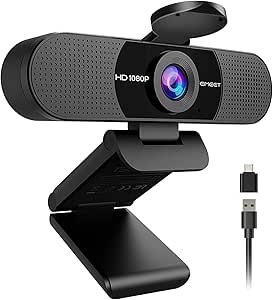
EMEET C960 1080p Webcam with Dual Microphones, Privacy Cover and USB-C Adapter
The EMEET C960 stands out as the best all-around choice for everyday Zoom meetings thanks to its balanced feature set. Its full HD 1080p video with automatic light correction ensures clear images in most lighting conditions, surpassing basic models like the Acer 1080p Webcam which lacks advanced exposure adjustments. The dual omnidirectional microphones support crisp voice pickup, making it suitable for small group calls. Its foldable, tripod-ready design adds convenience for portable setups, while the privacy cover enhances security. However, the fixed focus means it can’t adapt to different distances, and it doesn’t support Windows Hello, unlike some higher-end options. This webcam makes the most sense for users who want dependable quality without fuss.
Pros:- Full HD 1080p video with automatic exposure and color correction
- Dual omnidirectional microphones for clear audio
- Includes privacy cover and USB Type-A-to-C adapter
Cons:- Fixed focus offers less flexibility than autofocus models
- Best image quality requires good lighting conditions
Best for: Remote workers and online meeting users seeking a reliable, easy-to-use webcam with privacy features
Not ideal for: Power users needing autofocus or Windows Hello compatibility, or those using ultra-low light environments
- Video Resolution:1920 x 1080p Full HD
- Sensor Type:CMOS
- Field of View:90°
- Focus Type:Fixed focus
- Microphones:2 built-in omnidirectional microphones
- Connectivity:USB Type-A with A-to-C adapter
Our verdict“This webcam is ideal for users who prioritize straightforward, reliable HD video with decent audio in typical lighting scenarios.”
4K Webcam for PC & Mac with Autofocus and Noise-Canceling Microphones
The 4K Webcam distinguishes itself with ultra HD resolution and smooth 1080p at 60fps, making it ideal for those who want sharp, vibrant images in Zoom calls or streaming. Compared to the EMEET C960, which offers good 1080p quality, this model’s 4K resolution provides more detail, especially useful for professional presentations or multi-monitor setups. Its fast autofocus and smart low-light correction deliver consistently sharp images, even in less-than-ideal lighting. The dual noise-canceling microphones support clear voice capture, but its compatibility is limited to USB-A ports, which could pose issues for newer laptops with only USB-C. The wide-angle lens may introduce distortion at close distances, so users should be mindful of framing. This webcam is best for content creators or professionals prioritizing image quality.
Pros:- 4K ultra HD video at 30fps with excellent detail
- Fast autofocus and smart low-light correction
- Dual noise-canceling microphones for clear audio
Cons:- Requires USB-A port, may need adapters for USB-C only devices
- Wide-angle lens can cause image distortion at close range
Best for: Content creators, remote professionals, and streamers needing high-definition video quality
Not ideal for: Casual users or those with USB-C-only devices without adapters, due to compatibility issues
- Video Resolution:4K at 30fps, 1080p at 60fps
- Sensor:1/2.5″ CMOS
- Field of View:80 degrees
- Focus Type:Autofocus
- Microphones:Dual noise-canceling microphones
- Compatibility:Windows, macOS, Linux
Our verdict“This webcam is best suited for users who want professional-grade, ultra HD video and are okay with some setup considerations.”
EMEET 1080P Webcam with Microphone, C960 Web Camera, 2 Mics, 90°FOV, Plug and Play USB for Online Calls and Streaming
The EMEET C960 (not to be confused with the 4K model) offers solid 1080p video with a 90-degree wide-angle lens, making it a reliable choice for routine Zoom meetings. Its built-in noise reduction microphones support clear voice pickup, and automatic low-light correction helps improve image quality in dim environments. Its foldable, portable design is convenient for quick setups on the go, although it lacks advanced features like autofocus, which can be limiting for users needing sharper focus at varying distances. It doesn’t support Windows Hello, unlike some higher-end webcams, but its broad compatibility and simple plug-and-play nature make it accessible for most users. Overall, this model is best for those seeking a straightforward, portable webcam for everyday online communication.
Pros:- Full HD 1080p video with wide-angle coverage
- Built-in noise reduction microphones for clear audio
- Automatic low-light correction
Cons:- Lacks autofocus, which can affect focus at different distances
- Limited to basic features without advanced controls
Best for: Home office workers or students who need a reliable, portable webcam for regular Zoom or Teams calls
Not ideal for: Power users needing adjustable focus or advanced controls, or those requiring Windows Hello facial recognition
- Resolution:1920 x 1080p
- Field of View:90°
- Microphones:2 noise reduction microphones
- Light Correction:Automatic low-light correction
- Design:Foldable, portable
- Compatibility:Windows 10/11, macOS, Linux, Android TV
Our verdict“This webcam suits users who want an easy, portable solution for everyday video meetings without needing advanced features.”
Acer 1080p Webcam with Noise Cancellation Microphones and Privacy Cover
The Acer 1080p Webcam offers a dependable, straightforward option for Zoom and streaming, with a CMOS sensor delivering clear 1080p images. Its 360° adjustable rotation provides versatility in positioning, surpassing fixed-angle models like the EMEET C960 for users who need flexible camera angles. Dual noise-reduction microphones support crisp audio, and the built-in privacy cover adds an extra layer of security. However, its fixed focus limits focus adjustments, and it’s not suited for outdoor or water-exposed environments. The relatively modest size and simple USB connection make it ideal for desktop setups but less so for mobile or outdoor use. This webcam makes the most sense for users who value flexible positioning and privacy in a stable, indoor environment.
Pros:- Full HD 1080p video with clear image quality
- 360° adjustable rotation for flexible positioning
- Built-in privacy cover and noise-canceling microphones
Cons:- Fixed focus limits focus flexibility
- Not water resistant or suitable for outdoor environments
Best for: Remote professionals or educators who need flexible positioning and a secure privacy feature for indoor use
Not ideal for: Outdoor users or those needing autofocus or water resistance, due to fixed focus and indoor-only design
- Sensor Type:CMOS
- Connectivity:USB
- Viewing Angle:100°
- Focus Type:Fixed focus
- Microphones:Dual noise-canceling
- Features:360° rotation, privacy cover
Our verdict“This webcam is well-suited for indoor users who need adjustable angles, reliable audio, and privacy features for daily meetings.”

How We Picked
The webcams in this roundup were evaluated based on performance, build quality, ease of use, compatibility with Zoom, and value for money. We prioritized models with high video resolution, effective microphones, and user-friendly features like auto-focus and privacy covers. Price was also a factor, ensuring options cater to different budgets without sacrificing essential meeting features. The ranking reflects a balance between image quality, usability, and overall reliability for Zoom meetings specifically, rather than gaming or streaming. Ultimately, these products were selected to serve a range of needs from casual users to professionals who rely on high-quality video communication daily.| webcams for zoom meeting | Connectivity |
|---|---|
| Logitech C920e HD 1080p Webcam | — |
| Anker PowerConf C200 2K Webcam | USB 2.0 Type-A |
| EMEET C60E Dual-Camera 4K Webc | — |
| Logitech Brio 101 Full HD 1080 | USB-A |
| Logitech C920x HD Pro Webcam | — |
| 1080P HD Webcam with Noise-Can | USB 2.0/3.0/3.1, OTG |
| NexiGo N930AF Webcam with Micr | USB |
| Logitech C920S HD Pro Webcam | — |
| NexiGo N60 1080P Webcam with M | — |
| Webcam 1080P with Microphone & | USB |
| EMEET C960 1080p Webcam with D | USB Type-A with A-to-C adapter |
| 4K Webcam for PC & Mac with Au | — |
| EMEET 1080P Webcam with Microp | — |
| Acer 1080p Webcam with Noise C | USB |
Factors to Consider When Choosing Webcams For Zoom Meetings
Choosing a webcam for Zoom meetings involves more than just pixel count. Several factors influence how well a webcam will serve your needs, from image quality to platform compatibility. Understanding these factors helps avoid common pitfalls like overspending on features you don’t need or selecting a model with poor low-light performance. Here are key considerations to keep in mind before making a purchase.Resolution and Video Quality
Higher resolution webcams, such as 1080p or 4K, deliver sharper images that look more professional on screen. However, 4K webcams demand more bandwidth and processing power, which might not be necessary for all users. For most Zoom meetings, 1080p offers a good balance of clarity and performance, especially if your internet connection isn’t very fast. Keep in mind that some webcams upsample lower resolutions, so check if the actual output matches the specs.
Audio Quality and Microphone Features
Clear audio is just as important as video quality. Many webcams include built-in microphones, but their quality varies. Look for models with noise-canceling microphones to reduce background sounds and ensure your voice is heard clearly. Some webcams also offer multiple microphones and stereo sound, which can be beneficial for group meetings or noisy environments. Remember, external microphones might still be necessary for higher audio fidelity in professional settings.
Lighting and Low-Light Performance
Good lighting is essential for a professional appearance. Many webcams feature auto light correction to adapt to different lighting conditions, but the effectiveness varies. If your space has inconsistent or poor lighting, consider models with better low-light performance or additional lighting accessories. Avoid webcams that require perfect lighting setups, as this can become cumbersome for daily use.
Privacy and Security Features
Privacy concerns are common with webcams, so look for models with physical covers or shutters. This simple feature allows you to instantly block the lens when not in use, adding peace of mind. Some webcams include software-based privacy controls, but hardware covers are generally more reliable. Think about your security needs—if you frequently switch between multiple meetings or work from shared spaces, privacy features are a must.
Compatibility and Ease of Setup
Ensure the webcam easily integrates with your preferred platform, especially Zoom. Most webcams use USB connections, but check if they support USB-C or are compatible with your device. A plug-and-play setup simplifies installation, so look for models that require minimal configuration. Compatibility with different operating systems—Windows, Mac, or Linux—is also worth verifying to avoid surprises.
Additional Features and Budget Considerations
Additional features like adjustable mounts, built-in lighting, or auto-focus can enhance your experience but often increase the cost. Balance your needs with your budget; for example, casual users might not need 4K resolution or advanced AI noise canceling. On the other hand, professionals demanding high fidelity should consider investing in premium models despite the higher price. Recognize that spending more often yields better build quality and longevity, making it worthwhile for regular use.
Frequently Asked Questions
Will a higher resolution webcam improve my Zoom video quality?
Yes, higher resolution webcams like 1080p or 4K will produce sharper, clearer images, which can make your appearance more professional. However, to fully benefit from higher resolutions, you need a strong internet connection and a capable computer. If your hardware or bandwidth is limited, you might not notice much difference, and 1080p may be the most practical choice. Keep in mind that increasing resolution also increases file size and bandwidth usage during calls.Are built-in microphones enough for professional meetings?
Built-in microphones can be sufficient for casual meetings, but their quality varies widely. For clear, noise-free audio, look for webcams with noise-canceling microphones and stereo sound. If your environment is noisy or you need the highest audio fidelity, investing in an external microphone may be worthwhile. Remember, good audio quality often has a greater impact on meeting professionalism than video resolution alone.Do I need a webcam with a privacy cover?
A privacy cover is a simple but effective feature that allows you to physically block the lens when not in use. This adds a layer of security, especially if you work in shared or insecure environments. If privacy is a top concern, choose a model with a built-in cover or consider purchasing an external cover. While not essential for everyone, it provides peace of mind and quick security when you need it.Is a 4K webcam worth the extra cost for Zoom meetings?
For most Zoom users, 4K webcams offer more detail and future-proofing but may not provide noticeable benefits during typical video calls. They are particularly useful if you do screen sharing or presentations where high detail matters. However, they require better hardware, more bandwidth, and often higher investment. If your primary goal is professional video quality without extra complexity, a high-quality 1080p webcam usually suffices.How important is low-light performance for Zoom webcams?
Low-light performance greatly affects how clear and natural your video appears, especially in dim or uneven lighting conditions. Cameras with auto light correction and better sensors can compensate for poor lighting, maintaining visibility and color accuracy. If you often work in less-than-ideal lighting, prioritize webcams with strong low-light capabilities or consider adding external lighting. This can significantly improve your on-camera appearance without needing to change your environment.Conclusion
For casual users or those on a tight budget, a reliable 1080p webcam like the Logitech C920e offers solid performance without breaking the bank. Professionals who require clearer video and better noise reduction might prefer the Anker PowerConf C200 or the Logitech Brio for their higher resolutions and advanced features. Those seeking the best quality and future-proofing should consider 4K options like the EMEET C60E, despite the higher cost. Beginners will benefit from plug-and-play models with privacy covers, while security-conscious users should prioritize webcams with hardware shutters. Ultimately, your choice depends on your specific needs, environment, and budget.Halloween Picks

Spirit Halloween 4 ft 7 in Sitting Scarecrow Animatronic

MGparty 14.5FT Halloween Inflatable Walk-in Pumpkin House with LED Lights

10-Foot Halloween Inflatable Double-Headed Dragon Archway
As an affiliate, we earn on qualifying purchases.