Finding the right USB-C charging stations can feel overwhelming given the sheer number of wattage options and port configurations available. My top pick for most users is the Anker Prime 200W 6-Port GaN Desktop Charging Station because it balances raw power with a compact, heat-efficient design. For those needing to power a whole family’s gadgets at once, the Zobirez 10-Port Fast Charger offers unmatched port density, while the UGREEN 100W 6-Port GaN serves as a reliable, budget-friendly entry point. The main tradeoff you will face is choosing between maximum total wattage and per-port speed; many multi-port hubs share power, meaning simultaneous charging slows down individual devices. This guide breaks down which models maintain fast speeds under load and which are better suited for overnight trickle charging.

Get your wardrobe favorites delivered free with Prime
- Fast, free delivery on millions of items
- Prime Video, Amazon Music and more included
- Member-only deals all year
Key Takeaways
- GaN technology significantly reduces the physical footprint of high-wattage chargers, making desktop clutter manageable.
- Total wattage is a misleading metric; per-port output drops when multiple devices are connected on shared-power models.
- Models with adjustable dividers and included cables offer better desk organization but often lack individual port monitoring.
- Premium picks like Anker Prime maintain higher sustained speeds for laptops compared to budget multi-port hubs.
- Heat management is the primary differentiator between reliable long-term units and those prone to throttling under load.
| 380W USB C Charger Block with 4 USB Cables Dual 100W Charging Station |  | Best for Charging Two Laptops | Total output: 380W | Ports: 8 total: 5 USB-C and 3 USB-A, as described | High-output USB-C ports: 2 ports rated at 100W each | VIEW ON AMAZON | See Our Full Breakdown |
| Lcssio 300W Charging Station for Multiple Devices, 8 Port Fast Charger |  | Best for Family Device Organization | Total output: Up to 300W | Ports: 8 total, including 5 USB-C ports | Laptop-capable ports: 2 USB-C ports rated at 65W each | VIEW ON AMAZON | See Our Full Breakdown |
| Anker Prime 200W 6-Port GaN Desktop Charging Station |  | Best Compact Desktop Pick | Model: A2683 | Total output: 200W | Ports: 6 USB ports | VIEW ON AMAZON | See Our Full Breakdown |
| 750W Charging Station for Multiple Devices, Zobirez 10-Port Fast Charger |  | Best High-Capacity Family Hub | Advertised total output: Up to 750W | Ports: 10 total: 5 USB-C and 5 USB-A | Included cables: 10 total: 1 100W USB-C-to-USB-C, 5 short USB-C, 2 iPhone-compatible, and 2 Micro-USB | VIEW ON AMAZON | See Our Full Breakdown |
| 60W 12-Port USB-C Charging Station |  | Best for Many Low-Power Devices | Total output: 60W | Ports: 12 USB-C | Output per port: 5V/3A | VIEW ON AMAZON | See Our Full Breakdown |
| Anker 9-in-1 Desktop Charger and Power Strip, 100W | 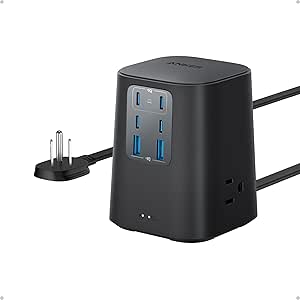 | Best for Mixed Desk Setups | Ports and outlets: 3 AC outlets, 4 USB-C ports, 2 USB-A ports | USB-C1 and USB-C2 output: Up to 100W each when used individually | Surge protection: 300 joules | VIEW ON AMAZON | See Our Full Breakdown |
| MEKIOJEO 12-Port 380W USB-C Charging Station |  | Best for High-Port-Count Charging | Total ports: 12: 8 USB-C and 4 USB-A | Listed total wattage: 380W | USB-C output options: 65W, 30W, and 20W | VIEW ON AMAZON | See Our Full Breakdown |
| UGREEN 100W 6-Port GaN USB-C Charging Station |  | Best Compact Multi-Device Pick | Total output: 100W | Ports: 4 USB-C and 2 USB-A | Maximum single USB-C output: Up to 65W | VIEW ON AMAZON | See Our Full Breakdown |
| Anker 112W 6-Port Desktop Charger | 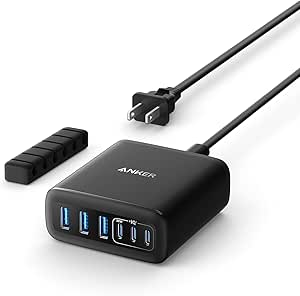 | Best for a Compact Desk | Total output: 112W | Ports: 3 USB-C and 3 USB-A | Maximum single USB-C output: 30W | VIEW ON AMAZON | See Our Full Breakdown |
| 10-Port 100W USB Charging Station with Adjustable Dividers and 10 Cables |  | Best for Family Device Organization | Ports: 10 total: 5 USB-C and 5 USB-A | Maximum total output: 100W | USB-C output: 5V/3A, up to 15W per port | VIEW ON AMAZON | See Our Full Breakdown |
| 150W 30-Port USB-C Charging Station |  | Best for Charging the Most Low-Power Devices | USB-C ports: 30 | Total output: 150W | Total current: 30A | VIEW ON AMAZON | See Our Full Breakdown |
| USB C Charging Station 10 Port with 4 Cables, 245W GaN Charger Block |  | Best Mixed-Port Pick for Laptop and Family Charging | Total ports: 10 | Port layout: 6 USB-C and 4 USB-A | Stated total output: 245W in product description; 200W in a specification field | VIEW ON AMAZON | See Our Full Breakdown |
| BREEKET 100W 6-Port GaN USB Charging Station |  | Best Compact Option for Phones and Accessories | Total output: 100W | Total ports: 6 | USB-C ports: 3 USB-C PD 3.0, up to 20W each | VIEW ON AMAZON | See Our Full Breakdown |
| 20-Port 270W USB Charging Station with Adjustable Dividers |  | Best Organized Charging Station for Shared Spaces | Total ports: 20 | Port layout: 10 USB-C and 10 USB-A | Total output: 270W | VIEW ON AMAZON | See Our Full Breakdown |
| Zobirez 420W 10-Port USB Charging Station with 5 USB-C Ports |  | Best High-Power Station for Laptop Charging | Total output: Up to 420W | Total ports: 10 | USB-C ports: 5 | VIEW ON AMAZON | See Our Full Breakdown |
| usbc charging station | Total output | Ports |
|---|---|---|
| 380W USB C Charger Block with | 380W | 8 total: 5 USB-C and 3 USB-A, as described |
| Lcssio 300W Charging Station f | Up to 300W | 8 total, including 5 USB-C ports |
| Anker Prime 200W 6-Port GaN De | 200W | 6 USB ports |
| 750W Charging Station for Mult | — | 10 total: 5 USB-C and 5 USB-A |
| 60W 12-Port USB-C Charging Sta | 60W | 12 USB-C |
| Anker 9-in-1 Desktop Charger a | — | — |
| MEKIOJEO 12-Port 380W USB-C Ch | — | — |
| UGREEN 100W 6-Port GaN USB-C C | 100W | 4 USB-C and 2 USB-A |
| Anker 112W 6-Port Desktop Char | 112W | 3 USB-C and 3 USB-A |
| 10-Port 100W USB Charging Stat | — | 10 total: 5 USB-C and 5 USB-A |
| 150W 30-Port USB-C Charging St | 150W | — |
| USB C Charging Station 10 Port | — | — |
| BREEKET 100W 6-Port GaN USB Ch | 100W | — |
| 20-Port 270W USB Charging Stat | 270W | — |
| Zobirez 420W 10-Port USB Charg | Up to 420W | — |
More Details on Our Top Picks
380W USB C Charger Block with 4 USB Cables Dual 100W Charging Station
For a shared desk where laptops and smaller devices need power together, this station stands out for its two 100W USB-C ports and eight-port layout. It also includes four USB-C cables, including a 100W braided cable, so there is less need to outfit every port before putting it to work. Compared with the Anker Prime 200W 6-Port, it offers more ports and a higher stated total output, but the Anker’s more compact format may suit a tidier desk better. The tradeoff is that the product description does not explain how power is divided among ports when many devices are connected; the advertised 380W total should not be read as 380W available to each device. Its mix of USB-C and USB-A adds flexibility, though buyers who want a charging dock with device slots should look at the Lcssio instead.
Pros:- Two USB-C ports are rated for up to 100W each
- Eight total ports include both USB-C and USB-A
- Four USB-C cables are included, including a 100W braided cable
- GaN III design is intended to reduce charger size and improve heat management
Cons:- Power allocation when several devices are connected is not clearly detailed
- The large port count and included cables may be unnecessary for a phone-and-tablet setup
Best for: Households or work teams charging two USB-C laptops alongside phones, tablets, and accessories at one desk
Not ideal for: Buyers who need a clearly specified power-sharing plan across all ports or a dock with built-in device slots
- Total output:380W
- Ports:8 total: 5 USB-C and 3 USB-A, as described
- High-output USB-C ports:2 ports rated at 100W each
- Charging technology:GaN III
- Included cables:4 USB-C cables, including one 100W braided cable
- Power cord:5 ft
- Input voltage:100–240V, according to the description
Our verdict“Choose this station if two laptop-capable USB-C ports and included cables matter more than a built-in device organizer.”
Lcssio 300W Charging Station for Multiple Devices, 8 Port Fast Charger
The Lcssio is the lineup’s more practical pick for a family charging spot: eight ports sit alongside fixed, case-friendly slots, so tablets and phones have somewhere to rest instead of collecting in a cable pile. Its two 65W USB-C ports can serve compatible laptops, while the additional USB-C and USB-A connections cover smaller devices. That makes it a less laptop-focused choice than the 380W USB C Charger Block, which offers two 100W ports and a higher stated total output. In return, Lcssio supplies a built-in organizer and six short mixed cables, including Lightning-compatible and Micro-USB options. The tradeoff is the lower laptop-port rating and a fixed divider design that cannot be rearranged. Buyers mainly charging phones, tablets, and family devices will get more organizational value here than buyers seeking maximum laptop power.
Pros:- Eight ports include five USB-C connections
- Two USB-C ports are rated at 65W for compatible laptops
- Fixed slots include two wider, taller spaces for bulkier devices or cases
- Six mixed short cables are included
Cons:- The 65W laptop ports offer less headroom than the 100W ports on the 380W USB C Charger Block
- Fixed dividers cannot be rearranged for unusually wide devices
- The stated 300W total does not specify how output is shared across all connected ports
Best for: Families with several phones and tablets, including devices kept in protective cases, who want a shared charging station with built-in slots
Not ideal for: People who regularly charge high-demand laptops and want 100W or more from each laptop port
- Total output:Up to 300W
- Ports:8 total, including 5 USB-C ports
- Laptop-capable ports:2 USB-C ports rated at 65W each
- Included cables:6 short mixed cables: 2 for iPhone and iPad, 3 USB-C, and 1 Micro-USB
- Design:Fixed charging slots, including 2 wider and taller spaces
- Safety features:Over-current, over-voltage, overload, overheat, overcharge, and short-circuit protection
- Power input:Corded electric; 110V listed
Our verdict“Pick the Lcssio for an organized family charging station with case-friendly slots, rather than for the lineup’s highest laptop output.”
Anker Prime 200W 6-Port GaN Desktop Charging Station
With a footprint of 4.4 × 3.0 inches, the Anker Prime is the easiest choice here to fit onto a crowded work surface without adding a row of device slots. Its six ports can serve several devices, and two USB-C ports can each supply up to 100W when used together—useful for powering a pair of compatible laptops. The 380W USB C Charger Block offers more ports and a higher stated total output, while the Lcssio adds physical storage for devices; this Anker instead favors a compact desktop hub from a named charging brand. Temperature monitoring is another practical safeguard. The compromises are its lower 200W total output and lack of a device-organizing dock. At 1.24 lb and intended for desk use rather than travel, it is compact on the desktop, not a lightweight charger to toss in a bag.
Pros:- Compact 4.4 × 3.0 × 1.4-inch body fits small desk spaces
- Two USB-C ports can each provide up to 100W when used together
- Charges up to six devices at once
- Temperature monitoring helps protect connected devices
Cons:- 200W total output is lower than the 300W and 380W options in this group
- Not intended for travel and weighs 1.24 lb
- No built-in slots to hold phones or tablets upright
Best for: Desk workers who want a compact, six-port hub and may charge two compatible USB-C laptops at once
Not ideal for: Travelers seeking a lightweight charger or families who need upright slots to organize several devices
- Model:A2683
- Total output:200W
- Ports:6 USB ports
- USB-C output:Up to 100W per port when 2 USB-C ports are used simultaneously
- Dimensions:4.4 × 3.0 × 1.4 in
- Weight:1.24 lb
- Included power cord:5 ft AC power cord
- Warranty:24 months
Our verdict“Choose the Anker Prime for a compact desk hub with strong dual-USB-C laptop output, not for maximum port count or portable use.”
750W Charging Station for Multiple Devices, Zobirez 10-Port Fast Charger
The Zobirez targets a demanding shared charging area: 10 ports split evenly between USB-C and USB-A, with the description rating each USB-C port at up to 120W. That combination is unusual in this group and gives a household or classroom room for newer USB-C devices as well as older USB-A accessories. Its fixed one-piece slots, including two wider center bays, help keep devices upright; the included ten-cable kit also reduces the setup work. Compared with the Lcssio 300W Charging Station, it claims substantially more total output and adds two ports, but Lcssio provides a more modest, family-focused layout with a clearly described 65W dual-laptop setup. Here, the 750W total and per-port ratings need careful interpretation: the description does not explain power sharing when all ports are occupied. It is a large-capacity choice, not the simplest one to evaluate.
Pros:- Ten ports split between five USB-C and five USB-A
- USB-C ports are advertised at up to 120W each
- Fixed, sturdy slots include two wider center bays for larger devices
- Includes ten cables in USB-C, iPhone-compatible, and Micro-USB formats
Cons:- The description does not explain how the claimed 750W total is allocated across ports
- Its high port count and charging capacity may be excessive for a small personal setup
- Fixed slots offer less layout flexibility than adjustable-divider organizers
Best for: Large households, classrooms, or shared offices with many USB-C laptops and legacy USB-A devices to charge in one place
Not ideal for: Buyers with only a few low-power devices or anyone who wants clearly documented output allocation across a fully loaded station
- Advertised total output:Up to 750W
- Ports:10 total: 5 USB-C and 5 USB-A
- Included cables:10 total: 1 100W USB-C-to-USB-C, 5 short USB-C, 2 iPhone-compatible, and 2 Micro-USB
- Slot design:Fixed one-piece organizer with 2 wider center bays
- Safety features:Over-current, over-voltage, overload, overheat, overcharge, and short-circuit protection
- Input voltage:120V
Our verdict“Choose this Zobirez for a busy shared charging area that needs many USB-C and USB-A connections, while checking that its output-sharing behavior fits your devices.”
60W 12-Port USB-C Charging Station
This station prioritizes port count over fast charging: all 12 connections are USB-C, making it a straightforward fit for a collection of phones, small tablets, and other modest-power devices. Its listed total output is 60W, with each port rated at 5V/3A, so it is not the right hub for laptop charging or for expecting every connected device to receive that per-port maximum at once. Compared with the Anker Prime 200W 6-Port, it doubles the number of connections but gives up high-power USB-C charging and temperature monitoring. Unlike the slotted Lcssio, it also does not provide a physical place to stand devices upright. The compact dimensions and multiple safety protections suit a crowded nightstand or travel kit, but the listing’s 240V input specification is worth checking against your local power supply before buying.
Pros:- Twelve USB-C ports accommodate many compatible devices
- Compact 13.6 × 6 × 3.3 cm tabletop design
- Includes overheat, overcharge, overcurrent, overload, and short-circuit protection
- USB-C-only layout avoids mixing connector types
Cons:- 60W total output is limited compared with laptop-capable stations
- Each port is listed at 5V/3A, with no higher-wattage USB-C charging specified
- The listed 240V input may not suit every buyer’s local power supply
Best for: People charging a large number of phones, small tablets, or other low-power USB-C devices that do not need laptop-speed charging
Not ideal for: Laptop owners, users who need high-wattage fast charging, or buyers who want built-in slots to organize devices
- Total output:60W
- Ports:12 USB-C
- Output per port:5V/3A
- Input voltage:240V
- Frequency range:50–60Hz
- Dimensions:13.6 × 6 × 3.3 cm
- Mounting type:Tabletop
- Safety features:Overheat, overcharge, overcurrent, overload, and short-circuit protection
Our verdict“Pick this 12-port station for numerous low-power USB-C devices, but choose a higher-output model for laptops or faster charging.”
Anker 9-in-1 Desktop Charger and Power Strip, 100W
I’d choose this Anker when a desk needs USB-C charging and conventional AC outlets in the same footprint. Its three AC outlets, four USB-C ports, and two USB-A ports handle a wider mix of equipment than the USB-only Anker 112W 6-Port Desktop Charger, which is more compact but cannot plug in AC-powered accessories. The standout is that USB-C1 and USB-C2 can each reach 100W when used individually, giving a compatible laptop a stronger direct-charge option than the 112W model’s 30W maximum per USB-C port. The tradeoff is that both ports do not provide that stated maximum simultaneously. Surge protection and a five-foot flat-plug cord add practical desk flexibility, but buyers seeking many high-speed USB-C ports should compare it with the MEKIOJEO 12-Port station.
Pros:- Combines three AC outlets with four USB-C and two USB-A ports
- USB-C1 and USB-C2 each support up to 100W when used individually
- Includes 300-joule surge protection and an eight-point safety system
- Five-foot flat-plug cord offers more placement flexibility than a direct-plug charger
Cons:- The stated 100W output is not available from both leading USB-C ports at once
- Its mixed outlet-and-port layout is less focused on high-capacity USB-C charging than stations such as the MEKIOJEO 12-Port
Best for: Home-office users who need laptop charging, USB accessories, and a few AC-powered desk devices from one unit.
Not ideal for: People who need multiple high-wattage USB-C devices charged at full speed at the same time, since the 100W rating applies to either of the first two ports when used individually.
- Ports and outlets:3 AC outlets, 4 USB-C ports, 2 USB-A ports
- USB-C1 and USB-C2 output:Up to 100W each when used individually
- Surge protection:300 joules
- Safety:Eight-point safety system
- Extension cord:5 ft, flat-plug
- Voltage:125V
- Plug type:Type B
- Enclosure and color:Plastic, black
Our verdict“Choose this Anker if your desk needs both strong single-device USB-C charging and built-in AC outlets.”
MEKIOJEO 12-Port 380W USB-C Charging Station
For a shared desk with many devices, I’d put the MEKIOJEO ahead of the six-port UGREEN 100W station because it provides 12 connections: eight USB-C and four USB-A. Its dedicated 65W port can serve a compatible laptop, while 30W and 20W outputs give other devices more headroom than the 15W-per-port USB-C limit on the 10-Port 100W Charging Station with Adjustable Dividers. That capacity comes with a qualification: the stated 380W total and individual port speeds do not mean every connected device charges at its maximum rate; output can vary as ports are occupied. The aluminum body and built-in protections suit a permanent desk setup, while the five-foot cord gives placement room. I’d skip it for international travel, since the listed input is 120V and the plug is North American two-pin.
Pros:- Provides eight USB-C and four USB-A ports for up to 12 connected devices
- Dedicated 65W output supports compatible laptop charging
- Aluminum alloy body and GaN technology in a compact design
- Includes overcharge, overheating, and short-circuit protections
Cons:- Charging speeds can change when multiple ports are in use
- 120V input and a North American two-pin plug limit its suitability abroad
Best for: Households, studios, or team desks charging several USB-C laptops, tablets, and phones from one North American outlet.
Not ideal for: International travelers or buyers who need guaranteed full-speed charging across many ports simultaneously.
- Total ports:12: 8 USB-C and 4 USB-A
- Listed total wattage:380W
- USB-C output options:65W, 30W, and 20W
- Technology:GaN
- Body material:Aluminum alloy
- Power cord:5 ft (1.5 m)
- Input voltage:120V
- Plug type:Type A, 2-pin
Our verdict“Pick the MEKIOJEO when the number of available USB-C connections matters more than guaranteed peak speed on every port.”
UGREEN 100W 6-Port GaN USB-C Charging Station
The UGREEN makes the most sense when I want six charging ports without a bulky desktop hub. Its vertical design saves desk space, and the mix of four USB-C and two USB-A ports is more flexible than the all-USB-C-heavy MEKIOJEO 12-Port station for a smaller everyday setup. A single USB-C port can deliver up to 65W, enough for compatible laptop charging, while the listed USB-C3 and USB-C4 outputs top out at 35W. That makes it a better fit for one laptop plus phones and tablets than for several power-hungry computers. The key compromise is shared power: 100W is the station total, not a promise of full output on every connected port. An included AC extension cord helps with placement, though the Type A plug is aimed at North American outlets.
Pros:- Four USB-C and two USB-A ports charge up to six devices
- Single USB-C output reaches up to 65W for compatible laptops
- Compact vertical design takes up less desk space
- GaN technology, smart power distribution, and an included AC extension cord
Cons:- The 100W total output is shared across connected devices
- Type A, 2-pin plug may not suit outlets outside North America
Best for: Desk users who want a space-saving charger for one compatible laptop and several phones, tablets, or accessories.
Not ideal for: People charging multiple laptops or seeking a dozen ports; the MEKIOJEO 12-Port offers twice as many connections.
- Total output:100W
- Ports:4 USB-C and 2 USB-A
- Maximum single USB-C output:Up to 65W
- USB-C3 and USB-C4 output:Up to 35W
- USB-A output:Up to 22.5W
- Charging technology:GaN with smart power distribution
- Included accessory:AC extension cord
- Plug type:Type A, 2-pin
Our verdict“Choose the UGREEN for a compact desk setup where one laptop and several smaller devices share a charger.”
Anker 112W 6-Port Desktop Charger
I’d favor this Anker when small size and a tidy desktop matter more than laptop-class USB-C output. At 3.0 × 3.2 × 1.3 inches, it is notably easier to tuck beside a monitor than the larger MEKIOJEO 12-Port station, while still charging six devices through three USB-C and three USB-A ports. Its 112W total output is useful for a mixed phone-and-tablet setup, but the 30W maximum from a single USB-C port is a clear step down from the UGREEN’s 65W port and the 100W-capable leading ports on the Anker 9-in-1 Power Strip. A silicone cable organizer helps keep the compact setup orderly; cables themselves are not included. This is a practical multi-device desk charger, not the best choice for a laptop that needs higher-wattage USB-C charging.
Pros:- Compact 3.0 × 3.2 × 1.3-inch body
- Three USB-C and three USB-A ports charge up to six devices
- 112W total output supports simultaneous charging across the ports
- Includes a silicone cable organizer
Cons:- Maximum single-port USB-C output is 30W, below the UGREEN’s 65W capability
- Charging cables are not included
- Only USB-C1 is specified for 30W MacBook Air charging
Best for: People with limited desk space who mainly charge phones, tablets, earbuds, and other lower-power USB devices.
Not ideal for: Laptop owners who need more than 30W from a USB-C port or buyers who expect charging cables to come in the box.
- Total output:112W
- Ports:3 USB-C and 3 USB-A
- Maximum single USB-C output:30W
- Maximum single USB-A output:18W
- Dimensions:3.0 × 3.2 × 1.3 in (77 × 82 × 33 mm)
- Weight:10.65 oz (302 g)
- Included accessory:Silicone cable organizer
- Warranty:18 months
Our verdict“Pick this Anker for a small, organized charging spot for phones and tablets, not for high-wattage laptop charging.”
10-Port 100W USB Charging Station with Adjustable Dividers and 10 Cables
This station is built around keeping a group of devices together, rather than charging one laptop at high speed. Ten adjustable dividers create separate places for phones, tablets, cameras, or e-readers, and the included ten cables reduce the need to gather compatible leads separately. Compared with the Anker 112W 6-Port Desktop Charger, it can hold and connect more devices at once, but its USB-C ports are limited to up to 15W each, making it a weaker fit for laptop charging than the UGREEN’s 65W USB-C port. Its 100W total is shared among connected devices, so port count should not be mistaken for ten full-speed outputs. Built-in electrical protections and a fan that activates at 55°C add safeguards, though some buyers may prefer a quieter, simpler desk charger.
Pros:- Ten USB ports and adjustable dividers organize a large group of devices
- Includes ten charging cables and a 1.5 m power cord
- Supports phones, tablets, cameras, e-readers, and smartwatches
- Overheat, overcharge, overvoltage, and short-circuit protection, plus temperature-triggered fan
Cons:- USB-C ports provide up to 15W each, making laptop charging slower than with the UGREEN
- The 100W total output is shared across connected devices
- The fan may run when the station reaches 55°C
Best for: Families or shared workspaces that need one organized charging station for phones, tablets, e-readers, and similar devices.
Not ideal for: Laptop users or anyone prioritizing quiet operation and faster USB-C charging; the UGREEN offers a much higher single-port USB-C output.
- Ports:10 total: 5 USB-C and 5 USB-A
- Maximum total output:100W
- USB-C output:5V/3A, up to 15W per port
- USB-A output:5V/2.4A, up to 12W per port
- Included accessories:10 dividers, 1.5 m power cord, and 10 charging cables
- Cooling:Fan activates at 55°C
- Protection:Overheat, overcharge, overvoltage, and short-circuit
- Input voltage:240V
Our verdict“Choose this station when organized, simultaneous charging for many smaller devices matters more than laptop-speed USB-C output.”
150W 30-Port USB-C Charging Station
When the number of devices matters more than charging speed, this station’s 30 USB-C ports give it a distinct role in the lineup. Its 150W total output is spread across ports rated at 5V/2.4A, making it a fit for phones, earbuds, and other modest-power electronics rather than laptops. Compared with the Zobirez 420W 10-Port USB Charging Station, it trades high-output USB-C charging for three times as many connection points. That makes it more useful for shared spaces with many small devices, but less versatile for newer laptops or users prioritizing fast charging. Built-in electrical protections and the included power cable add practical convenience; the main compromise is that every port is limited to 5V output.
Pros:- 30 USB-C ports can serve a large group of devices simultaneously
- 5V/2.4A per-port rating suits many phones and small electronics
- Includes overcurrent, overcharging, and short-circuit protection
- Corded design includes a power cable
Cons:- 5V-only output does not provide USB-C Power Delivery for laptops
- 150W total output is shared across as many as 30 connected devices
Best for: Offices, classrooms, or households that need to charge many phones and small USB-C devices at once.
Not ideal for: Laptop owners or anyone who needs USB-C Power Delivery or faster-than-5V charging.
- USB-C ports:30
- Total output:150W
- Total current:30A
- Output voltage:5V
- Maximum per-port output:5V/2.4A
- Power source:Corded electric
- Plug type:Type A, 2-pin
- Safety features:Overcurrent, overcharging, and short-circuit protection
Our verdict“Choose it when you need the highest port count for low-power devices, not fast charging for laptops.”
USB C Charging Station 10 Port with 4 Cables, 245W GaN Charger Block
This Roruite block is a flexible middle ground for a desk or travel bag: it has six USB-C ports, four USB-A ports, and a stated 245W shared maximum. Its standout detail is the first USB-C port’s 65W laptop output; the other USB-C ports are rated up to 20W, so the laptop connection has a clear priority. That makes it more useful for mixed devices than the all-5V 20-Port 270W USB Charging Station, though it serves fewer devices and does not offer a charging slot organizer. Four included USB-C-to-USB-C cables help get a setup started, and the detachable five-foot power cord supports flexible placement. Product details also list 200W in one specification field, while the description states 245W total, so I would not plan around the higher figure without confirmation.
Pros:- Dedicated first USB-C port is rated up to 65W for a laptop
- Six USB-C and four USB-A ports support mixed device types
- Includes four USB-C-to-USB-C cables and a detachable five-foot power cord
- Lists protections against overcharging, overvoltage, overcurrent, and overheating
Cons:- Only the first USB-C port is specified for laptop charging
- Product information conflicts on total output, listing 245W in the description and 200W in a spec field
- No device dividers are listed for keeping a crowded desk organized
Best for: Households or hybrid workers who need one laptop connection plus charging for phones, tablets, and USB-A accessories.
Not ideal for: Buyers who need a large number of organized charging bays or want clear, consistent confirmation of total output.
- Total ports:10
- Port layout:6 USB-C and 4 USB-A
- Stated total output:245W in product description; 200W in a specification field
- First USB-C port:Up to 65W
- Other USB-C ports:5 ports, up to 20W each
- USB-A ports:4 ports, up to 20W each
- Included cables:Two 6.6-foot and two 3.3-foot USB-C-to-USB-C cables
- Power cord:Detachable, 5 feet
Our verdict“Pick this for a mixed-device setup that needs one laptop-capable USB-C port, while treating the stated total output cautiously.”
BREEKET 100W 6-Port GaN USB Charging Station
The BREEKET is the compact, straightforward choice here: three USB-C PD 3.0 ports and three USB-A ports cover a small everyday mix without the bulk of the 20- or 30-port stations. Its 100W output is shared, and the listed USB-C ports reach up to 20W each, so this model suits phones, tablets, watches, and earbuds—not laptop charging. Compared with the Roruite 10-Port GaN Charger Block, it has fewer ports and less stated capacity, but its small dimensions and detachable five-foot extension cord make it easier to place or pack. Built-in protection adds reassurance for an accessory-focused setup. The tradeoff is limited headroom when several devices are connected, along with no dedicated high-wattage port for a laptop.
Pros:- Compact 3.27 x 2.36 x 1.1-inch body is easy to place or pack
- Three USB-C PD 3.0 and three USB-A ports cover common accessories
- Detachable five-foot AC extension cord offers flexible placement
- Protection covers overcharging, overheating, short circuits, and overcurrent
Cons:- Not intended for laptop charging
- 100W total output is shared across connected devices
- Only six ports, fewer than the Roruite and larger multi-device stations
Best for: Travelers and small households charging phones, earbuds, watches, and tablets without needing a laptop charger.
Not ideal for: Laptop users or families who regularly need to charge more than six devices at the same time.
- Total output:100W
- Total ports:6
- USB-C ports:3 USB-C PD 3.0, up to 20W each
- USB-A ports:3, up to 18W each
- Dimensions:3.27 x 2.36 x 1.1 inches
- Included power cord:Detachable AC extension cord, 5 feet
- Compatible devices:Phones, tablets, headphones, smartwatches, and small electronics
- Warranty:1 year
Our verdict“Choose the BREEKET for a compact phone-and-accessory hub; skip it if laptop charging or higher capacity is a regular need.”
20-Port 270W USB Charging Station with Adjustable Dividers
This station puts organization and capacity ahead of high-speed charging. Its 10 USB-C and 10 USB-A ports sit alongside 11 adjustable dividers, letting a shared desk or household keep devices separated instead of stacking them around a power block. It also includes 10 mixed USB cables, a useful starting point for a multi-device setup. Compared with the 150W 30-Port USB-C Charging Station, it offers fewer total connections but adds USB-A compatibility, dividers, and a higher stated total output. The important limitation is that every port is specified at 5V: USB-C reaches 3A and USB-A 2.4A, with no laptop-grade Power Delivery listed. That makes it a stronger organizer for phones and tablets than a choice for fast-charging computers.
Pros:- 20 ports split evenly between USB-C and USB-A
- 11 adjustable, detachable dividers help keep devices separated
- Includes 10 mixed USB cables for a ready-to-use charging area
- Lists over-temperature, over-voltage, overload, short-circuit, and overcurrent protection
Cons:- All ports are specified for 5V output, with no laptop charging support listed
- 270W total output is shared across connected devices
- Included cable types are described as mixed rather than itemized
Best for: Families, classrooms, or shared offices that want to charge and separate up to 20 phones, tablets, or small devices.
Not ideal for: People who need laptop charging, USB-C Power Delivery, or higher-voltage fast charging.
- Total ports:20
- Port layout:10 USB-C and 10 USB-A
- Total output:270W
- USB-C output per port:5V/3A
- USB-A output per port:5V/2.4A
- Included dividers:11 adjustable, detachable
- Included cables:10 mixed USB cables
- Warranty coverage:2-year replacement coverage
Our verdict“Choose this when organized, simultaneous charging for many small devices matters more than laptop-level power.”
Zobirez 420W 10-Port USB Charging Station with 5 USB-C Ports
Among these five, the Zobirez is the clearest fit for a desk that needs laptop charging as well as phone and tablet ports. Its 420W stated total output is paired with two 65W ports, three 45W ports, and five 30W ports, offering more high-power connections than the 30-port station or the all-5V 20-port organizer. Built-in dividers and eight short mixed cables also help keep a ten-device setup orderly. Compared with the Roruite 10-Port GaN Charger Block, it claims higher output across more ports, while Roruite makes only its first port explicitly laptop-capable. The tradeoffs are a smaller port count and short included cables that may constrain placement. Compatibility still depends on the device, cable, and charging requirements, so the headline output alone does not guarantee each device’s maximum speed.
Pros:- Two 65W ports and three 45W ports suit higher-power charging needs
- Ten ports support multiple devices from one station
- Built-in dividers and eight short mixed cables help organize a desk
- Includes protections against overcurrent, overheating, and short circuits
Cons:- Ten ports provide less capacity than the 20- and 30-port stations
- Included charging cables are short
- Actual charging compatibility depends on the device and cable requirements
Best for: Laptop-owning households or work desks that need several higher-power USB-C connections alongside charging for phones and tablets.
Not ideal for: Buyers who prioritize maximum port count, long included cables, or a clearly specified output standard for every device combination.
- Total output:Up to 420W
- Total ports:10
- USB-C ports:5
- Port output arrangement:Two 65W ports, three 45W ports, and five 30W ports
- Compatible devices:Laptops, phones, tablets, headphones, and other USB devices
- Included cables:8 short mixed charging cables
- Material:Flame-retardant ABS
- Weight:1.6 lb
Our verdict“Pick the Zobirez when multiple higher-power charging connections matter more than having the largest number of ports.”

How We Picked
I evaluated these charging stations based on three core pillars: power distribution efficiency, build quality, and versatility. First, I looked at how each unit handles simultaneous charging. Many cheap multi-port hubs advertise high total wattage but fail to deliver adequate power to high-demand devices like laptops when a phone is also plugged in. I prioritized models that advertise independent power zones or intelligent power sharing that doesn’t cripple laptop charging speeds.
Next, I assessed physical design and thermal performance. A charging station that gets dangerously hot or has ports that feel loose is a liability. I favored units using Gallium Nitride (GaN) technology, which generally runs cooler and smaller. Finally, I considered usability features such as cable management, port spacing, and whether the unit includes necessary cables. This ranking reflects a balance of raw performance and daily practicality for different user scenarios.
Factors to Consider When Choosing Usbc Charging Stations
Choosing a charging station isn’t just about picking the highest number on the box. You need to match the hardware to your actual device ecosystem and usage habits.Understand Power Sharing vs. Independent Output
Most multi-port USB-C charging stations use a shared power architecture. This means the total wattage is a pool that all connected devices draw from. If you plug in a 100W laptop charger port and then add a phone, the laptop might drop to 65W or 45W to accommodate the phone. Independent output models are rarer and more expensive but maintain specific wattages per port regardless of what else is plugged in. If you frequently charge a high-performance laptop while simultaneously charging two phones, look for models that explicitly state per-port maximums or use GaN tech that handles load balancing more intelligently.
GaN Technology and Thermal Efficiency
Gallium Nitride (GaN) chargers are more efficient than traditional silicon-based chargers. They generate less heat and allow for smaller form factors. In a charging station context, this matters because heat is the enemy of longevity. A plastic enclosure that gets warm to the touch after 10 minutes of charging a laptop will eventually degrade. GaN units, like the Anker or UGREEN models, tend to stay cooler and maintain consistent output speeds for longer periods. If you plan to leave your charging station running overnight or for extended work sessions, GaN is worth the slight price premium for safety and durability.
Port Count vs. Actual Usability
Buying a 12-port charger because you have 10 devices might seem logical, but it can lead to poor per-port performance. A 100W charger split across 12 ports means each port gets less than 10W on average, which is barely enough for a phone and useless for a tablet. Match port count to device type. For a desk setup with one laptop and two phones, a 4-6 port unit with higher individual output is far more effective than a 12-port low-wattage hub. Only choose high-port-count models if you are charging many low-power accessories like earbuds, watches, and older phones simultaneously.
Cable Management and Desk Aesthetics
A charging station is only as good as its ability to keep your desk tidy. Many budget multi-port hubs come with short, fixed cables or no cables at all, leading to a tangled mess of cords. Look for stations that include adjustable dividers or built-in cable storage. Some premium models integrate a power strip layout, allowing you to plug in non-USB devices alongside your USB-C gear. If your charging station sits on a visible desk, the footprint and cable routing capabilities are just as important as the wattage rating.
Compatibility with Proprietary Fast Charge Protocols
Not all USB-C ports support the same fast-charging protocols. While Power Delivery (PD) is the universal standard for laptops and modern phones, some brands like OnePlus or OPPO use proprietary fast-charge protocols that may not work at full speed on generic USB-C hubs. If you own devices from specific brands, check the charging station’s compatibility list. Universal PD support is safe for Apple, Samsung, and most laptops, but if you rely on extreme fast-charging speeds for specific Android phones, you may need a charger that explicitly supports those proprietary standards or stick to the manufacturer’s wall adapter for those specific devices.
Frequently Asked Questions
Can a USB-C charging station replace my laptop’s original wall adapter?
In many cases, yes, but you must check the wattage requirements. If your laptop came with a 65W or 100W adapter, a charging station that offers dedicated 65W or 100W ports can replace it. However, if you plan to charge other devices simultaneously, the laptop’s charging speed will likely drop to avoid overloading the station. For heavy workloads, it is often better to keep the original adapter for the laptop and use the station for peripherals, or invest in a high-wattage GaN station that maintains power priority for the laptop port.
Why do my devices charge slower when multiple are plugged in?
This is due to power sharing. Most charging stations have a total maximum output, such as 100W or 200W. The internal controller distributes this power among active ports. When you plug in a second device, the controller reallocates power to prevent overheating or circuit failure. This means a port that delivers 100W alone might only deliver 45W when another device is connected. To minimize this effect, look for stations with higher total wattage or those that advertise independent power zones for high-priority ports.
Is it safe to leave a multi-port charging station plugged in overnight?
Generally, yes, provided the unit has built-in safety mechanisms like over-current, over-voltage, and temperature protection. Reputable brands include these safeguards. However, cheap, unbranded units may lack adequate thermal management, leading to overheating or fire risks. If you leave it plugged in overnight, ensure the station is in a well-ventilated area, not buried under papers or inside a closed drawer. GaN chargers are particularly well-suited for this scenario because they run cooler than traditional silicon chargers.
Do I need a charging station with USB-A ports, or is USB-C enough?
This depends on your existing device inventory. If all your devices are less than three years old, they likely use USB-C. However, many older accessories, such as Bluetooth speakers, older Kindle e-readers, or legacy car chargers, still use USB-A. A hybrid station with both USB-A and USB-C ports offers greater versatility and future-proofs your purchase against older gadgets. If you are certain all your devices are USB-C, a pure USB-C station will be more compact and often cheaper.
How do I know if a charging station supports fast charging for my specific phone?
You need to match the Power Delivery (PD) profile of the charger with your phone’s requirements. Most modern smartphones support USB-PD. Check the charging station’s specifications for its PD output levels (e.g., 5V/3A, 9V/3A, 15V/3A, 20V/5A). If your phone supports 25W fast charging, the station must offer a 9V/3A or similar profile. If the station only offers 5V/2A (10W) on that port, it will charge slowly. Always verify that the specific port you intend to use supports the voltage and amperage your device requires.
Conclusion
Selecting the right USB-C charging stations depends largely on how many high-power devices you need to charge simultaneously. For the average professional who wants a reliable, all-in-one solution that doesn’t look like a science experiment, the Anker Prime 200W 6-Port GaN Desktop Charging Station remains the best overall choice due to its superior power management and compact design. If you are on a tighter budget but still need solid performance for a phone and tablet, the UGREEN 100W 6-Port GaN USB-C Charging Station offers the best value without sacrificing safety features.
For users with a massive ecosystem of older devices, the Zobirez 10-Port Fast Charger is the best for sheer port density, despite its larger footprint. Beginners who are just transitioning to USB-C should start with the Anker 9-in-1 Desktop Charger and Power Strip, as it combines familiar AC outlets with modern USB-C ports, easing the learning curve. Ultimately, prioritize per-port wattage over total wattage, and choose GaN technology for the best long-term reliability.