The best premium ultrawide monitor for most people is the Dell UltraSharp U4025QW, pairing a spacious 40-inch 5K2K screen with productivity-focused connectivity. For immersive gaming, the Samsung Odyssey Neo G9 57-inch brings the broadest, sharpest canvas, while the MSI MPG 491CQPX stands out for fast QD-OLED play. The main tradeoffs are screen size and desk fit, pixel density, gaming speed, and whether OLED contrast matters more than long-session productivity. A higher refresh rate or larger panel can be compelling, but neither automatically makes a monitor the better match for your setup. Read on for the full breakdown of all 15 options and how to choose between them.

Get your wardrobe favorites delivered free with Prime
- Fast, free delivery on millions of items
- Prime Video, Amazon Music and more included
- Member-only deals all year
Key Takeaways
- The Dell UltraSharp U4025QW is the most balanced work-focused pick: its 40-inch 5K2K format favors detailed, roomy desktop work over the extreme gaming focus of the biggest Samsung Odyssey models.
- The 57-inch Samsung Odyssey Neo G9 is the resolution-and-immersion outlier: its Dual UHD layout offers a larger, sharper gaming canvas, but calls for much more desk space and graphics power than a 34-inch monitor.
- 49-inch OLED models prioritize contrast and motion over mixed-use simplicity: the Samsung Odyssey OLED G9 and MSI MPG 491CQPX suit immersive gaming, while OLED care and static desktop use deserve consideration.
- Refresh rate is not the only meaningful gaming difference: the LG 39-inch OLED at 240Hz offers a smaller, more manageable curved screen than the 49- and 52-inch gaming choices.
- Not every monitor in this roundup is equally premium: 34-inch WQHD options are more approachable for desk space and everyday use, but they give up the resolution, panel technology, or scale that distinguishes the flagship models.
| LG UltraGear evo G9 52-Inch 5K2K 240Hz Curved Gaming Monitor |  | Best for High-Resolution, High-Speed Gaming | Screen size: 52 inches | Resolution: 5120 × 2160 (5K2K/WUHD) | Aspect ratio: 21:9 | VIEW ON AMAZON | See Our Full Breakdown |
| Dell UltraSharp U4025QW 40-inch Curved 5K2K WUHD LED Monitor |  | Best for Productivity and Connectivity | Screen size: 39.7 inches | Resolution: 5120 × 2160 | Aspect ratio: 21:9 | VIEW ON AMAZON | See Our Full Breakdown |
| Samsung 49-Inch Curved Dual QHD Ultrawide Monitor (LS49C954UANXZA) |  | Best for Side-by-Side Multitasking | Screen size: 49 inches | Aspect ratio: 32:9 | Resolution: 5120 × 1440 | VIEW ON AMAZON | See Our Full Breakdown |
| LG UltraGear 39-inch WQHD Curved OLED Gaming Monitor, 240Hz, 0.03ms, White |  | Best OLED Pick for Immersive Gaming | Screen size: 39 inches | Resolution: 3440 × 1440 (WQHD) | Panel type: OLED | VIEW ON AMAZON | See Our Full Breakdown |
| Samsung Odyssey G5 34-Inch Ultra-Wide Curved Gaming Monitor |  | Best Compact Gaming Pick | Screen size: 34 inches | Aspect ratio: 21:9 | Resolution: 3440 × 1440 | VIEW ON AMAZON | See Our Full Breakdown |
| LG UltraFine evo 40U990A 40-inch 5K2K Curved Ultrawide Monitor |  | Best for Creative Workstations | Screen size: 40 inches | Resolution: 5120 × 2160 (5K2K) | Aspect ratio and curve: 21:9, 2500R | VIEW ON AMAZON | See Our Full Breakdown |
| Samsung 57-Inch Odyssey Neo G9 Dual UHD Curved Gaming Monitor | 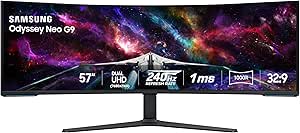 | Best for Maximum Gaming Immersion | Screen size: 57 inches | Resolution: Dual UHD | Aspect ratio and curve: 32:9, 1000R | VIEW ON AMAZON | See Our Full Breakdown |
| LG 34U650A-B 34-inch UltraWide IPS WQHD 100Hz HDR10 Curved Monitor |  | Best for Everyday USB-C Setups | Screen size: 34 inches | Resolution: 3440 × 1440 | Aspect ratio: 21:9 | VIEW ON AMAZON | See Our Full Breakdown |
| LG 34UC98-W 34-inch Curved UltraWide QHD IPS Monitor |  | Best for Straightforward Multitasking | Screen size: 34 inches | Resolution: 3440 × 1440 | Aspect ratio: 21:9 | VIEW ON AMAZON | See Our Full Breakdown |
| Samsung 49-inch Odyssey G9 G91F Curved Dual QHD Gaming Monitor |  | Best for Balanced Super-Ultrawide Gaming | Screen size: 49 inches | Resolution: 5120 × 1440 | Aspect ratio and curve: 32:9, 1000R | VIEW ON AMAZON | See Our Full Breakdown |
| Samsung Odyssey G9 49-Inch Curved Dual QHD Gaming Monitor |  | Best for High-Refresh-Rate Gaming | Screen size: 49 inches | Resolution: Dual QHD | Aspect ratio: 32:9 | VIEW ON AMAZON | See Our Full Breakdown |
| LG 34WR55QK-B 34-inch UltraWide Curved WQHD Monitor |  | Best for Laptop-Centered Work | Screen size: 34 inches | Resolution: 3440 × 1440 | Aspect ratio: 21:9 | VIEW ON AMAZON | See Our Full Breakdown |
| Dell 34 Plus USB-C Curved Monitor S3425DW, 34-inch WQHD VA, 120Hz |  | Best for Mixed Work and Play | Screen size: 34 inches | Resolution: 3440 × 1440 (WQHD) | Aspect ratio: 21:9 | VIEW ON AMAZON | See Our Full Breakdown |
| Samsung 49-inch Odyssey OLED G9 (G91SD) Dual QHD Curved Gaming Monitor |  | Best for OLED Image Quality | Screen size: 49 inches | Display technology: QD-OLED | Resolution: 5120 × 1440 (Dual QHD) | VIEW ON AMAZON | See Our Full Breakdown |
| MSI MPG 491CQPX 49-Inch Curved QD-OLED Gaming Monitor, 5120 × 1440, 240Hz |  | Best Premium Gaming Pick | Screen size: 49 inches | Display type: QD-OLED | Resolution: 5120 × 1440 (DQHD) | VIEW ON AMAZON | See Our Full Breakdown |
| premium ultrawide monitor | Screen size | Resolution | Refresh rate | Aspect ratio |
|---|---|---|---|---|
| LG UltraGear evo G9 52-Inch 5K | 52 inches | 5120 × 2160 (5K2K/WUHD) | 240Hz | 21:9 |
| Dell UltraSharp U4025QW 40-inc | 39.7 inches | 5120 × 2160 | 120Hz | 21:9 |
| Samsung 49-Inch Curved Dual QH | 49 inches | 5120 × 1440 | 120Hz | 32:9 |
| LG UltraGear 39-inch WQHD Curv | 39 inches | 3440 × 1440 (WQHD) | 240Hz | — |
| Samsung Odyssey G5 34-Inch Ult | 34 inches | 3440 × 1440 | 165Hz | 21:9 |
| LG UltraFine evo 40U990A 40-in | 40 inches | 5120 × 2160 (5K2K) | 120 Hz | — |
| Samsung 57-Inch Odyssey Neo G9 | 57 inches | Dual UHD | 240 Hz | — |
| LG 34U650A-B 34-inch UltraWide | 34 inches | 3440 × 1440 | 100 Hz | 21:9 |
| LG 34UC98-W 34-inch Curved Ult | 34 inches | 3440 × 1440 | 60 Hz | 21:9 |
| Samsung 49-inch Odyssey G9 G91 | 49 inches | 5120 × 1440 | 144 Hz | — |
| Samsung Odyssey G9 49-Inch Cur | 49 inches | Dual QHD | 240Hz | 32:9 |
| LG 34WR55QK-B 34-inch UltraWid | 34 inches | 3440 × 1440 | 100Hz | 21:9 |
| Dell 34 Plus USB-C Curved Moni | 34 inches | 3440 × 1440 (WQHD) | Up to 120Hz | 21:9 |
| Samsung 49-inch Odyssey OLED G | 49 inches | 5120 × 1440 (Dual QHD) | 144Hz | 32:9 |
| MSI MPG 491CQPX 49-Inch Curved | 49 inches | 5120 × 1440 (DQHD) | 240Hz | 32:9 |
More Details on Our Top Picks
LG UltraGear evo G9 52-Inch 5K2K 240Hz Curved Gaming Monitor
The 52-inch 5K2K display gives this LG a distinctive place among premium ultrawides: it pairs more vertical resolution than the Samsung 49-Inch Curved Dual QHD with a 240Hz refresh rate. That combination suits players who want a broad, detailed view without giving up fast motion. Its 1000R curve draws the wide screen toward the viewer, while DisplayHDR 600 and up to 95% DCI-P3 coverage add color and contrast for supported content. USB-C with up to 90W power delivery also makes it more useful for a laptop-based desk than a gaming-only setup. The tradeoff is its 52-inch footprint, which demands generous desk space; its VA panel and built-in speakers may also be less appealing for buyers prioritizing OLED contrast or dedicated audio.
Pros:- 5120 × 2160 resolution provides more vertical detail than the Samsung 49-Inch Curved Dual QHD.
- 240Hz refresh rate and 1ms response time support smooth, responsive gaming.
- DisplayHDR 600 and up to 95% DCI-P3 coverage offer vivid color for supported content.
- USB-C delivers up to 90W of power, alongside DisplayPort 2.1 and dual HDMI 2.1.
Cons:- The 52-inch screen needs substantial desk space and a suitable viewing distance.
- VA panel does not offer the per-pixel black levels of the LG UltraGear 39-inch OLED.
- Built-in speakers are a convenience, not a substitute for a headset or dedicated speakers.
Best for: PC gamers with a deep, wide desk who want 5K2K detail, a 240Hz refresh rate, and USB-C laptop charging in one display.
Not ideal for: Buyers with limited desk space or those who prioritize OLED blacks and external-quality audio over a very large, fast screen.
- Screen size:52 inches
- Resolution:5120 × 2160 (5K2K/WUHD)
- Aspect ratio:21:9
- Curvature:1000R
- Refresh rate:240Hz
- Panel type:VA
- HDR:VESA DisplayHDR 600
- USB-C power delivery:Up to 90W
Our verdict“Choose this LG if your desk can accommodate a 52-inch display and you want unusually high resolution alongside 240Hz gaming.”
Dell UltraSharp U4025QW 40-inch Curved 5K2K WUHD LED Monitor
The Dell UltraSharp U4025QW is the productivity-focused alternative to the gaming-first LG UltraGear evo G9: both offer 5120 × 2160 resolution, but Dell pairs it with a more moderate 120Hz refresh rate and an unusually broad connection hub. Thunderbolt, USB-C, Ethernet, DisplayPort, HDMI, and eight USB ports help consolidate a desk used with several peripherals or computers. Its 39.7-inch curved matte display also gives documents and timelines room to sit side by side, while height, swivel, and tilt adjustments help tailor the position. Compared with the LG, the Dell gives up 240Hz gaming speed and lists a 5ms response time; buyers seeking a more immersive gaming screen should look elsewhere. At 41.9 pounds, it is also a heavy monitor to install or reposition.
Pros:- 5120 × 2160 resolution provides a detailed workspace for multitasking.
- 120Hz refresh rate is smoother for scrolling and general motion than a basic office display.
- Thunderbolt, USB-C, Ethernet, DisplayPort, HDMI, and eight USB ports support a well-connected desk.
- Height, swivel, and tilt adjustments make it easier to position the large curved screen.
Cons:- The 120Hz refresh rate and 5ms response time trail the LG UltraGear evo G9 for fast gaming.
- At 41.9 pounds, installation and repositioning can be cumbersome.
- Only one HDMI port limits setups that rely on several HDMI-connected devices.
Best for: Hybrid-work professionals who want a high-resolution ultrawide, Thunderbolt and Ethernet connectivity, and room for multiple desk peripherals.
Not ideal for: Competitive gamers who want a 240Hz refresh rate, or anyone who needs a lighter monitor that is easy to move between desks.
- Screen size:39.7 inches
- Resolution:5120 × 2160
- Aspect ratio:21:9
- Refresh rate:120Hz
- Response time:5ms
- Brightness:600 nits
- Connectivity:DisplayPort, Ethernet, HDMI, Thunderbolt, USB
- Weight:41.9 pounds
Our verdict“Pick the Dell for a connected, high-resolution work desk; choose the LG UltraGear evo G9 instead if gaming speed is the priority.”
Samsung 49-Inch Curved Dual QHD Ultrawide Monitor (LS49C954UANXZA)
The Samsung’s 32:9 Dual QHD format makes it the lineup’s clearest fit for people who want the width of two side-by-side work areas without a center bezel. Compared with Dell’s 40-inch 5K2K UltraSharp, it offers a much wider canvas but less vertical resolution, so full-height documents and fine text may feel less spacious. The 120Hz refresh rate keeps everyday movement and compatible games fluid, while the USB-C 90W charging and KVM switch make it practical for switching between a work laptop and another computer. Picture-by-Picture mode has a catch: the 120Hz refresh rate is unavailable there. Its 49-inch span also calls for a broad desk, and DisplayHDR 400 is a more modest HDR specification than the LG UltraGear evo G9’s DisplayHDR 600.
Pros:- The 32:9 screen gives multiple side-by-side windows ample horizontal space.
- 120Hz refresh rate makes scrolling and motion smoother than standard 60Hz displays.
- USB-C charging up to 90W and a KVM switch support laptop-and-desktop workflows.
- 1000R curve, matte finish, and height-adjustable stand help suit extended desk use.
Cons:- 5120 × 1440 resolution offers less vertical workspace than the Dell UltraSharp U4025QW’s 5120 × 2160.
- Picture-by-Picture mode does not support the full 120Hz refresh rate.
- Its 49-inch width can overwhelm smaller desks, and DisplayHDR 400 is less capable than DisplayHDR 600.
Best for: Remote workers and multitaskers who regularly keep several full-width windows visible and want USB-C laptop charging with KVM switching.
Not ideal for: Buyers who need 5K2K vertical detail, use Picture-by-Picture at high refresh rates, or have a narrow desk.
- Screen size:49 inches
- Aspect ratio:32:9
- Resolution:5120 × 1440
- Curvature:1000R
- Refresh rate:120Hz
- HDR:VESA DisplayHDR 400
- USB-C charging:90W
- Contrast ratio:3000:1
Our verdict“Choose this Samsung if horizontal workspace and switching between computers matter more than 5K2K vertical detail or full-speed Picture-by-Picture.”
LG UltraGear 39-inch WQHD Curved OLED Gaming Monitor, 240Hz, 0.03ms, White
For buyers who value image contrast and rapid response over maximum workspace resolution, this 39-inch OLED takes a different route from the 5K2K LG UltraGear evo G9. Its 3440 × 1440 resolution is less detailed, but OLED’s deep blacks and 0.03ms response time suit dark games and fast action particularly well. The 240Hz refresh rate, FreeSync Premium, and NVIDIA G-SYNC compatibility cover a range of gaming PCs, while webOS adds streaming and cloud gaming without requiring a separate device. Its steep 800R curve creates a close, enveloping view, though that shape may not suit every desk or viewer. Buyers planning long stretches of static desktop use may prefer a less gaming-centered display, and those needing sharper text or more workspace should favor the Dell UltraSharp’s 5K2K panel.
Pros:- OLED panel delivers deep blacks and a 1,500,000:1 contrast ratio.
- 240Hz refresh rate and 0.03ms response time suit fast-moving games.
- FreeSync Premium and NVIDIA G-SYNC compatibility support a broad range of gaming PCs.
- webOS 24 adds streaming and cloud gaming without a separate streaming box.
Cons:- 3440 × 1440 resolution provides less workspace and detail than the 5K2K Dell and LG displays.
- The 800R curve is unusually steep and may feel uncomfortable or restrictive to some users.
- Its gaming-led feature set may be a poor match for buyers focused on office connectivity and multitasking.
Best for: PC gamers who want OLED contrast, very fast motion, adaptive sync for either major GPU ecosystem, and built-in streaming.
Not ideal for: Professionals who prioritize 5K2K workspace, viewers who dislike steep curves, or buyers seeking a primarily productivity-focused monitor.
- Screen size:39 inches
- Resolution:3440 × 1440 (WQHD)
- Panel type:OLED
- Curvature:800R
- Refresh rate:240Hz
- Response time:0.03ms (GtG)
- HDR:VESA DisplayHDR True Black 400
- Smart platform:webOS 24
Our verdict“Choose this LG if OLED contrast and 240Hz gaming matter more to you than 5K2K resolution or a gentler curve.”
Samsung Odyssey G5 34-Inch Ultra-Wide Curved Gaming Monitor
The Samsung Odyssey G5 is the most desk-friendly gaming choice here: its 34-inch, 3440 × 1440 screen gives a wide view without the footprint of the 39-inch LG OLED or the sprawling 49- and 52-inch models. A 165Hz refresh rate, 1ms MPRT response time, and FreeSync Premium support responsive play, making it a sensible fit for gamers who do not need 240Hz. Compared with the LG UltraGear 39-inch OLED, the G5 trades OLED contrast and a faster refresh rate for a smaller, simpler VA LCD design. Its 250 cd/m² brightness is a real limitation in bright rooms, and HDR10 support does not change that brightness ceiling. Connectivity is basic, with DisplayPort, HDMI, and a 3.5mm audio jack rather than USB-C.
Pros:- 34-inch ultrawide format is easier to fit than the larger Samsung and LG models.
- 3440 × 1440 resolution provides a sharp, wide gaming view.
- 165Hz refresh rate, 1ms MPRT, and FreeSync Premium support responsive gameplay.
- 1000R curve brings the screen edges closer to the viewer.
Cons:- 250 cd/m² brightness can be limiting in brightly lit rooms.
- VA LCD does not match the LG UltraGear 39-inch OLED’s deep blacks and contrast.
- Connectivity is limited to DisplayPort, HDMI, and a 3.5mm audio connection, with no listed USB-C.
Best for: PC gamers with limited desk space who want a 34-inch curved 21:9 screen and a refresh rate above 144Hz.
Not ideal for: Buyers who game in bright rooms, need USB-C or extensive work connectivity, or want OLED contrast and 240Hz performance.
- Screen size:34 inches
- Aspect ratio:21:9
- Resolution:3440 × 1440
- Panel type:VA LCD
- Curvature:1000R
- Refresh rate:165Hz
- Response time:1ms (MPRT)
- Brightness:250 cd/m²
Our verdict“Pick the Odyssey G5 if you want a compact curved gaming ultrawide with 165Hz motion and can accept modest brightness and basic connectivity.”
LG UltraFine evo 40U990A 40-inch 5K2K Curved Ultrawide Monitor
The 40-inch 5K2K Nano IPS Black panel gives this LG a clear productivity and creative-work focus: its 21:9 workspace offers room for detailed timelines and several open windows, while 99% DCI-P3 coverage supports wide-gamut projects. The 120 Hz refresh rate also makes scrolling and motion feel smoother than on the 60 Hz LG 34UC98-W. Thunderbolt 5, up to 96 W charging, Ethernet, and a built-in KVM can simplify a multi-device desk, especially when switching between a laptop and desktop. Compared with the gaming-led Samsung Odyssey Neo G9, this is a more restrained fit for color-focused work and standard ultrawide layouts. Its tradeoffs are substantial: the 32-pound body needs a generous desk, and the glossy screen can catch room reflections.
Pros:- 5120 × 2160 resolution provides a detailed, spacious 21:9 workspace.
- 99% DCI-P3 coverage and DisplayHDR True Black 600 suit wide-gamut creative tasks.
- Thunderbolt 5, up to 96 W power delivery, Ethernet, and KVM support a streamlined workstation.
- 120 Hz refresh rate with AMD FreeSync Premium keeps motion smoother than conventional office displays.
Cons:- Its 40-inch size and 32-pound weight demand a sturdy desk with ample space.
- Glossy screen finish can reflect windows and room lighting.
- The 21:9 format is less enveloping for games than the 32:9 Samsung Odyssey Neo G9.
Best for: Creative professionals and laptop-based multitaskers who want a high-resolution 40-inch workspace, wide color coverage, and one-cable workstation connectivity.
Not ideal for: Buyers with shallow desks, bright rooms with uncontrolled reflections, or a priority on extreme gaming refresh rates and immersion.
- Screen size:40 inches
- Resolution:5120 × 2160 (5K2K)
- Aspect ratio and curve:21:9, 2500R
- Panel:Nano IPS Black LCD
- Refresh rate:120 Hz
- Color coverage:99% DCI-P3
- HDR:VESA DisplayHDR True Black 600
- Connectivity:Thunderbolt 5, HDMI 2.1, DisplayPort 2.1, USB-C, USB-A, Ethernet
- Thunderbolt power delivery:Up to 96 W
Our verdict“Choose this LG for a color-capable, high-resolution workstation with modern connectivity, provided your desk can accommodate its size and glossy panel.”
Samsung 57-Inch Odyssey Neo G9 Dual UHD Curved Gaming Monitor
The 57-inch Dual UHD screen is the most expansive gaming canvas here, pairing a 32:9 layout with a tight 1000R curve that wraps a wide field of view around the player. Its 240 Hz refresh rate, 1 ms response time, and Quantum Mini LED backlight make it a more performance-focused choice than the Samsung Odyssey G9 G91F, which tops out at 144 Hz and Dual QHD. DisplayHDR 1000 and local dimming add bright highlights and stronger contrast for compatible games. The catch is that driving Dual UHD at 240 Hz calls for a capable graphics card, and the 41.9-pound monitor occupies serious desk space. It is also a less natural match for buyers who need a compact productivity display or a conventional 21:9 viewing layout.
Pros:- 57-inch Dual UHD 32:9 display creates an exceptionally broad gaming and multitasking workspace.
- 240 Hz refresh rate and 1 ms response time support fast, fluid gameplay.
- Quantum Mini LED backlighting with 2,392 local dimming zones and DisplayHDR 1000 enhances contrast and highlights.
- Stand offers height, tilt, and swivel adjustments.
Cons:- Full Dual UHD at 240 Hz requires a powerful, compatible graphics card.
- Its 52.3-inch width and 41.9-pound weight require substantial desk capacity.
- The extreme 32:9 format is less suited to buyers who prefer a standard ultrawide layout.
Best for: PC gamers with a high-end graphics card, a large desk, and a preference for a single, immersive display instead of a multi-monitor setup.
Not ideal for: Office users with limited desk space, gamers whose systems cannot drive Dual UHD at high refresh rates, or anyone seeking a compact 21:9 screen.
- Screen size:57 inches
- Resolution:Dual UHD
- Aspect ratio and curve:32:9, 1000R
- Refresh rate:240 Hz
- Response time:1 ms (GTG)
- Display technology:VA LED with Quantum Mini LEDs
- HDR and peak brightness:DisplayHDR 1000, up to 1,000 nits
- Contrast ratio:1,000,000:1
- Ports:DisplayPort 2.1, HDMI 2.1, USB hub
Our verdict“Pick the Odyssey Neo G9 for a huge, high-refresh gaming setup if your graphics hardware and desk can handle its demands.”
LG 34U650A-B 34-inch UltraWide IPS WQHD 100Hz HDR10 Curved Monitor
The LG 34U650A-B is the approachable 34-inch choice for buyers who want a curved 21:9 work surface without moving up to a 40- or 49-inch monitor. Its 3440 × 1440 IPS panel and 99% sRGB coverage suit everyday office tasks, browsing, and general creative work, while USB-C with up to 96 W charging can connect and power many laptops through one cable. At 100 Hz, it also feels smoother than the 60 Hz LG 34UC98-W for scrolling and casual gaming. However, its HDR10 support does not make it a high-brightness HDR display, and the modest 300 cd/m² brightness limits impact in bright rooms. The integrated speakers are convenient but not a replacement for dedicated audio, and its stand offers fewer ergonomic adjustments than the larger LG 40U990A.
Pros:- 34-inch 21:9 WQHD panel creates extra room for side-by-side work.
- USB-C supports video, data, and up to 96 W laptop charging.
- 100 Hz refresh rate provides smoother motion than the 60 Hz LG 34UC98-W.
- IPS panel with 99% sRGB coverage and built-in speakers suits general work and media.
Cons:- 300 cd/m² brightness and HDR10 support are limited for demanding HDR viewing.
- Built-in speakers lack the depth and output of dedicated speakers.
- Stand adjustments are more limited than those on more workstation-oriented options.
Best for: Laptop users and home-office buyers who want a 34-inch curved WQHD screen, single-cable USB-C charging, and smoother-than-basic motion.
Not ideal for: Colorists needing wide-gamut DCI-P3 coverage, HDR enthusiasts seeking high peak brightness, or buyers who need extensive stand adjustments.
- Screen size:34 inches
- Resolution:3440 × 1440
- Aspect ratio:21:9
- Panel:IPS LED
- Refresh rate:100 Hz
- Color gamut:Up to 99% sRGB
- Brightness:300 cd/m²
- HDR:HDR10
- USB-C power delivery:Up to 96 W
Our verdict“Choose this LG for a practical 34-inch laptop workstation with USB-C charging, not for demanding HDR or wide-gamut production.”
LG 34UC98-W 34-inch Curved UltraWide QHD IPS Monitor
The LG 34UC98-W earns its place as a straightforward curved productivity display: the 34-inch 3440 × 1440 IPS panel gives spreadsheets and side-by-side windows more room than a standard widescreen, while its height- and tilt-adjustable stand helps position the screen for long desk sessions. Two Thunderbolt ports, HDMI, and USB 3.0 offer useful connection choices for a workstation. Its main compromise is age in capability: the 60 Hz refresh rate feels less fluid than the 100 Hz LG 34U650A-B, and the 99% sRGB gamut is less suited to wide-gamut creative work than the LG 40U990A’s DCI-P3 coverage. This makes more sense for office users who value a familiar 34-inch format and port flexibility than for gaming or HDR-focused buyers.
Pros:- 3440 × 1440 resolution offers ample space for documents and side-by-side applications.
- Curved IPS screen combines a wide workspace with broad viewing angles.
- Two Thunderbolt ports join HDMI and USB 3.0 for flexible connections.
- Height- and tilt-adjustable stand helps tailor screen position.
Cons:- 60 Hz refresh rate is less fluid than the 100 Hz LG 34U650A-B.
- 99% sRGB coverage is a narrower creative-work fit than the LG 40U990A’s 99% DCI-P3.
- No HDR capability is listed, limiting its appeal for HDR media and gaming.
Best for: Office users who want a curved 34-inch WQHD workspace, adjustable positioning, and Thunderbolt connectivity for a practical workstation.
Not ideal for: Gamers seeking high refresh rates, creators needing wide-gamut coverage, or buyers who want USB-C laptop charging and modern HDR features.
- Screen size:34 inches
- Resolution:3440 × 1440
- Aspect ratio:21:9
- Panel type:IPS
- Refresh rate:60 Hz
- Response time:5 ms
- Color gamut:99% sRGB
- Ports:2 Thunderbolt, 2 HDMI, 2 USB 3.0
- Stand adjustment:Height and tilt
Our verdict“Choose the 34UC98-W for everyday multitasking and Thunderbolt connectivity if 60 Hz motion and sRGB coverage meet your needs.”
Samsung 49-inch Odyssey G9 G91F Curved Dual QHD Gaming Monitor
The Odyssey G9 G91F offers the broad 49-inch, 32:9 Dual QHD format without reaching the 57-inch scale of the Odyssey Neo G9. Its 144 Hz refresh rate, 1 ms response time, and AMD FreeSync Premium Pro make it a gaming-first option, while Picture-by-Picture and Picture-in-Picture can keep multiple sources visible at once. The 1000R curve helps bring the wide panel into view, and the matte finish is useful in rooms where reflections are a concern. Compared with the Neo G9, this model is more manageable but gives up the higher 240 Hz refresh rate, Dual UHD resolution, and Quantum Mini LED backlight. Its listed 280 cd brightness also makes it a weaker choice for bright HDR highlights than the Neo G9’s 1,000-nit peak.
Pros:- 49-inch Dual QHD resolution delivers a broad 32:9 gaming and multitasking workspace.
- 144 Hz refresh rate, 1 ms response time, and FreeSync Premium Pro support responsive gameplay.
- Picture-by-Picture and Picture-in-Picture help display multiple sources.
- Matte finish reduces distracting reflections compared with glossy screens.
Cons:- The 45.18-inch width and 34.4-pound weight require considerable desk space.
- 280 cd listed brightness is modest beside the Odyssey Neo G9’s 1,000-nit peak.
- Its 144 Hz refresh rate and Dual QHD resolution are less advanced than the Neo G9’s 240 Hz Dual UHD setup.
Best for: Gamers who want a 32:9, 49-inch screen for immersive play and side-by-side input sources, without stepping up to a 57-inch display.
Not ideal for: Buyers with limited desk width, players who need 240 Hz or Dual UHD detail, or HDR viewers prioritizing high peak brightness.
- Screen size:49 inches
- Resolution:5120 × 1440
- Aspect ratio and curve:32:9, 1000R
- Refresh rate:144 Hz
- Response time:1 ms (GtG)
- Display type:LCD, VA
- HDR and brightness:VESA DisplayHDR 600, 280 cd
- Adaptive sync:AMD FreeSync Premium Pro
- Connectivity:DisplayPort, HDMI, USB
Our verdict“Pick the G91F for a 49-inch super-ultrawide gaming screen with useful multi-source features, but choose the Neo G9 for higher refresh rates and stronger HDR hardware.”
Samsung Odyssey G9 49-Inch Curved Dual QHD Gaming Monitor
The 240Hz refresh rate is the main reason to choose this Odyssey G9: it prioritizes fast, fluid play across a huge 32:9 canvas. Its 1000R curve wraps that broad view toward the player, while Dual QHD gives you the equivalent workspace of two QHD screens without a center bezel. Compared with the Samsung Odyssey OLED G9 G91SD, this VA model refreshes faster on paper, but gives up OLED’s deep blacks and rapid pixel response. DisplayHDR 1000 and a listed 1000 cd/m² brightness support vivid highlights, though the large panel needs a wide, sturdy desk. I’d pick it for competitive gaming over mixed office use: the 1ms figure depends on specified settings, and a 49-inch screen can be more space than many setups can accommodate.
Pros:- 240Hz refresh rate suits fast-paced gaming
- Dual QHD resolution provides a broad 32:9 play area
- DisplayHDR 1000 and high listed brightness support prominent highlights
- Height, tilt, and swivel adjustments help tailor the viewing position
Cons:- 49-inch panel and stand require substantial desk space
- VA technology cannot match the OLED G9’s pixel response and black levels
- The advertised 1ms response time applies under specific settings and conditions
Best for: PC gamers with a powerful graphics card, a wide desk, and a preference for high refresh rates across a 32:9 screen.
Not ideal for: Desk-limited buyers or people who prioritize OLED black levels, because this 49-inch VA display is large and does not use an OLED panel.
- Screen size:49 inches
- Resolution:Dual QHD
- Aspect ratio:32:9
- Curvature:1000R
- Refresh rate:240Hz
- Display technology:VA LCD
- HDR:VESA DisplayHDR 1000
- Adaptive sync:AMD FreeSync Premium Pro
Our verdict“Choose this Odyssey G9 for a sweeping gaming view and 240Hz speed if your desk can handle its size and OLED is not your priority.”
LG 34WR55QK-B 34-inch UltraWide Curved WQHD Monitor
Among the 34-inch options here, the LG 34WR55QK-B makes the clearest case for a laptop-first desk: one USB-C cable can carry display and data while supplying up to 65W of power. Its 3440 × 1440 workspace and Picture-by-Picture mode are useful for keeping multiple sources or windows visible, while the matte finish and height-adjustable stand suit everyday work. Compared with the Dell 34 Plus S3425DW, it has a lower 100Hz refresh rate and less listed color coverage, so the Dell is a stronger fit for smoother motion and broader-color creative tasks. This LG’s 3000:1 contrast ratio is appealing for a VA panel, but 300 cd/m² brightness and 65W charging may fall short for bright rooms or power-hungry laptops. Some display and workspace adjustments also rely on OnScreen Control software.
Pros:- USB-C supports video and up to 65W laptop power delivery
- 3440 × 1440 resolution gives room for side-by-side windows
- Picture-by-Picture supports viewing two sources at once
- Height and tilt adjustments allow basic ergonomic positioning
Cons:- 100Hz refresh rate is below the Dell S3425DW’s 120Hz
- USB-C power delivery may not satisfy laptops that require more than 65W
- Some workspace and display adjustments require OnScreen Control software
Best for: Laptop users who want a curved WQHD workspace, a single-cable connection, and moderate USB-C charging for a work-focused setup.
Not ideal for: Creative professionals who need the broader color coverage listed for the Dell S3425DW, or laptop owners whose computers need more than 65W.
- Screen size:34 inches
- Resolution:3440 × 1440
- Aspect ratio:21:9
- Refresh rate:100Hz
- Panel type:VA LED
- Contrast ratio:3000:1
- USB-C power delivery:Up to 65W
- Connectivity:USB-C, 2 HDMI, DisplayPort, 2 USB ports, headphone jack
Our verdict“Pick this LG for a laptop-centered ultrawide workstation with useful USB-C and multitasking features, rather than for the strongest gaming or color specs.”
Dell 34 Plus USB-C Curved Monitor S3425DW, 34-inch WQHD VA, 120Hz
The Dell S3425DW is the most balanced 34-inch pick in this group for buyers who split time between productivity and gaming. Its 120Hz refresh rate edges out the LG 34WR55QK-B’s 100Hz, while 99% sRGB and 95% DCI-P3 coverage give it a broader stated color range than that LG. USB-C with up to 65W power delivery helps keep a laptop desk tidy, and built-in 2 × 10W speakers can handle basic audio without extra equipment. The 3440 × 1440 VA panel provides useful workspace and strong listed contrast, but its 300 cd/m² brightness is modest for a sunlit room. Compared with either 49-inch Odyssey, the Dell gives up the enveloping 32:9 gaming view; in return, it takes up less room and is easier to justify for everyday work alongside play.
Pros:- 120Hz refresh rate and AMD FreeSync Premium support smoother gameplay
- Listed 99% sRGB and 95% DCI-P3 coverage suit varied visual work
- USB-C supplies up to 65W of laptop power
- Built-in 2 × 10W speakers reduce the need for separate desktop audio
Cons:- 300 cd/m² brightness may be limiting in bright rooms
- 65W USB-C power delivery may be insufficient for some higher-powered laptops
- A 34-inch 21:9 screen offers less gaming width than the 49-inch Odyssey models
Best for: People who want one 34-inch monitor for laptop work, casual gaming, and video, with USB-C and built-in speakers.
Not ideal for: Competitive gamers seeking a 240Hz ultrawide or professionals who need a brighter display for a strongly lit workspace.
- Screen size:34 inches
- Resolution:3440 × 1440 (WQHD)
- Aspect ratio:21:9
- Panel type:VA
- Refresh rate:Up to 120Hz
- Color coverage:99% sRGB, 95% DCI-P3
- USB-C power delivery:Up to 65W
- Speakers:2 × 10W
Our verdict“Choose the Dell S3425DW if you want a capable 34-inch work-and-play monitor with better refresh and stated color coverage than the LG 34WR55QK-B.”
Samsung 49-inch Odyssey OLED G9 (G91SD) Dual QHD Curved Gaming Monitor
This Odyssey OLED G9 puts QD-OLED contrast and color ahead of outright refresh-rate leadership. Its 5120 × 1440 resolution spreads Dual QHD across a 49-inch 32:9 screen, while the 0.03ms response time and 144Hz refresh rate make it a compelling gaming display. Compared with the VA-based Samsung Odyssey G9, the G91SD offers OLED’s deep blacks and faster stated response, but its 144Hz ceiling is lower than that model’s 240Hz. The MSI MPG 491CQPX is the closer rival: it keeps QD-OLED and 32:9, then raises refresh to 240Hz, so this Samsung makes more sense when picture character and useful split-screen modes matter more than maximum frame rate. Burn-in safeguards are included, but static desktop elements remain a concern for long work sessions, and the large panel needs ample desk space.
Pros:- QD-OLED panel supports deep blacks and vivid color
- 5120 × 1440 resolution spans a detailed 32:9 workspace
- 0.03ms response time and 144Hz refresh rate suit responsive gaming
- Picture-in-Picture and Picture-by-Picture support multiple sources
Cons:- MSI MPG 491CQPX offers a higher 240Hz refresh rate
- OLED burn-in safeguards do not remove the risk from prolonged static content
- 49-inch screen requires substantial desk space
Best for: Gamers and media enthusiasts who want a 49-inch OLED ultrawide for deep blacks, vivid color, and occasional multitasking between sources.
Not ideal for: Buyers who leave static desktop content on-screen for long periods or who want the highest refresh rate available from a 49-inch QD-OLED.
- Screen size:49 inches
- Display technology:QD-OLED
- Resolution:5120 × 1440 (Dual QHD)
- Aspect ratio:32:9
- Pixel density:110 PPI
- Refresh rate:144Hz
- HDR:VESA DisplayHDR True Black 400
- Warranty:3 years
Our verdict“Choose the G91SD for a wide OLED gaming and media screen with multitasking modes, provided 144Hz is enough and your usage suits OLED.”
MSI MPG 491CQPX 49-Inch Curved QD-OLED Gaming Monitor, 5120 × 1440, 240Hz
The MSI MPG 491CQPX combines the QD-OLED contrast that makes the Samsung G91SD appealing with a 240Hz refresh rate, matching the faster VA Odyssey G9 while retaining OLED’s 0.03ms response time. That mix makes it the most gaming-focused OLED option here for players who want both a broad 32:9 view and very high refresh. Its 5120 × 1440 resolution keeps the workspace sharp across the 49-inch panel, and HDMI 2.1 adds support for console features including 120Hz, VRR, and ALLM. Compared with the Samsung OLED G9, the MSI prioritizes speed; compared with the VA Odyssey G9, it trades DisplayHDR 1000 for DisplayHDR True Black 400 and introduces OLED burn-in concerns. OLED Care 2.0 is intended to reduce that risk, not eliminate it, so static desktop use calls for caution.
Pros:- QD-OLED combines deep blacks with a 240Hz refresh rate
- 5120 × 1440 resolution provides a broad, detailed 32:9 view
- HDMI 2.1 supports console features including 120Hz, VRR, and ALLM
- Three-year warranty and OLED Care 2.0 accompany the panel
Cons:- OLED burn-in risk is reduced but not eliminated
- DisplayHDR True Black 400 is a different HDR approach from the VA Odyssey G9’s DisplayHDR 1000
- 49-inch size demands a wide desk and substantial viewing distance
Best for: PC and console gamers who want a 49-inch QD-OLED ultrawide with 240Hz speed, HDMI 2.1, and a three-year warranty.
Not ideal for: Buyers who keep static work windows visible for extended sessions, or who need the 1000 cd/m² brightness listed for the VA Odyssey G9.
- Screen size:49 inches
- Display type:QD-OLED
- Resolution:5120 × 1440 (DQHD)
- Aspect ratio:32:9
- Curvature:1800R
- Refresh rate:240Hz
- Response time:0.03ms (GtG)
- HDR:VESA DisplayHDR True Black 400
- Warranty:3 years
Our verdict“Pick the MSI MPG 491CQPX for a high-refresh QD-OLED gaming setup, as long as you can manage OLED’s static-content risk and fit its 49-inch screen.”

How We Picked
I ranked these monitors by how well their screen size, resolution, panel type, refresh rate, and connectivity fit the needs implied by a premium ultrawide purchase. For work, I gave weight to usable desktop space, text clarity, and practical connections; for gaming, I weighed refresh rate, response characteristics, contrast, and immersion. I also considered whether a monitor’s size and pixel load are realistic for common desks and graphics systems, rather than treating the biggest specification as an automatic win.
The order reflects breadth of usefulness first, then specialization. The Dell UltraSharp U4025QW ranks highest for its mix of detailed 5K2K space and work-oriented design, while the Samsung Odyssey Neo G9 leads for buyers explicitly seeking maximum gaming scale and resolution. OLED gaming models follow as strong but more use-specific choices; 34-inch and older or less feature-rich options rank lower because they trade away flagship resolution, speed, or panel advantages. Exact fit still depends on the buyer’s desk, computer, and workload.
| premium ultrawide monitor | HDR |
|---|---|
| LG UltraGear evo G9 52-Inch 5K | VESA DisplayHDR 600 |
| Dell UltraSharp U4025QW 40-inc | — |
| Samsung 49-Inch Curved Dual QH | VESA DisplayHDR 400 |
| LG UltraGear 39-inch WQHD Curv | VESA DisplayHDR True Black 400 |
| Samsung Odyssey G5 34-Inch Ult | — |
| LG UltraFine evo 40U990A 40-in | VESA DisplayHDR True Black 600 |
| Samsung 57-Inch Odyssey Neo G9 | — |
| LG 34U650A-B 34-inch UltraWide | HDR10 |
| LG 34UC98-W 34-inch Curved Ult | — |
| Samsung 49-inch Odyssey G9 G91 | — |
| Samsung Odyssey G9 49-Inch Cur | VESA DisplayHDR 1000 |
| LG 34WR55QK-B 34-inch UltraWid | — |
| Dell 34 Plus USB-C Curved Moni | — |
| Samsung 49-inch Odyssey OLED G | VESA DisplayHDR True Black 400 |
| MSI MPG 491CQPX 49-Inch Curved | VESA DisplayHDR True Black 400 |
Factors to Consider When Choosing Premium Ultrawide Monitors
Premium ultrawides differ most in how they divide screen area, not simply in diagonal size. I would match the panel to the work or games that will occupy it, then check whether the desk, computer, and daily habits support that choice.
Choose Screen Width and Resolution Together
A larger diagonal does not automatically produce a clearer image: resolution must keep pace with the extra width. A 34-inch WQHD monitor can be a sensible fit for a typical desk, while 40-inch 5K2K and 49-inch Dual QHD displays offer more room for windows or games. The 57-inch Dual UHD format raises the bar again in both workspace and graphics demand. A common mistake is to compare diagonal measurements without checking the number of pixels available for text and detail. Before buying, measure your viewing distance and ask whether you need more room for simultaneous windows or a more finely rendered image.
Match Refresh Rate to Your Computer and Games
High refresh rates make motion feel smoother, but the benefit depends on whether your computer can drive the monitor’s native resolution at a strong frame rate. A 240Hz ultrawide can be compelling for fast games, yet its wide pixel load may require a powerful graphics card. For office work, browsing, and slower-paced games, a more modest refresh rate may leave more room in the budget for resolution, connectivity, or panel quality. Check the monitor’s supported connection standards and your graphics card’s outputs before assuming its maximum refresh rate will be available. If your favorite games are demanding, prioritize consistent performance over a headline refresh figure.
Decide Whether OLED Fits Your Daily Use
OLED and QD-OLED panels are attractive for deep blacks, vivid contrast, and quick pixel response, which can make games and films feel more immersive. Their strengths matter less if the monitor mostly displays fixed desktop elements, menus, or work tools for long stretches. OLED owners should review the manufacturer’s panel-care features and warranty terms, then decide whether their routine suits an OLED display. IPS and VA alternatives may be more comfortable choices for buyers who want a conventional productivity screen or prefer not to manage static-image habits. The right panel depends on what stays onscreen, not just which technology sounds most advanced.
Check Desk Fit, Curve, and Viewing Distance
Ultrawides can be deeper and wider than their diagonal suggests, and a strong curve changes how the screen sits relative to the viewer. A 49- or 57-inch model may crowd speakers, leave little room for other desk gear, or require a sturdy mount. Measure the usable desk width and depth, including space for the stand, cables, and comfortable seating distance. Curvature can help keep the edges of a wide screen within a natural field of view, but it may be less suitable for tasks that rely on straight-line visual judgment. If this is a first ultrawide, a 34-inch model is often easier to place and adapt to than a super-ultrawide.
Treat Connectivity as Part of the Monitor’s Value
A premium screen can simplify a workspace if its ports match the devices you actually use. Check for USB-C power delivery, video inputs, and downstream USB connections rather than assuming a work-focused model will support every laptop setup. A single cable can reduce desk clutter, but its charging capacity and supported display mode still need to fit your computer. Gamers should confirm the inputs needed for their PC and console, including whether the monitor supports the desired resolution and refresh rate over that connection. Port selection is easy to overlook when comparing panel specifications, yet it can decide whether the monitor improves a daily setup or adds adapters.
Spend on the Advantage You Will Use
Paying more makes sense when a specific upgrade solves a real need: 5K2K detail for dense work, OLED contrast for immersive games, or a high refresh rate for fast competitive play. It is a weaker choice to buy a massive panel simply because it is the flagship size if your desk or graphics card cannot support it. Likewise, a premium gaming model may be poor value for a laptop-first office where USB-C connectivity and text clarity matter more than peak refresh. Decide which one or two features will change your daily experience, then treat the rest as secondary. This keeps a premium purchase focused on useful capability rather than an impressive specification list.
Frequently Asked Questions
Is a 49-inch ultrawide a practical replacement for two monitors?
It can replace a two-screen setup when you want continuous desktop space without a bezel dividing the middle. Window-management tools can help arrange work areas, though they do not fully reproduce the separate inputs or physical separation of two monitors. Check whether your computer can drive the full resolution and whether the monitor offers picture-by-picture features if you plan to connect multiple devices. A 49-inch screen also needs enough desk width and viewing distance to keep the edges comfortable. If you mainly want two independent work zones, compare the monitor’s input and software features before retiring your existing displays.
Should I choose 5K2K or 49-inch Dual QHD for work?
5K2K is generally the stronger fit if you value finer detail and a tall, spacious desktop for documents, timelines, or creative applications. A 49-inch Dual QHD screen gives a broad horizontal workspace, which can suit side-by-side windows, but its pixel layout and height differ from a 40-inch 5K2K display. Software scaling and your viewing distance affect how much usable room each format provides. Consider the apps you keep open and whether they benefit more from extra vertical space or a wider side-by-side layout. Also check your computer’s output support before choosing a high-resolution panel.
Is OLED a good choice if I work on the same monitor all day?
OLED can work well for mixed use, but a static-heavy routine calls for more care than a display used mainly for changing game and video content. Desktop bars, spreadsheets, and fixed application layouts can remain in the same places for long periods, so check the model’s screen-care tools and warranty coverage. If you would rather not manage that risk, an IPS or VA monitor may be a more comfortable productivity choice. The Samsung and MSI OLED options in this lineup are best understood as gaming-led picks rather than automatic replacements for every office display. Decide based on your actual screen habits, not contrast performance alone.
Do I need a high-end graphics card for a 57-inch Dual UHD gaming monitor?
A powerful graphics card is helpful because driving a very wide, high-resolution screen at high frame rates demands more rendering work than gaming at a smaller resolution. The exact requirement depends on the game, settings, and frame rate you want, so there is no single card that suits every buyer. Before choosing the 57-inch Samsung Odyssey Neo G9, check performance figures for your own games at the monitor’s native resolution. You can lower graphics settings or use scaling, but those choices may reduce the visual advantage that drew you to the display. Buyers with less capable systems may get a better balance from a smaller ultrawide.
Which type of ultrawide is the safest first purchase?
A 34-inch WQHD model is often the easiest starting point because it takes up less room and asks less of a graphics system than a 49- or 57-inch flagship. In this roundup, the Dell S3425DW offers a practical middle ground for buyers who want a curved ultrawide and 120Hz without moving straight to super-ultrawide scale. First-time buyers should still measure their desk and confirm their computer supports the monitor’s resolution and refresh rate. If sharper text or a one-cable laptop setup matters most, a work-focused model may be a better first choice than a gaming display. Choose the smallest screen that gives you the workspace you actually need.
Conclusion
Best overall: I recommend the Dell UltraSharp U4025QW for buyers who want a high-resolution ultrawide built around productivity. Best for maximum gaming scale: choose the Samsung Odyssey Neo G9 57-inch if your desk and graphics system can handle its size and resolution. Best premium OLED gaming: the MSI MPG 491CQPX is a strong fit for buyers prioritizing 49-inch QD-OLED contrast and fast play. Best value and best for beginners: the Dell S3425DW is a more approachable 34-inch option for buyers who do not need flagship scale. Best for a compact gaming setup: the LG 39-inch UltraGear OLED combines a fast 240Hz panel with less desk-spanning width than the super-ultrawides. Match the screen to your desk, computer, and daily workload, and the right choice becomes clearer than a specs-only comparison.