
For most desks, I’d start with the Mifaso 8-in-1 LED Desk Lamp: its 30W USB-C PD and built-in power strip make it the most versatile charging hub in this group. The Honeywell HWT-H2 stands out for shoppers who want full-spectrum light and both USB-A and USB-C, while the Lepro Adjustable LED Desk Lamp is a simpler choice if you mainly need task lighting and one USB port. The main tradeoff is whether you want a compact lamp with basic charging or a larger, more connected unit that can occupy more desk space. Port type, charging power, adjustability, and light controls all affect which one fits your routine. Read on for the full breakdown and a buying guide to help match a lamp to your desk.

Get your wardrobe favorites delivered free with Prime
- Fast, free delivery on millions of items
- Prime Video, Amazon Music and more included
- Member-only deals all year
Key Takeaways
- Mifaso leads for charging versatility: Its 30W USB-C PD and power-strip format suit desks where one lamp needs to handle several devices.
- Power-strip lamps solve a different problem from USB-only lamps: One Beat, Addtam, Drevet, and similar designs add AC outlets, but their larger footprint may be excessive if you only charge a phone.
- USB-C is not a guarantee of fast charging: The Mifaso listing specifies 30W USB-C PD, while a port label alone on other models does not establish equivalent output.
- Honeywell is the lighting-focused standout: Its full-spectrum design and USB-A/USB-C combination give it a different appeal from models centered on outlet access.
- Simple lamps can be the better desk fit: Lepro, Lampat, and other compact designs may suit focused task lighting better than a hub-style model with extra ports and outlets.
| One Beat LED Desk Lamp with Power Strip and USB Charging Ports |  | Best for a Built-In Charging Hub | AC outlets: 3 | USB ports: 4 (2 USB-C, 2 USB-A) | Extension cord: 5 ft | VIEW ON AMAZON | See Our Full Breakdown |
| Addtam LED Desk Lamp with Power Strip and USB Ports |  | Best for Flexible Positioning | Light source: LED | Color temperatures: 4 | Brightness levels: 5 | VIEW ON AMAZON | See Our Full Breakdown |
| Foldable LED Desk Lamp with USB-A and USB-C Ports |  | Best Compact Option | Power: 8 W | Color modes: 5 | Brightness levels: 3 | VIEW ON AMAZON | See Our Full Breakdown |
| Drevet LED Desk Lamp with USB-A Port and 2 AC Outlets |  | Best for a Simple Desk-Side Power Boost | Model: H04 | Color temperatures: 3 | Brightness levels: 3 | VIEW ON AMAZON | See Our Full Breakdown |
| Lepro Adjustable LED Desk Lamp with USB Charging Port, Black | 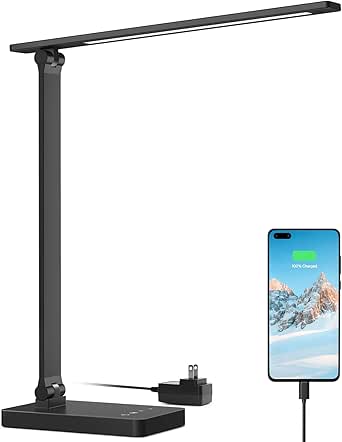 | Best for Focused Reading and Desk Work | Brightness: 450 lumens | Wattage: 15 W | Lighting modes: 3 | VIEW ON AMAZON | See Our Full Breakdown |
| LED Desk Lamp with Touch Control and USB Charging Port | 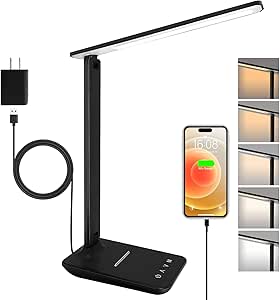 | Best for Simple, Adjustable Task Lighting | Brightness: 500 lumens | Brightness levels: 5 | Color temperatures: 5 options, 3000K–6000K | VIEW ON AMAZON | See Our Full Breakdown |
| TonyEst 12W LED Desk Lamp with Flexible Gooseneck and Dual USB Ports |  | Best for Bright, Flexible Workspaces | Power: 12 watts | Maximum brightness: 2000 lumens | Color temperatures: 3000K, 4000K, and 6000K | VIEW ON AMAZON | See Our Full Breakdown |
| Mifaso 8-in-1 LED Desk Lamp with Power Strip and 30W USB-C PD |  | Best for Charging and Power Access | Light modes: Cool, neutral, and warm | USB ports: 2 USB-C and 2 USB-A | USB-C PD output: 30W | VIEW ON AMAZON | See Our Full Breakdown |
| LED Desk Lamp with Power Strip and USB Charging | 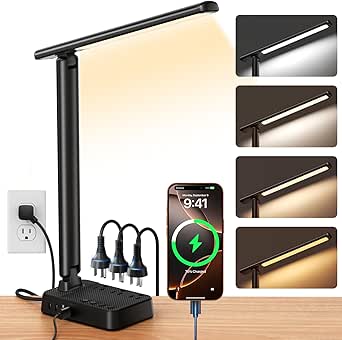 | Best for Fine-Grained Light Adjustment | Brightness: Stepless, 1%–100% | Color temperature: 2800K–6500K | AC outlets: 3 | VIEW ON AMAZON | See Our Full Breakdown |
| Honeywell HWT-H2 Full-Spectrum LED Desk Lamp with USB-A and USB-C Charging |  | Best for Color-Accurate Desk Work | Brightness: 550 lumens | Color temperature: 2700K–5700K | Color rendering index: CRI ≥94 | VIEW ON AMAZON | See Our Full Breakdown |
| 15W Dimmable LED Desk Lamp with USB-A and USB-C Ports | 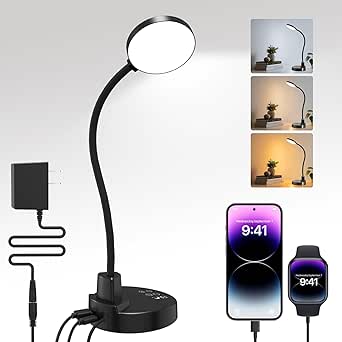 | Best for Flexible Task Lighting | Wattage: 15 watts | Color temperatures: 3000K, 4500K, 6000K | Brightness levels: 5 | VIEW ON AMAZON | See Our Full Breakdown |
| SIBRILLE Dimmable LED Desk Lamp with USB Charging |  | Best for Wide Desks | Wattage: 22 watts | Color temperatures: 3000K–6500K, 5 settings | Brightness adjustment: 10%–100% | VIEW ON AMAZON | See Our Full Breakdown |
| LED Desk Lamp with USB-C Charging and AC Outlets, Black |  | Best for Desk Power Access | Brightness: 800 lumens | Color rendering index: CRI 92 | Wattage: 10 watts | VIEW ON AMAZON | See Our Full Breakdown |
| Lampat Dimmable LED Desk Lamp with USB Charging Port |  | Best for Simple Preset Lighting | Lighting modes: Reading, Studying, Relaxation, Bedtime | Brightness levels: 5 | Controls: Touch-sensitive | VIEW ON AMAZON | See Our Full Breakdown |
| led desk lamp with usb port | Brightness levels | USB ports | Color temperatures |
|---|---|---|---|
| One Beat LED Desk Lamp with Po | 5 | 4 (2 USB-C, 2 USB-A) | 4 |
| Addtam LED Desk Lamp with Powe | 5 | 2 USB-C and 2 USB-A | 4 |
| Foldable LED Desk Lamp with US | 3 | USB-A and USB-C, 5V/2.1A | — |
| Drevet LED Desk Lamp with USB- | 3 | — | 3 |
| Lepro Adjustable LED Desk Lamp | 5 | — | — |
| LED Desk Lamp with Touch Contr | 5 | — | 5 options, 3000K–6000K |
| TonyEst 12W LED Desk Lamp with | — | 2 | 3000K, 4000K, and 6000K |
| Mifaso 8-in-1 LED Desk Lamp wi | — | 2 USB-C and 2 USB-A | — |
| LED Desk Lamp with Power Strip | — | 2 USB-C and 2 USB-A | — |
| Honeywell HWT-H2 Full-Spectrum | — | — | — |
| 15W Dimmable LED Desk Lamp wit | 5 | USB-A and USB-C output; no fast charging | 3000K, 4500K, 6000K |
| SIBRILLE Dimmable LED Desk Lam | — | — | 3000K–6500K, 5 settings |
| LED Desk Lamp with USB-C Charg | 3 | — | — |
| Lampat Dimmable LED Desk Lamp | 5 | — | — |
More Details on Our Top Picks
One Beat LED Desk Lamp with Power Strip and USB Charging Ports
The One Beat is the strongest fit here when clearing outlet clutter matters as much as task lighting. Its three AC outlets and four USB ports, including two USB-C, put more charging connections within reach than the Drevet, which has two outlets but only one USB-A port. Four color temperatures and five brightness levels give you useful lighting choices, while the foldable arm and adjustable head help aim the beam or tuck the lamp away. The tradeoff is that this is a power strip as well as a lamp: connected equipment must stay within its 1875 W and 15 A limits. Its product information also warns that the lamp head may become hot during extended use. Choose it for connection capacity, not the simplest, lightest setup.
Pros:- Combines a lamp with three AC outlets and four USB ports, including two USB-C ports.
- Four color temperatures and five brightness levels allow adjustment for different tasks.
- Foldable arm and adjustable head make it easier to direct light and reclaim desk space.
Cons:- Connected loads must remain within the stated 1875 W and 15 A limits.
- The lamp head may become hot during extended use.
- Its combination of lighting and power connections makes it less suited to buyers seeking a simple lamp.
Best for: Students or home-office users who need a desk light plus several nearby outlets and USB charging connections.
Not ideal for: Anyone who only needs to charge one device, wants a minimal lamp, or would connect equipment that could exceed the 1875 W and 15 A limits.
- AC outlets:3
- USB ports:4 (2 USB-C, 2 USB-A)
- Extension cord:5 ft
- Color temperatures:4
- Brightness levels:5
- Maximum power:1875 W
- Maximum current:15 A
- Voltage:120 V
Our verdict“Choose the One Beat if you want an adjustable desk lamp that also brings multiple AC and USB charging connections onto the desktop.”
Addtam LED Desk Lamp with Power Strip and USB Ports
The Addtam makes sense for a desk where both charging access and lamp positioning need to adapt. It pairs three AC outlets and four USB ports—two USB-C and two USB-A—with a 180° adjustable lamp and a 90° foldable arm. That gives it a similar charging role to the One Beat, but its listed adjustment range makes it a clear pick for users who regularly reposition their light. Four color temperatures and five brightness levels are managed by touch, so you can change the setup without reaching for a separate switch. The compromise is a corded, indoor-only lamp: it needs an outlet and is not waterproof. Compared with the simpler Lepro, the Addtam takes more desk-side space in exchange for its built-in power strip.
Pros:- Three AC outlets plus two USB-C and two USB-A ports provide several charging options.
- 180° lamp adjustment and a 90° foldable arm support flexible positioning.
- Four color temperatures and five brightness levels are controlled by touch.
- Includes a 5-foot cord and a stated 12-month warranty.
Cons:- Requires a nearby power outlet and is not waterproof.
- The built-in power strip may be unnecessary bulk for buyers who only need USB charging.
- The provided specifications do not state a maximum power or current load.
Best for: Remote workers or students who often change their desk layout and want multiple charging ports within reach.
Not ideal for: People needing a portable or moisture-resistant lamp, or buyers who do not need the added AC outlets.
- Light source:LED
- Color temperatures:4
- Brightness levels:5
- Maximum illumination:6500 K
- AC outlets:3
- USB ports:2 USB-C and 2 USB-A
- Adjustment:180° adjustable; 90° foldable arm
- Cord length:5 ft
- Voltage:125 V
Our verdict“Pick the Addtam if you want flexible lamp positioning alongside a full set of AC and USB connections.”
Foldable LED Desk Lamp with USB-A and USB-C Ports
This foldable lamp prioritizes a small, adaptable lighting setup over the outlet capacity of the One Beat and Addtam. Its 230° flexible arm, 90° base axis, and foldable design let you adjust the beam and reduce the lamp’s footprint when it is not in use. USB-A and USB-C ports add basic device charging, while five color modes, three brightness levels, and a soft night light cover more than standard task lighting. At 1.4 pounds, it is also easier to move than the power-strip lamps. The main limitation is charging capacity: the ports share a stated 5V/2.1A output, and there are no AC outlets. It is a better match for a compact desk or bedside table than for someone replacing a multiport charging hub.
Pros:- Foldable design, flexible arm, and adjustable base help manage a small work surface.
- Includes both USB-A and USB-C ports with a stated 5V/2.1A output.
- Five color modes, three brightness levels, and a soft night light support varied use.
- Metal base and 1.4-pound weight make the lamp easy to reposition.
Cons:- Offers no AC outlets, unlike the One Beat and Addtam power-strip lamps.
- USB output is specified at 5V/2.1A, which may limit charging expectations.
- Corded and not water resistant.
Best for: Readers or students with limited desk space who want adjustable lighting, a night-light mode, and nearby USB-A and USB-C charging.
Not ideal for: Users who need AC outlets or several high-capacity charging connections built into their desk lamp.
- Power:8 W
- Color modes:5
- Brightness levels:3
- USB ports:USB-A and USB-C, 5V/2.1A
- Adjustability:230° flexible arm; 90° base axis
- Dimensions:14.92 × 4.45 × 1.85 in
- Weight:1.4 lb
- Base material:Metal
Our verdict“Choose this model for compact, foldable lighting with basic USB charging, not for a desk-side power hub.”
Drevet LED Desk Lamp with USB-A Port and 2 AC Outlets
The Drevet is a more restrained alternative to the One Beat and Addtam: it adds two AC outlets and one USB-A port without turning the lamp into a four-port USB charging station. That limited connection set suits a desk where a phone and a couple of plugs are enough. Touch controls offer three color temperatures and three brightness levels, and the 180° adjustable head helps aim light toward a book or keyboard. The tradeoff is less flexibility than the larger power-strip lamps: there is no USB-C port, and the lighting has fewer settings than the five-level options. Its indoor-use listing is clear, but the product description’s waterproofing claim is unclear, so I would not treat it as suitable for wet locations.
Pros:- Two AC outlets add useful plug access without the larger four-USB-port setup of the One Beat.
- Touch controls provide three color temperatures and three brightness levels.
- 180° adjustable lamp head helps direct light where it is needed.
- Includes a stated two-year warranty.
Cons:- Only one USB-A port is provided; there is no USB-C connection.
- Three brightness levels and three color temperatures offer fewer settings than the One Beat and Addtam.
- Waterproofing information is unclear, so indoor use is the safer fit.
Best for: Dorm residents or bedroom users who need a USB-A charging point and a pair of AC outlets beside a basic adjustable lamp.
Not ideal for: Buyers who need USB-C charging, more lighting adjustments, or a lamp for damp environments.
- Model:H04
- Color temperatures:3
- Brightness levels:3
- Charging ports:1 USB-A
- AC outlets:2
- Lamp head adjustment:180°
- Dimensions:13.2 × 4 × 12 in (D × W × H)
- Weight:1.43 lb
- Warranty:2 years
Our verdict“Choose the Drevet if two AC outlets and a single USB-A port meet your needs better than a larger multiport charging hub.”
Lepro Adjustable LED Desk Lamp with USB Charging Port, Black
The Lepro puts its emphasis on adjustable task lighting rather than built-in outlet access. Its 450-lumen LED output, three lighting modes, and five brightness levels offer more stated brightness steps than the Drevet’s three, making it a better fit for readers who want to tune the light around close work. A diffused, non-flickering design is intended to keep desk illumination comfortable, and touch controls make changes straightforward. The 5V/1A USB port is useful for a nearby device, but it is modest beside the dual USB-A/USB-C setup on the foldable lamp or the four USB ports on the One Beat. This is the simplest choice here for lighting-led buyers; skip it if your main goal is adding outlets or faster device charging.
Pros:- 450-lumen output with three modes and five brightness levels supports adjustable desk lighting.
- Diffused, non-flickering light is designed for reading and desk work.
- Compact design fits desks and bedside tables.
- Includes touch controls and a two-year warranty.
Cons:- USB output is limited to 5V/1A.
- Provides one USB port and no AC outlets, unlike the One Beat and Drevet.
- Not waterproof.
Best for: Readers and desk workers who want several lighting adjustments, a compact footprint, and one convenient USB charging point.
Not ideal for: People who need USB-C, multiple device connections, built-in AC outlets, or higher USB charging output.
- Brightness:450 lumens
- Wattage:15 W
- Lighting modes:3
- Brightness levels:5
- USB output:5V/1A
- Height:15.1 in
- Dimensions:13.4 × 3.9 × 15.1 in (D × W × H)
- Power source:Corded electric
- Warranty:2 years
Our verdict“Pick the Lepro if adjustable, comfortable task lighting matters more to you than a high-capacity USB or AC charging hub.”
LED Desk Lamp with Touch Control and USB Charging Port
For a focused desk setup, this lamp pairs five brightness levels with five color temperatures, letting you shift from warm evening light to a cooler work setting without adding controls complexity. Its 500-lumen output suits reading and close-up tasks, though it is less powerful than the TonyEst lamp, which reaches 2,000 lumens and has a flexible gooseneck. A 5V/1A USB port can charge a small device, but it is slower and less versatile than the faster USB-C options on the Mifaso and Honeywell models. The adjustable head and foldable base help it fit changing desk layouts, and the two-year warranty adds reassurance. I’d skip it if you need strong charging or broad-area illumination; its appeal is straightforward, tunable light in a compact corded design.
Pros:- Five brightness levels and five color temperatures suit different tasks and times of day.
- Flicker-free 500-lumen output is suited to close-range reading and desk work.
- Adjustable head and foldable base allow flexible positioning and storage.
- Includes a two-year warranty.
Cons:- The 5V/1A USB port is limited to slower charging.
- Requires a corded power connection.
- Its 500-lumen output is modest compared with the TonyEst lamp.
Best for: Readers and students who want adjustable light for a compact desk and only need a basic USB charging connection.
Not ideal for: People who need fast phone charging, multiple charging ports, or enough brightness to illuminate a large work surface.
- Brightness:500 lumens
- Brightness levels:5
- Color temperatures:5 options, 3000K–6000K
- USB output:5V/1A
- Power:6 watts
- Adjustability:180° lamp head rotation; 90° foldable base
- Dimensions:11.5 × 4.8 × 13.3 in
- Warranty:2 years
Our verdict“Choose this lamp for a compact, adjustable light with a basic USB port, but pick the TonyEst or Mifaso if brightness or charging capability matters more.”
TonyEst 12W LED Desk Lamp with Flexible Gooseneck and Dual USB Ports
The TonyEst is the brightness-first choice in this group: its maximum 2,000 lumens can cover a larger work area than the 500-lumen LED Desk Lamp with Touch Control and USB Charging Port. Its tall, flexible gooseneck makes it easier to aim light over books, craft materials, or a broad desk, while two USB ports provide more charging convenience than a single-port lamp. Five modes, stepless dimming, and memory give it useful control without fixed brightness steps. The tradeoff is its 33.5-inch height, which takes more vertical room than the foldable Honeywell, and its 30-minute auto-off timer may not suit longer sessions. The USB ports draw power from the lamp, so this is a desk-lighting hub rather than a separate charging station.
Pros:- Up to 2,000 lumens provides more illumination than the 500-lumen touch-control lamp.
- Two USB ports allow two devices to charge from the lamp.
- Flexible gooseneck and weighted base support varied positioning.
- Stepless dimming, five lighting modes, and memory support repeatable settings.
Cons:- Its 33.5-inch height may be awkward under shelves or in compact work areas.
- The 30-minute auto-off timer may be too short for extended tasks.
- USB charging draws power from the lamp.
Best for: Crafters, readers, and desktop workers who need bright, aimable light and want to charge two devices at the desk.
Not ideal for: People with low shelves or limited vertical space, or anyone who needs a timer longer than 30 minutes.
- Power:12 watts
- Maximum brightness:2000 lumens
- Color temperatures:3000K, 4000K, and 6000K
- Lighting modes:5
- Dimming:Stepless
- USB ports:2
- Timer:30-minute auto-off
- Dimensions:5.9 × 5.9 × 33.5 in
Our verdict“Pick the TonyEst for a tall, bright, flexible desk light with dual USB charging, provided you have room for its upright profile.”
Mifaso 8-in-1 LED Desk Lamp with Power Strip and 30W USB-C PD
The Mifaso earns its place by doing more than adding a USB port to a lamp: it combines four AC outlets and four USB ports, including a 30W USB-C PD port, in one desktop unit. That makes it a stronger choice for a desk crowded with chargers than the Sompat lamp, which has fewer AC outlets and a lower stated maximum load. Three light modes and a foldable arm keep the lighting practical, but the provided details do not specify lumen output or dimming, so it is harder to judge for demanding task work than the TonyEst. The missing memory function means it may not restore your preferred setting, and the lamp head can heat during prolonged use. Its 1875W/15A combined-load limit also calls for care when several higher-power devices share the outlets.
Pros:- Combines four AC outlets with four USB ports, including USB-C and USB-A.
- 30W USB-C PD supports higher-output charging than the basic 5V/1A port on the touch-control lamp.
- Foldable arm and adjustable head help direct the light and reduce storage space.
- Touch controls offer cool, neutral, and warm light modes.
Cons:- No memory function to restore the previous light setting.
- Lamp head may become hot during prolonged use.
- Lighting information lists modes but not lumen output or dimming range.
Best for: Home-office users who need a lamp plus several outlet and USB connections in one desktop footprint.
Not ideal for: Buyers who prioritize detailed brightness control, saved light settings, or a lamp head that stays cool during long sessions.
- Light modes:Cool, neutral, and warm
- USB ports:2 USB-C and 2 USB-A
- USB-C PD output:30W
- AC outlets:4: two three-prong and two two-prong
- Maximum combined load:1875W/15A
- Adjustability:180° adjustable head; 90° foldable arm
- Height:12.6 in
- Cord length:5 ft
Our verdict“Choose the Mifaso when consolidating desk power and USB charging matters more than fine-grained lighting control.”
LED Desk Lamp with Power Strip and USB Charging
This Sompat model stands out for pairing stepless brightness from 1% to 100% with a broad 2800K–6500K color range, giving more adjustment detail than the Mifaso’s three stated light modes. Its built-in three AC outlets and four USB ports also make it a capable desk hub, though the Mifaso offers one more AC outlet and a specified 30W USB-C PD port. Sompat’s memory function and one-hour timer add everyday convenience: settings can persist, and the light can switch off without requiring a short half-hour limit. The main constraint is its 1200W/10A maximum, which is lower than the Mifaso’s combined-load rating and may rule out some higher-power devices. Its foldable arm helps compact desks, but buyers should check their equipment’s power needs before relying on the outlets.
Pros:- Stepless 1%–100% brightness and 2800K–6500K color range offer fine lighting control.
- Three AC outlets and four USB ports consolidate desk connections.
- Memory function and one-hour timer add useful daily controls.
- Foldable arm and adjustable head help adapt the lamp to compact desks.
Cons:- The 1200W/10A maximum may limit use with higher-power devices.
- USB-C charging output is not specified, so charging speed is harder to compare with the Mifaso.
- Requires a corded power connection.
Best for: Desk users who want highly adjustable light, saved settings, and several device connections for standard-power electronics.
Not ideal for: People planning to connect higher-power equipment or those who need a specified high-output USB-C PD connection.
- Brightness:Stepless, 1%–100%
- Color temperature:2800K–6500K
- AC outlets:3
- USB ports:2 USB-C and 2 USB-A
- Maximum power:1200W/10A
- Arm adjustment:90°
- Light head adjustment:180°
- Timer:1 hour
- Cord length:5 ft
Our verdict“Choose Sompat for detailed brightness and color tuning with saved settings, but favor the Mifaso if outlet capacity and specified USB-C PD power are priorities.”
Honeywell HWT-H2 Full-Spectrum LED Desk Lamp with USB-A and USB-C Charging
With a stated CRI of at least 94, the Honeywell is the clearest fit here for work where color appearance matters, such as drawing, design tasks, or choosing colors under desk lighting. Its 550-lumen output is close to the touch-control lamp’s 500 lumens, but the Honeywell adds stepless dimming and four color modes rather than fixed brightness steps. USB-A and USB-C ports cover two common charging connections; unlike the Mifaso, though, it has no AC outlets or stated USB-C PD wattage. The foldable, rotating design is easier to reposition than the tall TonyEst, and its brightness memory retains a preferred setting. The 30-minute timer may be brief for long work blocks, and the lamp still needs corded power.
Pros:- CRI ≥94 supports more accurate color appearance than the listed alternatives without a stated CRI.
- Stepless 10%–100% dimming and four color modes allow fine lighting adjustments.
- USB-A and USB-C ports support two common device connections.
- Foldable positioning, brightness memory, and touch controls add desk-friendly convenience.
Cons:- The 30-minute auto-off timer may not fit longer sessions.
- No AC outlets are included, unlike the Mifaso and Sompat.
- Requires a corded power connection and is not waterproof.
Best for: Artists, designers, and detail-oriented desk workers who value high color rendering, adjustable light, and USB-A/USB-C charging.
Not ideal for: People who need AC outlets, a longer auto-off timer, or a lamp with a specified high-wattage USB-C charging output.
- Brightness:550 lumens
- Color temperature:2700K–5700K
- Color rendering index:CRI ≥94
- Dimming range:10%–100%
- Color modes:4
- Charging ports:USB-A and USB-C
- Timer:30-minute auto-off
- Power:24 watts
- Design:Foldable and rotating
Our verdict“Pick the Honeywell for color-sensitive work and adjustable USB-equipped lighting, but choose a power-strip lamp if you also need AC outlets.”
15W Dimmable LED Desk Lamp with USB-A and USB-C Ports
The 360° flexible gooseneck makes this a strong fit when you need to aim light at a book, craft project, or small work area rather than illuminate a whole desk. Its three color temperatures and five brightness levels offer more fine-tuning than the Lampat’s four preset lighting modes, while the USB-A and USB-C ports let you charge two devices from the lamp. Those ports are output-only and do not support fast charging, so I would not choose it as a substitute for a higher-output charging hub. The timer options and low-brightness night mode add useful bedside flexibility, but the lamp requires its included AC adapter, and its plastic-and-silicone construction is less substantial than the metal SIBRILLE. Choose it for adjustable, directed light and everyday charging, not premium build or rapid charging.
Pros:- 360° gooseneck helps direct light precisely where a task needs it
- Three color temperatures and five brightness levels allow useful lighting adjustments
- USB-A and USB-C ports support charging two devices
- Four timer durations and a low-brightness night mode suit bedside use
Cons:- USB ports do not support fast charging
- Must use the included AC adapter
- Plastic and silicone construction is less substantial than the metal SIBRILLE
Best for: Readers, students, and hobbyists who want a bendable task light with both USB-A and USB-C charging at the desk or bedside.
Not ideal for: Buyers who need fast device charging, a metal-bodied lamp, or a setup that can run without the included AC adapter.
- Wattage:15 watts
- Color temperatures:3000K, 4500K, 6000K
- Brightness levels:5
- USB ports:USB-A and USB-C output; no fast charging
- Timer settings:30, 60, 90, and 120 minutes
- Gooseneck:Flexible, 360°
- Power source:Corded electric; included AC adapter
- Controls:Push button and touch panel
Our verdict“Choose this lamp for adaptable, precisely aimed lighting and two everyday USB charging ports, provided fast charging and premium materials are not priorities.”
SIBRILLE Dimmable LED Desk Lamp with USB Charging
For a desk that needs broad, even coverage, the SIBRILLE’s 24-inch lamp bar and adjustable stand are the main reasons to pick it. Its height range of 16.5 to 22.4 inches and rotating head make it easier to position over a study or gaming setup than the more compact cozoo, whose folding arms favor tight spaces. Five color temperatures and continuous 10%–100% brightness adjustment give you more control than the Lampat’s fixed brightness steps. The tradeoff is that this lamp focuses on lighting rather than desk connectivity: its description says USB charging, but the provided specifications do not identify port type or output. It also needs a wall outlet, and its one-hour timer offers less flexibility than the ZAPLIT’s multiple timer settings. The two-year warranty is a useful extra for a metal-bodied lamp.
Pros:- 24-inch lamp bar provides broad coverage across a desk
- Stand height adjusts from 16.5 to 22.4 inches
- Five color temperatures and smooth 10%–100% brightness adjustment
- Metal construction and a two-year warranty
Cons:- USB port type and output are not specified in the provided product data
- One-hour timer offers fewer choices than the ZAPLIT’s four timer settings
- Corded design requires access to a power outlet
Best for: Students, gamers, and home-office users with wide desks who want a long light bar, adjustable height, and fine brightness control.
Not ideal for: Buyers who need clearly specified USB port types or outputs, multiple timer choices, or a compact lamp for a crowded desk.
- Wattage:22 watts
- Color temperatures:3000K–6500K, 5 settings
- Brightness adjustment:10%–100%
- Lamp length:24 inches
- Stand height:16.5–22.4 inches
- Head rotation:0–180°
- Timer:1 hour
- Warranty:2 years
Our verdict“Pick the SIBRILLE for wide, adjustable desk lighting and a stated two-year warranty, but look elsewhere if detailed USB charging specifications are a priority.”
LED Desk Lamp with USB-C Charging and AC Outlets, Black
This cozoo lamp is the lineup’s most useful choice when the goal is to add charging and outlet access right at the desk: its base combines two USB ports, including USB-C, with two AC outlets. That makes it more versatile for a laptop-and-accessories setup than the Lampat, which offers a single USB port, and more suited to powering desk equipment than the ZAPLIT’s USB-only arrangement. Its folding arms and rotating joints can be tucked or angled in a compact workspace, while the 800-lumen output and CRI 92 provide useful task-lighting detail. The compromise is a short list of lighting adjustments: three modes and three brightness levels give less control than the SIBRILLE’s continuous dimming. It is also corded and not water resistant, so this is a desktop power-and-light solution, not a portable or damp-location lamp.
Pros:- Two USB ports, including USB-C, plus two AC outlets consolidate desk power
- Folding arms and three rotating joints help fit compact workspaces
- 800-lumen output and CRI 92 are specified for task lighting
- Memory function and a 60-minute timer add everyday convenience
Cons:- Three brightness levels provide less control than the SIBRILLE’s continuous dimming
- Corded electric design limits placement to areas near an outlet
- Not water resistant
Best for: Remote workers and students who want a compact desk lamp that also adds USB charging and AC outlets for nearby equipment.
Not ideal for: People who need finely adjustable brightness, a cordless lamp, or lighting for a damp environment.
- Brightness:800 lumens
- Color rendering index:CRI 92
- Wattage:10 watts
- Lighting modes:3
- Brightness levels:3
- Charging ports:2 USB ports, including 1 USB-C
- AC outlets:2; 1250 W capacity
- Adjustable arm:3 rotating joints
- Dimensions:4.76 × 6.45 × 13.9 inches (D × W × H)
Our verdict“Choose the cozoo when built-in AC outlets matter as much as USB charging, and skip it if detailed brightness control is your main priority.”
Lampat Dimmable LED Desk Lamp with USB Charging Port
The Lampat keeps the controls straightforward: four activity-based lighting modes and five brightness levels are managed from a touch-sensitive panel, with a one-hour auto-off timer for a session that should not stay lit. Its single 5V/1A USB port covers basic device charging, but it is less flexible than the dual-port ZAPLIT and lacks the USB-C-plus-AC-outlet combination of the cozoo. The preset modes may suit someone who prefers choosing Reading or Bedtime over adjusting color temperature directly, although the supplied data does not list the modes’ color temperatures or the lamp’s wattage and dimensions. That leaves fewer details for matching it to a particular desk setup. With no listed drawbacks beyond its limited charging specification, I would still treat this as a simpler, more basic option than lamps with broader connectivity or documented lighting ranges.
Pros:- Four presets cover reading, studying, relaxation, and bedtime
- Five brightness levels provide more adjustment than a single-output lamp
- Built-in 5V/1A USB port supports basic device charging
- One-hour auto-off timer can limit how long the lamp stays on
Cons:- Single 5V/1A USB port is less versatile than the ZAPLIT’s USB-A and USB-C ports
- No USB-C port or AC outlets are listed
- Provided product data does not specify wattage, dimensions, or color temperatures
Best for: Buyers who want simple touch controls, activity-based light presets, and one basic USB charging port for a bedside or study desk.
Not ideal for: People charging multiple devices, needing USB-C or faster output, or comparing lamps by stated color temperature, wattage, and dimensions.
- Lighting modes:Reading, Studying, Relaxation, Bedtime
- Brightness levels:5
- Controls:Touch-sensitive
- Timer:1-hour auto-off
- USB port:5V/1A
- Color:Piano black
Our verdict“Pick the Lampat for uncomplicated preset lighting and basic USB charging, but choose another option if you need multiple charging connections or detailed lighting specifications.”

How We Picked
I compared the 14 lamps around the decisions that matter for a desk light with built-in charging: USB port types and stated charging capability, availability of AC outlets, light adjustment and controls, flexibility of the lamp head or arm, and the likely desk footprint. I gave more weight to clearly specified features than to broad claims, since a USB-C port does not by itself reveal charging speed and a power strip adds utility only if the buyer needs the extra connections.
The ranking favors lamps that balance useful lighting with practical charging rather than maximizing the number of features. That puts the Mifaso 8-in-1 first for its specifically stated 30W USB-C PD and power-strip setup, while the Honeywell HWT-H2 earns a distinct place for full-spectrum lighting and dual port types. Compact, simpler options rank well for buyers who value a smaller setup, but sit below multi-use picks when their charging or outlet options are more limited. I also factored in tradeoffs: a larger hub can crowd a small desk, and extra charging connections matter less if the lamp’s light controls or placement do not suit the work area.
Factors to Consider When Choosing Led Desk Lamp With Usb Port
Before choosing a model, decide what job the USB port needs to do alongside the light. A desk lamp can be a focused task light, a convenient phone charger, or a small power hub, but one design may not serve all three equally well. These factors help separate useful additions from features that take up space without improving your setup.
Match Port Type to the Devices You Charge
List the devices you expect to connect before choosing between USB-A, USB-C, or both. Older cables and accessories often use USB-A, while newer phones, tablets, and earbuds may rely on USB-C. A lamp with both port types can reduce cable swapping, but port shape alone does not tell you how quickly it will charge a device. Look for a stated output or charging standard when charging speed matters. If the listing leaves output unclear, treat the port as a convenient top-up rather than a replacement for a dedicated charger. Avoid paying for a port combination your everyday devices cannot use.
Decide Whether You Need AC Outlets
Power-strip lamps can reduce the need to reach for a wall outlet when your desk has several wired devices. They are most useful when you regularly connect items such as a laptop charger, monitor, or small office accessory near the lamp. That extra connectivity often means a wider base or a more prominent body, so measure the usable desk area rather than just the empty corner. Check the product’s stated electrical limits and follow its instructions about which devices can be connected. A lamp with USB charging alone is usually the cleaner choice when the only goal is to charge a phone. Extra outlets are convenience, not a reason to overload a desk setup.
Choose Light Controls for Your Work
Brightness adjustment is more useful when your desk serves several purposes, such as reading, handwriting, and screen work. Dimming lets you adapt the lamp to changing room light without shifting its position or relying only on overhead lighting. Touch controls can be quick to operate, while physical buttons may be easier to locate without looking. Check whether the listing describes multiple brightness levels or only a general dimming feature; vague wording makes direct comparison harder. A lamp with many light settings is not automatically better if you will use one setting every day. Prioritize controls that make routine adjustments simple.
Check Reach, Aim, and Desk Footprint Together
A flexible arm or gooseneck can place light where it is needed, but reach matters only if the lamp can also sit securely on your desk. Compare the lamp’s base dimensions and arm movement with your workspace, especially if the lamp will sit beside a monitor or keyboard. Foldable models can be easier to store or reposition, while a fixed or shorter design may suit a permanent workstation. Watch for product descriptions that mention flexibility without specifying how far the head moves. A small base can save space but may offer less stability or reach. The best fit is the one that aims light at your work without forcing your other desk items to move.
Pay for Features You Will Use
More ports, outlet connections, and lighting modes can make a lamp more capable, but they also add clutter and complexity. A multi-outlet hub makes sense when it consolidates connections you already need; it is harder to justify if your desk is already well served by a power strip. Similarly, full-spectrum lighting may appeal to buyers prioritizing the light source, while a basic dimmable lamp may be enough for routine desk tasks. Compare the lamp’s lighting role and charging role separately instead of letting a long feature list decide for you. If a feature is not clearly specified, do not assume it performs like a dedicated device. A simpler lamp can be the more sensible choice for a compact or uncluttered workspace.
Frequently Asked Questions
Can a desk lamp USB port replace my phone’s wall charger?
Sometimes, but the answer depends on the lamp’s stated charging output and your device’s requirements. The Mifaso listing specifies 30W USB-C PD, which provides clearer guidance than a listing that simply says USB charging. A USB port without an output rating may charge more slowly than a dedicated wall adapter. Check the lamp’s documentation and your device’s charging needs before treating it as your primary charger. If you need fast charging, choose a model with a clearly stated compatible output.
Should I choose a lamp with USB-A, USB-C, or both?
Choose based on the cables and devices you actually use at your desk. USB-A remains handy for many existing cables and accessories, while USB-C is common on newer devices and can support faster charging when the lamp’s output allows it. A lamp with both reduces the need for adapters, but it does not guarantee that both ports can deliver high power at once. Check whether the listing explains the output for each port and any shared limits. If you mainly need a convenient charge for one device, a single suitable port may be enough.
Is a power-strip desk lamp worth the larger footprint?
It can be a good fit if your desk regularly needs extra AC outlets close to the work area. Models such as the One Beat, Addtam, and Mifaso combine lighting with additional connections, but that format can occupy more desk space than a lamp with USB charging alone. Measure the base and think about where cables will run before choosing one. Also check the unit’s electrical limits and the requirements of the devices you plan to connect. If your desk already has accessible outlets or a power strip, a smaller lamp may keep the workspace simpler.
What matters more: light adjustability or extra charging ports?
It depends on which problem you are trying to solve. If you write, read, or move between tasks at the same desk, adjustable brightness and a head or arm that aims well can affect everyday comfort. If your charging points are inconvenient, extra USB ports or AC outlets may have more practical value. A lamp that offers many connections but cannot direct light where you need it can still disappoint as a task light. Compare the lighting and charging features as separate needs, then choose the one that addresses your biggest daily annoyance. You do not need to maximize both categories.
Is a USB-C port enough to know whether a lamp charges quickly?
No. USB-C describes the connector, not the charging power, and different products can provide very different outputs through that port. Look for a stated wattage and supported charging standard, as the Mifaso’s 30W USB-C PD listing does. If the listing gives no output details, assume performance may be limited and check the product documentation before buying. Also verify whether the quoted output applies when other ports are in use. This distinction matters most for devices that need more than a slow top-up.
Conclusion
For the best overall balance of desk lighting and charging, I’d choose the Mifaso 8-in-1, especially when 30W USB-C PD and AC outlets will see regular use. The best value in features is a power-strip style pick such as One Beat or Addtam for buyers who need extra connections, while the best premium-leaning lighting choice is the Honeywell HWT-H2 for shoppers drawn to full-spectrum light and USB-A/USB-C. If you are a beginner seeking a straightforward lamp, the Lepro is an easier place to start than a larger power hub. For a flexible placement need, compare the TonyEst gooseneck with the foldable model; for a small, uncluttered desk, consider a simpler dimmable design such as Lampat or SIBRILLE. My final choice would come down to whether your bigger need is better-aimed light, dependable charging specifications, or fewer outlet hassles.