When looking for the best large button remote controls for seniors, I recommend options that are simple, reliable, and easy to handle. Many models feature big, tactile buttons, high-contrast colors, and straightforward setups, making them perfect for those with limited vision or dexterity. Remotes like the Flipper or GE Universal are highly rated for their durability and ease of use. If you explore further, you’ll discover more detailed features to help you choose the perfect remote.
Key Takeaways
- Large, tactile, color-coded buttons enhance visibility and ease of use for seniors with vision or dexterity challenges.
- Compatibility with major brands and simple setup features ensure reliable control of multiple devices.
- Ergonomic, lightweight designs with durable, impact-resistant materials promote comfortable handling and longevity.
- Many models include one-touch operation, tactile cues, and backlit buttons for better accessibility in various lighting conditions.
- User-friendly features like automatic code search and minimal programming make remote controls easy for seniors to operate confidently.
Flipper Big Button Universal TV Remote for Seniors


If you’re looking for a simple, easy-to-use remote designed specifically for seniors or those with low vision, the Flipper Big Button Universal TV Remote is an excellent choice. Its large, color-coded tactile buttons make it easy to identify and operate. The remote offers essential functions like On/Off, channel and volume control, and mute, without complicated streaming options or voice controls. Compatible with many IR-controlled TVs and cable boxes, it’s ideal for straightforward TV use. Program up to 25 favorite channels for quick access. Its compact, lightweight design, along with a silicon cover, helps prevent accidental presses, making it a practical, reliable option for ease of use.
Best For: seniors, individuals with low vision, or those needing a simple, easy-to-use TV remote with large tactile buttons.
Pros:
- Large, color-coded tactile buttons for easy identification and operation
- Limited functions (On/Off, channel, volume, mute) reduce complexity for users
- Compact, lightweight design with a silicon cover for durability and accidental press prevention
Cons:
- Does not support streaming devices, smart TV navigation, or voice control
- Requires line of sight for IR signals; may need extenders if devices are hidden
- No input button or advanced customization options, limiting advanced or additional features
GE Universal Remote Control for Smart TVs and Streaming Devices

The GE Universal Remote Control stands out as an excellent choice for seniors who want a straightforward way to manage their smart TVs and streaming devices. It features a large, ergonomic keyboard with big, easy-to-read buttons, making it comfortable and simple to use, especially for those with impaired vision. Compatible with a wide range of devices like Samsung, LG, Roku, Apple TV, and more, it controls up to two devices at once, reducing clutter. Setup is easy with automatic code search and preprogrammed functions, and free US-based support is available if needed. This remote offers a reliable, hassle-free experience for anyone seeking simplicity and convenience.
Best For: seniors and individuals with impaired vision seeking a simple, easy-to-use remote for managing multiple smart TVs and streaming devices.
Pros:
- Large, ergonomic buttons for comfortable and accessible use
- Controls up to two devices, reducing remote clutter and simplifying setup
- Easy programming with automatic code search and preloaded functions
Cons:
- Requires two AA batteries (not included) for operation
- Limited to basic entertainment functions without advanced customization
- Support and setup may require online assistance or troubleshooting
LG Replacement TV Remote Compatible with LG TVs

A standout choice for seniors and individuals with limited dexterity is the LG Replacement TV Remote compatible exclusively with LG TVs. Its big button design features an extra-large enter button, large universal controls, and tactile feedback, making it easy to use and reducing frustration. This remote is specifically tailored for those with vision or dexterity challenges, offering a comfortable, accessible experience. Compact and lightweight (7 x 2 x 1 inches), it’s easy to handle and store. Powered by 2 AAA batteries (not included), it’s a practical, straightforward solution ideal for seniors, grandparents, or anyone needing a simplified remote for LG TVs.
Best For: seniors, individuals with limited dexterity or vision, and those needing a simplified remote control for LG TVs.
Pros:
- Big button design with an extra-large enter button and tactile feedback for easy use
- Compatible exclusively with LG TVs, ensuring seamless operation
- Compact and lightweight (7 x 2 x 1 inches), making it easy to handle and store
Cons:
- Requires 2 AAA batteries, which are not included
- Not compatible with streaming devices, cable boxes, or other platforms
- Limited to LG TV control only, so it cannot operate other electronic devices
Big Button Universal Remote Control for TVs

Designed with simplicity in mind, the Big Button Universal Remote Control (model RC-G017) is perfect for seniors or anyone who prefers straightforward TV operation. It’s compatible with most brands, set-top boxes, and DVD players, and can learn commands from your original remote, making setup quick and easy. The remote features large, easy-to-read buttons and an ergonomic, compact design that fits comfortably in your hand. Its upgraded smart chips provide quick, reliable responses from up to 10 meters. With a durable build supporting over 160,000 clicks, this remote offers dependable, fuss-free control for everyday entertainment. Customer support and warranty are available if you need assistance.
Best For: seniors or anyone seeking an easy-to-use, straightforward remote control for their TV and entertainment devices.
Pros:
- Large, easy-to-read buttons simplify operation for users with vision or dexterity challenges
- Compatible with most TV brands, set-top boxes, and DVD players, offering versatile use
- Durable build supporting over 160,000 clicks ensures long-lasting reliability
Cons:
- Requires pairing with the original remote, which may be inconvenient if the original remote is unavailable
- Does not support functions on remotes without number buttons, limiting some features
- Batteries are not included, so users need to purchase them separately
TV Remote for Seniors, Big Button Remote (Black) for Major TV Brands

If you’re looking for a remote that makes controlling your TV simple and fuss-free, this Big Button Remote (Black) is an excellent choice for seniors. Its large, tactile buttons are easy to see and feel, reducing frustration and confusion. Designed specifically for those with limited dexterity or vision, it’s lightweight and compact, making it easy to handle. It works with major TV brands, so you don’t need multiple remotes. Programming is straightforward—just turn on your TV, press and hold Mute and Volume+ until the volume changes. Keep in mind, it’s solely for TVs and requires AAA batteries (not included).
Best For: seniors, elderly individuals, or anyone with limited dexterity or vision seeking an easy-to-use TV remote.
Pros:
- Large, tactile buttons improve accessibility for users with visual or motor impairments.
- Compatible with major TV brands, reducing the need for multiple remotes.
- Simple programming process with minimal setup required.
Cons:
- Not compatible with cable boxes, streaming devices, or smart TV features.
- Requires two AAA batteries, which are not included.
- Limited to basic TV control functions; lacks advanced features like smart TV navigation.
LuckyStar Big Button Universal Remote Control (A-TV2)

The LuckyStar Big Button Universal Remote Control (A-TV2) stands out as an excellent choice for seniors who want a straightforward, easy-to-use remote without the hassle of programming. It supports major US brands like LG, Vizio, Sharp, and Panasonic, making it versatile for most households. Setup is simple—just insert batteries and use quick setup options that automate most configurations. The large, intuitive buttons ensure easy pressing, while the ergonomic design provides a comfortable grip. This universal remote simplifies managing multiple devices, offering a reliable, user-friendly experience without complex instructions or programming, making it ideal for seniors seeking simplicity and convenience.
Best For: seniors or individuals seeking a simple, user-friendly universal remote that requires no programming and offers easy setup.
Pros:
- No programming needed; quick setup simplifies the initial use
- Large, intuitive buttons for easy pressing and navigation
- Ergonomic design provides comfortable handling during use
Cons:
- Limited advanced features compared to more complex remotes
- May not support all minor US brands or custom device configurations
- Basic functionality might not suit users seeking extensive device control
UltraPro BigEZ OneTouch Universal TV Remote for Seniors

The UltraPro BigEZ OneTouch Universal TV Remote is an excellent choice for seniors or anyone with visual impairments who need a simple, easy-to-use device. It features large, backlit white buttons that improve visibility and are colorblind-friendly, making operation straightforward. Preprogrammed for five major TV brands and compatible with multiple devices like streaming players and soundbars, it offers quick setup with OneTouch technology. The remote’s extra-large design helps prevent loss, and its intuitive navigation pad simplifies channel and volume adjustments. With dedicated support and online tutorials, this remote provides reliable, hassle-free control for a variety of entertainment devices.
Best For: seniors, visually impaired users, or anyone seeking a simple, easy-to-operate universal remote.
Pros:
- Large, backlit buttons enhance visibility and ease of use
- Preprogrammed for major TV brands with quick OneTouch setup
- Compatible with multiple devices including streaming players and soundbars
Cons:
- Requires 2 AA batteries (not included) for operation
- Limited to five preprogrammed TV brands, may need additional configuration for other brands
- Some users may find the extra-large size less portable for travel
Universal Big Button Remote for Seniors, Elderly, 2-Device Control

Designed specifically for seniors and the elderly, the Universal Big Button Remote for Seniors offers easy control over two devices, making it an ideal choice for those with limited dexterity or impaired vision. It seamlessly works with all major brands of TVs, soundbars, DVD players, and more, with default settings for LG, Samsung, Sony, and others. The large, color-coded tactile buttons make operation simple, and the learning function allows programming for two devices. Switching modes involves holding specific buttons, with LED indicators confirming changes. This remote combines accessibility with versatility, making it a practical gift for caregivers or anyone needing straightforward, reliable device control.
Best For: seniors, elderly individuals, or those with limited dexterity or impaired vision seeking simple, reliable remote control for multiple devices.
Pros:
- Large, color-coded tactile buttons enhance accessibility and ease of use.
- Supports control of two devices with simple mode switching and learning functions.
- Compatible with all major brands of TVs, soundbars, and other home entertainment devices.
Cons:
- Batteries are not included, requiring users to purchase them separately.
- Limited to controlling two devices at a time, which may not suit users with more electronics.
- The learning function may require some initial setup, which could be challenging for very tech-averse users.
Big Button Universal TV Remote (Orange)
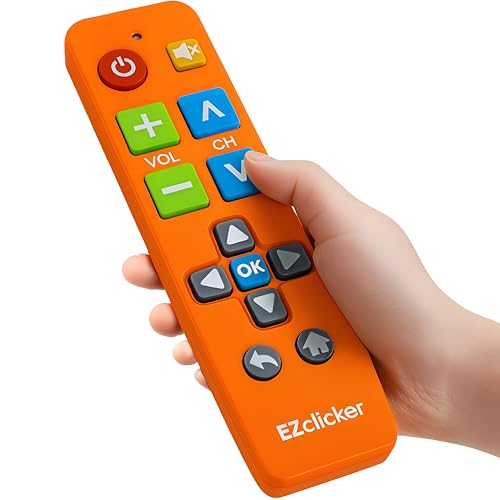
If you’re looking for a remote that simplifies TV control for seniors or those with visual or dexterity challenges, the Big Button Universal TV Remote (Orange) stands out. Its large buttons, including an extra-large enter key, make navigation straightforward, while tactile feedback helps confirm presses. The compact, lightweight design fits comfortably in small hands, perfect for elderly users or those with limited dexterity. It’s compatible with most major TV brands and easy to program—just turn on the TV, press and hold Mute and Volume+ until the volume changes. This remote is a reliable, accessible choice to enhance daily TV viewing for seniors.
Best For: seniors, visually impaired individuals, and those with limited dexterity seeking an easy-to-use TV remote.
Pros:
- Large, tactile buttons with an extra-large enter key for easy navigation
- Compact, lightweight design for comfortable handling
- Compatible with most major TV brands and simple to program
Cons:
- Not compatible with cable boxes, Firestick, or Roku sticks
- Requires 2 AAA batteries (not included) for operation
- Limited to TV control only, lacking features for other devices
QFX REM-115 8 in 1 Universal Remote Control

For seniors who want an easy-to-use remote that consolidates multiple devices, the QFX REM-115 8-in-1 Universal Remote Control is an excellent choice. It controls up to eight devices, including HDTVs, soundbars, Blu-ray players, and cable boxes, replacing several remotes with a single, user-friendly device. The jumbo size and glow-in-the-dark buttons make it easy to see and operate, even in low light. With quick access buttons for popular streaming services like Netflix and YouTube, it simplifies entertainment management. Designed specifically for smart TVs with internet capabilities, it’s a durable, straightforward remote that reduces clutter and enhances your viewing experience.
Best For: seniors and anyone seeking an easy-to-use, all-in-one remote control for smart TVs and multiple entertainment devices.
Pros:
- Simplifies control of up to eight devices with one remote, reducing clutter.
- Jumbo size and glow-in-the-dark buttons enhance visibility and ease of use, especially in low light.
- Quick access shortcut buttons for popular streaming services make entertainment selection fast and convenient.
Cons:
- Compatible only with internet-enabled smart TVs, limiting its use with traditional TVs.
- May require initial setup and pairing, which could be challenging for some users.
- Limited to controlling devices that are compatible with the remote’s features and functions.
Easy Universal Remote for Seniors

The Easy Universal Remote for Seniors stands out with its simple two-device control setup, making it perfect for elderly users who want hassle-free management of their entertainment systems. It allows effortless operation of a TV and set-top box with clearly labeled, large buttons that are easy to see and press. Its minimalistic, dementia-friendly design reduces confusion, while the built-in learning function lets you copy commands from your existing remotes for personalized use. Lightweight and durable, it’s comfortable to hold and built to withstand daily handling. This remote truly enhances independence, making managing your home entertainment straightforward and stress-free for seniors.
Best For: seniors and elderly individuals seeking an easy, straightforward remote control for managing their TV and set-top box without confusion.
Pros:
- Large, clearly labeled buttons with high contrast for easy visibility and operation
- Simple two-device control setup designed for ease of use by seniors
- Built-in learning function for customizing commands from existing remotes
Cons:
- Limited to controlling only two devices, which may not suit users with more electronics
- May lack advanced features found in more complex universal remotes
- Requires initial setup and learning of commands, which could be challenging for some users
Big Button Universal TV Remote Control for Seniors

Designed with seniors in mind, the Big Button Universal TV Remote Control offers an intuitive and straightforward way to manage multiple devices. It works with major brands like Samsung, LG, Sony, and more, and features easy brand switching—just hold the Power button and brand key for 2 seconds. The remote also includes a learning function to copy commands from your original remotes and can control up to 14 buttons for multiple devices. Its large buttons and clear LED indicators make setup simple, reducing confusion. Overall, this remote combines versatility, ease of use, and reliability, making it an excellent choice for seniors seeking a hassle-free remote.
Best For: seniors or individuals seeking an easy-to-use, versatile remote for controlling multiple devices and brands.
Pros:
- Compatible with major TV brands including Samsung, LG, Sony, and more, ensuring broad device support
- Large buttons and clear LED indicators make setup and operation simple and accessible
- Learning function allows copying commands from original remotes, reducing the need for multiple remotes
Cons:
- May require initial code searching or troubleshooting if certain functions do not work immediately
- Limited to controlling up to 14 buttons and devices, which might be insufficient for users with many gadgets
- Some users may find cycling through models for Hisense and Toshiba TVs a bit time-consuming
Easy to Use Big Button Universal TV Remote for Seniors

If you’re looking for a remote that makes controlling your TV straightforward, this easy-to-use big button universal remote is an excellent choice. It’s specially designed for seniors and those with vision difficulties, featuring large, clearly labeled buttons that are simple to press. The remote offers universal compatibility with most major TV brands, and setup is a breeze—no complicated instructions. Its ergonomic, lightweight design fits comfortably in your hand, making it easy to hold and operate for extended periods. Built to last, this remote provides reliable performance, so you can enjoy your favorite shows without frustration or confusion.
Best For: seniors and individuals with vision impairments seeking an easy-to-use, reliable TV remote with large buttons and simple setup.
Pros:
- Large, clearly labeled buttons for easy visibility and operation
- Universal compatibility with most major TV brands
- Ergonomic, lightweight design for comfortable extended use
Cons:
- May lack advanced features found on more complex remotes
- Limited customization options for specific TV models
- Larger size might be less discreet or portable for travel
Big Button TV Remote for Seniors and Elderly
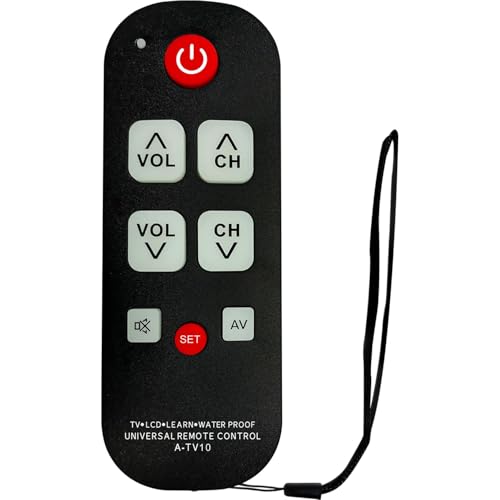
A big button TV remote for seniors and elderly is an excellent choice for those who need a simple, easy-to-use device to control their televisions. Its simplified button layout and large, clearly labeled buttons make it easy to see and operate, especially for users with low vision. Setup is quick and intuitive, requiring no technical skills—just point, learn, and control. It’s compatible with most major TV brands, offering a reliable alternative to complex remotes. Designed specifically for daily use, it reduces errors and frustration, helping seniors stay independent and enjoy their entertainment without hassle or confusion.
Best For: seniors and elderly individuals seeking a simple, reliable remote control with large, clearly labeled buttons for easy TV operation.
Pros:
- Easy to set up and use without technical skills
- Large, clearly labeled buttons enhance visibility and reduce errors
- Compatible with most major TV brands for versatile use
Cons:
- Limited advanced features compared to more complex remotes
- May not be suitable for users who prefer multiple function options
- Design is focused on simplicity, which might omit some customization options
Hisense Replacement TV Remote Control (Black)
The Hisense Replacement TV Remote Control (Black) stands out as an excellent choice for seniors who need a straightforward, easy-to-use remote. It features large, tactile buttons, including an extra-large enter button, making navigation simple for those with visual impairments or limited dexterity. Designed specifically for Hisense TVs, it requires no programming—just insert two AAA batteries, and it’s ready to use. Its compact, lightweight design (just over 3 ounces) makes it comfortable to handle and store. While it doesn’t work with streaming devices or cable boxes, its simplicity and accessibility make it ideal for elderly users, especially those with dementia or visual challenges.
Best For: seniors, individuals with visual impairments, or those with limited dexterity seeking a simple, accessible remote for Hisense TVs.
Pros:
- Large, tactile buttons with an extra-large enter button for easy navigation
- No programming required—just insert batteries and use immediately
- Lightweight and compact design enhances comfort and ease of handling
Cons:
- Not compatible with streaming devices, cable boxes, or other TV platforms
- Batteries are not included, requiring additional purchase
- Customer reviews average only 3.5 stars, indicating mixed satisfaction
Factors to Consider When Choosing Large Button Remote Controls for Seniors

When choosing a large button remote for seniors, I focus on button size and clarity to guarantee easy use. I also consider device compatibility, how simple it is to program, and whether the remote needs a direct line of sight. Finally, I look at battery life to make sure it stays powered without frequent replacements.
Button Size and Clarity
Choosing a remote control with appropriately sized and clearly labeled buttons is essential for seniors, as it directly impacts ease of use and confidence. Larger buttons are easier to locate and press accurately, reducing frustration, especially for those with impaired vision or dexterity. Clear, high-contrast labels make it simple to identify functions quickly, minimizing mistakes. Tactile feedback helps confirm a button press without needing to see the remote, which is valuable for low-vision users. Oversized buttons also decrease the chance of accidental presses, particularly for those with limited fine motor skills. Additionally, well-designed buttons with distinct shapes or textures enhance usability for individuals with cognitive impairments or low vision. Prioritizing size and clarity guarantees a more comfortable and reliable remote experience for seniors.
Device Compatibility Range
Making certain that a large button remote control is compatible with your loved one’s devices can make a significant difference in their daily experience. It’s essential to verify that the remote works with the specific brand and model of their TV or other equipment to ensure proper function. Look for remotes that support multiple device control—such as TVs, soundbars, and cable boxes—to reduce the clutter of multiple remotes. Check if the remote uses infrared (IR) or other compatible technologies based on their setup. Additionally, consider whether the remote can be programmed or learned to operate devices from various manufacturers, providing broader compatibility. A universal remote designed to work across many brands and device types can save time and frustration, making daily entertainment more accessible.
Ease of Programming
Ease of programming is a crucial factor to contemplate because it directly impacts how quickly and effortlessly seniors can set up their remote controls. I look for devices with simple, automatic setup features like one-touch or auto-programming options, which minimize steps and confusion. Clear instructions for manual code entry are also essential, making the process straightforward. Learning functions that can copy commands from existing remotes help simplify programming without complex procedures. Visual indicators such as LED lights or sound cues confirm successful setup or mode changes, providing reassurance. Additionally, remotes with preloaded or easily selectable codes for popular TV brands enable quick, hassle-free setup. Prioritizing these features ensures seniors can enjoy their remote controls with minimal frustration and maximum convenience.
Line of Sight Needs
Many infrared remote controls rely on a clear line of sight to work properly, so it’s important to contemplate this when choosing a remote for seniors. IR remotes need to be pointed directly at the TV sensor, with no obstacles in the way. Furniture, walls, or other electronics can block signals, causing the remote to stop working. This can be frustrating, especially for seniors who prefer simple, reliable devices. If the TV is stored inside cabinets or behind glass, the remote might not work unless the line of sight is clear. To overcome this, some setups use IR extenders or repeaters, which help transmit signals around obstacles. Being aware of line of sight needs ensures you select a remote that fits your setup and minimizes frustration.
Battery Life and Power
When choosing a large button remote for seniors, paying attention to battery life and power features can make a big difference in daily use. Long-lasting batteries reduce the need for frequent replacements, ensuring the remote stays functional when needed most. Remote controls with low power consumption extend battery life, minimizing recharging or battery swaps. Using standard AA or AAA batteries makes replacements straightforward and accessible. Some remotes include power-saving features like automatic shutoff or sleep modes, which help conserve battery during periods of inactivity. Regularly checking battery levels is essential to prevent sudden interruptions, especially for seniors relying on the remote for daily entertainment. Prioritizing these power features guarantees a more reliable, hassle-free experience that keeps the remote ready when needed.
User-Friendly Design Features
Choosing a large button remote for seniors involves prioritizing user-friendly design features that make operation simple and comfortable. Clearly labeled buttons with tactile feedback help improve visibility and ease of use, especially for those with impaired vision. An ergonomic design with a contoured shape reduces strain and makes handling more comfortable, even for limited dexterity. Simplified layouts with fewer buttons decrease confusion, allowing seniors to operate devices independently. High-contrast color schemes on buttons enhance distinguishability for users with low vision or color deficiencies. Additionally, backlit or glow-in-the-dark buttons are essential for low-light conditions, making nighttime operation easier. Focusing on these design features ensures the remote is accessible, intuitive, and comfortable, promoting greater independence and reducing frustration for seniors.
Durability and Material
Durability and the materials used in large button remote controls play a vital role in guaranteeing long-lasting performance for seniors. I look for remotes made from impact-resistant plastics that can handle drops and daily use without cracking or breaking. Rubberized or textured buttons are essential because they prevent slipping and resist wear from frequent pressing, extending the remote’s lifespan. High-quality materials also help the remote resist fading, discoloration, and cracking over time, maintaining its appearance and function. Reinforced internal circuits and sturdy housings ensure reliable operation and protect against internal damage. Additionally, water-resistant or spill-proof designs are a big plus, as they guard against moisture and accidental spills, greatly prolonging the remote’s usability and durability.
Cost and Accessibility
Cost and accessibility are essential factors to contemplate because they directly impact whether seniors can afford and easily find the remote controls they need. Basic models usually range from $10 to $50, making affordability a key consideration for many families. Accessibility features like high contrast, tactile feedback, and simple layouts greatly improve usability for those with vision or motor challenges. Many remote controls are designed to be universally compatible, working with multiple brands and devices, which reduces the need for multiple remotes and simplifies setup. Some models include learning functions or preset configurations that are easy to program, helping users with limited technical skills. Additionally, these remotes are widely available through online retailers and local stores, ensuring seniors and caregivers can easily access suitable options without hassle.
Frequently Asked Questions
Are These Remotes Compatible With All Major TV Brands?
Yes, most of these large button remotes are compatible with all major TV brands, including Samsung, LG, Sony, and Vizio. I always double-check the product specifications to guarantee compatibility, but generally, they work universally thanks to standard infrared or radio frequency signals. If you’re unsure, I recommend looking for remotes labeled “universal” or “compatible with all brands” to make setup easy and hassle-free.
Do They Require Batteries or Power Adapters?
Most large button remotes for seniors require batteries, usually standard AAA or AA, making them easy to substitute. Some models might include rechargeable batteries, but power adapters are uncommon. I recommend checking the specific product details before purchase, but generally, these remotes are battery-powered for convenience. I find that replacing batteries is simple, and it ensures the remote stays functional without needing a power adapter or constant charging.
Can They Control Multiple Devices Simultaneously?
Yes, many large button remote controls can control multiple devices simultaneously, but it depends on the model. I recommend checking if the remote supports universal functions or device swapping features, which make managing multiple gadgets easier. Some remotes even let you switch between devices with a single button press. Always review the product specifications to guarantee it meets your needs for multi-device control—this way, you’ll enjoy seamless entertainment and convenience.
Are They Resistant to Accidental Button Presses?
Yes, they’re quite resistant to accidental presses. I’ve found that many remote controls designed for seniors have sturdy buttons and a thoughtful layout that minimizes mistakes. They often feature tactile feedback and larger buttons, which help prevent unintended presses. Plus, some models include lock functions or specific button guards, giving me peace of mind that I won’t accidentally change channels or turn off devices when I’m not intending to.
How Durable Are These Remote Controls Over Time?
These remote controls are quite durable and hold up well over time. I’ve found that their sturdy build and quality materials help them withstand daily use, accidental drops, and general wear and tear. They’re designed with seniors in mind, so I feel confident recommending them for long-term use. With proper care, they remain reliable and functional, making them a great investment for anyone needing a dependable, easy-to-use remote.
Conclusion
Choosing the right large button remote is like finding a trusty compass in a busy maze—simple, reliable, and always guiding you smoothly. With these easy-to-use remotes, you’ll feel like you’re holding the keys to a world of entertainment, effortlessly steering your favorite shows. So, pick the one that fits your hand and lifestyle, and let it be your loyal companion on your TV adventures—making every click a moment of joy.