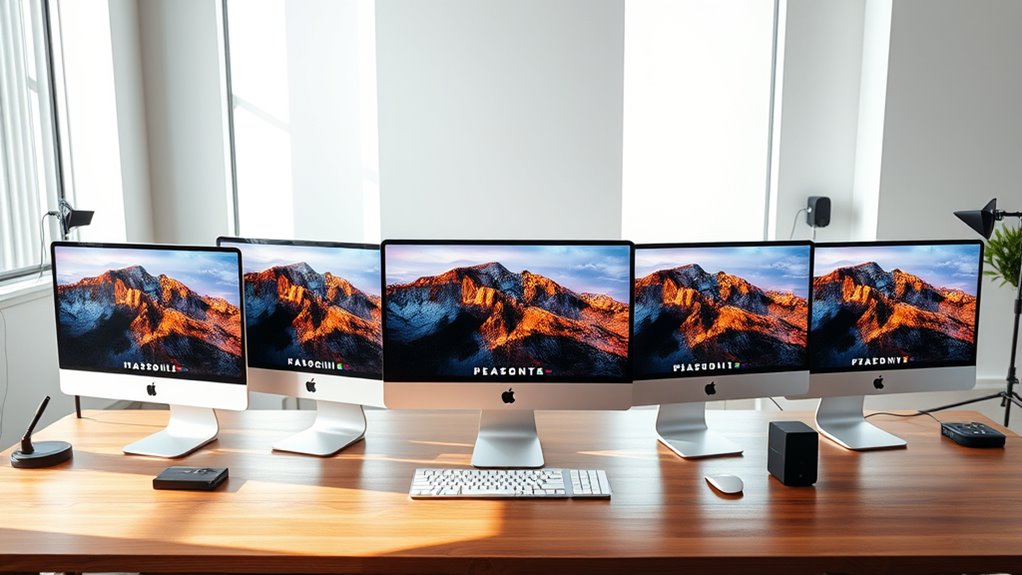

For most photographers choosing an iMac for photo editing, I’d start with the 2024 24-inch M4 iMac with 24GB of memory and a 512GB SSD: it offers the strongest listed configuration for demanding editing and multitasking. The 16GB, 512GB silver model is a more balanced alternative if you want extra built-in storage without stepping up to 24GB memory, while the 16GB, 256GB models suit lighter workflows. The main tradeoff is between memory for running editing apps smoothly and storage for keeping files close at hand; the 24-inch display size is shared across the iMacs here. I also include a USB-C hub for photographers who need more ports or a convenient way to connect external storage. Read on for how each option fits different editing needs and where the compromises lie.

Get your wardrobe favorites delivered free with Prime
- Fast, free delivery on millions of items
- Prime Video, Amazon Music and more included
- Member-only deals all year
Key Takeaways
- 24GB memory sets the first model apart: Among these iMacs, the 24GB RAM and 512GB SSD configuration gives the most headroom for large projects and multitasking.
- 512GB storage is the practical middle ground: Two silver iMac options have 512GB SSDs, reducing pressure to manage active files on external drives compared with the 256GB versions.
- The four 16GB, 256GB iMacs share the same core configuration: Blue, green, and silver finishes distinguish several options, but color does not change their listed memory or storage.
- The 16GB, 512GB silver model favors local space over extra memory: It can suit photographers who keep current work on the computer, while the 24GB model better fits heavier multitasking.
- The USB-C hub is an accessory, not a computer alternative: It adds connectivity and M.2 SSD support, but does not increase the iMac’s built-in memory or replace its internal storage.
| Apple 2024 iMac 24-inch All-in-One Desktop, M4 10-Core CPU and GPU, 24GB Memory, 512GB SSD, Silver |  | Best Overall for Photo Editing | Processor: Apple M4, 10-core CPU | Graphics: 10-core GPU | Display: 24-inch 4.5K Retina, 500 nits, up to 1 billion colors | VIEW ON AMAZON | See Our Full Breakdown |
| Apple 2024 iMac All-in-One Desktop Computer (M4 Chip, 24-inch Retina Display, 16GB RAM, 512GB SSD, Silver) |  | Best for a Larger Built-In Photo Library | Model year: 2024 | Processor: Apple M4, 10-core CPU | Graphics: 10-core GPU | VIEW ON AMAZON | See Our Full Breakdown |
| Apple 2024 iMac 24-inch All-in-One Desktop with M4, 10-Core CPU and GPU, 16GB Memory, 256GB SSD, Green | 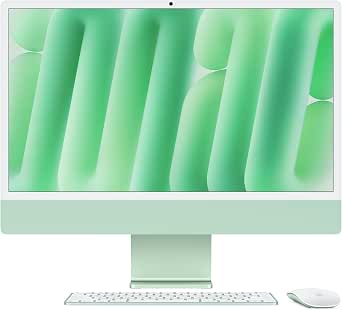 | Best for Faster Graphics on a Compact Budget | Processor: Apple M4, 10-core CPU | Graphics: 10-core GPU | Display: 24-inch 4.5K Retina, 500 nits, up to 1 billion colors | VIEW ON AMAZON | See Our Full Breakdown |
| Apple 2024 iMac All-in-One Desktop with M4 Chip, 24-inch Retina Display, 16GB Memory, 256GB SSD, Silver |  | Best for Everyday Photo Editing | Processor: Apple M4, 8-core CPU | Graphics: 8-core GPU | Display: 24-inch 4.5K Retina, 500 nits, up to 1 billion colors | VIEW ON AMAZON | See Our Full Breakdown |
| Apple 2024 iMac All-in-One Desktop Computer with M4 Chip, 24-inch Retina Display, 16GB RAM, 256GB SSD, Blue |  | Best Colorful Home-Desk Pick | Processor: Apple M4, 8-core CPU | Graphics: 8-core GPU | Display: 24-inch 4.5K Retina, 500 nits, up to 1 billion colors | VIEW ON AMAZON | See Our Full Breakdown |
| 11-in-1 USB C Hub for iMac 24 inch (2021-2024) with 4K HDMI, Ethernet, M.2 SSD Support, and Multiple Ports – Silver |  | Best Connectivity Upgrade for Photographers | Compatibility: 24-inch iMac (2021–2024) | HDMI output: 4K at 60Hz | Ethernet: 2.5G | VIEW ON AMAZON | See Our Full Breakdown |
| imac for photographer | Processor | Graphics | Display | Memory |
|---|---|---|---|---|
| Apple 2024 iMac 24-inch All-in | Apple M4, 10-core CPU | 10-core GPU | 24-inch 4.5K Retina, 500 nits, up to 1 billion colors | 24GB unified memory |
| Apple 2024 iMac All-in-One Des | Apple M4, 10-core CPU | 10-core GPU | 24-inch 4.5K Retina, 500 nits | 16GB unified memory |
| Apple 2024 iMac 24-inch All-in | Apple M4, 10-core CPU | 10-core GPU | 24-inch 4.5K Retina, 500 nits, up to 1 billion colors | 16GB unified memory |
| Apple 2024 iMac All-in-One Des | Apple M4, 8-core CPU | 8-core GPU | 24-inch 4.5K Retina, 500 nits, up to 1 billion colors | 16GB unified memory |
| Apple 2024 iMac All-in-One Des | Apple M4, 8-core CPU | 8-core GPU | 24-inch 4.5K Retina, 500 nits, up to 1 billion colors | 16GB unified memory |
| 11-in-1 USB C Hub for iMac 24 | — | — | — | — |
More Details on Our Top Picks
Apple 2024 iMac 24-inch All-in-One Desktop, M4 10-Core CPU and GPU, 24GB Memory, 512GB SSD, Silver
I’d rank this as the strongest all-round choice here for photographers who want a compact Mac desktop with room for larger editing sessions. Its 24GB of unified memory gives it more headroom than the 16GB configurations when working with layered files or several creative apps at once, while the 512GB SSD is less restrictive than the 256GB drives in the Silver and Blue 16GB models. The bright 4.5K Retina display supports up to one billion colors, making detailed image review comfortable on a desk where a separate monitor may not fit.
The tradeoff is the 24-inch screen: photographers who want more workspace may prefer an external display, and the all-in-one design leaves little scope for later hardware changes. Compared with the 16GB, 512GB Silver model, this one prioritizes memory capacity over nothing on the listed storage front, but its specs should be checked carefully before choosing between closely matched configurations.
Pros:- 24GB unified memory offers more breathing room for layered edits and multitasking than the 16GB options.
- 512GB SSD provides more working space than the 256GB configurations.
- 4.5K Retina display supports up to one billion colors and reaches 500 nits.
- Built-in 12MP camera, microphones, and Spatial Audio speakers reduce desk clutter.
Cons:- The 24-inch screen can feel cramped beside larger photo-editing monitors.
- Unified memory and internal storage are not presented as user-upgradeable.
- A 512GB internal drive can still fill quickly with RAW files and catalogs.
Best for: Photographers who edit sizable image libraries, keep several applications open, and want a capable all-in-one without adding a separate display.
Not ideal for: Photographers who need a large, color-critical workstation display or plan to expand internal memory and storage later.
- Processor:Apple M4, 10-core CPU
- Graphics:10-core GPU
- Display:24-inch 4.5K Retina, 500 nits, up to 1 billion colors
- Memory:24GB unified memory
- Storage:512GB SSD
- Camera:12MP Center Stage
- Connectivity:Up to four Thunderbolt 4 ports, Wi-Fi 6E, Bluetooth 5.3
- Weight:9.77 pounds
Our verdict“Choose this configuration for the roundup’s strongest blend of memory, storage, and a sharp built-in display in one desktop.”
Apple 2024 iMac All-in-One Desktop Computer (M4 Chip, 24-inch Retina Display, 16GB RAM, 512GB SSD, Silver)
This Silver configuration suits photographers who want more internal room for current projects but do not need the extra memory in the 24GB model. Its 512GB SSD doubles the capacity of the 256GB Silver and Blue iMacs, which can mean fewer immediate compromises when storing applications, catalogs, and active image files. The 10-core CPU and 10-core GPU also match the higher-core setup listed for the 24GB Silver, while the 4.5K display keeps the all-in-one workstation tidy.
The main compromise is 16GB of unified memory: photographers working with complex composites or large batches may benefit more from the 24GB option. It also remains a 24-inch screen, so it offers less canvas than a larger external monitor. Compared with the 8-core Blue model, this has stronger listed CPU and GPU counts and twice the SSD capacity, though the compact format still favors convenience over expansion.
Pros:- 512GB SSD offers more internal workspace than the 256GB models.
- Listed 10-core CPU and 10-core GPU suit demanding everyday creative work.
- 4.5K Retina display provides a detailed, bright workspace.
- Built-in camera, microphones, and six-speaker Spatial Audio system keep the setup self-contained.
Cons:- 16GB unified memory provides less headroom than the 24GB Silver configuration.
- The 24-inch display gives less room for image and editing-panel layouts than a larger monitor.
- Internal hardware expansion is limited by the all-in-one design.
Best for: Photographers who want a 512GB internal drive for active projects and a 10-core M4 configuration, while keeping memory needs moderate.
Not ideal for: Editors who routinely handle demanding layered composites, need more than 16GB memory, or want a display larger than 24 inches.
- Model year:2024
- Processor:Apple M4, 10-core CPU
- Graphics:10-core GPU
- Display:24-inch 4.5K Retina, 500 nits
- Memory:16GB unified memory
- Storage:512GB SSD
- Camera:12MP Center Stage
- Connectivity:Up to four Thunderbolt 4 ports, Wi-Fi 6E, Bluetooth 5.3.6
Our verdict“Pick this Silver iMac if internal storage matters more to your workflow than the 24GB model’s extra memory.”
Apple 2024 iMac 24-inch All-in-One Desktop with M4, 10-Core CPU and GPU, 16GB Memory, 256GB SSD, Green
This Green model is the more performance-focused pick among the 256GB configurations: its listed 10-core CPU and 10-core GPU distinguish it from the 8-core Silver and Blue models. For photographers who want a responsive M4 desktop for routine editing and image organization, that higher-core configuration is appealing without moving to the 24GB memory tier. The shared 4.5K Retina display offers the same 500-nit brightness and support for up to one billion colors found across the lineup.
Storage is the clear limitation. A 256GB SSD leaves less room for photo libraries than either 512GB Silver iMac, so an external drive or careful file management is likely to be part of the setup. Its 16GB memory also trails the 24GB Silver for heavier multitasking. Compared with the 8-core Blue iMac, this model emphasizes CPU and GPU counts rather than color choice alone, but it does not solve the small-drive constraint.
Pros:- 10-core CPU and 10-core GPU distinguish it from the 8-core Silver and Blue configurations.
- 4.5K Retina display has 500-nit brightness and supports up to one billion colors.
- Built-in 12MP camera and Spatial Audio speakers help keep the desk setup simple.
- Supports up to two external 6K displays for added workspace.
Cons:- 256GB SSD is restrictive for photographers keeping RAW files and catalogs locally.
- 16GB unified memory offers less headroom than the 24GB configuration.
- The all-in-one design limits future hardware changes.
Best for: Photographers who favor the listed 10-core CPU and GPU for editing responsiveness and are comfortable keeping image libraries on external storage.
Not ideal for: Photographers who want a large local photo archive, need 24GB memory, or prefer a larger working display.
- Processor:Apple M4, 10-core CPU
- Graphics:10-core GPU
- Display:24-inch 4.5K Retina, 500 nits, up to 1 billion colors
- Memory:16GB unified memory
- Storage:256GB SSD
- Camera:12MP Center Stage
- Connectivity:Up to four Thunderbolt 4 ports, Wi-Fi 6E, Bluetooth 5.3
- Color:Green
Our verdict“Choose the Green model for its 10-core configuration if you can work around the small SSD with external storage.”
Apple 2024 iMac All-in-One Desktop with M4 Chip, 24-inch Retina Display, 16GB Memory, 256GB SSD, Silver
This Silver iMac is the straightforward choice for photographers whose editing needs are moderate and who value a clean, ready-to-use desktop. Its 24-inch 4.5K Retina display has the same 500-nit brightness and broad color support as the more capable models, so choosing this configuration does not mean giving up the lineup’s main visual advantage. The 8-core M4 CPU and GPU make it a sensible fit for sorting, organizing, and routine edits, while the built-in camera and six speakers make it useful beyond photo work.
Its limitations show up as a library grows: 16GB memory and a 256GB SSD leave less room for demanding multitasking and local files than the 24GB/512GB Silver model. The Green iMac offers a listed 10-core CPU and GPU at the same memory and storage capacities, so this Silver version makes more sense for buyers who prioritize the basic configuration and established all-in-one format over extra listed cores.
Pros:- 4.5K Retina display offers high detail, 500-nit brightness, and support for up to one billion colors.
- M4 chip is suited to everyday editing and photo organization.
- 12MP Center Stage camera and Spatial Audio speakers are built in.
- Supports up to two external 6K displays.
Cons:- 256GB SSD can fill quickly with applications, catalogs, and active photo projects.
- 16GB memory is less suited to heavy multitasking than the 24GB model.
- Listed 8-core CPU and GPU counts are lower than the Green and 512GB Silver configurations.
Best for: New or occasional photographers who edit modest collections, want a sharp built-in display, and keep archives on external or cloud storage.
Not ideal for: Photographers who work with large RAW libraries, layered files, or several creative applications at once.
- Processor:Apple M4, 8-core CPU
- Graphics:8-core GPU
- Display:24-inch 4.5K Retina, 500 nits, up to 1 billion colors
- Memory:16GB unified memory
- Storage:256GB SSD
- Camera:12MP Center Stage
- Audio:Three microphones and six speakers with Spatial Audio
- Connectivity:Up to four Thunderbolt 4 ports, Wi-Fi 6E, Bluetooth 5.3
Our verdict“This is a sensible entry into the iMac lineup for routine editing, provided you plan to store most photos outside its 256GB drive.”
Apple 2024 iMac All-in-One Desktop Computer with M4 Chip, 24-inch Retina Display, 16GB RAM, 256GB SSD, Blue
The Blue iMac is best viewed as a style-led take on the more basic 8-core configuration, not as a step up for demanding photo work. Its 24-inch 4.5K Retina display shares the lineup’s 500-nit brightness and support for one billion colors, while the M4 chip with an 8-core CPU and GPU is suited to everyday edits and organizing smaller libraries. The blue finish gives buyers a distinctive alternative to the Silver models without changing the core desktop format.
For photographers comparing configurations, the Green iMac lists a 10-core CPU and GPU, and the 24GB Silver offers more memory; both are better aligned with heavier editing demands. The Blue model’s 256GB SSD also matches the smallest capacity in this group, making external storage a practical companion for expanding collections. Its appeal is strongest when color and a tidy all-in-one setup matter more than extra processing headroom or internal space.
Pros:- 4.5K Retina display provides a detailed workspace with 500-nit brightness.
- M4 chip suits routine photo tasks and general desktop use.
- Blue finish offers a distinct alternative to the Silver and Green configurations.
- Supports up to four Thunderbolt 4 ports and two external 6K displays.
Cons:- 256GB SSD provides limited room for a growing photo library.
- 16GB memory and listed 8-core CPU and GPU trail the higher-capacity or higher-core alternatives.
- Product data does not list the camera or audio details provided for some other models.
Best for: Photographers setting up a home desk who want a blue all-in-one for everyday editing and already use external or cloud storage.
Not ideal for: Photographers prioritizing maximum editing headroom, larger local libraries, or a larger display over the blue finish.
- Processor:Apple M4, 8-core CPU
- Graphics:8-core GPU
- Display:24-inch 4.5K Retina, 500 nits, up to 1 billion colors
- Memory:16GB unified memory
- Storage:256GB SSD
- Color:Blue
- Connectivity:Up to four Thunderbolt 4 ports, Wi-Fi 6E, Bluetooth 5.3
- External displays:Supports two external 6K displays
Our verdict“Choose the Blue iMac when its color and compact setup appeal more than the extra memory or processing headroom of other configurations.”
11-in-1 USB C Hub for iMac 24 inch (2021-2024) with 4K HDMI, Ethernet, M.2 SSD Support, and Multiple Ports – Silver
For photographers choosing an iMac, this hub helps address a practical limitation of the 24-inch M4 iMac lineup: connecting card readers, drives, wired networks, and an additional display without relying on separate adapters. Its SD and TF readers simplify image imports, while the M.2 slot adds up to 4TB of storage for photo libraries or active projects. Compared with choosing an iMac configuration with more built-in storage, this accessory offers expandable capacity, though the SSD must be installed separately and cannot have a heatsink. The 2.5G Ethernet and range of USB ports also suit photographers moving files to network storage or multiple peripherals. The tradeoff is narrow compatibility: it is made for 24-inch iMac models from 2021 onward, and external display extension requires a Thunderbolt port.
Pros:- Built-in SD and TF card readers make camera-file imports more direct.
- M.2 slot supports up to 4TB of NVMe PCIe or SATA storage.
- Includes 2.5G Ethernet, HDMI, and several USB-A and USB-C connections.
- Plug-and-play setup requires no drivers.
Cons:- Only fits 24-inch iMac models from 2021 to 2024.
- M.2 slot does not support SSDs with heatsinks.
- Extended external display use requires connection to a Thunderbolt port.
Best for: Photographers with a 2021–2024 24-inch iMac who regularly import SD or TF cards and want added ports plus expandable project storage.
Not ideal for: Owners of other Mac models, photographers who need an SSD with a heatsink, or buyers seeking a simple hub without M.2 storage and display features.
- Compatibility:24-inch iMac (2021–2024)
- HDMI output:4K at 60Hz
- Ethernet:2.5G
- USB ports:2 × USB-A 3.2 Gen 2, 2 × USB-A 2.0, 1 × USB-C 3.2 Gen 2
- Card readers:SD and TF
- M.2 SSD support:Up to 4TB; NVMe PCIe or SATA; no heatsink
- Audio and charging:3.5mm audio jack; 7.5W via USB-C 2.0
- Material and design:Aluminium alloy; slim, compact design
Our verdict“Choose this hub if your compatible 24-inch iMac needs convenient card imports and expandable storage, but skip it if you need broader Mac compatibility or a heatsink-equipped SSD.”

How We Picked
I ranked these options around the needs that most affect a photography workstation: memory for editing and multitasking, built-in SSD capacity for active libraries, and how easily the setup can connect to external drives and other gear. Since the listed iMacs share a 24-inch Retina display and M4 chip, I gave more weight to meaningful configuration differences than to finish color. I also treated the USB-C hub as a separate workflow accessory, judging it by the ports and storage connections it adds rather than comparing it as though it were a computer.
The 24GB/512GB iMac ranks first because it has the most memory and substantial built-in storage among the computers listed. The 16GB/512GB model follows for buyers who prioritize local workspace over added memory. The 16GB/256GB options are grouped as lighter-workload or finish-led choices, since their listed core specs are alike. The hub ranks as a specific-use add-on: it can improve connectivity, but it cannot compensate for a computer configuration that is short on memory.
| imac for photographer | Processor | Connectivity |
|---|---|---|
| Apple 2024 iMac 24-inch All-in | Apple M4, 10-core CPU | Up to four Thunderbolt 4 ports, Wi-Fi 6E, Bluetooth 5.3 |
| Apple 2024 iMac All-in-One Des | Apple M4, 10-core CPU | Up to four Thunderbolt 4 ports, Wi-Fi 6E, Bluetooth 5.3.6 |
| Apple 2024 iMac 24-inch All-in | Apple M4, 10-core CPU | Up to four Thunderbolt 4 ports, Wi-Fi 6E, Bluetooth 5.3 |
| Apple 2024 iMac All-in-One Des | Apple M4, 8-core CPU | Up to four Thunderbolt 4 ports, Wi-Fi 6E, Bluetooth 5.3 |
| Apple 2024 iMac All-in-One Des | Apple M4, 8-core CPU | Up to four Thunderbolt 4 ports, Wi-Fi 6E, Bluetooth 5.3 |
| 11-in-1 USB C Hub for iMac 24 | — | — |
Factors to Consider When Choosing Imac For Photographers
Choosing an iMac for photography is less about color or a long spec sheet than about matching the computer to your editing habits. I’d make the decision by looking at how large your files are, how many apps you keep open, and where you plan to store your photo library.
Match Memory to Your Editing Habits
Memory affects how comfortably an editing setup handles several tasks at once, such as working in a photo editor while browsing, exporting, or keeping a large catalog open. The 24GB configuration provides more headroom than the 16GB options in this roundup, which makes it the safer fit for heavier multitasking. If your edits are modest and you usually work in one main app at a time, 16GB may be a reasonable match. A common mistake is focusing only on the processor and overlooking memory, even though both shape the day-to-day feel of a workflow. Since the memory configuration is not something to treat like an external drive you can swap in later, choose based on the work you expect to do during the computer’s useful life. Pay for the extra capacity when large projects or layered editing are routine, not just an occasional possibility.
Plan Storage Around Your Active Library
A 256GB SSD can fill quickly when the computer holds applications, previews, exports, and a working set of image files. The 512GB models give more room for active work, though neither capacity removes the need for a broader backup and archive plan. Photographers who keep older shoots on external drives may find 256GB workable, provided they stay disciplined about moving completed projects. Those who prefer having several current jobs available locally may value the larger SSD more. Avoid treating storage capacity as a substitute for backup: an internal drive is still one place where files can be lost. Decide how much convenience matters compared with the cost and management of external storage before choosing between 256GB and 512GB.
Treat the Display as Part of a Color Workflow
All the iMac computers listed have a 24-inch Retina display, so the comparison here does not offer a larger built-in screen option. A shared display size makes the choice simpler, but photographers should still think about how their work will be viewed and delivered. If accurate color matters for print or client work, plan a color-managed workflow rather than assuming any screen will always match a finished print. Ambient light, screen brightness, and the viewing conditions of clients can affect how images appear. A separate calibrated display may be useful for some workflows, but it adds desk space and another device to manage. Consider whether the integrated screen’s size fits your editing layout before spending more on memory or storage.
Choose a Storage Strategy Before Buying
Photo libraries often outgrow the computer that first holds them, so it helps to decide in advance which files stay on the iMac and which move to external storage. Keeping current projects on the internal SSD can make everyday access straightforward, while an external drive can hold archives and backups. The USB-C hub adds M.2 SSD support and other connections, but a hub is only useful if its ports suit the drives and peripherals you actually own. Check the drive enclosure and connection requirements instead of assuming every accessory will perform the same way through any port. Keep at least one separate backup copy of irreplaceable originals, ideally stored apart from the working drive. This planning prevents a larger internal SSD from becoming a reason to postpone a proper backup routine.
Count Ports and Accessories in Your Whole Setup
Photographers may connect card readers, external drives, wired networking, and other accessories, so port access can shape the desk setup as much as computer performance. The listed 11-in-1 hub adds multiple ports and Ethernet, which may reduce the need to swap connections during a session. It also takes up space and adds another accessory and cable to manage. Before choosing one, list the devices you connect at the same time and confirm that the hub’s ports match them. A hub cannot add memory, improve the built-in display, or make a 256GB SSD larger. Buy one for a clear connectivity need, not as a substitute for choosing the right iMac configuration.
Frequently Asked Questions
Is 16GB of memory enough for editing photos on these iMacs?
16GB can suit lighter photo workflows, especially if you generally edit in one main application and keep active projects modest. The 24GB model is the stronger choice for larger jobs or frequent multitasking because it gives more memory headroom. How much you need depends on the size of your files, editing software, and other apps running at the same time. If you are choosing between 16GB/512GB and 24GB/512GB, prioritize memory when responsiveness under heavier workloads matters more than extra storage. If your work is simple and your files are well managed, the 16GB options may be sufficient.
Should I choose 512GB storage or 24GB memory?
These options address different bottlenecks, so I’d choose according to your workflow rather than treating one as universally better. The 24GB/512GB iMac has both listed, making it the most capable configuration in this group. If comparing a 16GB/512GB model with a 16GB/256GB model, the larger SSD helps keep more active work local. If you are weighing memory against storage on a broader configuration, prioritize memory for demanding multitasking and use external drives for archives when that suits your routine. Make a rough estimate of the space your applications and current projects need, then decide whether internal capacity or working headroom is the more pressing gap.
Can a USB-C hub make a 256GB iMac a better choice for photo storage?
A hub can make external storage easier to connect, and this 11-in-1 option lists M.2 SSD support among its features. That can help build a workflow where the iMac’s internal SSD holds apps and active files while an external drive stores other projects. The hub does not increase the iMac’s built-in capacity, however, and it does not replace a backup drive or backup plan. Check that the external SSD, enclosure, and cable work with the hub and your intended setup before relying on them. Choose the 256GB iMac only if you are comfortable managing files across internal and external storage.
Do the blue, green, and silver 16GB/256GB iMacs differ for photo editing?
Based on the listed configurations, the blue, green, and silver models all have an M4 chip, 16GB memory, and a 256GB SSD. The color choice does not change those stated editing-related specifications. I would pick among them based on the finish you prefer and any details beyond the listed specs that matter to your setup. If you need more local storage, compare them with the 16GB/512GB silver model instead of treating a color variation as a performance upgrade. For more memory, the 24GB/512GB iMac is the meaningful step up in this lineup.
Is the 24-inch display enough for serious photography work?
The iMacs in this roundup all use a 24-inch Retina display, so none provides a larger built-in screen. Whether that size suits you depends on how you arrange editing tools, reference images, and previews, as well as how much desk space you have. For print-focused work, screen size alone does not establish color accuracy; a consistent color-managed workflow matters too. If you regularly need more room for panels or side-by-side comparisons, consider how an additional display would fit your setup before buying. Buyers who prefer one integrated computer and screen may find the shared size a useful simplification.
Conclusion
My best overall pick is the 2024 24-inch M4 iMac with 24GB memory and a 512GB SSD, since it offers the strongest listed combination for photographers who multitask or handle larger projects. For best value, I’d choose the 16GB/512GB silver iMac when more local storage matters more than extra memory. The 16GB/256GB models are my best for beginners if the workflow is light and external storage is part of the plan; their listed core specs match, so choose the finish you prefer. The 24GB/512GB model is also the best premium configuration in this group for buyers seeking more working headroom without moving beyond the listed options. For specific connectivity needs, choose the 11-in-1 USB-C hub alongside a compatible iMac when you need its ports, Ethernet, or M.2 SSD support. Match memory to editing intensity, storage to library habits, and accessories to devices you actually use.
Halloween Picks

Spirit Halloween 54-Inch Sitting Scarecrow Animatronic

6-Foot Jason Voorhees Animatronic Halloween Decoration

Kalolary 11 ft Halloween Inflatable Archway Ghost House Tunnel
As an affiliate, we earn on qualifying purchases.