
For the best computers, tablets & components in 2026, I would put the Apple iPad 11-inch with A16 Chip first because it gives the clearest mix of speed, software longevity, and tablet polish. The Samsung Galaxy Tab A11+ stands out as the value pick for Android buyers, while the Fusion5 Helios 12 makes more sense if you want a larger Windows tablet with a 2K display. The main tradeoff is whether you need iPadOS stability, Android flexibility, or Windows app support. Renewed models like the Surface Go 2 and iPad 7th Generation can save money, but they ask you to accept older chips, tighter storage, or accessory costs. Keep reading for my full breakdown of where each pick wins, where it gives ground, and who should skip it.

Get your wardrobe favorites delivered free with Prime
- Fast, free delivery on millions of items
- Prime Video, Amazon Music and more included
- Member-only deals all year
Key Takeaways
- I ranked the Apple iPad 11-inch with A16 Chip as Best Overall because it has the strongest balance of current performance, app depth, and update runway; the drawback is that accessories can push the price up fast.
- The Samsung Galaxy Tab A11+ became my Best Value pick because it offers modern Android basics and 128GB storage without the older-hardware risk attached to renewed iPads and Surface models.
- The Windows choices split into clear roles: Fusion5 Helios 12 has the most polished big-screen Windows role, while Fusion5 WIN PRO Rugged makes more sense for field use than casual couch browsing.
- The QAZIPO 2-in-1 and Surface Go 2 are better for buyers who need laptop-style workflows, but neither should be confused with a full-power ultrabook.
- Spec-heavy budget options such as URAO X109 and the 10.1-inch Windows 11 Tablet are price-led picks; I would choose them only when basic browsing, streaming, and light documents matter more than long support.
| URAO X109 10.1-inch Android 16 Tablet |  | Best Budget Android Tablet | Display: 10.1-inch HD IPS | Resolution: 1280 x 800 | Processor: 2GHz octa-core Allwinner | VIEW LATEST PRICE | See Our Full Breakdown |
| Microsoft Surface Go 2 10.5-inch Touch-Screen Laptop |  | Best Compact Windows Pick | Display: 10.5-inch PixelSense touchscreen | Resolution: 1920 x 1280, 216 ppi | Processor: Intel Core m3 up to 3.4GHz | VIEW LATEST PRICE | See Our Full Breakdown |
| Fusion5 WIN PRO Rugged Windows 11 Tablet |  | Best Rugged Work Tablet | Display: 10.1-inch Full HD IPS touchscreen | Brightness: 500 nits | Processor: Intel 13th Gen Alder Lake N100 | VIEW LATEST PRICE | See Our Full Breakdown |
| Apple iPad 7th Generation 10.2-inch Wi-Fi 32GB |  | Best Entry iPad | Display: 10.2-inch | Processor: Apple A10 Fusion | Storage: 32GB | VIEW LATEST PRICE | See Our Full Breakdown |
| Samsung Galaxy Tab A11+ 6GB RAM 128GB Storage |  | Best Everyday Android Tablet | Display: 11-inch | Refresh Rate: Up to 90Hz | RAM: 6GB | VIEW LATEST PRICE | See Our Full Breakdown |
| QAZIPO 2-in-1 Laptop Tablet with Magnetic Keyboard |  | Best Detachable Windows 2-in-1 | Screen Size: 12 inches | Resolution: 2K FHD IPS, 100% sRGB | Processor: Intel Pentium Gold 6500Y, up to 3.4GHz | VIEW LATEST PRICE | See Our Full Breakdown |
| Fusion5 Helios 12 Windows 11 Tablet | 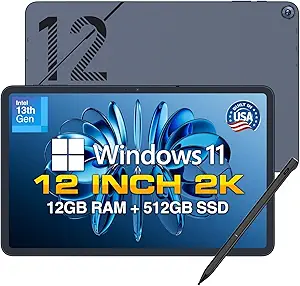 | Best Performance Windows Tablet | Display Size: 12 inches | Resolution: 2000 x 1200 IPS | Processor: Intel 13th Gen CPU | VIEW LATEST PRICE | See Our Full Breakdown |
| 10.1-inch Windows 11 Tablet with 6GB RAM and 128GB Storage |  | Best Budget Windows Tablet | Display Size: 10.1 inches | Operating System: Windows 11 Home | Processor: Intel processor | VIEW LATEST PRICE | See Our Full Breakdown |
| Apple iPad 11-inch with A16 Chip |  | Best iPad for Everyday Creators | Display Size: 11 inches | Display Type: Liquid Retina with True Tone | Processor: Apple A16 chip | VIEW LATEST PRICE | See Our Full Breakdown |
More Details on Our Top Picks
URAO X109 10.1-inch Android 16 Tablet
URAO X109 earns its spot as my budget Android pick because it puts money into the things casual buyers notice: 128GB storage, expandable capacity, Wi-Fi 6, and a low-blue-light IPS screen. Compared with the Samsung Galaxy Tab A11+, it has a smaller, lower-resolution-feeling 10.1-inch HD display and less polished software support, but it costs less for a similar everyday role. I would treat the advertised 30GB RAM carefully, since it combines physical and virtual memory; the real performance story is closer to a basic Android tablet with useful headroom. It makes sense for streaming, school portals, recipes, and light browsing, while buyers who want long update support or sharper media quality should move up to Samsung or Apple.
Pros:- 128GB built-in storage with expansion up to 1TB
- Wi-Fi 6 and Bluetooth 5.4 are strong for the price class
- Low-blue-light IPS display is suited to reading and casual use
- Fast 1.5-hour charging helps offset average battery life
Cons:- Advertised 30GB RAM includes virtual memory, which can mislead performance expectations
- 1280×800 resolution is modest next to the Surface Go 2 and Galaxy Tab A11+
- No built-in GPS limits map and field-use scenarios
Best for: Budget-focused households that want an Android tablet for streaming, web browsing, school apps, and expandable local storage.
Not ideal for: Travelers who rely on built-in GPS or buyers expecting laptop-like multitasking from the advertised 30GB RAM figure.
- Display:10.1-inch HD IPS
- Resolution:1280 x 800
- Processor:2GHz octa-core Allwinner
- Memory:30GB listed, 6GB physical plus 24GB virtual
- Storage:128GB, expandable up to 1TB via TF card
- Cameras:5MP front, 8MP rear
- Wireless:Wi-Fi 6, Bluetooth 5.4
- Battery:Up to 8 hours mixed use, 1.5-hour fast charge
Bottom line: Buy the URAO X109 if low price and expandable storage matter more than display sharpness or premium software polish.
Microsoft Surface Go 2 10.5-inch Touch-Screen Laptop
The Microsoft Surface Go 2 is the small Windows option I would rank highest for buyers who need real desktop apps in a travel-friendly size. Compared with the URAO X109 and Apple iPad 7th Generation, it is less about couch browsing and more about document editing, browser-based work, and light admin tasks in Windows 11 Pro. The 1920 x 1280 PixelSense display is sharper than the URAO screen, and the 1.15-pound body is easier to carry than the rugged Fusion5 WIN PRO. The catch is value creep: the Type Cover is sold separately, 128GB SSD storage fills quickly, and renewed status will not suit every buyer. It is portable and practical, but not the best choice for heavy multitasking.
Pros:- Runs Windows 11 Pro for desktop software compatibility
- Sharp 10.5-inch PixelSense touchscreen
- Very light 1.15-pound design for commuting
- USB-C and MicroSDXC add useful flexibility
Cons:- Type Cover is sold separately, raising the real setup cost
- 128GB SSD is limited for Windows apps and offline files
- Renewed condition may not appeal to buyers who want a new device
Best for: Students, consultants, and mobile workers who need a tiny Windows machine for Office, browser tools, and light productivity.
Not ideal for: Buyers who need a full laptop replacement out of the box, since the keyboard cover and accessories cost extra.
- Display:10.5-inch PixelSense touchscreen
- Resolution:1920 x 1280, 216 ppi
- Processor:Intel Core m3 up to 3.4GHz
- RAM:8GB
- Storage:128GB SSD
- Operating System:Windows 11 Professional
- Weight:Starting at 1.15 lbs
- Battery Life:Up to 9 hours
- Ports:USB-C, headphone jack, Surface Connect, MicroSDXC reader
Bottom line: Choose the Surface Go 2 when compact Windows access matters more than raw speed or included accessories.
Fusion5 WIN PRO Rugged Windows 11 Tablet
The Fusion5 WIN PRO takes a very different path from the Surface Go 2: it trades slim elegance for job-site durability, more storage, and a warranty that includes accidental damage. For field teams, warehouse checklists, vehicle diagnostics, or outdoor Windows workflows, its Intel N100 processor, 12GB RAM, and 512GB SSD give it more practical work capacity than the Surface Go 2 or the basic 10.1-inch Windows tablet in the wider lineup. The 500-nit Full HD screen also makes more sense outdoors than the URAO X109’s lower-resolution panel. My hesitation is portability: rugged tablets are bulkier, and the price only makes sense if the protective build is part of the job. For sofa use or school notes, it is more machine than most people need.
Pros:- Shockproof and dustproof design suits demanding work settings
- 512GB SSD gives far more space than the Surface Go 2
- 2-year warranty includes accidental damage coverage
- 500-nit Full HD display is better suited to bright environments
Cons:- Likely heavier than standard consumer tablets
- Higher price is hard to justify for casual home use
- Intel N100 is practical, not a high-performance workstation chip
Best for: Field technicians, warehouse teams, contractors, and small businesses that need a tough Windows tablet with strong warranty coverage.
Not ideal for: Home users who mainly want streaming, reading, or casual browsing, since the rugged build adds cost and likely weight.
- Display:10.1-inch Full HD IPS touchscreen
- Brightness:500 nits
- Processor:Intel 13th Gen Alder Lake N100
- RAM:12GB
- Storage:512GB SSD, expandable with MicroSD
- Battery:6000mAh with 30W Type-C fast charger
- Connectivity:Dual-band Wi-Fi, Bluetooth 5.0
- Durability:Shockproof and dustproof
- Warranty:2 years, including accidental damage
Bottom line: Pick the Fusion5 WIN PRO when durability and Windows storage matter more than light weight or low cost.
Apple iPad 7th Generation 10.2-inch Wi-Fi 32GB
The Apple iPad 7th Generation is the safest pick here for buyers who value the iPad app library, familiar controls, and accessory ecosystem over spec-sheet quantity. Compared with the URAO X109, it has far less storage and no Android flexibility, but its A10 Fusion chip, Touch ID, and iPadOS app support make it feel more coherent for family use, note apps, streaming, and school platforms. Against the newer Apple iPad 11-inch with A16 in the wider roundup, this renewed model is clearly the budget Apple route, not the performance pick. The main constraint is 32GB storage, which can feel tight once apps, photos, and offline video pile up. I would choose it for simplicity, not for future-proof headroom.
Pros:- iPadOS app ecosystem is strong for education, media, and productivity
- A10 Fusion chip is suitable for everyday tablet tasks
- Touch ID adds simple biometric security
- 10-hour battery life beats several budget Android options
Cons:- 32GB storage is restrictive by current tablet standards
- Renewed device comes with only a 90-day limited warranty
- No cellular connectivity in this configuration
Best for: Families, students, and Apple users who want an affordable iPad for learning apps, streaming, web use, and basic note-taking.
Not ideal for: Creative users or heavy app downloaders, because 32GB storage can run out quickly and there is no cellular option.
- Display:10.2-inch
- Processor:Apple A10 Fusion
- Storage:32GB
- Connectivity:Wi-Fi
- Security:Touch ID fingerprint sensor
- Rear Camera:8MP
- Front Camera:1.2MP FaceTime HD
- Battery Life:Up to 10 hours
- Warranty:90-day limited warranty
Bottom line: The iPad 7th Generation is the right budget Apple choice if app quality and ease of use matter more than storage capacity.
Samsung Galaxy Tab A11+ 6GB RAM 128GB Storage
The Samsung Galaxy Tab A11+ is my everyday Android pick because it balances screen size, audio, storage, and software features better than the cheaper URAO X109. The 11-inch 90Hz display should feel smoother for scrolling and casual gaming, while Dolby Atmos quad speakers make it a stronger media tablet than the Surface Go 2 or the older iPad 7th Generation. Samsung’s AI features, including Gemini and Circle to Search, also give it a more current feel than most budget Android tablets. The tradeoff is that Samsung leaves some useful details vague: battery capacity is not listed, and the faster 25W charger is separate. It is not a Windows productivity tool like the Fusion5 WIN PRO, but for shared family entertainment, it is the more balanced Android buy.
Pros:- 11-inch display gives more room than 10.1-inch budget tablets
- Up to 90Hz refresh rate makes scrolling and motion feel smoother
- Quad speakers with Dolby Atmos improve movie and video-call audio
- 128GB expandable storage fits family apps and offline media
Cons:- 25W fast charger is sold separately
- Battery capacity is not specified
- Not a substitute for Windows tablets that run desktop software
Best for: Families and Android users who want a polished tablet for streaming, browsing, video calls, light games, and shared home use.
Not ideal for: Workers who need Windows desktop apps or buyers who want the charger included for the fastest charging speeds.
- Display:11-inch
- Refresh Rate:Up to 90Hz
- RAM:6GB
- Storage:128GB, expandable
- Speakers:Quad speakers with Dolby Atmos
- Front Camera:5MP
- AI Features:Google Gemini and Circle to Search
- Charging:Fast charging support, 25W wall charger sold separately
- Warranty:2 years
Bottom line: Choose the Galaxy Tab A11+ if you want the most balanced Android tablet here for entertainment, family use, and everyday apps.
QAZIPO 2-in-1 Laptop Tablet with Magnetic Keyboard
I rank the QAZIPO 2-in-1 Laptop Tablet highest for buyers who want a real laptop-style setup without carrying a full notebook. Compared with the Fusion5 Helios 12, its biggest advantage is the included magnetic keyboard, which makes it better for essays, email, spreadsheets, and remote work right out of the box. The 12-inch 2K IPS touchscreen also gives it a sharper, more color-accurate feel than the smaller 10.1-inch Windows tablet. The tradeoff is processing headroom: the Intel Pentium Gold 6500Y is fine for everyday Windows tasks, but it is less suited to demanding creative apps or heavy multitasking than the Fusion5 Helios 12. I also see the limited ports as a compromise buyers should weigh if they often connect monitors, drives, and accessories.
Pros:- Included magnetic keyboard makes it more laptop-ready than tablet-only options
- 12-inch 2K IPS touchscreen supports sharper reading and better color work
- 12GB RAM and 512GB SSD give it stronger multitasking space than basic Windows tablets
- Office 365 subscription adds value for school and office buyers
Cons:- Pentium Gold processor is not built for heavy editing, gaming, or complex workloads
- Limited ports may require adapters for desktop-style use
- Smaller 12-inch workspace can feel tight for long spreadsheet sessions
Best for: Students and remote workers who want one lightweight Windows device for typing, browsing, video calls, and tablet-style note review.
Not ideal for: Power users running heavy creative software or multi-monitor desk setups, since the Pentium processor and port selection are limiting.
- Screen Size:12 inches
- Resolution:2K FHD IPS, 100% sRGB
- Processor:Intel Pentium Gold 6500Y, up to 3.4GHz
- RAM:12GB
- Storage:512GB SSD
- Operating System:Windows 11 Home
- Ports:USB-C, Micro HDMI, headphone jack
- Weight:1.4 lbs
- Included Software:Office 365, 1-year subscription
Bottom line: This is my pick for buyers who want a portable Windows tablet that can behave like a small laptop from day one.
Fusion5 Helios 12 Windows 11 Tablet
The Fusion5 Helios 12 earns its place as my performance-focused Windows tablet because it pairs an Intel 13th Gen CPU with 12GB DDR5 RAM and active cooling. That makes it the stronger choice than the QAZIPO 2-in-1 for longer workloads where heat and memory speed matter, such as browser-heavy work, light editing, and multiple Windows apps. It also beats the 10.1-inch Windows tablet for connectivity, with dual USB-C, USB 3.0, HDMI, and a 3.5mm jack. The catch is mobility away from a desk: battery life averages only about four hours, and no physical keyboard is included. I see this as a tablet for buyers who already know they want Windows power first and keyboard convenience second.
Pros:- Intel 13th Gen CPU and DDR5 RAM give it the strongest Windows performance in this batch
- Built-in fan helps sustain performance during heavier sessions
- Stylus is included for handwriting, markup, and sketching
- Broad port selection supports monitors, accessories, and wired peripherals
Cons:- Four-hour average battery life limits mobile work sessions
- No physical keyboard included, unlike the QAZIPO 2-in-1
- Active fan adds moving parts and may be less appealing for silent tablet use
Best for: Windows users who need a compact tablet for productivity, stylus input, external display use, and heavier multitasking than entry tablets can handle.
Not ideal for: Travelers who need all-day unplugged use or buyers who want a keyboard included in the price.
- Display Size:12 inches
- Resolution:2000 x 1200 IPS
- Processor:Intel 13th Gen CPU
- RAM:12GB DDR5
- Storage:512GB SSD
- Battery Life:4 hours average
- Ports:2 x USB-C, USB 3.0, HDMI, 3.5mm jack
- Weight:690 grams / 1.52 lbs
- Camera:5MP front, 8MP rear
Bottom line: This is the Windows tablet I would choose when performance and ports matter more than battery life or bundled laptop accessories.
10.1-inch Windows 11 Tablet with 6GB RAM and 128GB Storage
I place the 10.1-inch Windows 11 Tablet as the budget-friendly Windows pick because it focuses on the basics: Windows 11 Home, 6GB RAM, expandable storage, and a claimed long battery window. It cannot match the QAZIPO 2-in-1 for screen sharpness, storage, or keyboard-ready productivity, and it is far behind the Fusion5 Helios 12 for processor class and ports. Its appeal is simpler: it gives buyers a small Windows device for web apps, light documents, streaming, and travel use without paying for premium materials. The 6000mAh battery is its strongest buyer outcome, especially for casual use away from a charger. The tradeoff is polish. The plastic shell and unspecified display quality make it feel more utilitarian than the iPad or either 12-inch Windows model.
Pros:- Lower-spec Windows setup keeps it practical for basic productivity
- Claimed long battery life suits casual travel and couch use
- microSD expansion gives more storage flexibility than the iPad
- USB 3.0 and Micro HDMI add useful wired connectivity at this size
Cons:- 6GB RAM and 128GB storage are modest beside the 12GB and 512GB Windows models
- Plastic shell may feel less durable and less refined
- Display resolution and camera quality are not clearly specified
Best for: Budget-focused buyers who need a small Windows tablet for light schoolwork, web tools, streaming, and occasional document edits.
Not ideal for: Creative users, heavy multitaskers, or anyone who wants a premium display and metal build.
- Display Size:10.1 inches
- Operating System:Windows 11 Home
- Processor:Intel processor
- RAM:6GB
- Storage:128GB
- Expandable Storage:Up to 408GB with microSD
- Battery Capacity:6000mAh
- Connectivity:Wi-Fi, USB 3.0, Micro HDMI, Bluetooth 5.0
Bottom line: This is my value pick for buyers who want inexpensive Windows access in a compact tablet and can accept a basic build.
Apple iPad 11-inch with A16 Chip
The Apple iPad 11-inch is the best choice here for buyers who prefer app quality, smooth tablet performance, and a more polished media experience over full Windows flexibility. Its A16 chip, Liquid Retina display with True Tone, and 12MP front and rear cameras make it better suited to video calls, drawing apps, notes, streaming, and family sharing than the 10.1-inch Windows tablet. Compared with the Fusion5 Helios 12, it gives up desktop Windows software and built-in port variety, but it gains lighter weight, stronger tablet apps, and all-day battery expectations. The main cost is ecosystem spending: Apple Pencil and Magic Keyboard are separate purchases, and the 128GB base storage has no microSD safety net. I would rank it below the Windows picks for PC replacement duty, but above them for pure tablet use.
Pros:- A16 chip supports smooth app switching, creative apps, and everyday multitasking
- Liquid Retina display with True Tone is strong for reading, media, and drawing
- 12MP front and rear cameras are better for calls and capture than many budget tablets
- Lighter than the 12-inch Windows tablets in this batch
Cons:- 128GB base storage has no microSD expansion
- Apple Pencil and Magic Keyboard cost extra
- Less suited to desktop Windows software than the Fusion5 Helios 12 or QAZIPO 2-in-1
Best for: Students, families, and casual creators who want a fast mainstream tablet for apps, media, video calls, notes, and Apple Pencil workflows.
Not ideal for: Buyers who need Windows desktop apps, expandable storage, or a keyboard and stylus included in the initial price.
- Display Size:11 inches
- Display Type:Liquid Retina with True Tone
- Processor:Apple A16 chip
- Storage Capacity:128GB base capacity; available up to 512GB
- Battery Life:All-day battery life
- Cameras:12MP front and 12MP back, 4K video recording
- Connectivity:Wi-Fi 6
- Dimensions:9.79 x 7.07 x 0.28 inches
- Weight:1.05 pounds
Bottom line: This is the tablet I would pick for app-first buyers who want speed, screen quality, and a lighter everyday device instead of a Windows PC substitute.
How We Picked
I ranked the lineup by real buying usefulness rather than by the largest spec sheet. The criteria that mattered most were processor class, usable storage, RAM headroom, display quality, operating system support, accessory friction, portability, and condition risk on renewed hardware. I also checked platform and spec context against public model references for the Apple iPad 11-inch, Microsoft Surface Go 2, and Samsung Galaxy Tab A11+, then used the supplied product details for smaller-brand models where public documentation was thinner.
The order favors broader buyer fit over niche appeal. The iPad A16 rises to the top because its chip, storage floor, app library, and update outlook beat the renewed iPad 7th Gen and budget Android options for most people. Windows tablets move up when they pair enough memory and SSD space with a practical screen; that is why Fusion5 Helios 12 and QAZIPO sit above the basic 10.1-inch Windows tablet. I pushed older renewed hardware lower unless its price-sensitive role was clear, because a cheap device can cost more later through slowdowns, battery uncertainty, or required keyboard purchases.
Factors to Consider When Choosing Best Computers, Tablets & Components
I would treat this roundup as a portable-computing decision, not a pure component-shopping list. The products cluster around tablets, detachable Windows PCs, and budget 2-in-1s, so the best choice depends on whether you need apps, keyboard work, storage, or low upfront cost. A buyer who wants a family media tablet should not rank the same product first as someone who needs Windows-only software. My guide below focuses on the tradeoffs that change satisfaction after checkout.
Start With The Operating System
I would choose the operating system before comparing RAM because it decides what the device can actually run. iPadOS is the cleanest path for long app support, strong tablet apps, and easy family use, which is why the A16 iPad rises above the older iPad 7th Generation. Android gives more flexible file handling and often better value, making the Galaxy Tab A11+ and URAO X109 better fits for streaming, light productivity, and Google services. Windows 11 matters when you need desktop apps, plug-in workflows, or business tools, but it also asks more from the processor and battery. The mistake I would avoid is buying Windows for familiar menus when a tablet OS would feel faster and simpler. If one specific app drives the purchase, I would let that app pick the platform.
Read RAM And Storage Carefully
Big memory numbers can hide big differences in how a device feels day to day. On Android tablets, advertised totals such as 30GB RAM may include virtual memory, which helps with app switching but does not turn budget hardware into a workstation. On Windows tablets, 12GB RAM and a 512GB SSD carry more weight because desktop apps, updates, and browser tabs eat resources quickly. Storage type also matters: an SSD usually feels snappier than slower embedded storage when launching apps or installing updates. For most buyers, 128GB is the floor I would accept unless the tablet is only for streaming. A 32GB renewed iPad can still be useful, but I would treat it as a narrow-purpose device rather than a main computer.
Match Screen Size To The Work
A 10-inch tablet is easier to hold, but the comfort advantage fades when you add spreadsheets, split-screen work, or long writing sessions. The 12-inch Windows models make more sense for desk use because the extra space gives menus, documents, and browser windows room to breathe. A 2K display can make text and drawing sharper, yet it can also raise battery demand and price. The 11-inch iPad sits in the middle: large enough for notes and media, still compact enough for travel. I would avoid buying the biggest screen just because it sounds more productive. If the device will live in a bag or on a couch, weight and grip comfort matter as much as resolution.
Price Renewed Models Against Their Age
Renewed devices can be smart buys only when the discount is large enough to offset age-related risk. The Surface Go 2 and iPad 7th Generation have stronger brand ecosystems than many budget tablets, but older processors and smaller storage ceilings narrow their future use. Battery health, charger quality, return windows, and accessory availability should shape the real price. I would not pay close to new-tablet money for a renewed model unless the seller support is unusually strong. Older hardware also tends to lose value faster once software updates or app requirements move ahead. A renewed pick is best when the job is well defined: notes, travel browsing, school portals, or a spare household screen.
Budget For Keyboards, Pens, And Cases
Accessory math can flip the value ranking. A low-priced tablet may need a keyboard case, stylus, screen protector, hub, or extra charger before it matches the workflow you had in mind. Bundled options like the QAZIPO keyboard setup or Fusion5 Helios stylus can save hassle, but bundled accessories are not always as refined as first-party ones. The Surface Go 2 becomes more laptop-like with a Type Cover, yet that purchase can erase part of the renewed-device savings. The iPad A16 has excellent accessory support, but Apple-compatible keyboards and pencils raise the total cost. I would compare the complete kit price, not just the device price.
Frequently Asked Questions
Should I Buy An iPad, Android Tablet, Or Windows Tablet From This Roundup?
I would pick an iPad if app quality, long support, and an easy tablet interface matter most. I would choose Android if price, Google services, flexible file handling, and media use are the bigger priorities. A Windows tablet is the right move only when you need desktop software, USB accessories, or familiar file management. The tradeoff is that Windows needs more processor power and storage to feel smooth, so the cheapest Windows option is not always the best bargain. For most general buyers in this lineup, the iPad A16 is the safer all-around choice, while the Galaxy Tab A11+ is the better value play.
Is The Apple iPad A16 Worth Paying More Than A Renewed iPad 7th Generation?
For a main tablet, I would usually pay more for the Apple iPad A16. It starts with far more modern performance and storage, which matters as apps, browser tabs, and operating system updates get heavier. The renewed iPad 7th Generation makes sense only if the price is much lower and the use is light, such as reading, kids’ apps, web forms, or streaming. Its 32GB storage can feel tight quickly once apps and system files are loaded. The older iPad wins on low entry cost; the A16 iPad wins on lifespan, speed, and less buyer remorse.
Can The Windows 11 Tablets Replace A Laptop?
They can replace a laptop for some people, but I would define the work carefully before choosing one. The Fusion5 Helios 12, Fusion5 WIN PRO Rugged, and QAZIPO 2-in-1 have the RAM and storage profile that suits browser work, Office files, admin tools, and light multitasking better than the basic 10.1-inch Windows tablet. They are less convincing for heavy creative work, large code projects, gaming, or long typing sessions without a sturdy keyboard setup. Compared with the iPad and Galaxy Tab, Windows gives more software compatibility but usually less tablet polish. If laptop replacement is the goal, I would lean toward the 12-inch Windows models and budget for a stand, keyboard, and mouse.
How Much RAM And Storage Should I Prioritize?
I would treat 128GB storage as the practical minimum for a tablet that will hold apps, downloads, photos, and offline media. For Windows, I prefer 512GB SSD storage in this roundup because updates and desktop programs can fill small drives fast. RAM needs depend on platform: 6GB can be fine on a modern tablet OS, while Windows benefits from 12GB when multitasking. I would be careful with unusually high advertised RAM totals on budget Android models because part of the figure may rely on storage-based expansion. If the device is only for streaming, reading, and web browsing, storage matters less than screen comfort and battery reliability.
Which Model Is Safest For A Student Or First-Time Tablet Buyer?
For most students and first-time buyers, I would start with the Apple iPad A16 if the budget allows. It has the cleanest mix of performance, app support, note-taking accessories, and resale strength in this group. If the price needs to stay lower, the Samsung Galaxy Tab A11+ is easier to justify than many budget tablets because it has modern storage and a familiar Android ecosystem. The renewed iPad 7th Generation can work for younger students, but I would avoid it as a long-term school device unless the price is very low. Students who must run Windows-only school software should skip the iPads and look first at the Fusion5 Helios 12 or QAZIPO 2-in-1.
Conclusion
My Best Overall: Apple iPad 11-inch with A16 Chip pick balances speed, storage, app quality, and lifespan better than the rest. My Best Value: Samsung Galaxy Tab A11+ choice fits buyers who want a modern everyday tablet without paying iPad money. My Best Premium Windows Pick: Fusion5 Helios 12 is the stronger choice if you want a 12-inch 2K display, 12GB DDR5 RAM, 512GB SSD, and an included stylus.
For beginners, I would point most people to the Best For Beginners path of Galaxy Tab A11+ or iPad A16 depending on budget. For compact Windows use, the renewed Surface Go 2 is the more familiar choice, while the Fusion5 WIN PRO Rugged is the specific-needs pick for field work. The QAZIPO 2-in-1 suits buyers who want a keyboard bundle, and the URAO X109 or 10.1-inch Windows 11 Tablet should stay on the shortlist only for tight-budget, light-duty use.
Halloween Picks
halloween
As an affiliate, we earn on qualifying purchases.