
Finding the best standing desks for dual monitors on Amazon in 2026 requires balancing stability, adjustability, and space. The FLEXISPOT E6 stands out as the best overall choice thanks to its solid motor and large workspace. For those on a budget, the VIVO 32 inch Desk Converter offers reliable functionality at a lower price, though it sacrifices some premium features. The main challenge lies in choosing a desk that supports dual monitors securely while maintaining a comfortable ergonomic setup without breaking the bank. Keep reading for a detailed breakdown of the top options and what makes each one unique.
Key Takeaways
- The best desks combine strong stability with smooth, quiet height adjustment for dual monitors.
- Larger desktops like the FLEXISPOT 63″ model better support multiple monitors and accessories, but come at a higher cost.
- Desk converters are budget-friendly but may lack the durability and stability of full-sized standing desks.
- Motorized models generally provide easier, more consistent height adjustments compared to manual or spring-based options.
- Prioritizing cable management and ergonomic features can significantly improve daily usability, especially with dual monitors.




More Details on Our Top Picks
VariDesk Essential 36 Two-Tier Standing Desk Converter for Monitor & Accessories, Height Adjustable Sit-Stand Desk, Fully Assembled, Black
The VariDesk Essential 36 stands out for its simplicity and quick setup, making it a strong choice for those new to sit-stand workstations. Compared to the FLEXISPOT 36-inch model, it offers less height range—only up to 17.5 inches—and supports a lighter weight of 25 pounds, which might limit larger monitor setups. Its fully assembled design minimizes hassle, but the limited height adjustment and weight capacity mean it’s best suited for lighter dual monitor arrangements and users who prioritize quick, straightforward upgrades. The dual-handle lift system provides smooth adjustments, yet the limited number of height settings may not accommodate all ergonomic preferences. This pick makes the most sense for users seeking an affordable, space-saving upgrade without extensive customization needs.
Pros:- Fully assembled, ready to use immediately
- Simple dual-handle lift system for easy adjustments
- Fits on existing desks, saving space
- Sturdy enough for monitors and accessories
Cons:- Limited to 25 pounds weight capacity
- Only 11 height settings may not suit all users
- Design may not accommodate very large monitors
Best for: Budget-conscious home office users with standard dual monitor setups and minimal space requirements
Not ideal for: Users with larger or heavier monitors, or those needing extensive height adjustments for ergonomic comfort
- Width:36 inches
- Height Adjustment:Up to 17.5 inches
- Number of Levels:2
- Weight Capacity:25 pounds
- Assembly:Fully Assembled
- Color:Black
Bottom line: Ideal for users seeking a straightforward, budget-friendly dual monitor converter for light use and small spaces.
FLEXISPOT E6 3-Stage Dual Motor Electric Standing Desk 55 x 28 Sit Stand Up Desk, Holds 220 lbs, Adjustable Height w/Memory Presets, One-Piece Maple Desktop & Black Frame
The FLEXISPOT E6 makes a compelling case for those who need a large, versatile workspace that can comfortably hold dual monitors along with other accessories. Its 55-inch wide, one-piece maple desktop offers ample room compared to the narrower Varidesk Pro Plus 36, making it ideal for multitasking professionals or creative setups. The three-stage lift system provides a broader height adjustment range from 23.6” to 48.8”, surpassing the Varidesk converter and accommodating a variety of ergonomic preferences. Dual quiet motors support a weight capacity of up to 220 pounds, far exceeding the other options, which benefits heavier setups or multiple monitors. The tradeoff is the size and price: it’s bulkier and more expensive, making it less suitable for small spaces or budget-conscious buyers. This desk fits those prioritizing stability, size, and high weight capacity for demanding dual monitor configurations.
Pros:- Broader height adjustment range (23.6” to 48.8”)
- Supports up to 220 pounds, handling multiple monitors easily
- Large 55-inch desktop offers ample space
- Quiet dual motors for smooth operation
Cons:- Size and weight make it bulkier and harder to move
- Higher cost compared to manual converters
- Requires assembly, which may be complex for some users
Best for: Professionals needing a large, durable desk capable of supporting multiple monitors and accessories comfortably
Not ideal for: Small spaces or users on a tight budget who don’t require extensive height adjustment or high weight capacity
- Size:55 x 28 inches
- Height Range:23.6 to 48.8 inches
- Weight Capacity:220 lbs
- Lift System:3-stage dual motor
- Finish:Maple desktop, Black frame
- Assembly:Requires assembly
Bottom line: Best suited for users who need a spacious, high-capacity electric desk for heavy, multi-monitor setups and ergonomic flexibility.
FLEXISPOT 36-inch Height Adjustable Standing Desk Converter, Dual Monitor and Laptop Riser, Black
The FLEXISPOT 36-inch converter excels for users who want quick, easy sit-stand adjustments within a limited space. Its adjustable height from 4.7 to 16.6 inches allows for ergonomic positioning, but it doesn’t reach the heights of electric desks like the FLEXISPOT E6, making it less suitable for users who need to alternate between sitting and standing frequently or for taller users. Its sturdy X-frame and support for monitors up to 33 pounds make it a reliable manual solution for dual monitors, comparable to the VariDesk Essential 36, but with a broader height adjustment range. The simplicity and quick setup are appealing, but its limited height and weight capacity restrict heavy or diverse multi-monitor setups. This converter makes the most sense for those in need of a space-efficient, manually adjustable workstation for lighter setups.
Pros:- Adjustable height from 4.7 to 16.6 inches
- Supports monitors up to 33 pounds securely
- Sturdy X-frame construction for stability
- Easy to assemble and portable
Cons:- Limited maximum height for standing
- Manual adjustment may be less convenient for frequent changes
- Supports monitors only up to 33 pounds
Best for: Users seeking a compact, manual sit-stand converter for dual monitors and light workloads in small spaces
Not ideal for: Heavier setups or users needing frequent height changes or taller standing options
- Height Range:4.7 to 16.6 inches
- Supports Monitors:Up to 33 pounds
- Width:36 inches
- Material:X-frame steel
- Assembly:Quick and simple
- Color:Black
Bottom line: Best suited for users who need a space-saving, manual dual monitor riser with moderate height flexibility for light to moderate work sessions.
VIVO Height Adjustable 32 inch Standing Desk Converter with Dual Monitor Mount, Black
The VIVO 32-inch converter offers a compact, budget-friendly solution for dual monitors, especially suitable for smaller desks. Its dual VESA mounts support monitors up to 30 inches and 17.6 pounds each, making it ideal for lighter setups. The height adjustment from 4.5 to 20 inches provides a decent range for ergonomic shifts, and full motion arms allow for personalized positioning—comparable to the FLEXISPOT converter but with a slightly smaller surface. Assembly might involve some effort for beginners, but the sturdy steel frame ensures stability during use. This model is less suitable for very large monitors or heavy setups, and its size may be limiting for larger desks or multi-purpose spaces. It makes the most sense for compact environments where mobility and affordability are priorities.
Pros:- Supports dual monitors up to 30 inches and 17.6 lbs each
- Full motion adjustment for optimal viewing angles
- Height adjustable from 4.5 to 20 inches
- Supports VESA-compatible monitors
Cons:- Assembly may take some effort for beginners
- Limited to monitors with VESA mounts
- Size may be too small for large desks or multi-monitor setups
Best for: Users with small desks needing a flexible, dual monitor setup with full motion capabilities and moderate height adjustment
Not ideal for: Heavy or large monitors exceeding 30 inches or 17.6 pounds, or users seeking larger work surfaces
- Monitor Size Support:13” to 30”
- Weight Capacity:17.6 lbs per monitor
- Adjustment Range:4.5” to 20”
- Surface Dimensions:31.5” x 15.7”
- Material:Steel
- Assembly:Requires effort
Bottom line: Best for users with small desks who want flexible dual monitor positioning and adjustable height in a budget-friendly package.
FLEXISPOT 63″x28″ Large Dual Motor Electric Standing Desk, Black
This desk stands out for its generous 63×28-inch surface, making it ideal for users who need to support multiple monitors, creative tools, or gaming setups. Its dual motors provide smooth, whisper-quiet height adjustments, surpassing the single-motor designs like the VIVO 32-inch Converter in ease of use and stability. While assembly can be time-consuming, the sturdy alloy steel frame and engineered wood top justify the effort for those prioritizing durability and capacity. Compared to smaller, more compact options, this model offers a stable, ergonomic workspace for long, demanding sessions. The limited color choices and higher price are tradeoffs, but they suit users seeking a premium, large-scale solution.
Pros:- Huge surface area supports multiple monitors and accessories
- Dual motor system offers smooth, quiet adjustments
- Supports up to 198 lbs for heavy workloads
- Modern design fits various office or gaming spaces
Cons:- Assembly may be lengthy and somewhat complex
- Limited to black color, reducing aesthetic options
Best for: Designers, gamers, or multi-monitor users needing a spacious, heavy-duty desk for extended use.
Not ideal for: Small apartment dwellers or those with limited space who prefer a compact, lightweight desk.
- Product Type:Desk
- Shape:Rectangular
- Design:Computer Desk
- Color:Black
- Top Material:Engineered Wood
- Frame Material:Alloy Steel
- Desktop Size:63″x28″
- Maximum Weight Capacity:198 lbs
Bottom line: This desk is best suited for users who need a large, durable workspace capable of supporting multiple monitors and heavy equipment.
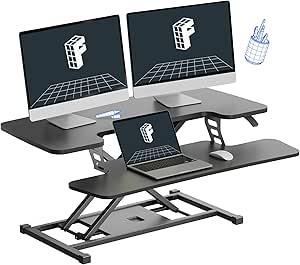
VIVO 32 inch Desk Converter, Height Adjustable Sit to Stand Riser, Dual Monitor and Laptop Workstation with Wide Keyboard Tray, Black
The VIVO 32-inch desk converter offers a practical solution for those who want to convert their existing workspace into a sit-stand setup without the bulk of a full desk. Its 31.5×15.7-inch surface accommodates dual monitors and a laptop, making it a good match for smaller spaces compared to the larger FLEXISPOT model. Its height adjustment range from 4.5 to 20 inches makes it suitable for most users, though it falls short of the full range offered by the Ergotron WorkFit-S. The sturdy steel construction ensures stability, but the limited maximum height and smaller surface size mean it’s less suitable for users with larger monitors or who prefer a higher standing position. For those with tight budgets or limited space, this model delivers solid value.
Pros:- Affordable, offering excellent value for a dual monitor setup
- Easy to adjust height for ergonomic comfort
- Sturdy steel construction ensures stability
- Minimal assembly required
Cons:- Maximum height of 20 inches may be limiting for taller users
- Surface size might be too small for larger setups
- Heavy to move once assembled
Best for: Home office workers or students needing a compact, adjustable work surface for dual monitors.
Not ideal for: Heavy users with large monitors or those seeking a full standing desk experience with extensive height range.
- Surface Dimensions:31.5″ x 15.7″
- Keyboard Tray Dimensions:31.3″ x 11.8″
- Adjustment Range:4.5″ to 20″
- Lift Capacity:33 lbs
- Material:High-grade steel
- Color:Black
- Model Number:DESK-V000K
- Brand:VIVO
Bottom line: This converter makes sense for users needing a space-efficient, budget-friendly option for dual monitors and occasional standing.
Ergotron WorkFit-S Dual Monitor Standing Desk Converter, Sit-Stand Workstation, Black
The Ergotron WorkFit-S excels in providing a flexible, ergonomic workstation for dual monitors up to 24 inches, making it a strong alternative to both the larger FLEXISPOT desk and the compact VIVO converter. Its 15×23-inch surface and adjustable height from 8.7 to 31.5 inches allow for personalized setups, with tilt and monitor angle adjustments that enhance comfort. Unlike the VIVO, it can handle heavier and larger monitors comfortably, but its weight and bulk make it less portable and harder to reposition. The extensive height range supports taller users or those who prefer a higher standing position, though moderate satisfaction ratings suggest some users may find the setup less intuitive. Overall, it’s ideal for professionals who prioritize ergonomic flexibility in a smaller footprint.
Pros:- Supports two monitors up to 24 inches with tilt and height adjustments
- Large, ergonomic worksurface and keyboard tray
- Adjustable height from 8.7 to 31.5 inches for taller users
- Durable, with a 5-year warranty
Cons:- Heavy and difficult to move once set up
- Limited to monitors up to 24 inches, restricting larger displays
- Customer feedback indicates moderate satisfaction, possibly due to setup complexity
Best for: Office workers or professionals needing a highly adjustable, space-efficient dual monitor setup.
Not ideal for: Users who require a lighter, more portable solution or larger work surface for sprawling setups.
- Fits monitors:up to 24 inches, 6-12 lbs each
- VESA compatibility:75x75mm and 100x100mm
- Worksurface dimensions:15 x 23 inches
- Keyboard tray size:27 x 9 inches
- Height adjustment:8.7 to 31.5 inches
- Weight capacity:variable
Bottom line: This converter suits users seeking a flexible, ergonomic dual monitor station in a compact form, willing to deal with some setup effort.

How We Picked
I evaluated each standing desk based on key factors like stability, ease of height adjustment, weight capacity, desktop size, and build quality. Durability and smoothness of the adjustment mechanism were critical, as dual monitors demand a stable platform. I also considered user reviews and value for money, ensuring each product offers a good balance of features and affordability. The rankings reflect how well each option supports dual monitor setups without compromising ergonomics or stability, making them suitable for various budgets and experience levels.Factors to Consider When Choosing Best Standing Desks For Dual Monitors Amazon
Choosing the right standing desk for dual monitors involves more than just price. It’s essential to consider factors that affect daily comfort, setup flexibility, and long-term durability. Getting these details right can prevent frustration and ensure your workspace promotes good posture and productivity. Here are the most important considerations when selecting a standing desk for dual monitors.Size and Surface Area
Ensure the desk or converter has enough surface space to hold your dual monitors comfortably alongside accessories like a keyboard, mouse, and other peripherals. Larger desktops provide more room and stability, especially important if you prefer wide or multiple monitors. However, bigger desks tend to be more expensive and take up more space, so measure your workspace carefully before choosing a size that fits your needs without overcrowding your area.
Adjustability and Stability
Look for desks with smooth, reliable height adjustment mechanisms—preferably motorized for effortless switching between sitting and standing. Stability is critical when supporting dual monitors; a wobbling or shaky surface can cause strain or accidents. Full-sized electric desks often outperform converters in stability, but high-quality converters with sturdy frames can also meet expectations if carefully selected.
Weight Capacity
Dual monitors can be heavy, especially if using large or curved screens. Check the weight limits of your chosen desk to ensure it can support your setup comfortably over time. Overloading can compromise stability and longevity, so investing in a desk with a higher capacity might be worthwhile if your monitors are substantial or if you plan to add accessories later.
Ease of Assembly and Use
Ease of setup varies; some desks arrive fully assembled, while others require assembly. For those who prefer a quick setup, ready-to-use models are preferable. Also, consider how intuitive the adjustment controls are—motorized desks with preset memory functions save time and effort during daily adjustments, making your workflow smoother.
Cable Management and Ergonomics
Cable organization features help keep your workspace tidy and prevent accidents. An ergonomic design that promotes proper monitor height and angle reduces strain on your neck and eyes. Prioritize desks that offer integrated cable channels or clips, and consider adjustable monitor mounts to optimize your dual monitor setup for comfort and productivity.
Frequently Asked Questions
Can I use a desk converter for dual monitors?
Yes, desk converters are a popular choice for dual monitors, especially if you already have a desk and want to add standing capability. However, it’s important to select a converter with enough surface area and stability to hold two monitors securely. Keep in mind that some converters may wobble or lack space for accessories, so choose one designed for dual monitor setups to maximize safety and comfort.
What’s the main difference between manual and electric standing desks?
Manual desks rely on springs, gas lifts, or cranks for height adjustment, which can be less convenient but more affordable. Electric desks use motors for effortless, smooth height changes at the push of a button, making frequent adjustments easier. For dual monitors, electric models tend to provide better stability and ease of use, especially if you switch positions multiple times daily.
Is a larger desktop always better for dual monitors?
Generally, yes. A larger desktop provides more room for two monitors and accessories, reducing clutter and increasing stability. But size alone isn’t enough; it must fit your workspace and support your ergonomic needs. Overly large desks can be cumbersome or overwhelming in small spaces, so balance size with your actual room dimensions and workflow preferences.
Are all dual monitor desks suitable for heavy monitors?
No, not all desks can support heavy monitors safely. Always check the weight capacity of your chosen model, especially if using large or curved screens. Investing in a desk with a higher weight limit ensures your setup remains stable and durable over time, avoiding potential damage or accidents caused by overloading.
How important is cable management for dual monitor setups?
Cable management is vital for maintaining an organized, clutter-free workspace. Proper cable routing reduces tangling and prevents accidental disconnections or tripping hazards. Desks with built-in cable channels or clips are especially useful for dual monitors, as they help keep your workspace clean and promote better ergonomics.
Conclusion
For those seeking the best overall performance and stability, the FLEXISPOT E6 is a strong pick, especially for users with larger dual monitor setups. Budget-conscious buyers will appreciate the reliability of the VIVO 32 inch Desk Converter, offering decent features at a lower price. If you want the smoothest experience and don’t mind spending more, the FLEXISPOT 63″ Electric Standing Desk provides ample space and top-tier motorized adjustment. Beginners or those with smaller workspaces should consider compact converters like the VIVO 32 inch model for simplicity and affordability. Ultimately, your choice depends on your workspace size, monitor weight, and ergonomic preferences.