
Wireless thermostats for home cinema comfort can help keep a viewing room steady without interrupting movie night to adjust the temperature. I name the Honeywell Home RTH9600WF my best overall pick for its clear color display and Wi-Fi control, while the ecobee Smart Thermostat Essential stands out for buyers who want an app-focused smart option and the Sensi ST55 for a straightforward approach. The main tradeoffs are HVAC compatibility, the need for a C-wire on some models, and whether you value a large on-wall screen or control from your phone. A programmable schedule can help set the room before a screening, but features and installation requirements vary across this lineup. Read on for the full breakdown and guidance on choosing a thermostat that fits both your cinema setup and heating system.

Get your wardrobe favorites delivered free with Prime
- Fast, free delivery on millions of items
- Prime Video, Amazon Music and more included
- Member-only deals all year
Key Takeaways
- The Honeywell Home RTH9600WF leads the roundup for buyers who want Wi-Fi control paired with an easy-to-read color display at the wall.
- The ecobee Smart Thermostat Essential and Sensi ST55 serve different priorities: ecobee suits buyers seeking a smart-app experience, while the Sensi is a simpler route to Wi-Fi scheduling.
- Honeywell’s RTH9585WF1004 is another display-centered choice, but buyers should compare its fit and feature set directly with the RTH9600WF rather than treating the two as interchangeable.
- Several Sensi models give this lineup a range of complexity: the Touch 2 favors a more prominent interface, while the Lite is the stripped-back choice for buyers who want fewer extras.
- Compatibility matters as much as smart features. The generic single-stage model explicitly requires a C-wire, and buyers should verify system type and wiring before choosing any thermostat.
| Honeywell Home RTH9600WF Smart Color Wi-Fi Thermostat |  | Best Overall for a Polished Cinema Setup | Model: RTH9600WF | Connectivity: Wi-Fi | Display: Selectable color LCD touchscreen | VIEW ON AMAZON | See Our Full Breakdown |
| ecobee Smart Thermostat Essential Wi-Fi Thermostat |  | Best for Apple HomeKit Households | Connectivity: Wi-Fi | Display: 3.74-inch LCD touchscreen | Power and installation: Battery powered; some C-wire installations may require a separately sold Power Extender Kit | VIEW ON AMAZON | See Our Full Breakdown |
| Honeywell Home RTH9585WF1004 Wi-Fi Smart Color Thermostat |  | Best for Simple Color-Touchscreen Scheduling | Model: RTH9585WF1004 | Connectivity: Wi-Fi | Display: Customizable color touchscreen | VIEW ON AMAZON | See Our Full Breakdown |
| Sensi ST55 Wi-Fi Smart Thermostat |  | Best for DIY Installation | Model: ST55 | Connectivity: Wi-Fi | Display: 5-inch LED | VIEW ON AMAZON | See Our Full Breakdown |
| XuLuaba Smart Wi-Fi Programmable Thermostat |  | Best for Basic Single-Stage Setups | Model: STN705W-Blue | System type: Single-stage, 1 heat/1 cool | Voltage and power: 24V AC; C-wire required; cannot run on batteries | VIEW ON AMAZON | See Our Full Breakdown |
| Sensi Touch 2 Smart Wi-Fi Thermostat (ST76) |  | Best for Room-by-Room Cinema Comfort | Model: Sensi Touch 2 ST76 | Connectivity: Wi-Fi | Display: LCD touchscreen | VIEW ON AMAZON | See Our Full Breakdown |
| Sensi Lite Wi-Fi Smart Thermostat (ST25) | 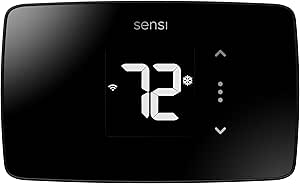 | Best Value for Straightforward Scheduling | Model: ST25 | Connectivity: 2.4 GHz Wi-Fi | Controls: App, touch, voice | VIEW ON AMAZON | See Our Full Breakdown |
| Siterwell Smart Wi-Fi Programmable Thermostat with Touchscreen |  | Best for a Large, Clear Wall Display | Model: GS366A-MWAC | Connectivity: Wi-Fi | Display: 3.5-inch color touchscreen with temperature and humidity display | VIEW ON AMAZON | See Our Full Breakdown |
| PRO1 T855iSH Wi-Fi Programmable Thermostat with 8-Inch Backlit Display |  | Best for Advanced HVAC Scheduling | Model: T855iSH | Connectivity: Wi-Fi | Display: 8-inch backlit LCD | VIEW ON AMAZON | See Our Full Breakdown |
| Smart Wi-Fi Thermostat Single-Stage 1 Heat / 1 Cool, App Remote Control, 7-Day Programmable |  | Best for Basic Single-Stage Systems | System compatibility: Conventional single-stage 1 Heat / 1 Cool; gas, oil, or electric | Connectivity: 2.4 GHz Wi-Fi | Power: 24 V AC; C-wire required; no battery operation | VIEW ON AMAZON | See Our Full Breakdown |
| wireless thermostats for home cinema comfort | Connectivity | Model | Display | Power |
|---|---|---|---|---|
| Honeywell Home RTH9600WF Smart | Wi-Fi | RTH9600WF | Selectable color LCD touchscreen | Battery powered; requires 1 AAA battery; C-wire required |
| ecobee Smart Thermostat Essent | Wi-Fi | — | 3.74-inch LCD touchscreen | — |
| Honeywell Home RTH9585WF1004 W | Wi-Fi | RTH9585WF1004 | Customizable color touchscreen | AC power; C-wire required |
| Sensi ST55 Wi-Fi Smart Thermos | Wi-Fi | ST55 | 5-inch LED | Corded electric; 24 volts AC; 2 AA batteries included |
| XuLuaba Smart Wi-Fi Programmab | — | STN705W-Blue | — | — |
| Sensi Touch 2 Smart Wi-Fi Ther | Wi-Fi | Sensi Touch 2 ST76 | LCD touchscreen | 24 V; common wire (C-wire) required |
| Sensi Lite Wi-Fi Smart Thermos | 2.4 GHz Wi-Fi | ST25 | — | Two included AAA batteries or C-wire; C-wire required for heat pump and heat/cool-only systems |
| Siterwell Smart Wi-Fi Programm | Wi-Fi | GS366A-MWAC | 3.5-inch color touchscreen with temperature and humidity display | C-wire required |
| PRO1 T855iSH Wi-Fi Programmabl | Wi-Fi | T855iSH | 8-inch backlit LCD | Hardwired 24V |
| Smart Wi-Fi Thermostat Single- | 2.4 GHz Wi-Fi | — | Backlit LCD | 24 V AC; C-wire required; no battery operation |
More Details on Our Top Picks
Honeywell Home RTH9600WF Smart Color Wi-Fi Thermostat
For a home cinema where clear, at-a-glance control matters, I’d put the RTH9600WF ahead of simpler button-based options. Its customizable color touchscreen makes temperature changes straightforward before a movie, while app and voice control let you adjust the room without walking to the wall. Flexible schedules and energy-use information also help set a cooler viewing-room temperature for regular movie nights without relying on manual changes each time.
Compared with the Honeywell Home RTH9585WF1004, this model adds automatic heat-to-cool switching and broader smart-home support, making it the more adaptable pick. The tradeoff is installation: it requires a C-wire, and neither Honeywell works with electric baseboard heat. I’d check the HVAC wiring and system type before choosing it.
Pros:- Customizable color touchscreen makes local temperature adjustments easy to read.
- App and voice control support remote adjustments without leaving the viewing area.
- Flexible scheduling and energy-use information support repeatable movie-night settings.
- Smart alerts and automatic heat-to-cool switching add useful system oversight.
Cons:- Requires a C-wire or compatible power adapter.
- Does not support 120–240V electric baseboard heat.
- Heating-only oil furnace systems require a C-wire.
Best for: Home-cinema owners with a compatible 24V forced-air, boiler, or eligible heat-pump system who want a prominent touchscreen and scheduled comfort.
Not ideal for: Homes with electric baseboard heating or no suitable C-wire, and buyers who want a thermostat that works without checking HVAC compatibility.
- Model:RTH9600WF
- Connectivity:Wi-Fi
- Display:Selectable color LCD touchscreen
- Power:Battery powered; requires 1 AAA battery; C-wire required
- Voltage:24 volts
- Compatible systems:Forced-air gas, oil, or electric; hot water and steam; heat pumps with electric backup
- Smart-home compatibility:Amazon Alexa, Google Assistant, Microsoft Cortana, IFTTT
- Mounting and dimensions:Wall mount; 1 x 4.75 x 3.5 inches
Our verdict“Choose the RTH9600WF for a compatible HVAC system if you want the most adaptable touchscreen-led control in this group.”
ecobee Smart Thermostat Essential Wi-Fi Thermostat
I’d choose the ecobee Smart Thermostat Essential when a home cinema is part of an Apple HomeKit setup or when room-by-room comfort may matter later. It pairs a touchscreen with app control, and its auto-away and auto-scheduling features can reduce needless heating or cooling when the room is empty. Indoor humidity detection and fan control add useful context for a viewing space that can feel stuffy even when the displayed temperature seems right.
Against the Honeywell RTH9600WF, ecobee’s distinction is HomeKit support and a wider range of listed HVAC types, including dual fuel and boilers; Honeywell offers a more explicitly customizable color screen. This ecobee is not a complete room-monitoring package out of the box: its Power Extender Kit or SmartSensor may cost extra, and compatibility should be checked before purchase.
Pros:- Supports Apple HomeKit, Google Assistant, and Amazon Alexa.
- Auto-away and auto-scheduling can adapt temperature control to household routines.
- Indoor humidity detection and fan control provide more than basic temperature adjustment.
- Works with many 24 VAC systems, including boilers and dual-fuel equipment.
Cons:- Compatibility must be checked against the specific HVAC system.
- A Power Extender Kit may be needed for some installations and is sold separately.
- SmartSensor for separate room monitoring is sold separately.
Best for: Movie-room owners using Apple HomeKit who want app scheduling, humidity awareness, and the option to add separate room monitoring.
Not ideal for: Buyers who need a confirmed fit for an unusual HVAC setup or expect room sensors and installation accessories to be included.
- Connectivity:Wi-Fi
- Display:3.74-inch LCD touchscreen
- Power and installation:Battery powered; some C-wire installations may require a separately sold Power Extender Kit
- Compatible systems:Most 24 VAC HVAC systems, including gas, oil, electric, dual fuel, forced air, heat pumps, and boilers
- Smart-home compatibility:Apple HomeKit, Google Assistant, Amazon Alexa
- Scheduling and automation:Auto-away and auto-scheduling
- Additional controls:Fan control and indoor humidity detection
- Mounting and material:Wall mount; plastic; white
Our verdict“Pick the ecobee if HomeKit support and expandable room comfort matter more than an included sensor or a customizable color display.”
Honeywell Home RTH9585WF1004 Wi-Fi Smart Color Thermostat
The RTH9585WF1004 suits a cinema room where I want easy local adjustments and dependable scheduled temperature changes, without needing a wide set of smart-home integrations. Its customizable color touchscreen, app access, and flexible programming make it straightforward to set a cooler room for planned viewing. Energy reports and equipment alerts add a practical layer beyond the thermostat’s wall controls.
Compared with the RTH9600WF, this Honeywell keeps the same touchscreen-led approach but lists Alexa and Google Home rather than the broader assistant and IFTTT support of its sibling. The ecobee Essential, by contrast, adds HomeKit and humidity detection. This model’s fit is narrower than that ecobee’s listed system range: it needs a C-wire and does not support electric baseboard heat, so wiring and system type should guide the choice.
Pros:- Customizable color touchscreen supports clear on-wall operation.
- App, Alexa, and Google Home control allow adjustments from elsewhere in the home.
- Flexible scheduling can set recurring temperatures for regular viewing times.
- Energy reports and equipment alerts provide useful system information.
Cons:- Requires a C-wire for installation.
- Not compatible with electric baseboard heat.
- Smart-home support is narrower than the RTH9600WF’s listed ecosystem range.
Best for: Owners of compatible forced-air, hot-water, steam, or eligible heat-pump systems who want a colorful touchscreen and scheduled cinema-room temperatures.
Not ideal for: Homes with electric baseboard heat, no C-wire, or a need for Apple HomeKit integration or humidity detection.
- Model:RTH9585WF1004
- Connectivity:Wi-Fi
- Display:Customizable color touchscreen
- Power:AC power; C-wire required
- Compatible systems:Forced-air systems, hot water and steam, and heat pumps with electric backup
- Smart-home compatibility:Amazon Alexa and Google Home
- Features:Flexible scheduling, energy reports, and equipment alerts
- Mounting and color:Wall mount; gray
Our verdict“Choose this Honeywell when you want color-screen scheduling on a compatible system and do not need HomeKit or broader assistant support.”
Sensi ST55 Wi-Fi Smart Thermostat
For a home-cinema owner who would rather get the thermostat installed with minimal wiring guesswork, I’d shortlist the Sensi ST55. Its built-in level and app-guided instructions make wall placement and setup more approachable, while a common wire is not required in most applications. App, button, and voice controls offer several ways to adjust the room before a screening, and scheduling can handle regular evening routines.
Unlike the Honeywell RTH9600WF and RTH9585WF1004, the ST55 supports Apple HomeKit, SmartThings, and Vera as well as Alexa and Google Assistant. Its appeal is practical setup and broad platform choice rather than a color touchscreen; the display is an LED screen, and common-wire needs can vary with the HVAC configuration. I’d check the wiring requirements for the specific system before relying on the no-common-wire advantage.
Pros:- Built-in level and app instructions support DIY installation.
- Common wire is not required in most applications.
- Works with Alexa, Apple HomeKit, Google Assistant, SmartThings, and Vera.
- Offers scheduling, HVAC usage reports, alerts, and maintenance reminders.
Cons:- Common-wire requirements vary by HVAC setup.
- LED display lacks the customizable color touchscreen found on the Honeywell models.
- Listed compatibility should be checked for the specific heating and cooling equipment.
Best for: DIY-minded cinema-room owners with compatible air conditioners, boilers, furnaces, or heat pumps who want app-led installation guidance and broad smart-home support.
Not ideal for: Buyers prioritizing a customizable color touchscreen or those whose HVAC system requires a common wire that is not available.
- Model:ST55
- Connectivity:Wi-Fi
- Display:5-inch LED
- Power:Corded electric; 24 volts AC; 2 AA batteries included
- Compatible HVAC:Air conditioner, boiler, furnace, and heat pump
- Smart-home compatibility:Amazon Alexa, Apple HomeKit, Google Assistant, SmartThings, Vera
- Controls:Buttons, app, touch, and voice
- Installation and mounting:Wall mount; built-in level and app instructions
Our verdict“Pick the Sensi ST55 if guided DIY setup and broad smart-home support matter more than a large color touchscreen.”
XuLuaba Smart Wi-Fi Programmable Thermostat
The XuLuaba STN705W-Blue is the narrow-fit option here: it makes sense for a simple, compatible single-stage 1 heat/1 cool system when app scheduling and voice control are the main cinema-room needs. Smart Life control, Alexa and Google Home support, and choices among 7-day, 5-1-1-day, or non-programmable operation cover the basics for setting a repeatable viewing schedule.
Compared with the Sensi ST55, XuLuaba offers more clearly specified schedule modes but does not share Sensi’s broad smart-home list or its common-wire flexibility. Its main drawback is compatibility: it requires a C-wire and excludes multi-stage systems, millivolt systems, and heat pumps with auxiliary or emergency heat. I’d only select it after confirming the system is single-stage and within its stated limits.
Pros:- Offers 7-day, 5-1-1-day, and non-programmable operating modes.
- Smart Life app provides remote control and scheduling.
- Compatible with Alexa and Google Home.
- Step-by-step installation instructions are included.
Cons:- Requires a C-wire and cannot run on batteries.
- Limited to single-stage 1 heat/1 cool systems.
- Incompatible with heat pumps with auxiliary or emergency heat, multi-stage systems, and millivolt conventional systems.
Best for: Owners of a confirmed compatible single-stage 24V system who want Smart Life scheduling and Alexa or Google Home control for a cinema room.
Not ideal for: Households with multi-stage HVAC, a heat pump with auxiliary or emergency heat, a millivolt system, or no available C-wire.
- Model:STN705W-Blue
- System type:Single-stage, 1 heat/1 cool
- Voltage and power:24V AC; C-wire required; cannot run on batteries
- Connectivity and app:Wi-Fi; Smart Life app
- Controls:App and touch
- Voice compatibility:Alexa and Google Home
- Programming:7-day, 5-1-1-day, or non-programmable
- Compatibility limits:Not for heat pumps with auxiliary or emergency heat, multi-stage systems, or millivolt conventional systems
Our verdict“Choose XuLuaba only for a verified compatible single-stage system when its scheduling options matter more than broad HVAC support.”
Sensi Touch 2 Smart Wi-Fi Thermostat (ST76)
The Sensi Touch 2 is my pick for a cinema room that runs warmer or cooler than the rest of the house. It can pair with up to 15 Sensi Room Sensors (sold separately), giving you a way to account for temperature differences beyond the thermostat’s wall location. That flexibility sets it apart from the Sensi Lite ST25, which offers scheduling and remote control but no stated room-sensor support. App-guided installation, a touchscreen, and Alexa, Google Assistant, and SmartThings compatibility make routine adjustments convenient before a screening. The tradeoff is that room sensors add a separate purchase, and the thermostat requires a C-wire. I’d choose it when balancing several rooms matters more than keeping the setup simple and self-contained.
Pros:- Supports up to 15 compatible Sensi Room Sensors for addressing temperature differences across rooms
- App-guided DIY installation and touchscreen controls
- Scheduling, remote access, energy reports, and maintenance alerts
- Works with Alexa, Google Assistant, and SmartThings
Cons:- Requires a C-wire
- Room sensors are sold separately
- Its room-balancing features may be more than needed for a single-zone home
Best for: Homeowners whose cinema room sits far from the thermostat or has uneven temperatures, and who are willing to add compatible room sensors.
Not ideal for: Renters or buyers without a C-wire, and anyone who wants room sensing without buying separate sensors.
- Model:Sensi Touch 2 ST76
- Connectivity:Wi-Fi
- Display:LCD touchscreen
- Compatible platforms:Amazon Alexa, Google Assistant, SmartThings
- Power:24 V; common wire (C-wire) required
- Supported HVAC:Air conditioner, boiler, furnace, heat pump
- Room sensors:Compatible with up to 15 Sensi Room Sensors, sold separately
- Dimensions:5.6 × 3.25 × 0.77 in
Our verdict“Choose the Sensi Touch 2 if temperature balance across the cinema room and the rest of the home is your priority and you can accommodate its C-wire and separate sensors.”
Sensi Lite Wi-Fi Smart Thermostat (ST25)
The Sensi Lite ST25 suits a cinema setup where scheduled comfort and remote adjustments matter more than room sensors or a large display. Its app, 7-day scheduling, geofencing, and energy reports cover the everyday basics, while ENERGY STAR certification gives energy use a clearer place in the decision. Compared with the Sensi Touch 2, it is the simpler choice: it can run on batteries or a C-wire in many installations, but it lacks the Touch 2’s stated support for multiple room sensors. The wiring caveat depends on the system: a C-wire is required for heat pumps and heat/cool-only systems, while most other listed setups do not require one. It also needs 2.4 GHz Wi-Fi, so check the home network before choosing it.
Pros:- Scheduling, geofencing, remote app access, and energy usage reports
- Battery or C-wire power, depending on HVAC system
- ENERGY STAR-certified
- Includes a stated privacy commitment against selling personal information or using thermostat activity for targeted ads
Cons:- Requires a C-wire for heat-pump and heat/cool-only systems
- Connects only to 2.4 GHz Wi-Fi
- Does not list the Sensi Room Sensor compatibility offered by the Sensi Touch 2
Best for: Homeowners seeking app scheduling and geofencing for a standard HVAC setup, especially if they want battery power to avoid adding a C-wire where supported.
Not ideal for: Owners of heat-pump or heat/cool-only systems without a C-wire, or anyone who wants room-sensor support for a separate cinema room.
- Model:ST25
- Connectivity:2.4 GHz Wi-Fi
- Controls:App, touch, voice
- Compatible assistants:Amazon Alexa, Google Assistant, SmartThings
- Power:Two included AAA batteries or C-wire; C-wire required for heat pump and heat/cool-only systems
- Supported HVAC:Air conditioner, boiler, furnace, heat pump
- Certification:ENERGY STAR-certified
- Warranty:3 years
Our verdict“Pick the Sensi Lite for practical schedules and remote control on a compatible system, but choose the Touch 2 if cinema-room sensor support is a priority.”
Siterwell Smart Wi-Fi Programmable Thermostat with Touchscreen
The Siterwell GS366A-MWAC puts visibility first, with a 3.5-inch color touchscreen that displays temperature and humidity. That can make quick adjustments easier when you’re passing the thermostat on the way to the cinema room; app control and voice support also let you change settings remotely. Compared with the PRO1 T855iSH, the Siterwell emphasizes a color touchscreen and humidity information rather than the PRO1’s 7-day scheduling options and keypad lockout. It supports many standard 24VAC residential systems, including single- and multi-stage heating and cooling, but compatibility still depends on the home’s wiring and equipment. A C-wire is required, so it is less flexible than the Sensi Lite in installations where that model can use batteries.
Pros:- 3.5-inch color touchscreen shows temperature and humidity
- App-based remote control and programmable schedules
- Compatible with Alexa and Google Assistant
- UL-certified and backed by a three-year warranty
Cons:- Requires a C-wire
- HVAC compatibility depends on the specific system
- Product details do not list room-sensor support
Best for: Homeowners with a compatible 24VAC system who want a prominent color display and app or voice control for quick comfort adjustments.
Not ideal for: Buyers without a C-wire, or anyone who needs room sensors, geofencing, or clearly specified multi-zone control for a dedicated cinema space.
- Model:GS366A-MWAC
- Connectivity:Wi-Fi
- Display:3.5-inch color touchscreen with temperature and humidity display
- Controls:App, touch, voice
- Voice assistants:Amazon Alexa, Google Assistant
- HVAC compatibility:Most standard 24VAC residential systems; single-stage and multi-stage heating and cooling
- Power:C-wire required
- Certification and warranty:UL-certified; 3-year warranty
Our verdict“Choose the Siterwell if a clear color display is your priority and your 24VAC system has a C-wire; consider the PRO1 if scheduling controls matter more.”
PRO1 T855iSH Wi-Fi Programmable Thermostat with 8-Inch Backlit Display
The PRO1 T855iSH is the control-focused pick for homes where a cinema room shares a more involved heating or cooling system. Its listed support for 2H/2C conventional and 5H/3C heat-pump systems, plus 7-day scheduling, auto changeover, and programmable fan control, offers more HVAC-specific control than the single-stage model in this group. The 8-inch backlit display and glow button aid visibility, while keypad lockout and setpoint limits help prevent casual changes to a carefully set schedule. Against the Siterwell GS366A-MWAC, PRO1 gives up the color screen and displayed humidity in favor of scheduling and system controls. Its main limitation is installation flexibility: it needs hardwired 24V power, and the product details do not list room-sensor support for independently balancing a cinema room.
Pros:- Supports listed 2H/2C conventional and 5H/3C heat-pump systems
- 7-day scheduling, auto changeover, and programmable fan control
- Keypad lockout and setpoint limits can protect preset comfort settings
- Backlit display and glow button support visibility
Cons:- Requires hardwired 24V power
- Product details do not list room-sensor compatibility
- Its advanced HVAC controls may be unnecessary for a basic single-stage system
Best for: Homeowners with compatible multi-stage or heat-pump HVAC who want detailed weekly schedules, fan settings, and limits on household adjustments.
Not ideal for: People without hardwired 24V power, or buyers seeking a color touchscreen, room sensors, or a simple battery-powered installation.
- Model:T855iSH
- Connectivity:Wi-Fi
- Display:8-inch backlit LCD
- Programming:7-day or non-programmable
- HVAC compatibility:2H/2C conventional; 5H/3C heat pump
- Power:Hardwired 24V
- Additional controls:Auto changeover, programmable fan, keypad lockout, filter reminders, 5-minute compressor delay
- Dimensions:1.75 × 5.25 × 5.25 in
Our verdict“Choose the PRO1 when your HVAC system benefits from detailed scheduling and control; the Siterwell is a better fit if a color touchscreen matters more.”
Smart Wi-Fi Thermostat Single-Stage 1 Heat / 1 Cool, App Remote Control, 7-Day Programmable
This single-stage Wi-Fi thermostat makes the most sense when a cinema room relies on a conventional 1 Heat / 1 Cool system and the goal is straightforward remote scheduling. The app supports 7-day programming, while the backlit LCD is useful for checking settings in a dim hallway before a movie. Its defined system fit is narrower than the PRO1 T855iSH, which lists support for multi-stage conventional and heat-pump equipment; this model is for compatible single-stage gas, oil, or electric systems only. It also requires a C-wire and 2.4 GHz Wi-Fi, with no battery option. The ±2°F control specification and lack of listed room-sensor support make it a practical basic controller, not a solution for fine-grained temperature balancing between rooms.
Pros:- App-based remote adjustments and 7-day scheduling
- Designed for conventional single-stage 1 Heat / 1 Cool systems
- Backlit LCD is readable in low light
- Specified temperature control accuracy is within ±2°F
Cons:- Requires a C-wire and cannot operate on batteries
- Not compatible with multi-stage systems or heat pumps
- Supports 2.4 GHz Wi-Fi only
Best for: Owners of conventional single-stage gas, oil, or electric HVAC who want app-based adjustments and a weekly schedule without advanced system controls.
Not ideal for: Homes with heat pumps, multi-stage HVAC, no C-wire, or a 5 GHz-only network, and buyers seeking room-by-room temperature balancing.
- System compatibility:Conventional single-stage 1 Heat / 1 Cool; gas, oil, or electric
- Connectivity:2.4 GHz Wi-Fi
- Power:24 V AC; C-wire required; no battery operation
- Wiring terminals:RH, RC, W, Y, G, C
- Programming:7-day schedule
- Display:Backlit LCD
- Temperature control:Specified accuracy within ±2°F
- Dimensions:0.98 in D × 4.72 in W × 3.86 in H
Our verdict“Choose this model for basic app scheduling on a compatible single-stage system; opt for the PRO1 if your HVAC setup needs multi-stage support.”

How We Picked
I ranked these thermostats around the needs of a home cinema: setting a comfortable temperature before a screening, making adjustments without leaving the room, and keeping wall controls easy to read in a dim space. I weighed Wi-Fi and app control, scheduling, display usability, stated installation requirements, and the range of HVAC setups each product appears suited to. A thermostat with useful remote control and a readable interface ranks ahead of one that offers fewer clear advantages for cinema use.
The ranking also reflects tradeoffs, not just feature counts. The Honeywell Home RTH9600WF earns the top spot for balancing a color display with connected control; the ecobee and Sensi alternatives rank well for buyers whose priorities differ. More basic or narrowly specified options can still suit a particular installation, but they rank lower when buyers need to verify more limitations or give up interface flexibility. Since compatibility varies by system and wiring, I treat manufacturer specifications and installer guidance as essential checks rather than assuming every model fits every home.
Factors to Consider When Choosing Wireless Thermostats For Home Cinema Comfort
Choosing a cinema thermostat is less about maximizing smart features and more about matching controls to the room, the HVAC system, and how you watch. I would settle installation and compatibility questions before comparing displays or app extras.
Match the thermostat to your HVAC system first
Thermostats are not universally interchangeable, even when their product names sound similar. Check whether your home has conventional heating and cooling, a heat pump, multistage equipment, or another configuration, then compare that with the model’s supported systems. A product listing that names a single-stage setup is a narrower fit than one whose documentation covers your equipment. Do not assume wire colors alone identify each connection; confirm terminal labels and system instructions. If your current thermostat controls unusual equipment or several zones, ask an HVAC professional to verify compatibility before ordering. This check can rule out an appealing option early and prevent a frustrating installation.
Check C-wire and power needs before planning installation
Wi-Fi thermostats need a dependable source of power, and wiring requirements differ by model. A stated C-wire requirement, such as the one attached to the single-stage thermostat in this roundup, should be treated as a hard installation condition unless the manufacturer documents an approved alternative. Older homes may lack a spare C-wire at the thermostat, even if other wiring is present. Look at your existing thermostat wiring and the manufacturer’s installation guide before buying, rather than assuming an app or adapter will solve the issue. A professional can identify safe options when wiring is unclear. Paying for a feature-rich thermostat will not help if the home cannot power or support it properly.
Plan around the room’s actual comfort pattern
A cinema room may warm up during a long screening as equipment and occupants add heat, while a basement room can feel cool before the system catches up. Think about when you want the room comfortable: ahead of scheduled movie nights, throughout a changing household routine, or only when you make a manual adjustment. Scheduling can reduce last-minute changes, while remote control is useful when plans shift. A single thermostat sensor measures conditions near its location, not necessarily every seat in a large or open room. If temperature varies across zones, solve that layout problem separately rather than expecting a new wall control to balance the whole space. The right routine depends more on the room and HVAC layout than on the number of app features.
Choose controls you can use without brightening the room
A large touchscreen can make adjustments easier from across a room, but a bright display may be distracting during a film. A smaller or simpler interface can be less obtrusive, though it may take more effort to read from the seating area. Check whether the screen’s brightness can be adjusted or whether you can make changes from a phone before deciding that a bigger display is automatically better. Also think about who will operate it: guests may prefer clear physical controls, while household members who already use an app may favor phone access. Place the thermostat where it can measure representative room conditions, not in direct sun or near a heat source. Usability and placement work together; an attractive screen cannot fix a poor reading location.
Decide how much smart-home complexity you want
Connected thermostats can make scheduling and remote adjustments convenient, but each added app or integration creates another setup step. If you mainly want to set a schedule and occasionally adjust temperature, a simpler Wi-Fi model may be a better fit than one chosen for a long list of smart features. Before buying, confirm the phone app supports your device and household needs, and check whether any desired voice or smart-home platform is explicitly supported. Avoid paying attention to feature names without confirming what they do in your system. App control also depends on a stable home network, so consider whether the thermostat offers useful local controls if Wi-Fi is unavailable. The best level of connectivity is the one your household will actually use.
Know when to pay more—and what you are paying for
A higher-tier model makes sense when its particular benefit solves a real problem, such as a clearer display, a more convenient interface, or a smart-control feature your household will use. It is less compelling when the room only needs a dependable schedule and basic temperature adjustments. Compare installation needs and system compatibility before comparing feature lists, since a lower-complexity model that fits your wiring may be the wiser choice. Also account for whether you will need professional installation or additional components; those needs can matter more than the thermostat’s headline features. For a dedicated cinema, convenience during screenings may justify a better interface, but a bright screen or complicated app can be a poor match for a simple setup. Spend on the feature that removes your biggest annoyance, not on extras by default.
Frequently Asked Questions
Can I install a wireless thermostat in my cinema room without a C-wire?
It depends on the thermostat and your HVAC wiring. Some models require a C-wire, and the single-stage model in this roundup explicitly lists that requirement; do not assume a different model will work without one. Check the installation guide for the exact product and inspect the wiring at your current thermostat before purchasing. If you cannot identify the connections, have an HVAC professional check them rather than guessing. A compatible power solution may be available for some systems, but only use one the manufacturer approves.
Will a thermostat in the cinema room keep every seat at the same temperature?
No wall thermostat can guarantee uniform comfort across a room by itself. It reads conditions where it is installed, and airflow, sunlight, insulation, and seating location can create temperature differences elsewhere. Place it away from vents, windows, electronics, and other heat sources so its reading better reflects the room. If the cinema is one zone within a larger space, the HVAC system may respond to conditions outside the viewing area as well. Persistent hot or cold seats may call for airflow balancing or zoning rather than a different thermostat.
Is phone control useful if I already have a programmed schedule?
It can be, especially when movie plans do not follow a fixed routine. A schedule can prepare the room for regular viewing times, while phone access lets you adjust when a screening starts early, runs late, or gets canceled. If your household rarely changes plans, basic scheduling may be enough and a more elaborate connected setup may add little value. Also consider whether the app is convenient for everyone who uses the room. Choose remote control for a real routine benefit, not just because it appears on a feature list.
Should I choose a thermostat with a large touchscreen for a dark home theater?
A larger screen can make temperature adjustments easier to read, but it may draw attention during a film if its brightness is not adjustable. Check the display settings and whether the thermostat can dim or turn off its screen before treating size as an advantage. If you plan to make most changes through an app, a smaller on-wall display may be perfectly adequate. Room placement matters too: a screen near the viewing area can be more distracting than one outside the room. Balance readability against light spill rather than choosing solely by screen size.
Which should I prioritize: app features, scheduling, or HVAC compatibility?
Start with HVAC compatibility, because a thermostat that cannot support your system is not a viable choice. Next, confirm wiring and power requirements so the installation plan is realistic. After those checks, choose scheduling if you watch at predictable times, or app control if plans change and remote adjustments would help. Display style comes after those practical needs for most buyers. This order prevents smart features from distracting from the basic fit between the thermostat and your home.
Conclusion
For most home cinema owners, I recommend the Honeywell Home RTH9600WF as the best overall, pairing Wi-Fi control with a color display that is easy to read at the wall. The Sensi ST55 is my best-value direction for shoppers seeking straightforward connected scheduling, while the ecobee Smart Thermostat Essential is my best premium-style pick for buyers who place more weight on an app-centered smart experience. For beginners, I would start with the Sensi Lite ST25 if its simpler feature set matches the system and controls they need. Choose the Sensi Touch 2 or the display-focused PRO1 T855iSH when a prominent interface is the priority, and consider the generic single-stage model only when its system limits and C-wire requirement fit your installation. Before choosing any of them, verify HVAC compatibility and wiring; that check matters more than a cinema-friendly feature you cannot use.
Halloween Picks
halloween
As an affiliate, we earn on qualifying purchases.