
If you’re looking to boost your productivity, I’ve found that ultrawide monitors can truly transform your workspace. With expansive screen real estate and vibrant visuals, displays like the Samsung 49” Curved Dual QHD and Dell 34” Curved Monitor stand out for their performance and ergonomic features. High refresh rates and multiple connectivity options make multitasking seamless. Trust me, there’s much more to explore about these monitors and how they can enhance your setup.
Key Takeaways
- Look for ultrawide monitors with high resolutions like 3440×1440 or 5120×1440 for improved clarity and workspace efficiency.
- Choose displays with multiple connectivity options, including USB-C, for seamless integration with various devices and reduced cable clutter.
- Select monitors featuring ergonomic adjustments, such as height and tilt, to enhance comfort during long hours of use.
- Opt for models with high refresh rates (100Hz or higher) and adaptive sync technologies to ensure smooth multitasking and gaming experiences.
- Consider displays with eye care technologies to reduce eye strain and support prolonged productivity without discomfort.
Samsung 49” Ultrawide Curved Dual QHD Computer Monitor (LS49C954UANXZA)


If you’re looking for an immersive experience that boosts productivity, the Samsung 49” Ultrawide Curved Dual QHD Monitor (LS49C954UANXZA) might just be the perfect fit for you. With its expansive 49-inch display and 32:9 aspect ratio, it transforms your workspace. The dual QHD resolution ensures sharp visuals, while the 120Hz refresh rate makes gaming and scrolling smooth. Plus, the multiple connectivity options, including USB Type-C, simplify desk organization. Ergonomically designed, it’s adjustable for comfort, and TÜV-certified eye care technology minimizes strain. Despite some minor drawbacks, overall, it’s a fantastic investment for anyone serious about productivity.
Best For: Professionals and gamers seeking an expansive, high-resolution display to enhance productivity and immersive experiences.
Pros:
- Large 49-inch curved display with dual QHD resolution for sharp, clear images and enhanced field of view.
- Multiple connectivity options including USB Type-C and a KVM switch for streamlined desk organization and control of multiple devices.
- Ergonomically designed with height adjustment and TÜV-certified eye care technology to reduce strain during long hours of use.
Cons:
- KVM switch controls can be difficult to access and lack clear documentation, complicating operation.
- Color reproduction and contrast may be inconsistent, leading to potential eye discomfort for some users.
- Resolution issues can occur when displaying multiple systems side-by-side, affecting multitasking capabilities.
Samsung 34 ViewFinity S50GC Series Ultrawide QHD Monitor (LS34C50DGANXZA)

The Samsung 34 ViewFinity S50GC Series Ultrawide QHD Monitor (LS34C50DGANXZA) is a fantastic choice for professionals looking to enhance their productivity. With its 21:9 aspect ratio and Ultra-WQHD resolution, I can maximize my screen space for seamless multitasking. The HDR10 technology allows me to enjoy vibrant visuals, while the 100Hz refresh rate ensures smooth content viewing. Thanks to features like PBP and PIP, I can effortlessly manage multiple applications. Plus, the eye care features, including the ambient light sensor and Eye Saver Mode, make long hours comfortable. This monitor truly elevates my workspace experience.
Best For: Professionals and creatives seeking an ultrawide monitor that enhances productivity and provides vibrant visuals for both work and entertainment.
Pros:
- Seamless multitasking with PBP and PIP features, allowing simultaneous viewing of multiple applications.
- Vibrant visuals supported by HDR10 technology and over 1 billion colors for a more immersive experience.
- Comfortable usage thanks to eye care features like the ambient light sensor and Eye Saver Mode.
Cons:
- Higher price point compared to standard monitors, which may not fit every budget.
- Limited adjustability in ergonomics, potentially affecting user comfort for extended periods.
- Potential compatibility issues with older graphics cards that may not support the monitor’s full capabilities.
Samsung Viewfinity S65UA 34-Inch Ultrawide QHD Curved Monitor (LS34A654UBNXGO)

For anyone seeking an immersive workspace that boosts productivity, the Samsung Viewfinity S65UA 34-Inch Ultrawide QHD Curved Monitor is a standout choice. Its 34-inch curved display and 21:9 aspect ratio enhance multitasking and provide stunning visuals with ultra WQHD resolution. The 100Hz refresh rate ensures smooth performance, perfect for both work and gaming. Plus, its eye care features reduce strain, making long hours comfortable. The USB Type-C port simplifies connections, while the minimal border design keeps distractions at bay. Overall, this monitor combines functionality and style, making it an excellent addition to any productivity-focused setup.
Best For: Those seeking a high-quality, immersive workspace for multitasking, gaming, and design projects.
Pros:
- Vibrant visuals with ultra WQHD resolution and HDR10 support, delivering over a billion colors for an enhanced viewing experience.
- Ergonomic design featuring a height-adjustable stand and intelligent eye care technology that reduces eye strain during prolonged use.
- Seamless connectivity with a USB Type-C port that allows for easy connection and charging of devices with a single cable.
Cons:
- Limited gaming features compared to dedicated gaming monitors, as it may lack advanced gaming-specific settings.
- Higher price point compared to standard monitors, which may not be suitable for budget-conscious consumers.
- Potential glare issues due to the curved design, which might not be ideal in brightly lit environments.
Sceptre 34-Inch Curved Ultrawide WQHD Monitor (C345B-QUT168)

Looking to enhance your productivity while enjoying a spacious and immersive visual experience? The Sceptre 34-Inch Curved Ultrawide WQHD Monitor (C345B-QUT168) is a fantastic choice. With its stunning 3440 x 1440 resolution and 21:9 aspect ratio, you’ll relish the extra screen space. The 1500R curvature and 165Hz refresh rate make for smooth visuals, perfect for both gaming and work. Plus, it covers 99% of the sRGB color gamut, ensuring vibrant colors. Users love its sleek design and solid build, making it a great addition to any setup. It’s an affordable option with impressive features and reliable performance.
Best For: Those seeking an immersive ultrawide monitor that excels in both gaming and productivity with vibrant colors and smooth visuals.
Pros:
- High resolution of 3440 x 1440 and 165Hz refresh rate for smooth gameplay and detailed visuals.
- 1500R curvature enhances immersion and provides a comfortable viewing experience.
- Affordable pricing with a solid build quality and aesthetic design.
Cons:
- Some users report minor issues with black levels and text sharpness.
- A warm-up period may be necessary for optimal color saturation.
- Occasional concerns about packaging quality and minor defects upon delivery.
Dell 34 Plus USB-C Curved Monitor (S3425DW)

With a stunning 34-inch curved display and vibrant 3440×1440 resolution, the Dell 34 Plus USB-C Curved Monitor (S3425DW) stands out as an ideal choice for professionals seeking both productivity and visual excellence. Its 99% sRGB and 95% DCI-P3 color coverage ensure lifelike visuals, while the 120Hz refresh rate and AMD FreeSync Premium make for smooth performance in multitasking and casual gaming. I appreciate the Eye ComfortView Plus technology that reduces blue light, allowing for extended use without strain. Plus, the USB-C connectivity simplifies my workspace by combining power, data, and display into one cable. This monitor truly enhances my productivity!
Best For: Professionals and casual gamers seeking a high-quality, versatile monitor for productivity and entertainment.
Pros:
- Vibrant Colors: 99% sRGB and 95% DCI-P3 coverage for true-to-life visuals.
- Smooth Performance: 120Hz refresh rate with AMD FreeSync Premium for fluid multitasking and gaming.
- Eye Comfort Features: Enhanced ComfortView Plus technology reduces blue light emissions for prolonged use without eye strain.
Cons:
- Limited Gaming Performance: Some users may experience slight ghosting in fast-paced games due to VA panel characteristics.
- Stand Stability: The stand lacks a proper locking mechanism, which may require careful placement.
- Integrated Speakers: While satisfactory for casual listening, they do not match dedicated high-end audio systems.
INNOCN 45C1R 45 Inch Ultrawide Curved Gaming Monitor

The INNOCN 45C1R 45 Inch Ultrawide Curved Gaming Monitor is ideal for anyone who craves an immersive workspace, combining stunning visuals and multitasking capabilities. With a 5120x1440p resolution and a 120Hz refresh rate, I enjoy vibrant colors and seamless images, perfect for gaming and content creation. The 1500R curvature considerably reduces eye fatigue, while the HDR400 support enhances detail. I appreciate the rich connectivity options, including USB-C for easy laptop connections. Although some users report minor issues, like coil whine or setup difficulties, the overall performance and ergonomic features make it a fantastic addition to my workspace.
Best For: Gamers and content creators seeking an immersive and high-quality visual experience with advanced multitasking features.
Pros:
- High-resolution 5120x1440p display with a 120Hz refresh rate for vibrant colors and smooth images.
- Rich connectivity options including USB-C for easy connections to various devices and PIP/PBP technology for multitasking.
- Ergonomic design with adjustable tilt, swivel, and height to enhance user comfort and reduce eye strain.
Cons:
- Some users experience minor issues such as coil whine and setup difficulties with the control navigation.
- Reports of hardware defects including missing screws, flickering, and occasional monitor failures.
- Customer support experiences vary, with some users reporting delays and unhelpful responses.
Alienware 34 Curved Gaming Monitor (AW3425DWM)

For gamers seeking an immersive experience, the Alienware 34 Curved Gaming Monitor (AW3425DWM) stands out with its 1500R curvature and ultrawide 34-inch display. I love its sharp WQHD resolution and vibrant colors, thanks to the DCI-P3 95% coverage. The 180Hz refresh rate and 1ms response time make fast-paced gaming a breeze, eliminating motion blur. Plus, the customizable RGB lighting adds a sleek touch to my setup. While some users report backlight bleed and HDR performance issues, I find its performance in FPS titles impressive. Overall, it’s a solid choice for both gaming and productivity tasks, though adjustments may be needed for some genres.
Best For: Gamers looking for an immersive ultrawide experience with high refresh rates and vibrant visuals.
Pros:
- High refresh rate of 180Hz and 1ms response time for smooth, responsive gameplay.
- DCI-P3 95% color coverage and VESA DisplayHDR 400 certification for vibrant and sharp visuals.
- Customizable RGB lighting and sleek design enhance the aesthetics of any gaming setup.
Cons:
- Some users experience backlight bleed and mediocre HDR performance.
- Lack of HDMI 2.1 and built-in speakers may limit versatility.
- The ultrawide format may require adjustments for certain game genres, especially competitive multiplayer.
LG 34-inch UltraWide Curved Computer Monitor (34WR55QK-B)

If you’re someone who juggles multiple tasks or projects simultaneously, the LG 34-inch UltraWide Curved Computer Monitor (34WR55QK-B) could be an excellent fit for your workspace. Its 3440 x 1440 WQHD resolution and 21:9 aspect ratio provide a vivid, immersive experience. The curved screen and borderless design minimize distractions, while the adjustable stand ensures ergonomic comfort. With a 100Hz refresh rate and HDR10 support, visuals are smooth and vibrant, perfect for productivity. Plus, the USB-C connectivity simplifies connections and charging. While some users note brightness issues in bright rooms, overall, it’s a solid choice for enhancing your workflow.
Best For: Users who manage multiple tasks or projects simultaneously and seek a large, immersive screen for enhanced productivity.
Pros:
- Crisp 3440 x 1440 WQHD resolution and 21:9 aspect ratio provide an expansive workspace for multitasking.
- Curved screen and 3-side borderless design minimize distractions and enhance the viewing experience.
- USB-C connectivity allows for easy charging and data transfer through a single cable, simplifying connections.
Cons:
- Brightness may be insufficient in very bright environments, limiting usability in certain lighting conditions.
- Stand height adjustment may not meet the ergonomic preferences of all users, potentially causing discomfort.
- Curved design and large base may occupy more desk space, which could be a concern for smaller work areas.
INNOCN 29 Ultrawide Monitor (100Hz, 21:9, 2560 x 1080P)
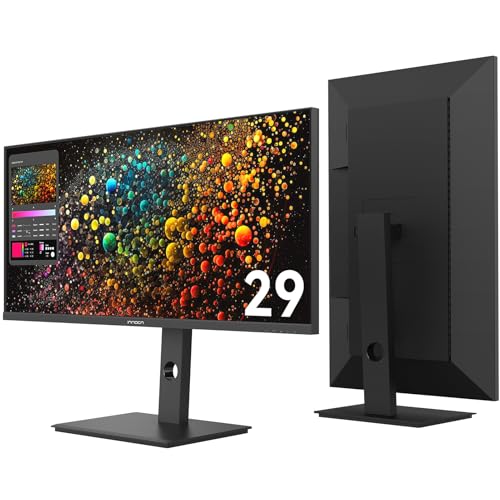
Crafted with creators and multitaskers in mind, the INNOCN 29 Ultrawide Monitor offers an impressive 21:9 aspect ratio that provides 33% more horizontal space than standard displays. This 29-inch IPS screen with a 2560×1080 resolution delivers cinematic clarity, perfect for editing timelines or video calls. The 100Hz refresh rate ensures smooth visuals, enhancing gaming and streaming experiences. With a USB-C port supporting 65W Power Delivery, I can charge my devices while reducing cable clutter. Plus, the fully adjustable stand promotes ergonomic comfort, making it a versatile choice for both productivity and entertainment in any workspace.
Best For: Creators, professionals, and multitaskers seeking an expansive workspace for productivity and entertainment.
Pros:
- Fully adjustable stand promotes ergonomic comfort during long hours of use.
- 100Hz refresh rate ensures smooth visuals for gaming, streaming, and video playback.
- USB-C port with 65W Power Delivery simplifies connectivity and reduces cable clutter.
Cons:
- Limited to a 2560×1080 resolution, which may not satisfy users needing higher pixel density.
- Some users may find the 29-inch size less immersive compared to larger ultrawide monitors.
- The sleek black finish may not appeal to all aesthetic preferences or office decors.
MSI Optix MAG342CQR Gaming Curved Monitor

The MSI Optix MAG342CQR Gaming Curved Monitor is an exceptional choice for gamers seeking an immersive experience with its stunning 34-inch UWQHD resolution and 1500R curvature. The 21:9 aspect ratio provides a wider viewing angle, enhancing gameplay with vibrant visuals. With a fast 144Hz refresh rate and 1ms response time, I enjoy smooth, tear-free gaming, thanks to AMD FreeSync support. The narrow bezel design keeps me focused, while the adjustable stand allows for personalized comfort. Plus, Mystic Light adds a cool customizable touch. This monitor truly elevates my gaming experience and is a fantastic addition to any setup.
Best For: Gamers looking for an immersive experience with high performance and vibrant visuals.
Pros:
- High UWQHD resolution (3440 x 1440) with a 21:9 aspect ratio for an expansive viewing experience.
- Fast 144Hz refresh rate and 1ms response time for smooth, tear-free gameplay.
- Ergonomic adjustments and narrow bezel design enhance comfort and immersion.
Cons:
- Curved design may not appeal to all users or setups.
- Brightness of 300 nits may be less than some competitors in bright environments.
- Limited connectivity options compared to some other gaming monitors.
LG UltraWide QHD 34-Inch Curved Computer Monitor (34WQ73A-B)

For professionals who juggle multiple tasks, the LG UltraWide QHD 34-Inch Curved Computer Monitor (34WQ73A-B) stands out as an exceptional choice. Its 3440 x 1440 resolution and 21:9 aspect ratio provide ample screen real estate for multitasking, whether I’m in meetings or comparing reports side by side. With 99% sRGB color accuracy, my creative projects look stunning. The built-in KVM switch and LG Dual Controller simplify managing multiple devices, while the USB Type-C port reduces cable clutter. Plus, eye care technologies like Reader Mode and Flicker Safe make long work hours more comfortable. This monitor’s performance is truly impressive!
Best For: Professionals who require a high-resolution, multitasking-friendly monitor for creative work and efficient workflow management.
Pros:
- 99% sRGB color coverage ensures highly accurate color reproduction for graphic design and photography.
- Built-in KVM switch allows control of two computers with one monitor, enhancing productivity.
- Eye care technologies like Reader Mode and Flicker Safe reduce eye strain during extended use.
Cons:
- The curved design may not appeal to everyone and could take time to get used to.
- Limited gaming features compared to dedicated gaming monitors, such as high refresh rates.
- Higher price point compared to standard monitors, which might not fit all budgets.
Samsung 49 Odyssey OLED G9 Gaming Monitor (G91SD)

If you’re looking for a monitor that seamlessly blends gaming and productivity, the Samsung 49 Odyssey OLED G9 (G91SD) stands out with its stunning QD-OLED display technology. Its 5120 x 1440 resolution and vibrant color accuracy deliver exceptional clarity, perfect for multitasking or immersive gaming. The 0.03ms response time and 144Hz refresh rate ensure smooth gameplay, while features like Picture-in-Picture enhance productivity. Plus, with ergonomic adjustments and a sleek design, it looks great in any workspace. Although some users mention a desire for more USB ports, the overall performance and versatility make it a top choice for both gamers and professionals.
Best For: Gamers and professionals seeking a high-quality, versatile monitor that excels in both immersive gaming and productivity tasks.
Pros:
- Exceptional QD-OLED display technology providing vibrant colors and true blacks.
- Ultra-fast 0.03ms response time and 144Hz refresh rate for smooth gameplay.
- Ergonomic design with adjustable stand and multitasking features like Picture-in-Picture.
Cons:
- Limited USB port options, which may not accommodate all peripherals.
- Potential burn-in risks associated with OLED technology.
- Some users report the brightness level may not meet their expectations.
SANSUI 34 Inch Curved Ultrawide Gaming Monitor

Looking for an immersive gaming experience? The SANSUI 34 Inch Curved Ultrawide Gaming Monitor delivers just that with its 3440×1440 UWQHD resolution and 1500R curvature. The fast VA panel boasts a 240Hz refresh rate and 1ms response time, making every action seamless. Plus, with HDR support and vibrant color accuracy (sRGB 130%, DCI-P3 97%), your games will look stunning. It features adaptive sync technologies, PIP/PBP modes, and AI enhancements to elevate your gameplay. With HDMI2.1 and DP1.4 ports, connectivity’s a breeze. Backed by a 30-day guarantee and lifetime support, this monitor is a solid investment for any gamer.
Best For: Gamers seeking an immersive experience with high refresh rates and vibrant visuals.
Pros:
- Fast 240Hz refresh rate and 1ms response time for smooth gameplay.
- Curved 1500R design enhances immersion and viewing comfort.
- Multiple connectivity options including HDMI2.1 and DP1.4 for versatile setup.
Cons:
- No built-in speakers, requiring external audio solutions.
- Limited ergonomic adjustments (tilt only) compared to some competitors.
- HDR performance may not be as impactful as higher-end models.
Monoprice 40in Ultrawide 1440P Productivity Monitor

The Monoprice 40in Ultrawide 1440P Productivity Monitor stands out as an exceptional choice for professionals and creatives who thrive on multitasking. With its impressive 3440x1440P resolution and vibrant IPS panel, colors pop and details shine, making my projects come alive. The 144Hz refresh rate ensures smooth motion, whether I’m editing videos or gaming. Plus, the flat design offers stability and a generous workspace. While the OSD can be a bit tricky, the connectivity options are versatile. Overall, I appreciate its quality, and with an average rating of 4.8 stars, it’s clear I’m not alone in my praise.
Best For: Professionals and creatives who require a high-resolution display for multitasking and vibrant visuals.
Pros:
- Immersive Ultrawide Quad HD (3440x1440P) resolution for enhanced productivity.
- 144Hz refresh rate for smooth motion, ideal for video editing and gaming.
- Versatile connectivity options including HDMI, DisplayPort, and USB A ports.
Cons:
- On-screen display (OSD) navigation can be tricky and outdated.
- Console gaming limited to 100Hz via HDMI; full 144Hz only available through DisplayPort.
- Built-in audio may be insufficient at full volume, requiring external speakers.
LG UltraWide FHD 29-Inch Computer Monitor (29WQ600-W)

For those who juggle multiple tasks or enjoy immersive gaming experiences, the LG UltraWide FHD 29-Inch Computer Monitor (29WQ600-W) stands out as an excellent choice. With its 29-inch IPS display and 2560×1080 resolution, it offers vibrant visuals and accurate colors. The sleek design features thin bezels, making it a stylish addition to any workspace. I love the 1-millisecond Motion Blur Reduction and AMD FreeSync, which enhance my gaming sessions. Plus, its versatile connectivity options, including USB-C, keep my desk organized. While it lacks height adjustment, its overall performance and affordability make it a fantastic investment for productivity and casual use.
Best For: Users seeking a budget-friendly monitor for multitasking, casual gaming, and content creation with vibrant visuals.
Pros:
- High-quality IPS display with 2560×1080 resolution and HDR support for enhanced visuals.
- Fast response time of 1 millisecond and AMD FreeSync technology for smooth gaming experiences.
- Versatile connectivity options including HDMI, DisplayPort, and USB-C, helping to reduce desk clutter.
Cons:
- Limited adjustment options with only tilt functionality and no vertical height adjustment.
- Short connection cables which may require extensions for certain setups.
- Not suitable for high-end gaming or professional color-critical tasks due to its specifications.
Factors to Consider When Choosing Ultrawide Monitors for Productivity
When I think about choosing an ultrawide monitor for productivity, I consider several key factors. Screen size and resolution play a vital role, as does the importance of aspect ratio. Additionally, I can’t overlook refresh rates, color accuracy, and the variety of connectivity options available.
Screen Size and Resolution
Choosing the right screen size and resolution is vital for maximizing productivity with an ultrawide monitor. I’ve found that larger screens, like 34 inches or more, really enhance multitasking by providing extensive workspace. However, they may require a bigger desk and a bit more viewing distance. When it comes to resolution, I recommend going for at least 3440×1440 (WQHD) or even 5120×1440 (Dual QHD) for sharper images and clearer text, which ultimately reduces eye strain during long sessions. It’s essential to balance size and resolution; a higher resolution on a large screen can demand more powerful graphics hardware. Always align your choice with your intended use, whether it’s design work, multitasking, or general productivity.
Aspect Ratio Importance
After considering screen size and resolution, another key factor I find important is the aspect ratio of an ultrawide monitor. The aspect ratio determines the width-to-height proportion, with common options like 21:9 and 32:9. I appreciate that a wider ratio, like 32:9, nearly doubles the horizontal space of a traditional 16:9 monitor, which greatly enhances my multitasking ability. However, it’s crucial to think about compatibility too. Some applications may not fully utilize the ultrawide screen or require adjustments. Monitors with a 21:9 aspect ratio strike a nice balance, offering immersion while remaining compatible with various productivity tasks like video editing and coding. Ultimately, your choice should align with your primary use case.
Refresh Rate Considerations
While I often focus on screen size and resolution, the refresh rate of an ultrawide monitor is equally essential for enhancing productivity. A higher refresh rate, like 120Hz or above, offers smoother motion and reduces motion blur, which can be critical during fast-paced tasks such as video editing. For productivity, I recommend aiming for at least a 75Hz refresh rate to guarantee responsive interactions and minimize lag. This considerably impacts scrolling fluidity, window switching, and overall multitasking on ultrawide screens. However, keep in mind that monitors with high refresh rates may require more powerful graphics hardware. When choosing, balance the refresh rate with other features like resolution and connectivity to align with your workflow needs.
Color Accuracy Features
When optimizing productivity with an ultrawide monitor, color accuracy features play a significant role. I always look for monitors that support wide color gamuts like sRGB 99% or DCI-P3 95% for vibrant, accurate colors. HDR support, such as HDR10 or DisplayHDR 400, is also essential, enhancing contrast and color depth for lifelike images. Factory calibration or built-in color calibration tools are must-haves to guarantee consistent accuracy right out of the box. I prioritize IPS panels, as they provide better color consistency and wider viewing angles compared to VA or TN options. Finally, I review user and professional feedback on color fidelity, especially for tasks like photo editing or graphic design, to gauge real-world performance.
Connectivity Options Available
Connectivity options are essential for maximizing the productivity benefits of an ultrawide monitor. I always look for models with multiple input ports, like HDMI, DisplayPort, USB-C, and USB-A, as they allow me to connect various devices simultaneously. The USB-C ports are especially handy since they often support power delivery, charging my laptop and peripherals with a single cable. When I consider the number and type of ports, I make certain compatibility with my gaming console, desktop, and laptop, which affects my setup’s flexibility. Some monitors even include built-in hubs or multi-port docks, making data transfer and device charging effortless. Overall, the right connectivity options simplify my workspace and enhance my productivity experience.
Ergonomic Design Elements
Choosing an ultrawide monitor with ergonomic design elements is essential for maintaining comfort during long work sessions. I always look for an adjustable stand that allows me to customize height, tilt, swivel, and pivot. This flexibility helps me find the perfect viewing angle. Curved screens, like 1500R or 1800R, also catch my eye since they reduce eye strain by matching the natural curvature of my vision. VESA mount compatibility is another vital factor; it lets me attach my monitor to wall mounts or adjustable arms, promoting better posture. Finally, ensuring my monitor is at eye level and at an appropriate distance minimizes neck and eye strain, making a world of difference for my productivity and comfort.
Eye Care Technologies
To guarantee a comfortable and productive work environment, I pay close attention to eye care technologies in ultrawide monitors. Features like blue light reduction are essential for minimizing eye fatigue, especially during those late-night work sessions. I also look for flicker-free backlighting, which eliminates screen flickering that can lead to discomfort and headaches over time. Automatic brightness adjustments adapt the display to different lighting conditions, ensuring a consistent and comfortable viewing experience. I prefer monitors with TÜV Rheinland certification, as it indicates they meet safety standards for reducing eye strain. Integrated eye care modes further enhance long-term eye health, making these technologies a crucial consideration when selecting an ultrawide monitor for productivity.
Multi-tasking Capabilities
With eye care technologies set for comfort, I can focus on another key aspect of ultrawide monitors: their multitasking capabilities. These monitors often come with multiple input ports and features like Picture-in-Picture (PIP) or Picture-by-Picture (PBP), letting me use various applications and devices seamlessly. High-resolution displays, such as Dual QHD or Ultra-WQHD, enable me to arrange multiple windows side-by-side without losing clarity, which boosts my workflow efficiency. Plus, split-screen software and customizable window management tools make organizing tasks a breeze. With multi-input support and remote display controls, I can monitor different sources simultaneously, eliminating the need for extra screens. Ultimately, the spacious screen real estate and ergonomic adjustments assure I can work comfortably for extended periods.
Frequently Asked Questions
What Is the Average Lifespan of an Ultrawide Monitor?
The average lifespan of an ultrawide monitor is typically around 5 to 10 years, depending on usage and care. I’ve found that factors like brightness settings, usage hours, and environmental conditions can impact longevity. Regularly cleaning the screen and keeping it away from extreme temperatures can help extend its life. So, if you take good care of it, you might enjoy your ultrawide monitor for years to come!
Can Ultrawide Monitors Support Multiple Devices Simultaneously?
Yes, ultrawide monitors can support multiple devices simultaneously. I’ve experienced this firsthand with my setup. By using Picture-by-Picture (PBP) or Picture-in-Picture (PiP) modes, I can easily switch between my laptop and desktop without hassle. It’s incredibly efficient for multitasking, whether I’m working on a project or streaming content. Just make sure to check the monitor’s specifications to verify it has the necessary ports to connect all your devices.
Are Ultrawide Monitors Suitable for Console Gaming?
Yes, ultrawide monitors are definitely suitable for console gaming! I’ve experienced the immersive gameplay they offer, thanks to their wider field of view. It enhances the overall experience, especially for racing and adventure games. Just keep in mind that not all games support ultrawide resolutions, so you might encounter some letterboxing. Still, when the game does support it, the visuals can be stunning, making it a fantastic choice for any gamer.
How Do Ultrawide Monitors Affect Eye Strain During Long Use?
Ultrawide monitors can actually help reduce eye strain during long use for me. The wider screen allows for a more natural viewing experience, letting my eyes relax as I take in the entire display without constantly shifting focus. I’ve noticed that the reduced need for scrolling and switching between windows makes my work feel less taxing. However, I still make sure to take regular breaks and adjust the brightness to suit my environment.
What Is the Best Way to Mount an Ultrawide Monitor?
The best way to mount an ultrawide monitor is to use a sturdy VESA-compatible mount. I prefer adjustable arms because they let me position my screen perfectly for comfort. Make sure to check the weight capacity and compatibility with my monitor’s size. I usually find it helpful to measure my desk space beforehand. Once mounted, I can easily adjust the height and angle, improving my overall productivity and reducing neck strain during long sessions.
Conclusion
In the quest for ultimate productivity, you might think a bigger screen is the magic solution, right? Well, it turns out that sometimes, juggling multiple ultrawide monitors can feel like a circus act—just with fewer clowns and more cables. Still, if you choose wisely, an ultrawide monitor can transform your workspace into a productivity powerhouse. So, embrace the irony: in this world of endless screen real estate, finding balance might be the real challenge!

Sophia has a vibrant background in fashion and digital media from Milan, Italy. She leverages her extensive network in the fashion industry to create engaging content that resonates with our global audience, enhancing our online presence. Sophia is adept at crafting compelling narratives that captivate our followers.