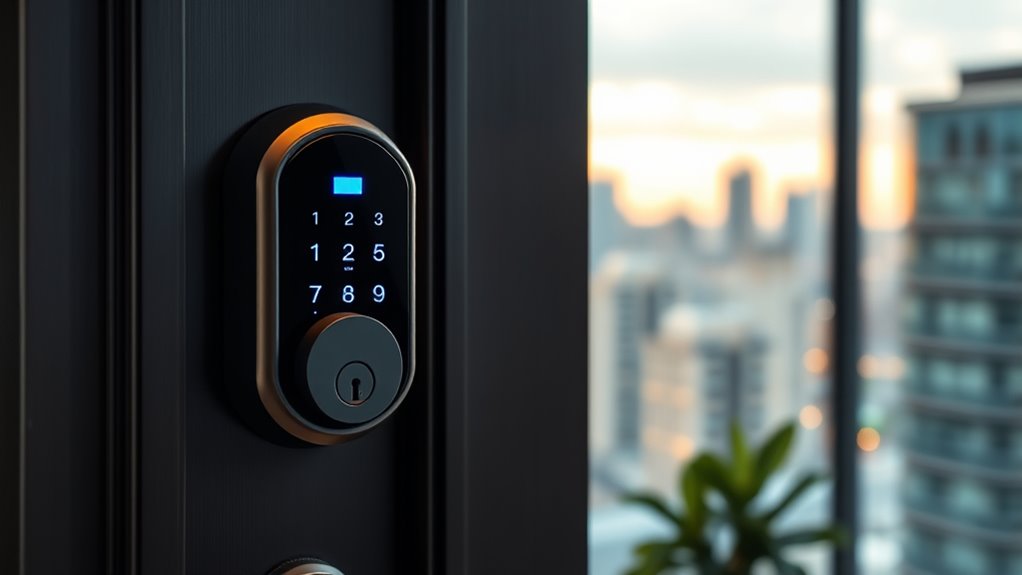

If you’re looking for the best smart locks for apartments in 2025, I recommend options that combine easy installation, multiple access methods, and robust security features. Many models support keyless entry, fingerprint, app control, and voice commands, with reliable Wi-Fi and Bluetooth connectivity. They also include auto-lock, activity logs, and durable design. If you keep exploring, you’ll find ways to select the perfect lock that suits your lifestyle and keeps your space secure effortlessly.
Key Takeaways
- Choose smart locks with multiple access methods like fingerprint, passcodes, app, and voice control for versatile apartment security.
- Prioritize models with easy DIY installation and compatibility with standard door sizes for quick setup.
- Opt for locks with strong encryption, activity logs, and auto-lock features to enhance security and monitor access.
- Consider weather-resistant and durable options suitable for outdoor or high-traffic apartment environments.
- Ensure the lock supports smart home integrations (Alexa, Google, Apple) for seamless control and automation.
Philips Retrofit Smart Lock 230X


If you’re looking for a smart lock that easily upgrades your existing deadbolt without the hassle of hardware changes, the Philips Retrofit Smart Lock 230X is an excellent choice. It works with standard deadbolts, so you won’t need to replace your hardware or keys. With built-in Wi-Fi, you can control it remotely through the Philips Home Access App from anywhere. It also supports voice commands via Alexa and Google Assistant, and features auto-lock for added convenience. Setup is simple—just connect the lock to your Wi-Fi, scan a QR code, and you’re ready. This lock keeps your existing keys, blending traditional security with modern smart features effortlessly.
Best For: homeowners seeking an easy, hardware-neutral upgrade to their existing deadbolt with remote access and voice control capabilities.
Pros:
- Maintains existing key access, ensuring traditional security remains intact
- Easy installation process with no need for hardware replacement
- Supports remote control via Wi-Fi and voice commands through Alexa and Google Assistant
Cons:
- Requires a stable Wi-Fi connection for optimal performance
- Limited to standard deadbolt compatibility, may not fit all door types
- Customer support hours are limited to weekdays and specific weekend times
SwitchBot Smart Lock WiFi, Electronic Deadbolt for Front Door

The SwitchBot Smart Lock WiFi stands out as an excellent choice for renters and homeowners who want a hassle-free, keyless entry solution that easily retrofits onto existing deadbolts. It installs in minutes using only 3M adhesive, requiring no tools, and works with various lock types without altering your hardware. You can control it remotely via the SwitchBot app or voice commands with Google, Siri, or Alexa. Its AES-128 encryption keeps your access secure, and it runs on batteries that last around 180 days. With features like auto-lock, notifications, and Apple Watch compatibility, this lock offers convenience and peace of mind for modern living.
Best For: Renters and homeowners seeking a quick, tool-free, keyless upgrade to their existing deadbolt with remote control and smart features.
Pros:
- Easy installation with no tools needed, using only 3M adhesive in minutes
- Compatible with various lock types without modifying existing hardware
- Supports remote control, voice commands, auto-lock, notifications, and Apple Watch integration for enhanced convenience and security
Cons:
- Battery life may require frequent replacements, approximately every 180 days with regular use
- Limited to electronic deadbolts with specific sizes and types, potential compatibility issues with some locks
- Requires WiFi connection and smartphone app for full functionality, which may not be suitable for users seeking purely offline solutions
Smart Door Handle Lock with Keypad, Fingerprint, and App Control

For landlords, property managers, and Airbnb hosts seeking flexible yet secure access options, the Yamiry Fingerprint Smart Knob stands out with its 6-in-1 open methods. It supports fingerprint recognition, Bluetooth app control, personalized passcodes, key fobs, mechanical keys, and Alexa voice release (with WiFi gateway). You can remotely lock or release, generate temporary codes, and track access history through the app. Installation is quick—about 10 minutes—on most standard doors, with no extra drilling needed. Its reversible handle fits both left and right-handed doors, making it a versatile choice for managing multiple properties securely and conveniently.
Best For: landlords, property managers, and Airbnb hosts seeking a secure, versatile, and remotely manageable smart lock solution.
Pros:
- Supports 6-in-1 unlocking methods including fingerprint, app control, passcodes, key fobs, keys, and Alexa voice commands for maximum flexibility.
- Easy 10-minute installation on standard doors without extra drilling, suitable for both left and right-handed doors.
- Allows remote lock management, temporary access code generation, and access history tracking via mobile app for convenient property oversight.
Cons:
- Requires batteries (not included) that need regular replacement for uninterrupted operation.
- Alexa voice unlocking requires additional WiFi gateway, adding extra setup steps and cost.
- Some users may find the app setup process complex or encounter compatibility issues with certain smartphone models.
Nuki Smart Lock WiFi Electronic Deadbolt with App Control
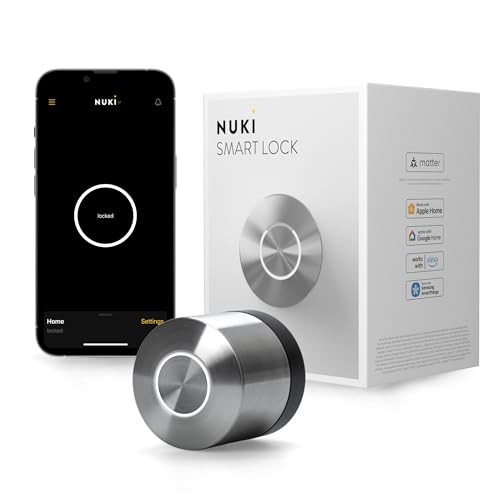
With its seamless app control and quick installation, the Nuki Smart Lock WiFi Electronic Deadbolt is an ideal choice for renters seeking a secure, keyless entry system. It installs easily within 15 minutes on the inside of your door without drilling, fitting over your existing deadbolt. The lock supports Bluetooth, Wi-Fi, and Matter over Thread, ensuring versatile connectivity. Features like Auto Unlock provide hands-free access, while the app lets you share digital keys and monitor activity. Built with bank-level encryption and tamper alerts, it offers top-tier security. Plus, the battery lasts for months and charges in just 2 hours, making it a reliable, user-friendly smart lock option.
Best For: renters and homeowners seeking a secure, easy-to-install, keyless entry solution with versatile smart home compatibility.
Pros:
- Quick and easy installation within 15 minutes without drilling over existing deadbolt
- Supports multiple connectivity options including Bluetooth, Wi-Fi, and Matter over Thread for seamless smart home integration
- Provides high-level security features such as bank-level encryption, tamper alerts, and activity monitoring
Cons:
- Requires a compatible smartphone and app for full functionality
- Premium subscription features are included free only until December 2025, after which they may incur additional costs
- Dependence on batteries means periodic charging or replacement is necessary for continuous operation
Keyless Digital Keypad Door Lock with Handle

If you’re looking for a smart lock that offers versatile access options and seamless control, the Keyless Digital Keypad Door Lock with Handle is an excellent choice. It provides multiple ways to open, including fingerprint recognition, passcodes, key fobs, mechanical keys, and voice control via Alexa. You can manage the lock remotely using the Tuya app, assign temporary or permanent access, and review entry logs anytime. Installation is quick and tool-free, compatible with standard U.S. doors. With features like auto-lock and remote control, this lock guarantees convenience and security for any apartment, making it ideal for property managers and busy households alike.
Best For: busy households, property managers, and vacation rental owners seeking a versatile, secure, and easy-to-install smart lock solution.
Pros:
- Multiple access options including fingerprint, passcodes, key fobs, and voice control for convenience
- Remote management features via Tuya app allow easy control and user access customization
- Quick, tool-free installation suitable for standard U.S. doors
Cons:
- Requires Wi-Fi connection for remote and voice control features
- May have a learning curve for users unfamiliar with smart lock technology
- Limited to compatible doors, so may not fit all door types or sizes
Smart Door Lock with Handle, Keyless Entry and Remote Passcode Generation

A smart door lock featuring a handle, keyless entry, and remote passcode generation is ideal for busy homeowners seeking seamless security. With multiple access methods like the Tuya app, fingerprint, keypad, NFC card, or mechanical key, you can effortlessly control who enters your home. The advanced biometric technology allows for quick, 0.5-second fingerprint unlocks, perfect for high-security areas. Manage access remotely, assign temporary codes, and track entry logs via the app. Its auto-lock feature guarantees your door is always secure, while easy installation fits standard wooden doors without tools. This lock combines convenience and security for modern living.
Best For: busy homeowners and families seeking a secure, convenient, and modern keyless entry solution for their homes or apartments.
Pros:
- Multiple access methods including app, fingerprint, keypad, NFC, and mechanical key for versatile entry options.
- Fast 0.5-second fingerprint unlock with advanced biometric technology for quick security.
- Remote management via app allows for easy access control, logs, and auto-lock settings from anywhere.
Cons:
- Requires compatible wooden doors and installation may be challenging for non-technical users.
- Battery-dependent operation; backup power sources or manual keys are necessary in case of battery failure.
- Limited to specific door thicknesses (1.18-1.97 inches), which may not suit all door types.
Yale Matte Black Smart Lock with Google Matter

The Yale Matte Black Smart Lock with Google Matter stands out as an ideal choice for tech-savvy renters and homeowners seeking seamless smart home integration. It works effortlessly with Google ecosystem devices like Google TV, Nest Hub, and Nest Wi-Fi Pro, thanks to its Matter technology, which guarantees compatibility across various brands. The lock supports standard US and Canadian doors, includes an adapter for smaller bore holes, and features a traditional key backup for added reliability. With remote management via the Google Home app, custom entry codes, and voice control options, it offers both security and convenience—perfect for modern living. Its sleek matte black finish blends style with durability.
Best For: homeowners and renters seeking a sleek, compatible, and secure smart lock that integrates seamlessly with Google ecosystem devices and supports remote access.
Pros:
- Seamless integration with Google Home ecosystem, including Google TV and Nest devices
- Supports standard US and Canadian doors with an adapter for smaller bore holes, plus traditional key backup
- Certified ANSI/BHMA Grade 2 security with durable matte keypad and energy-efficient Matter over Thread technology
Cons:
- Requires a Matter-enabled hub for remote access and control from anywhere
- May have a learning curve for users unfamiliar with smart lock setup and app management
- Limited to specific finishes (matte black), which may not match all home aesthetics
Philips Wi-Fi Smart Door Lock with Keyless Entry

For busy individuals seeking seamless access, the Philips Wi-Fi Smart Door Lock with Keyless Entry stands out with its versatile open options, including app control, passcodes, fingerprint, voice commands, and physical keys. You can create up to 100 custom passcodes for family, friends, or renters, and quick one-touch fingerprint opening makes mornings easier. The built-in Wi-Fi enables remote control without extra hubs, and real-time notifications keep you updated on door activity. With auto-lock settings and Away Mode for added security, this lock offers both convenience and peace of mind. Installation is straightforward, fitting most doors, and voice control integrates smoothly with Alexa and Google Assistant.
Best For: busy homeowners and families seeking a versatile, remote-controlled smart lock with keyless entry and enhanced security features.
Pros:
- Supports multiple unlocking methods including app control, passcodes, fingerprint, voice commands, and physical keys.
- Enables remote access and real-time activity notifications without needing an extra hub.
- Auto-lock and Away Mode features provide added convenience and security during trips or busy mornings.
Cons:
- Requires 2.4GHz Wi-Fi network within 65 feet, limiting placement options.
- Batteries (not included) need regular replacement to ensure optimal operation.
- No built-in door sensor, so it does not automatically detect door open or close status.
GHome Smart Fingerprint Door Lock, 4-in-1 Keypad & App Control Biometric Door Knob

If you’re looking for a smart lock that combines ease of use with robust security, the GHome Smart Fingerprint Door Lock stands out as an excellent choice. It offers four access methods: fingerprint recognition (20 fingerprints), personalized passwords (20 available), app control, and mechanical keys for emergencies. Made of durable aluminum, it’s easy to install and fits standard doors. The lock open in just 1.5 seconds with 99.9% accuracy, and all data is stored locally for privacy. With auto-lock, remote management, and a long-lasting rechargeable battery, this lock provides seamless security and convenience for apartments, homes, or offices.
Best For: homeowners, renters, and small business owners seeking a secure, easy-to-install smart lock with multiple access options.
Pros:
- Fast, accurate fingerprint recognition with a 1.5-second unlock time and 99.9% accuracy
- Local data storage ensures user privacy and high security without cloud dependency
- Easy installation requiring only basic tools, suitable for various door types
Cons:
- Battery life may require regular recharging, especially with frequent use
- Limited to 20 fingerprint and password slots, which may not suffice for larger households or businesses
- Compatibility with non-standard door thicknesses or styles may require additional adapters or adjustments
August Home Smart Lock, 3rd Generation – Silver

Built for renters and homeowners alike, the August Home Smart Lock (3rd Generation, Silver) offers a seamless upgrade to your existing deadbolt with quick, easy installation. It replaces the thumbturn inside, transforming your lock into a smart device while keeping the traditional exterior look intact. You can control it via the August app or Apple Watch, with features like auto-unlock for hands-free entry, auto-lock for added security, and DoorSense technology to confirm if your door is securely closed. Compatible with most single-cylinder deadbolts, it’s a flexible, portable solution that enhances convenience and security without requiring special tools or expertise.
Best For: homeowners and renters seeking an easy-to-install, portable smart lock that enhances security and convenience without altering the exterior appearance.
Pros:
- Quick and easy installation within approximately 10 minutes without special tools
- Maintains the traditional exterior lock appearance while offering smart features
- Compatible with most single-cylinder deadbolts and suitable for renters
Cons:
- Limited to single-cylinder deadbolts; not compatible with all lock types
- Requires a smartphone or Apple Watch for full functionality; may not suit users without smart devices
- Some users may experience connectivity issues with the August app or Bluetooth range
eufy Security Smart Lock C220, Fingerprint Keyless Entry Door Lock

The eufy Security Smart Lock C220 stands out for its advanced fingerprint recognition system, making it an excellent choice for anyone seeking quick, secure access without fumbling for keys. Its self-learning AI improves recognition accuracy over time, minimizing unlocking errors. You can also use the keypad, physical key, app control, Apple Watch, or voice commands with Alexa or Google Assistant for flexible access options. It features alarm notifications for suspicious attempts, a waterproof IP53 rating, and handles extreme temperatures from -22℉ to 158℉. Powered by 8 AA batteries, it lasts about 8 months and connects directly to Wi-Fi for remote control through the eufy app.
Best For: those seeking a secure, versatile, and easy-to-install smart lock with keyless entry options and remote control capabilities.
Pros:
- Advanced self-learning AI enhances fingerprint recognition accuracy over time.
- Multiple access methods including fingerprint, keypad, app, physical key, Apple Watch, and voice commands.
- Built-in Wi-Fi allows remote management and real-time notifications without additional hubs.
Cons:
- Battery life (~8 months) may require frequent replacements depending on usage.
- Installation, while straightforward, may still pose challenges for some users unfamiliar with do-it-yourself projects.
- IP53 waterproof rating provides limited water resistance, which may not suit extremely harsh outdoor environments.
TEEHO TE001 Keyless Entry Door Lock with Keypad

The TEEHO TE001 Keyless Entry Door Lock with Keypad stands out for its user-friendly setup and versatile access options, making it an ideal choice for busy homeowners and renters alike. It features a keypad with 20 user codes, including a temporary guest code, plus automatic locking and anti-peeping password protection. Made from durable aluminum alloy with weather resistance, it’s built to last both indoors and outdoors. Installation is straightforward with just a screwdriver, and it doesn’t require batteries — they’re included. With a sleek matte black finish, a back-lit keypad, and smart security features, this lock combines convenience and reliability seamlessly.
Best For: busy homeowners and renters seeking a reliable, easy-to-install keyless lock with versatile access options and weather-resistant durability.
Pros:
- User-friendly installation requiring only a screwdriver, suitable for both men and women.
- Supports 20 user codes, including a temporary guest code, enhancing convenience for family and guests.
- Durable aluminum alloy construction with weather resistance (IP54), suitable for indoor and outdoor use.
Cons:
- Not compatible with door holes smaller than 54mm (2-1/8 inches).
- Requires proper battery maintenance, as low battery alerts are necessary to prevent lockouts.
- Limited to standard door setups; may need additional accessories for non-standard installations.
Video Smart Lock with Camera & Doorbell, 5-in-1 Keyless Entry Door Lock
If you’re looking for a smart lock that combines security with convenience, the Video Smart Lock with Camera & Doorbell, 5-in-1 Keyless Entry Door Lock, is an excellent choice. It features an auto-lock system that secures your door seconds after closing, reducing security worries. The built-in camera and doorbell allow real-time video monitoring and instant alerts for visitors or deliveries. With five unlocking options—fingerprints, PIN codes, IC cards, app control, and backup key—you can easily grant access to family, guests, or contractors. Its quick, no-drill installation and activity logs give you peace of mind while keeping your front door secure and accessible.
Best For: homeowners, renters, or property managers seeking a secure, convenient, and feature-rich smart lock with integrated video and versatile access options.
Pros:
- Auto-lock feature enhances security by automatically securing the door after closing.
- Multiple unlock methods including fingerprints, PINs, IC cards, app, and backup key provide flexible access.
- Built-in camera and doorbell enable real-time monitoring and instant visitor alerts from anywhere.
Cons:
- Requires 4 AA batteries, which need replacement approximately every 8 months.
- DIY installation, while quick, may be challenging for individuals unfamiliar with tools or door adjustments.
- Emergency unlocking relies on USB-C port, which may be less convenient during power or device failures.
Fingerprint Door Lock, Smart Biometric Door Handle with Passcode Keyless Entry

For those seeking a quick and secure way to open their door, the Fingerprint Door Lock with its 0.3-second recognition speed offers a seamless experience. It features 4-in-1 access: fingerprint, passcode, mechanical keys, and app control, making it versatile and user-friendly. The upgraded large fingerprint sensor improves accuracy and stability, handling up to 100 fingerprints and 50 passcodes. It’s compatible with standard US doors and easy to install on either side. Plus, it includes an emergency USB port for power, low battery alerts, and sleek black zinc alloy design. Overall, it’s a reliable and modern choice for enhanced home security.
Best For: homeowners and renters seeking a secure, quick, and versatile keyless entry solution with smart connectivity.
Pros:
- Fast recognition speed of 0.3 seconds ensures quick door access.
- 4-in-1 access methods provide flexible entry options including fingerprint, passcode, mechanical keys, and app control.
- Upgraded large fingerprint sensor enhances accuracy and stability, accommodating up to 100 fingerprints.
Cons:
- Requires 4 AAA batteries (not included), which may need frequent replacement depending on usage.
- Compatibility limited to US standard doors with specific back panel and thickness dimensions.
- No included batteries and limited information on battery life could lead to concerns over long-term power management.
Philips Fingerprint Keyless Door Lock with Touchscreen
Anyone seeking a secure, high-tech lock that combines biometric fingerprint recognition with multiple access options will appreciate the Philips Fingerprint Keyless Door Lock with Touchscreen. It recognizes fingerprints in just 0.3 seconds with 99.99% accuracy and supports unlimited one-time PIN codes, perfect for guests or deliveries. The lock features a touchscreen keypad, mechanical keys, and customizable auto-lock from 30 to 180 seconds. Installation is straightforward, compatible with most standard doors, and setup is voice-guided. Powered by batteries with a 24-month warranty and lifetime support, this lock offers flexible, reliable security with ease of use.
Best For: homeowners and property managers seeking a secure, high-tech lock with biometric, PIN, and mechanical key options for convenient and flexible access.
Pros:
- Fast fingerprint recognition with 99.99% accuracy in just 0.3 seconds
- Supports unlimited one-time PIN codes for versatile guest and delivery access
- Easy, voice-guided installation compatible with most standard doors
Cons:
- Auto-lock only engages when the door is manually closed; it does not detect door open status
- Requires battery replacement when power drops below 20%, which may cause temporary lock unavailability
- Compatibility check needed before purchase to ensure proper fit and function with specific door thickness
Factors to Consider When Choosing Smart Locks for Apartments

When choosing a smart lock for my apartment, I focus on how well it works with my existing hardware and its security features. I also consider how easy it is to install, the control options available, and whether it suits my connectivity and power needs. These factors help me pick a lock that’s reliable, secure, and convenient to use.
Compatibility With Existing Hardware
Choosing a smart lock that fits your apartment’s existing hardware is crucial to guarantee a smooth installation process and reliable performance. First, verify the lock is compatible with your current deadbolt or handle without requiring major modifications. Check if it supports your door’s thickness, typically between 1-3/8″ and 2″, and whether the bore hole diameters match. It’s also important to confirm if the lock can be installed on your door type—wood, metal, or composite—without needing extra adapters. Before purchasing, ensure that the lock’s mounting mechanism and dimensions align with your hardware to avoid installation issues. Ultimately, consider if the smart lock allows for mechanical key access as a backup, ensuring you’re covered even if digital features fail.
Security and Encryption Levels
Are you confident that your smart lock’s security measures are strong enough to keep intruders out? High encryption standards like AES-256 are vital, as they offer robust protection against hacking attempts. End-to-end encryption ensures that communication between your app and the lock remains secure from interception, preventing unauthorized access. Secure pairing methods, such as QR codes or physical buttons, help reduce the risk of someone unauthorized pairing a device. Regular firmware updates from manufacturers are essential—they patch vulnerabilities and improve encryption protocols over time. Additionally, multi-factor authentication adds an extra layer of security by combining passwords, biometric data, or physical keys. Prioritizing these security features ensures your smart lock effectively safeguards your apartment against potential threats.
Control and Access Options
Smart locks offer a variety of control and access options to suit different lifestyles and security needs. I look for multiple methods like keypad codes, fingerprint recognition, or smartphone app control, so I can choose what’s most convenient. Remote access via a mobile app or web platform is a game-changer—allowing me to lock or release my door from anywhere. The ability to generate and revoke temporary or one-time codes is essential for guests or service providers, adding flexibility without compromising security. Integration with voice assistants like Alexa or Google Assistant offers hands-free control, which I find very practical. Finally, activity logs or access history tracking help me monitor who entered and when, giving me peace of mind and added security.
Installation Ease and Compatibility
When selecting a smart lock for your apartment, it’s essential to guarantee it fits your door’s specifics and existing hardware to make installation smooth. Check if the lock is compatible with your door type, thickness, and hardware to avoid surprises. Opt for models supporting tool-free or minimal-tool installation to simplify setup, especially if you’re not tech-savvy. Reversible handles or adjustable components are helpful for fitting both left- and right-handed doors. It’s also important to ensure the lock works seamlessly with your preferred smart home ecosystem, like Alexa, Google Assistant, or Apple. Finally, look for locks that provide clear, step-by-step instructions or videos, making DIY installation straightforward and stress-free. Compatibility and ease of installation are key for a hassle-free smart lock experience.
Connectivity and Power Needs
Choosing the right smart lock for your apartment involves carefully considering its connectivity options and power needs. I recommend selecting a lock that supports your preferred connection, like Wi-Fi, Bluetooth, or Zigbee, to guarantee reliable remote access and smooth integration with other devices. It’s also important to verify the power source requirements, including battery type and lifespan, so you don’t face frequent replacements or lockouts due to power failure. Look for energy-efficient designs or low power consumption features that extend battery life and reduce maintenance costs. Additionally, choose a lock that provides low battery alerts to help you stay proactive. Finally, confirm if it can operate independently of internet connectivity or sync seamlessly with your home automation system, providing peace of mind in any situation.
Smart Home Integration
Ensuring your smart lock integrates smoothly with your existing home ecosystem can make managing your apartment much more convenient. First, check if the lock is compatible with your preferred smart home platforms like Alexa, Google Home, Apple HomeKit, or Matter, for seamless control. Also, verify that it supports multi-protocol options such as Wi-Fi, Bluetooth, Zigbee, or Z-Wave, matching your current devices. Consider if the lock can connect with other smart home gadgets like security cameras, doorbells, or automation systems, creating a detailed security setup. Remote access is essential, so see if it offers app control from anywhere. Lastly, confirm the firmware and software support regular updates to maintain security and compatibility with evolving smart home standards, keeping your system reliable and secure over time.
Frequently Asked Questions
How Do Smart Locks Impact Overall Apartment Security?
Smart locks substantially boost my apartment security by giving me keyless access and remote control. I can easily grant or revoke entry for friends or service providers without handing out physical keys. Plus, I get real-time alerts about who enters and when, which helps me stay informed and respond quickly if something seems off. Overall, they make my space more secure and my life much more convenient.
Are Smart Locks Compatible With All Smartphone Models?
Smart locks are like chameleons—they adapt to most smartphone models, making them quite versatile. I’ve found that most modern devices, whether iPhone or Android, work seamlessly with these locks thanks to Bluetooth or Wi-Fi compatibility. However, it’s always wise to double-check the lock’s specifications before purchasing. Rest assured, the chances are high that your smartphone, regardless of brand, will be compatible, making securing your apartment a breeze.
What Is the Typical Battery Life of These Smart Locks?
Typically, smart locks last about 6 to 12 months on a single set of batteries, depending on the model and usage. I recommend checking the lock’s battery indicator regularly so you’re not caught off guard. Some models even send alerts when batteries are running low. Replacing batteries is usually quick and straightforward, ensuring your lock stays secure without any hassle.
Can Smart Locks Be Integrated With Existing Home Automation Systems?
Yes, smart locks can usually be integrated with existing home automation systems, but it depends on the lock model and your setup. I’ve found that many are compatible with popular platforms like Alexa, Google Home, or Apple HomeKit. Before buying, I recommend checking the lock’s compatibility to guarantee seamless integration. This way, you can control your lock remotely, automate access, and even set up routines for added convenience.
What Are the Privacy Concerns Related to Smart Lock Data?
Think of your smart lock data as a secret diary—you want to keep it safe. Yes, there are privacy concerns, like potential hacking or unauthorized access to your access logs and personal info. I always recommend strong passwords, regular updates, and choosing brands with robust security measures. Protecting your lock data is like locking your door—necessary to keep intruders out and your privacy intact.
Conclusion
Choosing the right smart lock is like finding the perfect key to your digital castle—secure, reliable, and easy to use. As you weigh your options, remember that the best lock fits seamlessly into your lifestyle, offering peace of mind without complexity. With so many innovative choices, you’re well on your way to turning your apartment into a fortress of convenience and security. Your space deserves nothing less than smart, simple protection.