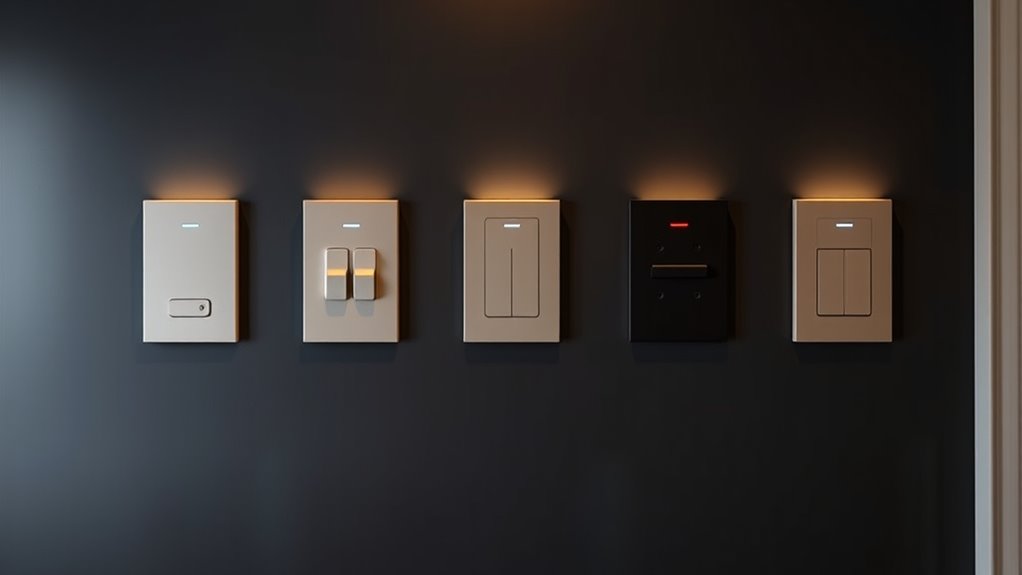

If you’re looking for the best premium smart light switches that blend style with smart home convenience, I’ve got you covered. These switches offer sleek designs, easy installation, and seamless compatibility with voice assistants like Alexa, Google, and Apple. Many support scheduling, automation, and remote control, making your home smarter and more stylish. Curious to find out which models stand out and how they can elevate your space? Keep going to explore more options and details.
Key Takeaways
- Top premium smart switches offer seamless integration with voice assistants like Alexa, Google, and Siri for convenience.
- They feature sleek, modern designs that enhance home aesthetics while providing reliable safety certifications.
- Installation is straightforward with app-guided setup, though some models require neutral wiring and professional installation.
- These switches support automation, scheduling, and remote control to optimize energy efficiency and security.
- They connect via Wi-Fi or Zigbee, eliminating the need for hubs, and support features like dimming and scene customization.
Kasa Smart Light Switch HS200P3, Single Pole, 2.4GHz Wi-Fi, 3 Count


If you’re looking for a reliable smart switch that’s easy to install and works seamlessly with your existing setup, the Kasa Smart Light Switch HS200P3 is an excellent choice. It’s a single pole switch that requires a neutral wire and connects via 2.4 GHz Wi-Fi. The pack includes three switches, making it perfect for multiple rooms. I love how straightforward the app-guided setup is, with clear instructions through Kasa or Tapo apps. You can control your lights remotely, set schedules, or activate ‘away mode’ for security. Plus, with Alexa and Google Assistant compatibility, hands-free control is just a voice command away.
Best For: homeowners seeking an easy-to-install, reliable smart switch that integrates seamlessly with voice assistants and supports remote control and scheduling.
Pros:
- Easy app-guided installation with clear step-by-step instructions
- Compatible with Alexa and Google Assistant for hands-free voice control
- Includes three switches, ideal for multi-room automation
Cons:
- Requires a neutral wire for installation, which may not be available in all homes
- Limited to 2.4 GHz Wi-Fi networks, not compatible with 5 GHz bands
- Must be installed by someone familiar with electrical wiring or a professional electrician
Leviton Decora Smart Wi-Fi Switch (2nd Gen)

The Leviton Decora Smart Wi-Fi Switch (2nd Gen) stands out as an ideal choice for homeowners seeking seamless smart lighting control without the need for a hub. It works with your existing Wi-Fi and supports Matter, making setup straightforward via the My Leviton app. Whether you want single pole or 3-way control, it’s compatible with wired or wire-free switches. You can schedule exterior lights, control everything remotely, or use voice commands with Alexa, Google Assistant, or Siri. Its auto-shutoff feature adds convenience and energy savings, while its sleek design fits well in any modern home. Installation is simple, with no hub required, and firmware updates expand its smart home capabilities.
Best For: homeowners seeking easy-to-install, hub-free smart lighting control with versatile wiring options and voice assistant compatibility.
Pros:
- No hub required; connects directly to existing Wi-Fi for quick setup.
- Supports both wired and wire-free 3-Way configurations, offering flexible installation options.
- Compatible with major voice assistants (Alexa, Google Assistant, Siri) and supports Matter for broader smart home integration.
Cons:
- Requires a neutral wire for installation, which may not be available in all homes.
- Limited to 15A and 3/4 HP load capacity, which may not suit high-power devices.
- Firmware updates needed to enable Matter support, which could involve additional steps or delays.
Kasa Smart Light Switch HS200, Single Pole, 2.4GHz Wi-Fi Light Switch

For those seeking a reliable, easy-to-install smart switch that seamlessly integrates with existing home setups, the Kasa Smart Light Switch HS200 stands out. Designed for single-pole wiring and requiring a neutral wire, it connects via 2.4GHz Wi-Fi and works with Google Home and Amazon Alexa. With dimensions of just over four inches, it’s compact and easy to fit. Setup is straightforward through the Kasa or Tapo app, and remote control lets you manage your lights from anywhere. Safety is assured with UL certification, and no hub is needed, making this switch a practical, stylish addition to any smart home.
Best For: homeowners seeking a reliable, easy-to-install smart light switch that integrates seamlessly with voice assistants and smart home systems.
Pros:
- Easy app-guided installation compatible with Kasa and Tapo apps
- Works with Amazon Alexa and Google Assistant for voice control
- UL certified for safety and no hub required for setup
Cons:
- Requires a neutral wire for installation, limiting compatibility with some wiring setups
- Only supports 2.4GHz Wi-Fi networks, not 5GHz
- Designed for single-pole wiring, not suitable for multi-way switches without additional components
Kasa Smart 2-Gang Wi-Fi Light Switch (HS200-2)

Looking for a smart light switch that combines sleek design with easy installation? The Kasa Smart 2-Gang Wi-Fi Light Switch (HS200-2) is perfect. Its 2-gang design lets you control two different circuits with a clean, flush look. It works with 2.4GHz Wi-Fi, Alexa, Google Assistant, and Samsung SmartThings—no hub needed. Installation is straightforward, requiring a neutral wire and simple app-guided setup via Kasa or Tapo. You can control and monitor your lights remotely, set schedules, and use Away Mode for security. It’s UL certified, reliable, and designed for seamless integration into your smart home.
Best For: homeowners or renters seeking an easy-to-install, stylish smart switch to control multiple circuits remotely with voice assistant compatibility.
Pros:
- Easy app-guided installation requiring only a neutral wire, no complex wiring needed
- Compatible with popular smart home platforms like Alexa, Google Assistant, and Samsung SmartThings
- Allows remote control, scheduling, and security features such as Away Mode
Cons:
- Requires a neutral wire for installation, which may not be available in all homes
- No mention of dimming capabilities, limiting lighting customization
- Installation may require an electrician if unfamiliar with electrical wiring
Kasa Matter Smart Light Switch

If seamless integration across multiple smart home platforms is a priority, the Kasa Matter Smart Light Switch KS205 stands out as an excellent choice. It’s Matter certified, ensuring compatibility with Apple Home, Alexa, Google, and Samsung SmartThings. The switch supports 2.4GHz Wi-Fi and LAN control, offering reliable online and offline operation. I appreciate its Multi-Admin feature, which simplifies management by allowing control from multiple systems simultaneously. With easy app-guided installation, voice control, scheduling, and security features like Away Mode, it combines modern smart tech with user-friendly design. Plus, UL certification and a 2-year warranty give me peace of mind.
Best For: homeowners seeking a reliable, cross-platform compatible smart light switch with easy installation and comprehensive control features.
Pros:
- Matter certified for seamless compatibility with Apple Home, Alexa, Google, and Samsung SmartThings
- Supports LAN control and 2.4GHz Wi-Fi for stable online and offline operation
- Easy app-guided installation requiring only a neutral wire and standard wall plate
Cons:
- Designed for single-pole setups; not suitable for multi-switch or complex wiring configurations
- Requires a neutral wire, which may not be available in all homes
- No dimming functionality; only on/off control
Kasa Apple HomeKit Smart Light Switch 3-Pack

The Kasa Apple HomeKit Smart Light Switch 3-Pack stands out for seamless integration into the Apple ecosystem, making it an excellent choice for those already invested in Apple devices. With support for Siri voice commands, controlling your lights is effortless. It’s compatible with Alexa and Google Assistant too, offering flexible voice control options. Installation is straightforward thanks to app-guided setup, though a neutral wire is needed. You can manage lights remotely via the Kasa app, set schedules, and activate security features like Away Mode. Sold as a white, UL-certified 3-pack, it’s a stylish, reliable addition to any smart home.
Best For: Apple users seeking seamless smart lighting control within the Apple ecosystem who want easy installation and versatile voice command options.
Pros:
- Supports Apple HomeKit for smooth integration with Apple devices and Siri voice control
- App-guided installation simplifies setup with standard wiring requirements
- Remotely manage lights, set schedules, and activate security features via the Kasa app
Cons:
- Requires a neutral wire for installation, which may not be available in all homes
- Apple HomeKit remote control necessitates additional Apple device like HomePod or Apple TV on the same network
- Only compatible with single pole switches, limiting some multi-location configurations
Kasa Smart Dimmer Switch HS220, Single Pole, Needs Neutral Wire

For homeowners who already have neutral wiring in their switches, the Kasa Smart Dimmer Switch HS220 stands out as an excellent choice because it offers seamless smart control without the need for a hub. This dimmer connects directly to your Wi-Fi network, allowing you to control your lights via the Kasa app or voice commands with Alexa and Google Assistant. Its sleek design fits single-pole setups, and the adjustable dimming feature creates a cozy ambiance. Installation is straightforward with step-by-step app guidance, but electrical experience is recommended. Overall, it combines convenience, style, and reliable smart features, making it a top premium option.
Best For: homeowners with existing neutral wiring seeking a reliable, hub-free smart dimmer switch for single-pole lighting control.
Pros:
- Seamless Wi-Fi connectivity with no hub required for easy setup
- Compatible with voice assistants like Alexa and Google Home for hands-free control
- Adjustable dimming features create customizable lighting ambiance
Cons:
- Requires neutral wire, so not suitable for homes without this wiring
- Installation may be complex for those without electrical experience
- Limited to single-pole setups; not compatible with multi-way switches
TREATLIFE Smart Light Switch 4 Pack
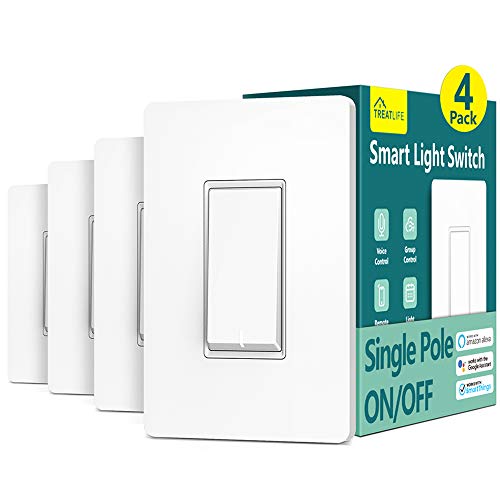
The TREATLIFE Smart Light Switch 4 Pack stands out as an excellent choice for those seeking reliable, app-controlled smart switches for single-pole setups. Compatible with Alexa, Google Home, and SmartThings, it offers seamless voice and remote control via the Smart Life app. Designed for 2.4GHz WiFi networks, it requires a neutral wire and supports up to 1250W, making it suitable for most lighting loads. The switches feature easy installation with clear instructions and include standard screwless wall plates. With a 4.5-star rating from over 9,000 reviews, this pack provides a cost-effective, convenient, and stylish upgrade for any smart home.
Best For: homeowners seeking reliable, easy-to-install smart switches for single-pole lighting setups compatible with Alexa, Google Home, and SmartThings.
Pros:
- Seamless voice and app control with compatibility across major smart home platforms
- Easy installation with clear instructions and included accessories
- Cost-effective 4-pack offers great value for multiple switches
Cons:
- Only supports 2.4GHz WiFi, not compatible with 5GHz networks
- Requires a neutral wire for installation, which may not be available in all homes
- Not suitable for 3-way or multi-location switch circuits
Kasa Smart 3-Way Switch Kit (2 Count)

If you’re looking to upgrade your home with smart lighting that offers both convenience and style, the Kasa Smart 3-Way Switch Kit (2 Count) stands out. These switches replace traditional 3-way setups in areas like hallways, staircases, or garages, and are compatible with 2.4 GHz Wi-Fi networks. Installation is straightforward with the app-guided setup, but a neutral wire and Wi-Fi are required. You can control the switches remotely via the Kasa or Tapo app, and they work seamlessly with Alexa and Google Assistant. Developed in Silicon Valley and UL certified, they combine safety, reliability, and smart automation for a truly modern home.
Best For: homeowners seeking an easy-to-install, reliable smart switch solution to control multiple lighting points in areas like hallways, staircases, or garages.
Pros:
- Easy app-guided installation with step-by-step instructions
- Compatible with voice assistants like Alexa and Google Assistant for hands-free control
- No hub required, supporting 2.4 GHz Wi-Fi networks for reliable connectivity
Cons:
- Requires neutral wire and 2.4 GHz Wi-Fi, which may not be available in all homes
- Designed for 3-way or single pole configurations, limiting use in more complex wiring setups
- Installation may require an electrician if unfamiliar with electrical wiring or complex setups
TP-Link Tapo Smart Light Switch (4-Pack)

The TP-Link Tapo Smart Light Switch (4-Pack) stands out as an excellent choice for those seeking seamless smart home integration combined with reliable performance. It replaces standard switches to control lights, fans, and fixtures, working with 2.4 GHz Wi-Fi, Alexa, and Google Assistant for voice commands. Installation is straightforward with the Tapo app, but it requires neutral wiring—best to consult an electrician if unsure. You can remotely control and monitor your devices via smartphone, set schedules, and activate security features like Away Mode. With a 2-year warranty and UL certification, this pack offers a convenient, safe, and flexible solution for enhancing your home automation.
Best For: homeowners and DIY enthusiasts looking to easily upgrade their lighting and appliance control with a reliable, Wi-Fi-enabled smart switch compatible with voice assistants.
Pros:
- Easy app-guided installation with no hub required
- Compatible with Amazon Alexa and Google Assistant for voice control
- Remote control and scheduling features enhance convenience and security
Cons:
- Requires neutral wiring, which may necessitate professional installation
- Only compatible with 2.4 GHz Wi-Fi networks, not 5 GHz
- Limited to single-pole wiring setups, not suitable for multi-way switches
Kasa Smart Light Switch HS200-LA, Light Almond

For those seeking a seamless blend of style and smart home control, the Kasa Smart Light Switch HS200-LA in Light Almond stands out as a top choice. This sleek switch is designed for single-pole setups and requires a neutral wire, making installation straightforward for those with electrical knowledge. It connects via 2.4 GHz Wi-Fi and works effortlessly with Alexa and Google Home, allowing for hands-free control. I appreciate its scheduling features and security options like Away Mode, which deters intruders. Certified by UL for safety, this switch combines modern convenience with a warm, neutral-toned design that complements any home decor.
Best For: homeowners seeking an easy-to-install, stylish smart switch compatible with voice assistants and offering scheduling features.
Pros:
- Easy app-guided installation with step-by-step instructions
- Compatible with Alexa and Google Home for hands-free control
- UL certified and no hub required, ensuring safety and convenience
Cons:
- Requires neutral wire and basic electrical knowledge for installation
- Limited to single-pole setups, not suitable for multi-way switches
- Only supports 2.4 GHz Wi-Fi, not compatible with 5 GHz networks
Kasa Smart Light Switch HS200-BL

The Kasa Smart Light Switch HS200-BL stands out for those seeking a seamless blend of style and smart home integration, thanks to its sleek black design and reliable Wi-Fi connectivity. It replaces standard switches and supports single pole wiring, requiring a neutral wire for installation. Compatible with Alexa and Google Assistant, it allows voice control for added convenience. The setup is straightforward with the Kasa or Tapo app, and you can control your lights remotely from anywhere. With features like scheduling, timers, and Away Mode, it enhances both comfort and security. UL certified and hub-free, it’s a stylish, reliable choice for modern smart homes.
Best For: homeowners seeking an easy-to-install, stylish smart switch with reliable Wi-Fi connectivity and voice control compatibility.
Pros:
- Seamless integration with Alexa and Google Assistant for voice commands
- Supports scheduling, timers, and Away Mode for security and automation
- Easy app-guided installation with no hub required
Cons:
- Requires a neutral wire for installation, which may not be available in all homes
- Limited to single pole wiring setups, not suitable for multi-way switches
- Needs a stable 2.4 GHz Wi-Fi connection for optimal performance
Kasa Smart WiFi Motion Sensor Switch, 1-Pack

If you want a smart switch that effortlessly enhances your home automation, the Kasa Smart WiFi Motion Sensor Switch is an excellent choice. It’s a single-pole, UL-certified device that requires a neutral wire and connects seamlessly to your 2.4GHz Wi-Fi network. No hub needed, and setup is straightforward with the app’s guidance. Equipped with motion detection, it turns lights on automatically when it senses movement and off after a preset time, making it perfect for hallways, bathrooms, or bedrooms. Plus, daylight detection prevents daytime activation. Compatible with Alexa, Google Assistant, and Samsung SmartThings, it offers reliable, convenient control from anywhere.
Best For: homeowners seeking an easy-to-install, reliable smart switch with motion detection and automation features to enhance home convenience and security.
Pros:
- Easy app-guided installation requiring no hub and compatible with standard wall plates
- Automates lighting with motion and daylight detection, reducing energy waste
- Supports voice control and integrates with Alexa, Google Assistant, and SmartThings for seamless smart home connectivity
Cons:
- Requires a neutral wire for installation, limiting compatibility with some existing wiring setups
- Limited to 2.4GHz Wi-Fi networks, which may affect connectivity in multi-band environments
- Max load capacity is 600W for incandescent bulbs, which may not suit high-wattage lighting needs
GE CYNC Smart Light Switch, Wi-Fi & Bluetooth, White

When upgrading your home’s lighting with a smart switch that combines style and functionality, the GE CYNC Smart Light Switch stands out thanks to its built-in Wi-Fi and Bluetooth connectivity. Its toggle style offers a classic look that blends seamlessly with any decor. Compatible with Alexa and Google Assistant (sold separately), it provides hands-free voice control. You can control your lights remotely, set schedules, and create scenes via the Cync app. Designed for easy DIY installation in homes with neutral and ground wires, it supports multi-switch control and works with Cync or C by GE bulbs, enhancing convenience and energy efficiency.
Best For: homeowners seeking an easy-to-install, stylish smart switch compatible with popular voice assistants for remote control and energy management.
Pros:
- Easy DIY installation compatible with homes built after the 1980s with neutral and ground wires
- Seamless integration with Alexa and Google Assistant for voice control (devices sold separately)
- Supports scheduling, scene setting, and multi-switch control for enhanced home automation
Cons:
- Requires a neutral and ground wire for installation, limiting compatibility with some older homes
- Bluetooth functionality may have limited range compared to Wi-Fi-only options
- Packaging may vary as C by GE transitions to CYNC branding, potentially causing some confusion
GHome Smart Wi-Fi Light Switch (4 Pack)

For homeowners seeking reliable, easy-to-install smart switches, the GHome Smart Wi-Fi Light Switch (4 Pack) stands out with its seamless compatibility with Amazon Alexa and Google Assistant. It operates on 2.4GHz Wi-Fi, supporting up to 1800 watts and requiring a neutral wire for installation. The switch is UL and FCC certified, ensuring safety. I appreciate its scheduling features, allowing automation based on sunset, sunrise, or specific times, and remote control via the Smart Life app. The ability to create groups for multiple switches simplifies managing lighting remotely. Just note, it’s designed for single-pole wiring and isn’t compatible with smart bulbs.
Best For: homeowners seeking a reliable, easy-to-install smart switch compatible with voice assistants and capable of scheduling and remote control.
Pros:
- Seamless compatibility with Amazon Alexa and Google Assistant for hands-free control
- Supports scheduling, timers, and automation for enhanced home lighting management
- Easy remote access and grouping via the Smart Life app for convenient operation
Cons:
- Designed only for single-pole wiring, not suitable for 3-way setups
- Requires a neutral wire for installation, which may not be available in all homes
- Not compatible with smart bulbs, limiting some smart lighting options
Factors to Consider When Choosing Premium Smart Light Switches

When selecting a premium smart light switch, I consider how well it integrates with my existing smart home ecosystem and how easy it is to install. I also look at remote control options, automation capabilities, and voice command compatibility to guarantee convenience. These factors help me choose a switch that’s not only stylish but also seamlessly enhances my daily routines.
Compatibility With Ecosystems
Choosing a premium smart light switch that seamlessly integrates with your existing smart home ecosystem is essential for a smooth and efficient experience. You want to guarantee it works with platforms like Apple HomeKit, Amazon Alexa, Google Home, or Samsung SmartThings. Check if the switch supports popular connectivity protocols such as Wi-Fi, Zigbee, or Z-Wave, which help it connect reliably within your setup. Confirm that you can control the switch via your ecosystem’s native app or voice assistant for easy automation and remote access. Also, see if it requires additional hubs or bridges, or if it connects directly without extra devices. Finally, look for cross-platform compatibility and firmware updates that expand integration options over time, keeping your smart home flexible and future-proof.
Wiring and Installation Ease
Selecting a premium smart light switch isn’t just about features and compatibility; ease of installation plays a big role in guaranteeing a smooth upgrade. I look for switches compatible with my existing wiring, especially those that require a neutral wire, which most advanced models need. Clear app-guided setup instructions are a plus, making installation straightforward without much electrical work. I also verify that the switch supports my home’s wiring configuration, whether it’s single-pole or 3-way, to ensure proper operation. Features like tool-free mounting or quick-connect terminals make installation even easier, saving time and effort. Finally, I consider the switch’s design and size, ensuring it fits seamlessly into my wall space and replaces my current switch without additional modifications.
Remote Control Features
Remote control features are essential for modern smart light switches because they let me control my lighting from anywhere using my smartphone. With these features, I can turn lights on or off regardless of my location, which adds convenience and security. Many switches support voice commands through virtual assistants like Alexa, Google Assistant, or Siri, making hands-free operation simple. I also appreciate scheduling and timer options that I can set remotely, automating lighting based on my routines. Real-time status monitoring helps me verify whether lights are on or off at a glance. Plus, integration with home automation systems allows me to control multiple devices simultaneously, creating coordinated lighting scenes and enhancing my smart home experience. These features make remote control truly seamless and intuitive.
Automation and Scheduling
When evaluating premium smart light switches, automation and scheduling features play a essential role in enhancing convenience and energy efficiency. These switches often let me set specific on and off times, or create routines based on sunset, sunrise, or countdown timers. Many models include away or occupancy modes, which randomly turn lights on and off to mimic occupancy, boosting security when I’m away. I appreciate the ability to customize routines triggered by environmental conditions or other smart devices, ensuring seamless operation. The capacity to create multiple schedules per switch provides flexibility for different days or scenarios. Proper setup helps me save energy, maintain consistent lighting patterns, and improve security, making automation and scheduling essential factors when choosing a premium smart light switch.
Voice Command Integration
Since voice command integration is a key feature in premium smart light switches, I make certain to choose models that work seamlessly with popular voice assistants like Amazon Alexa, Google Assistant, or Apple Siri. Compatibility guarantees I can control my lighting effortlessly with just my voice, which is especially handy when my hands are full. I also verify that the switch supports hands-free operation, so I don’t need to touch anything to turn lights on or off. Grouping switches with other smart devices is a plus, allowing me to manage multiple lights or create scenes through voice commands. In the end, I look for switches with reliable voice recognition and regular firmware updates, so my system stays responsive and compatible as voice assistant features evolve.
Safety Certifications & Standards
Ensuring my smart light switch meets safety standards is crucial for peace of mind and reliable operation. I look for switches that are UL or ETL certified, as these labels confirm they meet strict safety requirements. It’s also important to verify compliance with local electrical codes, like FCC or CE certifications, to guarantee safe use in my area. I prioritize switches with built-in safety features such as surge protection, overload prevention, and thermal cutoffs, which help reduce fire risks. Proper grounding and correct wiring, including a neutral wire, are essential to prevent electrical faults. Additionally, I choose products that have undergone third-party safety testing, confirming they meet international safety and quality standards. These precautions give me confidence in both the safety and durability of my smart switch.
Aesthetic and Design
Choosing a smart light switch that complements your home’s style starts with its design. I look for sleek, modern options—think minimalist finishes in white or black—that blend effortlessly with my decor. A slim profile and smooth surface help the switch sit flush against the wall, creating a clean look. Customizable faceplates or color options allow me to match or enhance my interior scheme easily. I also appreciate design features like rounded edges, subtle textures, and matte finishes, which reduce glare and fingerprints. Discreet indicators or LEDs are essential; they shouldn’t distract from the overall aesthetic. Ultimately, the right design elevates my space while seamlessly integrating smart functionality, making my home both stylish and smart.
Frequently Asked Questions
How Do I Troubleshoot Connectivity Issues With Premium Smart Switches?
When troubleshooting connectivity issues with premium smart switches, I start by checking your Wi-Fi signal strength and ensuring your device is within range. I also restart the switch and your router to refresh connections. Make sure your app and firmware are up to date. If problems persist, resetting the switch to factory settings and reconnecting it often solves the issue. Don’t forget to verify your network credentials are correct.
Are These Switches Compatible With Existing Home Automation Systems?
Imagine your smart switch as a puzzle piece fitting perfectly into your home’s automation puzzle. Most premium switches are designed for seamless compatibility with popular systems like Alexa, Google Home, and Apple HomeKit. I always double-check the product specs and your existing setup before buying. When in doubt, I recommend choosing switches with broad compatibility to guarantee they integrate smoothly, making your smart home feel like a well-orchestrated symphony.
What Is the Installation Process for Multi-Way Switch Configurations?
To install a multi-way smart switch, I turn off the power at the breaker, then remove the existing switches. I connect the traveler wires and the common wire to the new switch, following the manufacturer’s wiring diagram. After securing everything properly, I turn the power back on and test the setup. Some switches require a neutral wire, so I double-check compatibility before starting. It’s straightforward but always best to follow instructions carefully.
How Secure Are These Smart Switches From Hacking or Unauthorized Access?
I believe these smart switches are quite secure if you follow best practices. Manufacturers typically include encryption and regular firmware updates to protect against hacking. I always recommend using strong, unique passwords and enabling two-factor authentication when available. It’s also essential to keep your device firmware current. While no system is 100% foolproof, these precautions markedly reduce the risk of unauthorized access, giving me peace of mind.
Can These Switches Be Integrated With Voice Assistants Other Than Alexa or Google?
Yes, many premium smart switches can integrate with voice assistants beyond Alexa and Google, like Apple’s Siri via Apple HomeKit or Samsung’s SmartThings. I’ve found that checking compatibility before purchasing is key. Most brands now support multiple platforms, making it easier for me to control my lights with different voice assistants. Just verify the switch’s app or hub supports your preferred ecosystem for seamless integration.
Conclusion
Choosing the right premium smart light switch feels like lighting up your entire home with a simple tap or voice command. Imagine walking into a room where the lights greet you softly, perfectly timed to your day. With these top picks, you’re not just installing a switch—you’re creating a seamless, stylish ambiance that transforms your space into a haven of convenience and elegance. Let your home shine brighter, smarter, and more beautifully than ever before.