
If you’re looking for the 15 best premium heavy-duty monitor arms for stability and durability, I’ve got you covered. These models support large, ultrawide, and heavy monitors up to 57 inches and 44 lbs, featuring reinforced VESA mounts, thick arms, and strong bases for maximum stability. They’re fully adjustable for ergonomic comfort and come with smart mounting options. Keep exploring to discover the top picks that will perfectly fit your workspace and monitor needs.
Key Takeaways
- Supports large monitors up to 57 inches and weights up to 44 lbs, ensuring stability for ultrawide and heavy screens.
- Features reinforced VESA mounts, wider bases, and thicker arms for enhanced durability and long-term stability.
- Fully adjustable with tilt, swivel, rotation, and height options for ergonomic customization.
- Built with high-quality materials like aluminum alloy, tested for thousands of motion cycles for reliability.
- Offers versatile mounting options such as clamp and grommet setups, suitable for various desk thicknesses.
Ergotron HX Heavy Duty Gaming Monitor Arm for Ultrawide Monitors
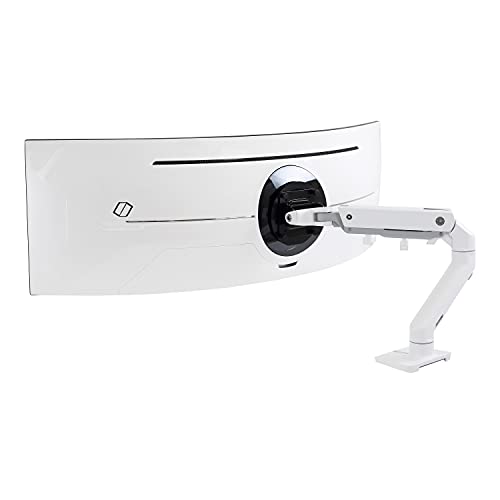

If you’re looking for a heavy-duty monitor arm that can handle large ultrawide screens, the Ergotron HX is an excellent choice. It supports monitors up to 49 inches and weighs between 28 to 42 pounds, making it perfect for gaming or professional setups. The arm is VESA-compatible with 75x75mm and 100x100mm patterns, ensuring broad compatibility. Installation is straightforward with a two-piece desk clamp or optional grommet mount. With 11.5 inches of lift, 360-degree rotation, and a 20-degree tilt, I can easily adjust my ultrawide monitor for maximum comfort. It’s durable, tested extensively, and backed by a 10-year warranty.
Best For: professionals and gamers who need a heavy-duty, adjustable mount capable of supporting large ultrawide monitors up to 49 inches and 42 pounds for enhanced workspace organization and immersive viewing.
Pros:
- Supports ultrawide monitors up to 49 inches and 42 pounds, suitable for large displays.
- Offers extensive adjustability with 11.5 inches of lift, 360-degree rotation, and 20-degree tilt.
- Durable construction backed by extensive testing and a 10-year warranty.
Cons:
- May require a surface with sufficient thickness (0.4 to 2.6 inches) for proper installation using the desk clamp.
- Heavier monitors may require careful handling during setup due to the weight range.
- Limited VESA patterns (75x75mm and 100x100mm) may not fit all monitor models.
MSI MPG Dual Monitor Stand Arms (Supports 17-35″)

The MSI MPG Dual Monitor Stand Arms stand out as an excellent choice for professionals and gamers who need robust support for large monitors. Supporting screens from 17 to 35 inches and up to 44 lbs each, it offers heavy-duty durability. The stand features full adjustability—tilt, swivel, and rotation—allowing ergonomic positioning and workspace flexibility. With both clamp and grommet mounting options, it fits desks of various thicknesses. VESA compatibility guarantees secure monitor attachment, while vibrant RGB lighting adds style. Built for stability and longevity, this stand is perfect for those seeking a reliable, versatile solution for dual monitor setups.
Best For: professionals and gamers seeking a heavy-duty, versatile dual monitor stand with ergonomic adjustments and stylish RGB lighting.
Pros:
- Supports large monitors from 17 to 35 inches with up to 44 lbs capacity per screen
- Full adjustability including tilt, swivel, and rotation for ergonomic positioning
- Features both clamp and grommet mounting options for versatile desk compatibility
Cons:
- Might be more expensive than basic monitor stands due to its durability and features
- The RGB lighting, while stylish, may not appeal to all users or fit minimalist setups
- Assembly and installation could be complex for some users unfamiliar with VESA mounts
MSI MAG MT201D Dual Monitor Stand

Designed to support a wide range of monitor sizes from 17 to 45 inches, the MSI MAG MT201D dual monitor stand is ideal for professionals who need a heavy-duty, reliable mounting solution. It features a robust build with a weight capacity of 2 to 20 kg per screen, ensuring stability even with larger displays. The stand offers versatile installation options, including clamp and grommet bases, compatible with various desk thicknesses. Its VESA compatibility and fully adjustable ergonomics—tilt, swivel, and rotation—allow for personalized, comfortable setups. With quick-release plates and a sleek black finish, this stand combines durability with user-friendly convenience.
Best For: professionals and heavy users who need a durable, versatile dual monitor solution capable of supporting large screens with ergonomic adjustments.
Pros:
- Supports monitor sizes from 17 to 45 inches with a high weight capacity of up to 20 kg per screen
- Offers flexible mounting options with clamp and grommet bases suitable for various desk thicknesses
- Fully adjustable tilt, swivel, and rotation for ergonomic and personalized viewing angles
Cons:
- May require installation tools and some assembly, which could be time-consuming for beginners
- The increased weight capacity might add to the overall desk load and stability considerations
- The sleek black finish may show fingerprints and dust more readily over time
MSI MPG MT201R V2 Monitor Stand Arm

The MSI MPG MT201R V2 Monitor Stand Arm stands out as an excellent choice for users who need robust, flexible support for larger and heavier monitors. It supports screens from 17 to 49 inches, with a weight capacity of 44 lbs per monitor, ensuring stability for demanding setups. The stand features VESA compatibility and ergonomic adjustments via a heavy-duty gas spring, allowing smooth positioning. Its sleek gray design is enhanced with vibrant RGB lighting, while installation options include clamp and grommet bases for various desktop thicknesses. With a 3-year warranty and positive reviews, the MSI MPG MT201R V2 combines durability, versatility, and style for premium monitor support.
Best For: users seeking a durable, fully adjustable monitor stand arm capable of supporting large, heavy screens with customizable ergonomic positioning.
Pros:
- Supports monitors from 17 to 49 inches, accommodating a wide range of screen sizes
- Heavy-duty gas spring allows smooth and adjustable ergonomic positioning
- Versatile installation options including clamp and grommet bases for different desktop thicknesses
Cons:
- Weighs 13.3 pounds, which may be heavier than some other stands for easier mobility
- Limited to a maximum load of 44 lbs per monitor, which may restrict very heavy setups
- First available date listed as July 3, 2025, which appears to be a future or incorrect date, potentially indicating a typo or pre-release info
HUANUO NITROGLIDE Dual Monitor Stand for 13″–40

If you’re looking to support larger, heavier monitors securely and with ease, the HUANUO NITROGLIDE Dual Monitor Stand is an excellent choice. It supports 13″–40″ monitors weighing up to 26.4 lbs per arm and is compatible with VESA 75×75mm and 100×100mm standards. Its solid aluminum arms, larger base, and dual C-clamp ensure stability for heavier screens. The NITROGLIDE technology provides smooth, precise adjustments, with arms extending up to 25.59″ and height adjustable up to 21.1″. Full motion capabilities include swivel, tilt, and rotation, making ergonomic positioning effortless. It also features flexible mounting options and built-in USB ports for added convenience.
Best For: users seeking a sturdy, adjustable dual monitor stand capable of supporting larger, heavier screens with flexible mounting options and integrated USB connectivity.
Pros:
- Supports large monitors up to 40″ and 26.4 lbs per arm for heavy-duty stability
- Smooth, precise adjustments with NITROGLIDE technology for ergonomic positioning
- Includes built-in USB ports and cable management for enhanced workspace organization
Cons:
- May require a larger desk space due to the size and range of motion
- Installation might be complex for some users unfamiliar with mounting hardware
- Grommet mounting options are limited to desk thicknesses up to 3.54″
VIVO Heavy Duty Aluminum Ultrawide Monitor Tension Arm

For anyone managing a multi-monitor setup with ultra-wide screens, the VIVO Heavy Duty Aluminum Ultrawide Monitor Tension Arm offers robust support and effortless adjustability. It fits monitors up to 49 inches and 44 pounds, supporting VESA patterns of 75x75mm or 100x100mm. The tension arm counterbalances the monitor’s weight, making height adjustments smooth and ergonomic. With tilting from +50° to -20°, 180° swiveling, 360° rotation, and 11 inches of height adjustment, it provides flexible positioning. Plus, integrated cable covers keep cords organized, and the sturdy mounting options fit desks up to 3.2 inches thick, ensuring stable, clean, and versatile setup.
Best For: professionals, gamers, and multi-monitor users seeking a durable, highly adjustable mount for ultra-wide monitors up to 49 inches and 44 lbs.
Pros:
- Supports large ultra-wide monitors with VESA compatibility up to 100x100mm
- Features smooth, ergonomic adjustments including tilt, swivel, rotation, and height with tension balance
- Built-in cable management keeps workspace tidy and organized
Cons:
- May require some assembly and proper mounting to ensure stability
- Designed specifically for large monitors, possibly overkill for smaller setups
- Heavy-duty construction could be less suitable for very lightweight or compact monitors
BenQ BSH01 Ergo Monitor Arm

Designed for those who need reliable support for large, heavy monitors, the BenQ BSH01 Ergo Monitor Arm offers exceptional durability and stability. It fits screens up to 45 inches and supports weights from 4 to 44 lbs, making it compatible with most major brands like Dell, HP, Samsung, and LG. Built with a robust gas spring tested for 25,000 cycles, it prevents sagging and ensures long-lasting performance. The steel reinforcement plate protects your desk surface from scratches and deformation. Quick to install via top-mounting options, it also features full motion capabilities, cable management, and easy adjustments for a clutter-free, ergonomic workspace.
Best For: users seeking a durable, fully adjustable monitor arm capable of supporting large, heavy screens up to 45 inches and 44 lbs for a stable and ergonomic workspace.
Pros:
- Supports monitors up to 45 inches and 44 lbs, suitable for most large displays.
- Built with a tested gas spring (25,000 cycles) ensuring long-term stability and no sagging.
- Features quick installation options with versatile mounting methods and full motion adjustments.
Cons:
- May be overkill for users with smaller or lighter monitors who don’t need heavy-duty support.
- Installation might require some effort to align and secure properly, especially for grommet mounting.
- The full range of motion and adjustments could be complex for beginners to optimize initially.
Ergotron LX Monitor Arm for Flat and Curved Ultrawide Monitors

The Ergotron LX Monitor Arm stands out as an excellent choice for users with large, ultrawide monitors, thanks to its robust compatibility and versatile mounting options. It fits single monitors up to 34 inches and weighing 7-25 pounds, supporting VESA 75x75mm and 100x100mm patterns. With both desk clamp and grommet mount options, it adapts well to various desk types and thicknesses. The arm offers 13 inches of lift, 360-degree rotation, and 75-degree tilt, ensuring ergonomic flexibility. Its sleek, modular design with built-in cable management keeps your workspace organized and stylish. Built for durability, it’s backed by a 10-year warranty and expert support.
Best For: users with large ultrawide monitors up to 34 inches seeking a durable, adjustable monitor arm for ergonomic comfort and workspace organization.
Pros:
- Supports monitors up to 34 inches and 25 pounds, accommodating most ultrawide screens.
- Offers versatile mounting options, including desk clamp and grommet mount, suitable for various desk types.
- Features extensive adjustability with 13 inches of lift, 360-degree rotation, and 75-degree tilt for personalized viewing angles.
Cons:
- May be more expensive compared to simpler monitor arms due to its advanced features and durability.
- Requires a desk with sufficient thickness for secure mounting, which might limit compatibility with some surfaces.
- Slightly bulky appearance could be less suited for minimalist or ultra-compact workspaces.
MSI MPG MT201DR Dual Monitor Stand Arms
If you’re seeking a sturdy and versatile dual monitor stand, the MSI MPG MT201DR stands out as an excellent choice. It supports 17-35 inch screens with VESA compatibility and can hold up to 44 lbs per arm, ensuring stability for larger monitors. The stand offers full adjustability—tilt, swivel, and rotation—thanks to a heavy-duty gas spring, making ergonomic setup easy. Its sleek gray design complements modern workspaces, and installation options include clamp or grommet bases for various desk thicknesses. Built for durability and reliability, this stand is a solid investment for anyone needing robust dual monitor support.
Best For: professionals and gamers seeking a durable, highly adjustable dual monitor stand to support larger screens in a modern workspace.
Pros:
- Supports 17-35 inch monitors with up to 44 lbs per arm for heavy-duty stability
- Fully adjustable with tilt, swivel, and rotation for ergonomic customization
- Sleek gray design and RGB lighting add aesthetic appeal to any workspace
Cons:
- Slightly heavy at approximately 20.2 pounds, which may be cumbersome for some setups
- Installation options require desk compatibility with clamp or grommet bases, which may not fit all desks
- Limited to monitors with VESA compatibility of 75×75 or 100×100 mm, which could restrict some users
MSI MPG MT201R Adjustable RGB Single Monitor Stand Arm
For anyone seeking a sleek, customizable monitor arm that supports larger screens and enhances workspace aesthetics, the MSI MPG MT201R Adjustable RGB Single Monitor Stand Arm is an excellent choice. It accommodates monitors from 17 to 49 inches, supporting up to 44 lbs, and features VESA compatibility for versatile mounting. The stand’s heavy-duty construction guarantees durability, while the adjustable gas spring allows flexible positioning—height, tilt, swivel, and rotation. Easy to install with clamp or grommet options, it also adds a stylish RGB lighting touch. With a 4.6-star rating from 163 reviews, it’s proven reliable and functional for long-term use.
Best For: individuals seeking a durable, adjustable monitor arm that supports larger screens and enhances workspace aesthetics with customizable RGB lighting.
Pros:
- Supports monitors from 17 to 49 inches and up to 44 lbs, accommodating a wide range of screen sizes and weights
- Fully adjustable with height, tilt, swivel, and rotation for ergonomic comfort
- Easy to install with both clamp and grommet options, plus stylish RGB lighting for aesthetic appeal
Cons:
- Heavier weight (13.18 pounds) may require more effort during installation or repositioning
- Limited desk thickness compatibility for grommet mount (10-48 mm) compared to clamp (10-85 mm)
- Higher price point relative to basic monitor arms due to premium features and RGB lighting
HUANUO Dual Monitor Stand with Adjustable Mount for 13-32 Inch Screens

Looking for a sturdy monitor arm that can handle larger screens with ease? The HUANUO Dual Monitor Stand is designed for 13-32 inch displays weighing up to 19.8 lbs each, with VESA mounts 75x75mm or 100x100mm. It offers both C-clamp and grommet mounting options for secure attachment to wooden desks, avoiding issues with cross beams or panels. The stand features full motion—swivel, tilt, and rotation—and smooth adjustments for ergonomic positioning. Its strong, stable design promotes better posture and productivity, making it ideal for anyone who needs reliable, heavy-duty support for dual monitors in a professional workspace.
Best For: professionals and gamers seeking a sturdy, adjustable dual monitor setup for screens 13-32 inches weighing up to 19.8 lbs each, with VESA compatibility and stable desk mounting.
Pros:
- Supports a wide range of monitor sizes and weights, ensuring versatility.
- Full motion adjustments including swivel, tilt, and rotation for optimal ergonomic positioning.
- Secure mounting options with C-clamp and grommet bases on suitable wooden desks.
Cons:
- Not recommended for glass or plastic desks, limiting suitable surface options.
- Requires a desk without cross beams or panels underneath for secure installation.
- Installation may be complex for users unfamiliar with mounting hardware or with limited space.
VIVO Premium Aluminum Monitor Arm for Ultrawide Screens up to 49 Inches

The VIVO Premium Aluminum Monitor Arm is an excellent choice for anyone needing to support ultrawide screens up to 49 inches, especially if you work with large, curved monitors that require sturdy, flexible mounting. It holds monitors weighing up to 33 lbs and is compatible with VESA 75x75mm and 100x100mm mounts, including curved 1000R screens. The arm offers versatile adjustments: -30° to +45° tilt, 180° swivel, 180° rotation, and 13 inches pneumatic height adjustment. Its durable aluminum construction, cable management, and quick-release VESA plate make it a reliable, sleek solution for a stable, customizable workspace.
Best For: professionals and gamers who need a sturdy, adjustable mount for ultrawide or large curved monitors up to 49 inches and 33 lbs.
Pros:
- Supports ultrawide screens up to 49 inches and curved 1000R monitors for versatile compatibility
- Fully adjustable with tilt, swivel, rotation, and pneumatic height for ergonomic positioning
- Durable aluminum construction with cable management and quick-release VESA plate for easy setup
Cons:
- Additional adapters required for monitors without VESA holes, which may incur extra costs
- Grommet mounting is limited to desks up to 1.9 inches thick, potentially restricting some desk options
- Slightly heavy at 12.7 pounds, which may require sturdy desk support
Heavy Duty Monitor Arm for Ultrawide Monitors

If you need a monitor arm that can handle the size and weight of ultrawide screens, this heavy-duty option delivers unmatched support. It supports monitors up to 57” and 44 lbs, making it ideal for large, curved, or flat ultrawides from 24″ to 49″. Its built-in pneumatic spring system allows smooth weight adjustments, ensuring stability without sagging. Compatible with VESA standards up to 100x100mm and including adapters for models like Samsung G9, it offers versatile mounting options with clamp or grommet setups. Fully adjustable with tilt, swivel, rotation, and 13 inches of height adjustment, this arm provides ergonomic flexibility for demanding ultrawide setups.
Best For: professionals or enthusiasts who require robust support for large ultrawide monitors up to 57″ and 44 lbs, ensuring ergonomic flexibility and stability for demanding multi-monitor setups.
Pros:
- Supports ultrawide monitors up to 57″ and 44 lbs for heavy-duty applications
- Fully adjustable with tilt, swivel, rotation, and 13 inches of height adjustment for ergonomic comfort
- Compatible with both clamp and grommet mounting options, including VESA adapters for specific models like Samsung G9
Cons:
- May be more expensive than standard monitor arms due to heavy-duty features
- Requires sufficient desk space for larger mounting options and modular extensions
- Installation might be more complex given the size and weight capacity of the arm
MSI MAG MT201 Adjustable Monitor Stand Arm

For those seeking a versatile and robust monitor arm, the MSI MAG MT201 stands out with its extensive compatibility and adjustable features. It supports screens ranging from 17 to 49 inches and weighing up to 44 lbs, fitting VESA standards of 75×75 mm and 100×100 mm. Installation is flexible, with clamp and grommet options to suit different desks. The quick-release VESA plate makes mounting and dismounting effortless. Its fully adjustable design offers tilt (+50°/-20°), swivel (+90°/-90°), and rotation (+180°/-180°), ensuring ergonomic comfort. Built with durable materials and finished in sleek black, it combines durability with a professional appearance perfect for any setup.
Best For: professionals, gamers, and anyone needing a versatile, sturdy monitor arm with extensive adjustability and broad monitor compatibility.
Pros:
- Supports a wide range of monitor sizes (17-49 inches) and weights (4.4-44 lbs), offering great flexibility.
- Fully adjustable tilt, swivel, and rotation for ergonomic comfort and customizable viewing angles.
- Easy installation with both clamp and grommet options, plus quick-release VESA plate for effortless mounting.
Cons:
- May require precise desk measurements for optimal mounting depending on the installation option.
- Heavier monitors at the upper weight limit might need additional support or reinforcement.
- The black finish, while sleek, may show fingerprints or dust more readily over time.
HUANUO TitanLift™ Heavy Duty Monitor Arm for Ultrawide Screens

Designed specifically for ultrawide screens, the HUANUO TitanLift™ Heavy Duty Monitor Arm delivers exceptional support for monitors ranging from 17 to 49 inches and weighing up to 40 pounds. Crafted from high-strength aluminum alloy, it features reinforced VESA heads, thicker arms, and a wider base for maximum stability. Tested with 50,000 motion cycles and a triple load capacity, it’s built to last. The arm offers a wide range of motion—tilt, swivel, rotate, and height adjustment—to guarantee ergonomic comfort. Quick to install with simple cable management, the TitanLift™ is perfect for creating a tidy, flexible workspace with reliable support.
Best For: professionals and gamers who need robust, adjustable support for ultrawide monitors up to 49 inches and 40 lbs in weight to optimize ergonomic comfort and workspace organization.
Pros:
- Heavy-duty construction with high-strength aluminum alloy ensures durability and stability for large ultrawide screens.
- Wide range of motion including tilt, swivel, rotate, and height adjustment allows personalized ergonomic positioning.
- Easy to install with quick setup, built-in cable management, and tension adjustment for one-handed customization.
Cons:
- Requires VESA mounting holes (75x75mm or 100x100mm), which may not be compatible with all monitor models.
- The maximum extension of 24.8 inches may not suit very large or multi-monitor setups.
- Heavier weight capacity may be overkill for smaller or lighter monitors, potentially adding unnecessary cost for some users.
Factors to Consider When Choosing Premium Monitor Arms Heavy Duty
When selecting a premium heavy-duty monitor arm, I look closely at weight capacity limits to guarantee it can support my screens safely. Compatibility standards and mounting options are also vital so that everything fits and installs easily. Finally, I consider build quality and range of motion to find a durable, flexible solution that meets my workspace needs.
Weight Capacity Limits
Choosing a monitor arm with the right weight capacity is essential for stability and durability. You want to guarantee the arm can support your monitor’s weight comfortably, so it doesn’t sag or become unstable over time. Heavy-duty monitor arms typically support between 28 to 50 pounds, making them ideal for large or ultrawide screens. It’s important to check your monitor’s weight and select an arm that exceeds it slightly—this allows for future upgrades or adding accessories. Also, consider how the weight might change when the arm is fully extended or adjusted, as leverage can increase the effective load. By choosing an arm with an appropriate weight capacity, you ensure your setup remains stable, safe, and long-lasting.
Compatibility Standards Required
Selecting the right heavy-duty monitor arm means paying close attention to compatibility standards. First, verify the arm supports your monitor’s VESA mounting pattern, whether it’s 75x75mm or 100x100mm. Next, confirm that the arm’s weight capacity exceeds your monitor’s weight, including any mounting hardware. It’s also essential to check the size compatibility, especially for ultrawide or large screens up to 49 inches or more. Don’t forget to check the mounting options—whether clamp or grommet—so they fit your desk’s thickness and surface type. Finally, review the arm’s range of motion and tilt specifications to ensure they align with your ergonomic needs and workspace setup. Proper compatibility guarantees a stable, secure, and functional monitor setup.
Range of Motion Options
A monitor arm’s range of motion is essential for creating an ergonomic workspace tailored to your needs. With options like tilt, swivel, and rotation, you can customize your monitor’s position for maximum comfort. Adjustable height features, such as pneumatic or gas spring lifts, allow precise vertical positioning, reducing strain during long work sessions. Full 360-degree rotation and extensive tilt angles—often ±50° or more—offer flexible viewing angles for different tasks and preferences. Articulation features like extendable arms and pivot joints enable seamless adjustments with minimal effort. These multiple axes of movement ensure your monitor can be positioned perfectly, supporting ergonomic alignment and workspace flexibility. Choosing a heavy-duty monitor arm with a wide range of motion helps improve comfort, productivity, and long-term health.
Mounting Method Flexibility
Flexibility in mounting methods is essential for creating a versatile and user-friendly workspace. Quick-release VESA plates make installation and adjustments simple, allowing me to set up or reposition my monitor without hassle. Dual mounting options, like clamp and grommet bases, ensure compatibility with various desk surfaces and thicknesses, boosting versatility. An adjustable mounting system can support a wide range of monitor sizes and weights, which is critical for heavy-duty, ultrawide, or oversized screens. Compatibility with multiple VESA standards, such as 75x75mm and 100x100mm, guarantees my monitor fits securely regardless of brand. Additionally, secure mounting mechanisms prevent sagging or shifting over time, maintaining ideal positioning during long work sessions. Overall, adaptable mounting options are indispensable for a stable, flexible, and easy-to-use setup.
Build Durability Quality
When choosing a heavy-duty monitor arm, build durability quality stands out as a key factor. High-quality materials like reinforced aluminum, steel, or durable alloys guarantee the arm lasts and resists wear over time. A robust construction with thicker arms, reinforced joints, and secure mounting hardware prevents sagging and keeps the monitor stable during extended use. Tested gas springs or tension mechanisms with high cycle ratings guarantee smooth, reliable adjustments without degrading. Metal components and sturdy VESA plates contribute to overall strength, resisting deformation even under heavy loads. Additionally, extended warranties and thorough quality testing reflect the manufacturer’s confidence in their product’s durability. Focusing on these factors helps ensure your monitor arm maintains stability and performance for years to come.
Adjustability Features Offered
Enhance your workspace by choosing a monitor arm that offers extensive adjustability features, ensuring ideal comfort and ergonomics. Premium heavy-duty mounts typically provide a wide range of tilt, swivel, and rotation options—often exceeding +50°/-50° tilt and 180° swivel—so you can find the perfect viewing angle. Many models include height adjustment mechanisms, like gas springs or pneumatic lifts, offering 11 to 13 inches of vertical movement for tailored positioning. Full articulation, including 360° rotation and adjustable tilt, helps reduce strain and adapt to different tasks. Precise tension control and one-hand adjustments make repositioning large or heavy monitors effortless, preventing sagging. Additionally, features like quick-release VESA mounts and integrated cable management streamline setup and keep your workspace tidy.
Size and Screen Fit
Choosing the right heavy-duty monitor arm starts with making certain it can support your monitor’s size and weight. I check that the arm can handle screens ranging from 17 to 49 inches, especially for ultrawide or larger displays. It’s essential to verify VESA compatibility, like 75x75mm or 100x100mm, so your monitor mounts securely. Weight capacity matters—your monitor’s weight should fall within the arm’s supported range, usually between 4.4 to 44 pounds for heavy-duty models. If you have curved or ultrawide monitors, make sure the arm can accommodate their curvature, including specific radii like 1000R. Finally, confirm that the mounting hardware and maximum extension suit your desk size and monitor dimensions for maximum stability and fit.
Workspace Integration Needs
Selecting the right heavy-duty monitor arm involves guaranteeing it integrates smoothly with your workspace setup. First, check that the mounting options, like clamp or grommet, fit your desk’s thickness and surface type. Compatibility with your monitor’s VESA pattern—usually 75x75mm or 100x100mm—is essential for a secure fit. Consider whether the arm’s range of motion and height adjustments match your ergonomic needs, helping you maintain comfort during long hours. Additionally, evaluate how well the cable management system works with your existing organization, preventing clutter. Ultimately, confirm the size and weight capacity support your monitors without extra adapters or modifications. A seamless integration will enhance stability, reduce setup hassle, and create a more efficient workspace.
Frequently Asked Questions
How Do I Ensure Compatibility With My Monitor’s VESA Pattern?
To guarantee compatibility with your monitor’s VESA pattern, I recommend first checking your monitor’s manual or measuring the distance between the mounting holes. Most monitors follow the common VESA standards like 75x75mm or 100x100mm. Then, pick a monitor arm that supports those dimensions. If you’re unsure, I suggest consulting the product specifications or contacting the manufacturer to confirm compatibility before making a purchase.
What Is the Maximum Weight Capacity for These Premium Monitor Arms?
Most premium heavy-duty monitor arms can support weights ranging from 20 to 50 pounds, with some models holding up to 60 pounds. I always check the manufacturer’s specifications to make sure I don’t exceed the maximum weight capacity, as going beyond it can compromise stability and durability. It’s essential to choose an arm that matches your monitor’s weight to maintain safety and performance.
Are These Monitor Arms Suitable for Desk Mounting or Wall Mounting?
These monitor arms are primarily designed for desk mounting, offering sturdy clamps and grommets for secure attachment. While some models might support wall mounting with additional hardware, I recommend sticking to desk mounting for maximum stability and ease of adjustment. If wall mounting is essential for your setup, check the product specifications or consult the manufacturer to make certain of compatibility. Prioritizing the right mount ensures your monitor stays safe and steady.
How Easy Is It to Adjust the Monitor Positions After Installation?
Adjusting these monitor arms after installation is quite straightforward. I find they move smoothly thanks to high-quality joints and gas springs, allowing me to easily tilt, rotate, or reposition my monitor without much effort. The robust build guarantees stability once set, but I can make quick adjustments whenever needed. Overall, they’re designed for user-friendly flexibility, making it simple to find the perfect viewing angle whenever I want.
Do These Arms Include Cable Management Features?
Yes, many of these arms include cable management features. I find that integrated clips and channels help keep my workspace tidy by hiding and organizing cables neatly. It’s a great addition because it prevents tangling, reduces clutter, and makes adjusting the monitor easier without worrying about messy cords. If cable management is important to you, look for arms with dedicated features—they really make a difference in maintaining a clean, professional setup.
Conclusion
After exploring these top-tier heavy-duty monitor arms, I can honestly say they’re built to handle even the wildest workloads—like lifting a small spaceship! Whether you’re gaming, working, or multitasking, these options ensure stability and durability that’ll last a lifetime (or at least until your next tech upgrade). Trust me, investing in one of these is like giving your setup a superhero cape—ready to conquer anything you throw at it.