
For most buyers, I’d start with the Xiaomi TV Box S (3rd Gen): its Google TV platform, 4K support, and voice remote make it a balanced pick for everyday streaming. The onn Android TV 4K UHD Streaming Device is a simpler route for buyers who want a straightforward voice-remote setup, while the Mini 1080p HDMI and AV Media Player suits older displays and local media playback. The main tradeoffs are platform and app support, voice-control convenience, connection options, and whether your TV can benefit from 4K. Keep reading for the full breakdown of where each player fits—and which compromises are worth accepting.

Get your wardrobe favorites delivered free — and shop member deals
- Fast, free delivery on millions of items
- Access to Prime Big Deal Days deals on October 6–7
- Prime Video, Amazon Music and more included
Key Takeaways
- The Xiaomi TV Box S (3rd Gen) is the strongest all-around fit among these picks because it combines Google TV voice control with 4K-focused features and modern wireless connectivity.
- The onn and TiVo Stream 4K are simpler streaming-focused alternatives; buyers should compare their preferred interface and app experience rather than assuming every voice remote works the same way.
- The Mini 1080p player fills a different role: its HDMI and AV connections can suit older televisions, but it is not a like-for-like choice for 4K Google TV streamers.
- The EASYTONE’s listed hardware is the most ambitious on paper, including Ethernet and USB 3.0, but buyers should check app certification and voice-control compatibility before choosing it for mainstream streaming.
- Voice control is only useful when the remote, platform, and desired apps work together; a long feature list matters less than reliable search and playback control for the services you use.
| Xiaomi TV Box S (3rd Gen) – 4K UHD Android Google TV Streaming Device with Dolby Vision, Atmos, Wi-Fi 6, and Bluetooth Remote |  | Best Overall for Voice-Controlled Streaming | Operating system: Android Google TV | Resolution: 4K UHD (3840 × 2160) | Processor: 64-bit 6nm quad-core A55, up to 2.5 GHz | VIEW ON AMAZON | See Our Full Breakdown |
| Formuler GTV 4K Media Streaming Box |  | Best for Wired-Network Voice Streaming | Operating system: Android TV 12.0 | Resolution: 4K UHD (3840 × 2160) | Processor and GPU: Amlogic S905X2 quad-core; ARM G31 MP2 | VIEW ON AMAZON | See Our Full Breakdown |
| Mini 1080p HDMI and AV Media Player | 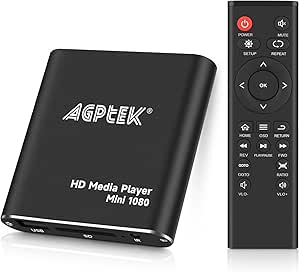 | Best for Local Files and Older TVs | Maximum video output: 1080p at 60 Hz | Connections: HDMI, composite AV, USB 2.0/3.0 | Supported storage: USB drives up to 512 GB, SD cards up to 128 GB, hard drives up to 8 TB | VIEW ON AMAZON | See Our Full Breakdown |
| EASYTONE Android TV Box 14.0 (2026) – 4GB RAM, 32GB ROM, Octa-core H728, 4K/8K HDR10, Wi‑Fi 6, 1000M Ethernet, Bluetooth 5.0, USB 3.0 |  | Best for Multitasking and Expandable Setup | Operating system: Android 14 | Processor: Allwinner H728 octa-core | RAM: 4 GB | VIEW ON AMAZON | See Our Full Breakdown |
| onn Android TV 4K UHD Streaming Device with Voice Remote and HDMI Cable |  | Best for Simple Google Assistant Searches | Operating system: Android TV | Resolution: 4K UHD (3840 × 2160) | RAM: 2 GB | VIEW ON AMAZON | See Our Full Breakdown |
| TiVo Stream 4K Streaming Media Player |  | Best for Unified Streaming and Live TV Discovery | Model: RA2400 | Operating connectivity: Wi-Fi | Connector: HDMI | VIEW ON AMAZON | See Our Full Breakdown |
| Phantom Dcolor GD2 Certified Android TV 4K Streamer |  | Best for Storage Capacity | Operating system: Android 12 TV | Processor: Quad-core 64-bit Cortex-A35 | GPU: ARM Mali-G31 MP2 | VIEW ON AMAZON | See Our Full Breakdown |
| Raxxio MAG555 4K Streaming Media Player with Google TV | 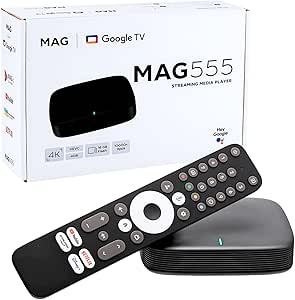 | Best for Families and Expandable Storage | Operating system: Google TV | Processor: Amlogic S905Y4-B2 | Memory: 2 GB RAM | VIEW ON AMAZON | See Our Full Breakdown |
| media players with voice control | Operating system | Storage | Connectivity | Resolution |
|---|---|---|---|---|
| Xiaomi TV Box S | Android Google TV | 32 GB | Wi-Fi 6, Bluetooth, HDMI 2.1, USB | 4K UHD (3840 × 2160) |
| Formuler GTV 4K Media Streamin | Android TV 12.0 | 16 GB eMMC | Dual-band 2×2 AC Wi-Fi, Bluetooth 5.0, Gigabit Ethernet | 4K UHD (3840 × 2160) |
| Mini 1080p HDMI and AV Media P | — | — | — | — |
| EASYTONE Android TV Box 14.0 | Android 14 | 32 GB internal, expandable via USB/TF | Dual-band Wi-Fi 6, 1000 Mbps Ethernet, Bluetooth 5.0 | — |
| onn Android TV 4K UHD Streamin | Android TV | 8 GB | HDMI, Wi-Fi | 4K UHD (3840 × 2160) |
| TiVo Stream 4K Streaming Media | — | — | — | 4K |
| Phantom Dcolor GD2 Certified A | Android 12 TV | 32 GB eMMC | — | — |
| Raxxio MAG555 4K Streaming Med | Google TV | 16 GB internal, expandable via USB | Dual-band Wi-Fi, Bluetooth 5.0, HDMI, USB, Ethernet | — |
More Details on Our Top Picks
Xiaomi TV Box S (3rd Gen) – 4K UHD Android Google TV Streaming Device with Dolby Vision, Atmos, Wi-Fi 6, and Bluetooth Remote
The Xiaomi TV Box S (3rd Gen) is my strongest all-around pick for buyers who want voice search alongside polished picture and sound. Its Google TV voice remote makes finding shows and controlling compatible smart-home devices straightforward, while Dolby Vision, HDR10+, and Dolby Atmos support give it a broader cinema-focused feature set than the onn Android TV device. Wi-Fi 6 can help maintain a steadier connection on a compatible network, though it does not add much if your router lacks Wi-Fi 6. The 32 GB of storage also gives it more room for apps than Formuler’s 16 GB. The tradeoff is 2 GB of RAM, which may limit heavier multitasking; I’d pick the EASYTONE instead if extra memory and an octa-core chip matter more than the Xiaomi’s named HDR and audio formats.
Pros:- Google TV remote offers voice control and smart-home management.
- Dolby Vision and HDR10+ support suit compatible 4K televisions.
- Dolby Atmos and DTS:X provide support for immersive audio formats.
- 32 GB storage exceeds the 16 GB in the Formuler GTV.
Cons:- 2 GB RAM may constrain multitasking or demanding apps.
- Wi-Fi 6 benefits depend on having a compatible router.
Best for: Viewers who want hands-free Google TV search, broad HDR and audio format support, and room for a larger app collection.
Not ideal for: Heavy multitaskers or buyers with a non-Wi-Fi 6 setup who want the benefit of its newest wireless standard.
- Operating system:Android Google TV
- Resolution:4K UHD (3840 × 2160)
- Processor:64-bit 6nm quad-core A55, up to 2.5 GHz
- RAM:2 GB
- Storage:32 GB
- Connectivity:Wi-Fi 6, Bluetooth, HDMI 2.1, USB
- Video support:Dolby Vision, HDR10+, H.264, H.265/HEVC, VP9
- Audio support:Dolby Atmos, DTS:X
- Included:Voice remote, HDMI cable, power adapter, user manual
Our verdict“Choose the Xiaomi if you want voice-controlled Google TV with strong HDR and audio support, and do not need more than 2 GB of RAM.”
Formuler GTV 4K Media Streaming Box
The Formuler GTV 4K suits buyers who want voice-controlled Android TV but prefer a direct network connection over relying on wireless. Its voice remote and Chromecast cover everyday searching and casting, while Gigabit Ethernet offers a wired option the Xiaomi TV Box S does not list. That can make it a better fit for a TV beside a router or Ethernet wall port. It also supports 4K output and Dolby and DTS-HD audio, although the Xiaomi names more advanced formats, including Dolby Vision and Dolby Atmos. Formuler’s 16 GB storage is half the Xiaomi’s 32 GB, and its 2 GB of RAM is modest for extensive multitasking. Its listed H.264 ceiling of 4K at 30 fps is another limit for some high-frame-rate files.
Pros:- Voice remote supports hands-free content searches.
- Gigabit Ethernet offers a wired alternative to dual-band Wi-Fi.
- Chromecast is built in for casting compatible content.
- Dolby and DTS-HD audio support covers common surround formats.
Cons:- 16 GB storage is limited compared with the Xiaomi TV Box S’s 32 GB.
- H.264 video is listed at up to 4K at 30 fps.
- 2 GB RAM leaves limited headroom for heavy multitasking.
Best for: Streamers with an Ethernet connection who want a Google-certified Android TV box, voice search, and Chromecast.
Not ideal for: Viewers who need extensive app storage, H.264 playback at 4K/60 fps, or the Xiaomi’s listed Dolby Vision and Dolby Atmos formats.
- Operating system:Android TV 12.0
- Resolution:4K UHD (3840 × 2160)
- Processor and GPU:Amlogic S905X2 quad-core; ARM G31 MP2
- RAM:2 GB DDR4 at 2400 MHz
- Storage:16 GB eMMC
- Connectivity:Dual-band 2×2 AC Wi-Fi, Bluetooth 5.0, Gigabit Ethernet
- Video codecs:VP9; H.265 up to 4K at 60 fps; H.264 up to 4K at 30 fps
- Audio:AAC, Dolby, DTS-HD
- Ports:USB 3.0, USB 2.0, HDMI 2.1 with CEC, Gigabit LAN, IR extension
Our verdict“Pick the Formuler if wired Gigabit Ethernet is a priority and its storage and format limits suit your viewing habits.”
Mini 1080p HDMI and AV Media Player
This Mini 1080p HDMI and AV Media Player is the outlier in a voice-control roundup: the supplied information lists a standard remote, not voice control, and there is no Google TV or Android TV platform for spoken searches. I’d include it only for a different kind of job—playing personal files from USB storage, SD cards, or a hard drive, including on a television with composite AV input. By comparison, the onn Android TV device provides voice search and streaming apps, but it does not fill this player’s stated role as a local-file unit with AV output. 1080p at 60 Hz is the ceiling, so it is not a 4K streaming alternative to Xiaomi or Formuler. Its broad playback controls are useful for repeat or shuffle playback, but FAT/FAT32 support and the listed MBR requirement constrain drive compatibility.
Pros:- Reads media from USB drives, SD cards, and hard drives.
- HDMI and composite AV outputs support newer and older televisions.
- Playback controls include loop, shuffle, resume, and subtitle support.
- Supports listed storage capacities up to 8 TB for hard drives.
Cons:- No voice-control feature is listed, unlike the onn Android TV device.
- Maximum output is 1080p, below the 4K capability of the other streaming boxes.
- FAT/FAT32 file systems and MBR partition support limit drive compatibility.
Best for: People who play their own media files from USB, SD cards, or hard drives, especially on an older TV with composite AV input.
Not ideal for: Buyers specifically seeking voice-controlled streaming, app-based services, or 4K video output.
- Maximum video output:1080p at 60 Hz
- Connections:HDMI, composite AV, USB 2.0/3.0
- Supported storage:USB drives up to 512 GB, SD cards up to 128 GB, hard drives up to 8 TB
- Supported file systems:FAT, FAT32
- Hard-drive partition support:MBR
- Playback features:Loop, shuffle, resume, repeat, zoom, fast forward, rewind, rotation, time selection
- Dimensions:2.48 in L × 0.51 in H
- Weight:249 g
- Included accessories:Remote control, analog AV cable
Our verdict“Choose this player for local-file playback and legacy AV connections, not for voice-controlled streaming.”
EASYTONE Android TV Box 14.0 (2026) – 4GB RAM, 32GB ROM, Octa-core H728, 4K/8K HDR10, Wi‑Fi 6, 1000M Ethernet, Bluetooth 5.0, USB 3.0
The EASYTONE Android TV Box puts more emphasis on memory and connectivity than on named cinema formats. Its 4 GB RAM and 32 GB storage exceed the Xiaomi TV Box S’s 2 GB of RAM, making this the more appealing fit for buyers who keep several apps or tasks in play. It also combines Wi-Fi 6 with Gigabit Ethernet, USB 3.0, and a voice-controlled remote, so it offers flexible ways to connect and add storage. The listed output reaches 8K HDR10, but the product data does not name Dolby Vision or HDR10+, formats the Xiaomi supports. Nor does the listing identify Google certification or a particular streaming-app ecosystem, so buyers should verify app compatibility for their needs. This is a spec-forward alternative, not the safest pick for someone prioritizing established Google TV features.
Pros:- 4 GB RAM provides more memory headroom than the Xiaomi TV Box S and Formuler GTV.
- 32 GB internal storage can be expanded through USB or TF.
- Wi-Fi 6 and Gigabit Ethernet provide wireless and wired network choices.
- Voice-controlled remote and USB 3.0 support a flexible setup.
Cons:- Dolby Vision and HDR10+ support are not listed.
- Google certification and a specific streaming-app ecosystem are not specified.
- 8K output claims do not establish compatibility with every app or video format.
Best for: Tinkerers and multitasking households seeking more RAM, USB expansion, and both Wi-Fi 6 and Gigabit Ethernet.
Not ideal for: Buyers who want named Dolby Vision or HDR10+ support, or who need a clearly specified Google TV streaming platform.
- Operating system:Android 14
- Processor:Allwinner H728 octa-core
- RAM:4 GB
- Storage:32 GB internal, expandable via USB/TF
- Video output:Up to 8K HDR10; 4K at 60 fps
- Connectivity:Dual-band Wi-Fi 6, 1000 Mbps Ethernet, Bluetooth 5.0
- Ports:USB 3.0, HDMI output
- Supported video codecs:H.264, H.265, MPEG-1, MPEG-2, MPEG-4
- Voice control:Voice-controlled remote
Our verdict“Choose the EASYTONE if extra memory, expansion, and varied connections matter more than the Xiaomi’s named HDR formats and Google TV platform.”
onn Android TV 4K UHD Streaming Device with Voice Remote and HDMI Cable
The onn Android TV 4K UHD Streaming Device is the straightforward choice for buyers who mainly want to speak a search instead of typing with a remote. Its Google Assistant voice remote works with Android TV, and built-in Chromecast makes it easy to send compatible content from a phone. Compared with the Xiaomi TV Box S, it has a simpler listed feature set: 8 GB of storage versus 32 GB, and no listed Dolby Vision, HDR10+, or Wi-Fi 6. The Xiaomi is the more capable pick for viewers building around picture formats and local app storage; onn keeps the focus on 4K streaming basics and casting. Its United States-only region compatibility is a major boundary, not a minor detail. I’d skip it outside that market or if a larger app library matters.
Pros:- Google Assistant voice remote enables spoken content searches and control.
- Built-in Chromecast supports casting from Android and iOS devices.
- 4K UHD output supports compatible televisions and content.
- HDMI cable is included for connection to a television.
Cons:- Designed for use in the United States and incompatible with other regions.
- 8 GB storage is limited compared with the Xiaomi TV Box S and Formuler GTV.
- Dolby Vision, HDR10+, and Wi-Fi 6 are not listed.
Best for: U.S.-based viewers who want basic 4K Android TV streaming, Google Assistant voice search, and phone-to-TV casting.
Not ideal for: Buyers outside the United States, or viewers who need more than 8 GB of storage or specified advanced HDR formats.
- Operating system:Android TV
- Resolution:4K UHD (3840 × 2160)
- RAM:2 GB
- Storage:8 GB
- Connectivity:HDMI, Wi-Fi
- Audio/video codecs:H.264, H.265/HEVC
- Included:Voice remote, HDMI cable
- Weight:12 ounces
- Region compatibility:United States only
Our verdict“Pick the onn device for simple voice-controlled 4K streaming and casting in the United States, but choose Xiaomi for more storage and specified HDR support.”
TiVo Stream 4K Streaming Media Player
The TiVo Stream 4K earns its place for viewers who want voice search alongside a combined view of streaming apps and live TV. Its Google Assistant control can help find content without typing, while watch lists and recommendations make it easier to move between services. It also supports 4K, Dolby Vision, and Dolby Atmos, a stronger format mix than the Phantom Dcolor GD2’s listed Dolby Audio support. Unlike the Raxxio MAG555, TiVo’s standout is its focus on bringing discovery together rather than expandable storage or user profiles. The tradeoffs are its 8 GB storage, Wi-Fi and HDMI dependence, and a stated 90-day warranty. I’d choose it for search and discovery, not for extra storage headroom.
Pros:- Combines streaming apps and live TV discovery in one interface
- Google Assistant voice control supports hands-free content search
- Supports 4K video, Dolby Vision HDR, and Dolby Atmos
- Compact TV-stick form factor
Cons:- 8 GB of storage leaves less capacity than the Phantom Dcolor GD2’s 32 GB
- Requires both Wi-Fi and an HDMI connection
- Stated warranty is only 90 days
Best for: Viewers who use several streaming apps and live TV services and want Google Assistant voice search plus one place to discover what is available.
Not ideal for: Buyers who need wired networking, expandable storage, or a longer stated warranty; the product requires Wi-Fi and lists a 90-day warranty.
- Model:RA2400
- Operating connectivity:Wi-Fi
- Connector:HDMI
- Resolution:4K
- HDR:Dolby Vision
- Audio:Dolby Atmos
- Memory:2 GB RAM; 8 GB storage
- Form factor:TV stick
- Warranty:90 days
Our verdict“Choose the TiVo Stream 4K if voice-led discovery across streaming apps and live TV matters more than storage capacity or a longer warranty.”
Phantom Dcolor GD2 Certified Android TV 4K Streamer
The Phantom Dcolor GD2 suits buyers who want Google Assistant voice control on an Android TV streamer with more built-in space for apps. Its 32 GB storage is four times the TiVo Stream 4K’s listed capacity, which gives app-heavy households more room without relying on USB expansion. Built-in Chromecast adds a simple way to send compatible content from a phone, while dual-band Wi-Fi and stated Netflix 4K support cover common streaming needs. Compared with the Raxxio MAG555, the GD2 offers more internal storage, but the Raxxio lists Bluetooth 5.0 and USB-expandable storage. The GD2’s 2 GB of RAM is modest, and its included 3-pin UK plug may not suit buyers in other regions. I’d check plug compatibility before choosing it.
Pros:- 32 GB of internal storage offers more app space than the TiVo Stream 4K
- Google Assistant voice control is included
- Built-in Chromecast supports casting from compatible devices
- Dual-band Wi-Fi and stated Netflix 4K support
Cons:- 2 GB of RAM may limit headroom for heavier multitasking
- Included 3-pin UK plug may not be compatible with local outlets
- No USB storage expansion is listed
Best for: Android TV users who install multiple apps, want Google Assistant voice search, and can use the included 3-pin UK plug or provide a compatible power solution.
Not ideal for: Buyers outside the plug’s intended region who need a locally compatible adapter, or those seeking more than 2 GB of RAM.
- Operating system:Android 12 TV
- Processor:Quad-core 64-bit Cortex-A35
- GPU:ARM Mali-G31 MP2
- Memory:2 GB DDR4 RAM
- Storage:32 GB eMMC
- Wi-Fi:Dual-band 2.4 GHz / 5.0 GHz
- Video streaming:Up to 4K; Netflix 4K supported
- Audio:Dolby Audio
- Included accessories:Voice remote, HDMI cable, 3-pin UK plug, user manual
Our verdict“Pick the Phantom Dcolor GD2 if you want generous built-in app storage with Google Assistant and its UK-style plug works for your setup.”
Raxxio MAG555 4K Streaming Media Player with Google TV
The Raxxio MAG555 is the family-oriented pick here: its Google TV setup includes user profiles and parental controls, while the voice remote can make finding content easier for different household members. Its 16 GB of internal storage, expandable via USB, gives it more flexibility than the TiVo Stream 4K’s 8 GB, though it falls short of the Phantom Dcolor GD2’s 32 GB built in. The MAG555 also supports 4K HDR playback up to 60 fps and dual-band Wi-Fi; Bluetooth 5.0 can connect compatible accessories. Dolby Digital is specified, rather than the TiVo’s listed Dolby Atmos. Some voice functions depend on individual apps, and access to content relies on compatible services and subscriptions, so the remote cannot make every app behave alike.
Pros:- Google TV includes user profiles and parental controls
- Voice remote supports Google Assistant
- 16 GB internal storage can be expanded via USB
- 4K HDR playback up to 60 fps with dual-band Wi-Fi and Bluetooth 5.0
Cons:- Voice features depend on support from individual apps
- Content access depends on compatible third-party apps and subscriptions
- Dolby Digital is listed, but Dolby Atmos is not
Best for: Families who want separate Google TV profiles, parental controls, voice search, and the option to add storage through USB.
Not ideal for: Buyers who need guaranteed voice commands across every app or who prioritize Dolby Atmos support; app voice features vary and Dolby Atmos is not listed.
- Operating system:Google TV
- Processor:Amlogic S905Y4-B2
- Memory:2 GB RAM
- Storage:16 GB internal, expandable via USB
- Video output:3840 × 2160 (4K) at up to 60 fps
- Video codecs:H.264, H.265/HEVC
- Audio:Dolby Digital
- Connectivity:Dual-band Wi-Fi, Bluetooth 5.0, HDMI, USB, Ethernet
- Warranty:1 year manufacturer
Our verdict“Choose the Raxxio MAG555 for a shared household that values profiles, parental controls, and USB-expandable storage over broader app-independent voice control.”

How We Picked
I ranked these players by how well their voice control serves everyday viewing, alongside platform usability, stated video support, and practical connection options. A voice remote is more useful when it works with a familiar TV interface and can search across the apps a buyer actually watches. I also weighed setup simplicity, compatibility cues, and whether each device’s strengths match a clear use case.
The order favors balanced streaming devices with a defined platform and 4K capability over products whose main appeal is specialized connectivity or headline hardware. That does not make the lower-ranked models poor fits: the Mini 1080p player is aimed at older displays, while the EASYTONE emphasizes ports and listed specifications. Where details such as app certification or voice features are not clear from the product information, I treat that uncertainty as a buying drawback rather than assuming performance.
| media players with voice control | Operating system | Connectivity | Audio |
|---|---|---|---|
| Xiaomi TV Box S | Android Google TV | Wi-Fi 6, Bluetooth, HDMI 2.1, USB | — |
| Formuler GTV 4K Media Streamin | Android TV 12.0 | Dual-band 2×2 AC Wi-Fi, Bluetooth 5.0, Gigabit Ethernet | AAC, Dolby, DTS-HD |
| Mini 1080p HDMI and AV Media P | — | — | — |
| EASYTONE Android TV Box 14.0 | Android 14 | Dual-band Wi-Fi 6, 1000 Mbps Ethernet, Bluetooth 5.0 | — |
| onn Android TV 4K UHD Streamin | Android TV | HDMI, Wi-Fi | — |
| TiVo Stream 4K Streaming Media | — | — | Dolby Atmos |
| Phantom Dcolor GD2 Certified A | Android 12 TV | — | Dolby Audio |
| Raxxio MAG555 4K Streaming Med | Google TV | Dual-band Wi-Fi, Bluetooth 5.0, HDMI, USB, Ethernet | Dolby Digital |
Factors to Consider When Choosing Media Players With Voice Control
Before choosing, I’d match the player to the television, streaming apps, and kind of voice commands you expect to use. These broader checks can prevent paying for features your setup cannot use—or buying a low-cost device that does not fit your streaming habits.
Check What Voice Control Can Actually Do
“Voice control” can mean searching for a title, opening an app, controlling playback, or issuing commands to other smart devices, and those abilities are not interchangeable. Check whether the remote has a microphone and whether the player’s operating system supports the commands you care about. Voice search may work across some services but not others, so test compatibility against your regular subscriptions before choosing. Also consider whether you want hands-free control or simply a microphone button on the remote. A remote-based system is convenient for quick searches, but it still needs to be within reach and may not replace the TV’s own controls. Choosing by the command features you will use is more useful than choosing by the word “voice” alone.
Match Resolution and HDR to Your Television
A 4K label only helps when the display, content, and connection all support that resolution. If your TV is 1080p, a 4K player can still work, but its headline video capability may not improve what you see. HDR formats also vary, so check the formats supported by both the player and television rather than assuming every HDR label means the same thing. Older sets with AV input may need a player that supports that connection, making the Mini 1080p model a distinct kind of option. Buyers planning a future TV upgrade may prefer a 4K-capable streamer, but should not treat resolution as a substitute for app compatibility. Match the device to the weakest link in your setup.
Verify App Support and Platform Certification
A device can advertise Android, Google TV, or access to apps without offering the same certified streaming experience as another player. Before buying, confirm that your key services are available and supported at the playback quality you expect. This matters most with less familiar boxes that emphasize processor, memory, or 8K claims: those specifications do not prove that popular streaming apps work smoothly or reliably. Check for clear certification details and current software support, especially if you plan to use the player as your main entertainment hub. A familiar interface can also reduce the learning curve for household members. I would prioritize verified app access over extra hardware figures when streaming is the main job.
Choose Connectivity for Your Room, Not a Spec Sheet
Wi-Fi is convenient, but a wired Ethernet connection can be helpful when the player sits near a router and wireless reception is inconsistent. USB ports matter if you expect to connect local storage or accessories; they add little for someone who only streams through apps. Check the player’s output ports against the television, sound system, and available space around the HDMI connection. Bluetooth can support compatible accessories, though it does not automatically mean every remote or audio device will pair. Extra ports and newer wireless standards may justify a more capable box for a busy setup, but they can be wasted on a basic bedroom TV. Decide which connection problem you need to solve before paying for added flexibility.
Think About Setup and Who Will Use the Remote
A device with an intuitive home screen and a clearly laid-out voice remote may be a better household choice than a box with more settings and ports. If several people will use it, consider how easily they can find apps, switch inputs, and recover when a voice search fails. Check whether the remote can also control basic TV functions, since juggling multiple remotes can make a new player less convenient. Compact dongle-style devices can hide behind a screen, while boxes may offer more room for connections but need a visible spot. For a secondary TV, simple setup can matter more than premium formats. Match interface complexity to the least technical person who will use the system regularly.
Treat High Hardware Claims With Care
Large memory figures, fast processors, and 8K labels can sound persuasive, but they do not answer whether voice search is responsive or streaming apps are properly supported. For app-based viewing, software updates and certification may affect daily use more than raw hardware claims. Look for clear information about the operating system, remote functions, and the services the device supports. If a listing leaves those points vague, treat that uncertainty as part of the tradeoff. Buyers who need Ethernet or USB expansion may still value a feature-rich box, but should verify those connections work with their intended accessories. Spend on benefits you can name, not specifications that have no clear role in your setup.
Frequently Asked Questions
Will a voice-control media player work with my existing television?
Most HDMI streaming players can connect to a television with a compatible HDMI input, but resolution and HDR depend on what both devices support. If your TV is older, check whether it has HDMI or only AV inputs before ordering. The Mini 1080p HDMI and AV Media Player is the lineup’s option aimed at setups that may need AV connectivity, while the other picks are more clearly positioned as modern streaming devices. Also check whether your TV’s HDMI port has enough clearance for the player or cable. Voice features come from the player and its remote, so they do not require a smart TV, but some commands may not control every TV function.
Can I use voice search across all my streaming subscriptions?
Not always: search behavior depends on the device platform and each streaming service’s integration. A voice remote may find a title in one app but only open another app or return a general web result for the same request. Before buying, check whether your most-used services appear in the platform’s voice search and whether playback commands are supported. If you often switch between subscriptions, a unified TV interface can be more useful than a remote that only launches apps. Keep the remote’s physical controls in mind too, since voice search is a convenience rather than a guarantee of universal control.
Should I choose an 8K-labeled player if my TV is 4K?
Usually, not for the resolution claim alone. A 4K television cannot display native 8K detail, and much of the practical experience depends on app support, source content, and reliable playback. The EASYTONE lists 4K/8K HDR10 and expanded connectivity, but buyers should verify app certification and voice functions before treating those specifications as an advantage. If you need Ethernet or USB 3.0, those connections may be a more relevant reason to compare it with simpler streamers. For a standard 4K streaming setup, a well-matched platform and remote can matter more than a larger resolution number.
Is a separate media player worthwhile if my TV already has streaming apps?
It can be, if your TV’s interface is slow, lacks apps you use, or has an awkward remote. A dedicated player can provide a different app platform and a voice remote that makes title searches easier. On the other hand, if your television already supports your services and voice commands reliably, a second device may add little beyond another remote and input. Check whether the player can control basic TV functions to reduce remote juggling. The decision is less about having the newest device and more about fixing a specific limitation in your current setup.
What should I check before choosing a lesser-known Android TV box?
Confirm the exact operating system, supported streaming apps, certification status, remote microphone functions, and update policy. Hardware claims such as memory, processor type, and wireless standards do not confirm that services will play at their expected quality. Check the available outputs and whether Ethernet or USB connections match accessories you plan to use. Look for clear instructions on voice search and compatibility with your television and audio equipment. If that information is hard to verify, a more established platform may be the safer choice for a main-room streamer, even if it offers fewer ports.
Conclusion
For the best overall, I recommend the Xiaomi TV Box S (3rd Gen) for its blend of Google TV voice control and 4K-oriented features. The best value-style choice is the onn Android TV 4K UHD Streaming Device for buyers who want a straightforward streaming setup with a voice remote. For beginners, I’d also point to the onn, while the best premium-leaning pick is the Xiaomi, based on its broader feature mix rather than a verified luxury tier. Choose the Mini 1080p player for older TVs or AV connections, and compare the EASYTONE or Raxxio MAG555 when their listed connectivity and Google TV features match a specific need. The Formuler GTV 4K, TiVo Stream 4K, and Phantom Dcolor GD2 may suit buyers drawn to their respective streaming platforms, but I’d verify voice functions and app compatibility before making any of them a primary player.
Fall Picks
fall essentials
As an affiliate, we earn on qualifying purchases.