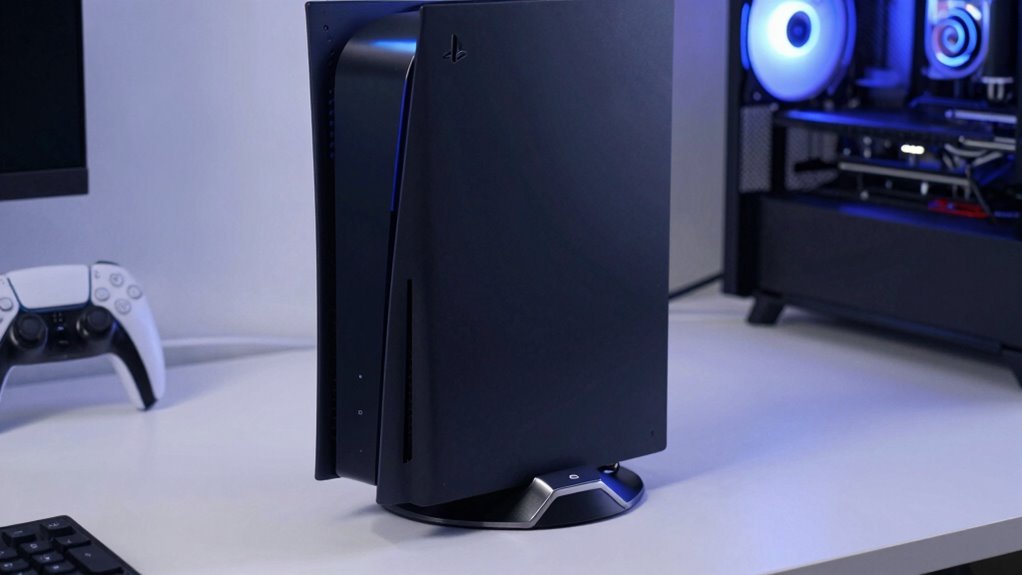

Keeping your PS5 cool during extended gaming sessions is essential to maintaining performance and longevity. In 2026, the market offers a variety of cooling stands that combine fans, charging docks, and organized storage. Among these, the PS5/Slim/Pro Stand and Cooling Station with LED Controller Charging Station stands out for its all-in-one design, making it ideal for users who want a compact, multifunctional solution. The Tokluck PS5 Cooling Station offers smart, automatic cooling and RGB lighting for those who want a customizable setup, while the Cooling Station with Controller Charger for PS5 provides a balance of effective cooling and straightforward design at a mid-range price. Each option has distinct strengths and compromises, so choosing the right one depends on your specific gaming habits and setup requirements.

Get your wardrobe favorites delivered free with Prime
- Fast, free delivery on millions of items
- Prime Video, Amazon Music and more included
- Member-only deals all year
Key Takeaways
- Multifunctional stands that combine cooling, charging, and storage provide the most convenience, but often come with increased bulk.
- Adjustable fan speeds and automatic cooling features help prevent overheating during long gaming sessions, especially with high-performance games.
- Compatibility varies; some stands are designed specifically for standard PS5 models, while others support all versions including Slim and Pro.
- Lighting features like RGB can enhance aesthetics but may be distracting or unnecessary for some users.
- Power sources differ: some stands draw power from the PS5 USB port, limiting placement options, while others have external power adapters.
| PS5/Slim/Pro Stand and Cooling Station with LED Controller Charging Station for PlayStation 5 Console |  | Best Overall Multifunctional Stand | Compatibility: PS5, PS5 Slim, PS5 Pro | Cooling Fan Speed: 3 levels (3100-3500 RPM) | Controller Charging Time: 2.5 hours | VIEW ON AMAZON | See Our Full Breakdown |
| PS5/Slim/Pro Cooling Station with Controller Charging Station for Playstation 5 Console |  | Best for Effective Cooling & Controller Charging | Cooling Fan Speeds: High, Mid, Low | Charging Time: 3 hours | USB Ports: 3 | VIEW ON AMAZON | See Our Full Breakdown |
| Tokluck PS5 Cooling Station with Auto Turbofan & Controller Charger |  | Best for Automatic Cooling & Customization | Compatibility: All PS5 Console Digital & Disc | Fan Speed Modes: Manual and automatic with 3 levels | Charging Time: 2.5 hours | VIEW ON AMAZON | See Our Full Breakdown |
| PS5/Slim/Pro Stand with Cooling & Charging Station, RGB Lights, Adjustable Fan, Controller Charger |  | Best for Aesthetic & Stability | Compatibility: PS5, PS5 Slim, PS5 Pro | Cooling System: High-efficiency fans | Charging Ports: USB for controllers, 3 USB HUBs | VIEW ON AMAZON | See Our Full Breakdown |
| Cooling Station with Controller Charger for PS5, Dual Controller Charging, 3-Level Cooling Fan, RGB Lighting, Vertical Stand |  | Best for Quiet Operation & Easy Setup | Compatibility: All PS5 models (2020, Slim, Pro) | Cooling Fan Levels: 3 (Low, Mid, High) | Charging Time: 2 hours for DualSense, 2.5 hours for Edge controllers | VIEW ON AMAZON | See Our Full Breakdown |
| cooling stands for ps5 | Compatibility | USB Ports | Charging Time | Lighting |
|---|---|---|---|---|
| PS5/Slim/Pro Stand and Cooling | PS5, PS5 Slim, PS5 Pro | 3 | — | — |
| PS5/Slim/Pro Cooling Station w | PS5 Standard, Slim, Digital, Disc, Pro | 3 | 3 hours | — |
| Tokluck PS5 Cooling Station wi | All PS5 Console Digital & Disc | 3 | 2.5 hours | 9 RGB effects |
| PS5/Slim/Pro Stand with Coolin | PS5, PS5 Slim, PS5 Pro | — | — | RGB |
| Cooling Station with Controlle | All PS5 models (2020, Slim, Pro) | — | 2 hours for DualSense, 2.5 hours for Edge controllers | RGB with 9 modes |
More Details on Our Top Picks
PS5/Slim/Pro Stand and Cooling Station with LED Controller Charging Station for PlayStation 5 Console
This stand excels for users seeking a comprehensive solution, merging cooling, controller charging, and accessory storage in a single device. Its adjustable fan speeds provide effective cooling, and the multiple USB ports support various peripherals. Compared with simpler stands, it offers more value for those who want an integrated setup, but it can feel bulky for small setups and the fan noise at higher speeds might be distracting during quiet moments. Its safety features and organized design make it a versatile pick for dedicated gamers.
Pros:- Combines cooling, charging, and storage in one device
- Adjustable fan speeds for tailored cooling
- Supports multiple accessories and games
- Safety features prevent overcharge and overheating
Cons:- Can be bulky for small spaces
- Fan noise at high speeds
Best for: Gamers who want an all-in-one stand that reduces clutter and provides reliable cooling and charging.
Not ideal for: Players with limited space or those seeking a minimalistic setup without extra features.
- Compatibility:PS5, PS5 Slim, PS5 Pro
- Cooling Fan Speed:3 levels (3100-3500 RPM)
- Controller Charging Time:2.5 hours
- USB Ports:3
- Game Storage:14 discs
- Protection Features:Overcharge, overheat, overvoltage, short-circuit
Our verdict“A versatile and comprehensive stand perfect for gamers who want all-in-one functionality.”
PS5/Slim/Pro Cooling Station with Controller Charging Station for Playstation 5 Console
This cooling station is tailored for gamers who prioritize active cooling during long sessions. Its turbo fan with three adjustable speeds ensures overheating is kept at bay, while the dual-controller fast-charging dock saves time. Its multiple USB ports and accessory organization make it a practical choice, although it’s not compatible with Edge controllers and can be bulky. External power is needed for full functionality, which might limit placement options.
Pros:- Highly effective cooling with adjustable speeds
- Fast charging for two controllers in 3 hours
- Multiple USB ports for accessories
- Keeps controllers, headset, and discs organized
Cons:- Not compatible with Edge controllers
- Requires external power source
- Can be bulky
Best for: Players who game for several hours and need reliable cooling and quick controller recharge.
Not ideal for: Those using Edge controllers or who prefer a lightweight, minimal setup.
- Cooling Fan Speeds:High, Mid, Low
- Charging Time:3 hours
- USB Ports:3
- Compatibility:PS5 Standard, Slim, Digital, Disc, Pro
- Overcharge Protection:Yes
- Included Accessories:Headset holder, media remote slot, screw
Our verdict“A solid choice for long gaming marathons needing efficient cooling and quick controller recharge.”
Tokluck PS5 Cooling Station with Auto Turbofan & Controller Charger
This stand is ideal for gamers who appreciate smart features, with its automatic fan speed control based on console temperature and customizable RGB lighting. It supports all PS5 versions, offering dual controller charging in just 2.5 hours. The setup might seem complex due to multiple features, and the lighting effects could be a distraction during gameplay. Noise levels of the fan are not clearly specified, which could be a concern for sensitive users.
Pros:- Automatically adjusts fan speed based on temperature
- Quick 2.5-hour controller charging
- Nine RGB lighting effects with adjustable brightness
- Supports all PS5 console types
Cons:- Setup may be complex for some users
- Lighting effects may be distracting
- Noise levels are unspecified
Best for: Tech-savvy gamers who want a visually customizable setup with automatic cooling adjustments.
Not ideal for: Casual players seeking a simple, plug-and-play cooling solution without lighting or automation.
- Compatibility:All PS5 Console Digital & Disc
- Fan Speed Modes:Manual and automatic with 3 levels
- Charging Time:2.5 hours
- Lighting:9 RGB effects
- USB Ports:3
- Lighting Memory Function:Yes
Our verdict“A feature-rich stand suited for gamers who value automation and aesthetics over simplicity.”
PS5/Slim/Pro Stand with Cooling & Charging Station, RGB Lights, Adjustable Fan, Controller Charger
This multifunctional stand offers a balance of cooling, charging, and aesthetic features, with adjustable fans and RGB lighting. Its stable, secure design and multiple USB ports make it suitable for users who want a tidy, attractive setup. However, the setup can be complex due to many features, and noise from the cooling fans during operation may bother some gamers. It relies on the PS5 USB port for power, which could limit placement flexibility.
Pros:- Effective cooling with adjustable fans
- Supports multiple USB charging and data transfer
- RGB lighting adds aesthetic appeal
- Secure, stable placement
Cons:- Complex setup with many features
- Potential noise from fans
- Dependent on PS5 USB port for power
Best for: Users who want a stylish, stable stand with flexible cooling and charging options.
Not ideal for: Those preferring a minimal or lightweight stand without extra lighting or adjustable fans.
- Compatibility:PS5, PS5 Slim, PS5 Pro
- Cooling System:High-efficiency fans
- Charging Ports:USB for controllers, 3 USB HUBs
- Lighting:RGB
- Fan Adjustment:Auto with 3 levels
- Protection Features:Over-charging, over-current, over-temperature
Our verdict“A stylish, functional stand for gamers seeking both performance and visual flair.”
Cooling Station with Controller Charger for PS5, Dual Controller Charging, 3-Level Cooling Fan, RGB Lighting, Vertical Stand
This stand is designed for those who prioritize quiet operation combined with effective cooling and simple setup. It supports all PS5 models, features a 3-level adjustable fan, and can charge two controllers simultaneously. Its organized design includes storage for accessories and a phone holder, making it ideal for clutter-free setups. The reliance on the PS5 USB port for power can limit placement options, and some users might find the RGB lighting unnecessary.
Pros:- Quiet operation during cooling
- Effectively cools with adjustable fan levels
- Charges two controllers simultaneously
- Organized storage for accessories
Cons:- Requires PS5 USB port for power
- Controllers and accessories not included
- Lighting modes may be unnecessary
Best for: Casual gamers who want reliable cooling and charging without noise or complicated features.
Not ideal for: Enthusiasts seeking advanced automation or extensive customization options.
- Compatibility:All PS5 models (2020, Slim, Pro)
- Cooling Fan Levels:3 (Low, Mid, High)
- Charging Time:2 hours for DualSense, 2.5 hours for Edge controllers
- Lighting:RGB with 9 modes
- Power Source:USB from PS5
- Additional Ports:2 USB charging ports
- Accessories Included:Phone holder, headphone hook
Our verdict“A straightforward, quiet cooling and charging stand suitable for everyday gaming needs.”

How We Picked
Our selection process prioritized stands that are specifically designed for PS5 and its variants, with an emphasis on cooling efficiency, ease of use, and additional features like charging and storage. We compared products based on cooling performance, compatibility, build quality, user-friendly features, and value for money. We also considered user feedback about noise levels, setup complexity, and how well each stand balances form and function. The goal was to identify options that offer real benefits for different types of gamers, from casual players to enthusiasts who want the most comprehensive cooling and organization solutions.
| cooling stands for ps5 | Compatibility |
|---|---|
| PS5/Slim/Pro Stand and Cooling | PS5, PS5 Slim, PS5 Pro |
| PS5/Slim/Pro Cooling Station w | PS5 Standard, Slim, Digital, Disc, Pro |
| Tokluck PS5 Cooling Station wi | All PS5 Console Digital & Disc |
| PS5/Slim/Pro Stand with Coolin | PS5, PS5 Slim, PS5 Pro |
| Cooling Station with Controlle | All PS5 models (2020, Slim, Pro) |
Factors to Consider When Choosing Cooling Stands For Ps5
Choosing the right cooling stand for your PS5 depends on your gaming habits, setup space, and aesthetic preferences. The key factors include cooling capacity, additional features like charging and storage, compatibility with your PS5 version, and noise levels. Whether you prioritize a simple cooling solution, an all-in-one organizer, or a feature-rich automation stand, understanding these aspects will help you find the perfect fit.
Cooling Performance
Effective cooling is essential for prolonged gaming sessions, especially with high-performance games that generate more heat. Stands with adjustable fan speeds or automatic temperature control help prevent overheating without excessive noise. Consider your environment and whether noise levels matter—some stands operate quietly, while others might be louder at higher speeds.
Additional Features
Many stands offer more than cooling: controller charging, accessory storage, RGB lighting, and data transfer. Decide which features are most valuable to you. For example, if you want a clutter-free setup, a stand with organized storage and charging docks makes sense. If lighting is purely aesthetic, choose a model with customizable RGB effects.
Compatibility and Power
Ensure the stand supports your specific PS5 model—standard, Slim, or Pro. Also, check how the device is powered: some draw power from the PS5 USB port, limiting placement flexibility, while others include external power adapters for more freedom. Consider your setup space and whether the stand’s size fits your gaming area.
Noise and Setup
Cooling fans can be noisy, especially at higher speeds. Read user reviews regarding noise levels to gauge suitability for your environment. Additionally, consider the complexity of setup—some stands come pre-assembled or straightforward, while others with multiple features may require more effort to install and configure.
Frequently Asked Questions
Can I use these cooling stands with all PS5 models?
Most stands listed support all PS5 models, including the standard, Slim, and Pro versions. However, always double-check compatibility before purchasing, especially if you have a specific version like the Digital Edition or Edge controllers, which some stands might not support.
Do these stands significantly reduce PS5 temperature?
Yes, stands with high-quality fans and adjustable speeds can effectively lower console operating temperatures, helping to prevent overheating during long gaming sessions. Automatic cooling features further optimize performance without manual adjustments.
Is RGB lighting necessary in a cooling stand?
RGB lighting is primarily for aesthetic enhancement and does not impact cooling performance. If visual customization is important, models with RGB effects add flair, but if you prefer a minimal setup, you can opt for simpler, non-lit stands.
Do I need external power adapters for these cooling stands?
Many stands draw power from the PS5 USB port, which is convenient but can limit placement options. Some higher-end models include external power adapters, providing more flexibility in placement and potentially reducing noise or power concerns.
How loud are these cooling stands during operation?
Fan noise varies among models, with some operating quietly enough for most environments, while others can be noticeable at higher speeds. Reading user reviews can give you an idea of real-world noise levels, especially if you value a quiet gaming experience.
Conclusion
If you primarily want a simple, quiet solution for cooling and charging, the Cooling Station with Controller Charger for PS5 makes a reliable choice. Gamers who seek an all-in-one, customizable setup with RGB lighting will appreciate the Tokluck PS5 Cooling Station. For those who desire a balance of style, stability, and performance, the PS5/Slim/Pro Stand and Cooling Station with LED Controller offers a versatile, feature-rich option. Depending on your gaming habits, space, and aesthetic preferences, these picks can elevate your PS5 experience without sacrificing performance or convenience.