
When selecting a 6K monitor for a Mac Studio, clarity and color accuracy are paramount for professional workflows. The LG 32U990A-S stands out as the best overall choice with its stunning Nano IPS panel and Thunderbolt 5, offering fast data transfer and seamless Mac compatibility. For those on a tighter budget, the BenQ MA270U offers excellent color matching and a versatile USB-C hub at a more accessible price. Meanwhile, the ASUS ProArt PA27JCV excels for creatives needing precise color calibration and high resolution. The main tradeoffs in this category involve balancing resolution, color fidelity, connectivity, and price—more pixels often mean higher costs, and top-tier color accuracy can come with increased complexity or expense. Continue reading for an in-depth breakdown of these options and find the perfect fit for your Mac Studio setup.

Get your wardrobe favorites delivered free with Prime
- Fast, free delivery on millions of items
- Prime Video, Amazon Music and more included
- Member-only deals all year
Key Takeaways
- Higher resolution models like 6K provide unmatched detail, but often come at a premium price and may require powerful hardware for optimal performance.
- Color accuracy and calibration features vary significantly; professional-grade monitors like the ProArt and LG Nano IPS excel here, making them ideal for creative work.
- Connectivity options such as Thunderbolt 5 and USB-C are essential for seamless Mac Studio integration, with some monitors offering built-in hubs for added convenience.
- Size matters: larger 32-inch displays maximize workspace but can be more expensive and demanding on desk space, while 27-inch options balance size and affordability.
- Tradeoffs between resolution, price, and features mean buyers should prioritize their specific needs—whether professional editing, general use, or high-detail viewing.
| LG 32U990A-S 32-Inch Ultrafine 6K Nano IPS Professional Monitor with Thunderbolt 5 |  | Best Overall for Creative Professionals | Display Size: 32 inches | Resolution: 6144 x 3456 (6K) | Panel Type: Nano IPS Black | VIEW ON AMAZON | See Our Full Breakdown |
| BenQ MA270U 27-Inch 4K UHD IPS Monitor with Mac Color Match and USB-C Hub | 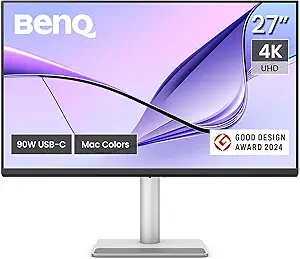 | Best Value for Mac Users Needing Calibrated 4K | Size: 27 inches | Resolution: 3840×2160 (4K UHD) | Color Gamut: 95% P3, 99% sRGB | VIEW ON AMAZON | See Our Full Breakdown |
| ASUS ProArt PA27JCV 27-Inch 5K USB-C Professional Monitor for Mac |  | Best for Professional Creators Needing 5K Clarity | Display Size: 27 inches | Resolution: 5120 x 2880 (5K) | Panel Type: IPS | VIEW ON AMAZON | See Our Full Breakdown |
| LG 27US500-W 27-Inch 4K UHD IPS Monitor with HDR10, Borderless Design, Reader Mode, Flicker Safe, HDMI & DisplayPort – White |  | Best Budget-Friendly 4K Option for Everyday Use | Screen Size: 27 inches | Resolution: 3840 x 2160 (4K UHD) | Display Technology: IPS | VIEW ON AMAZON | See Our Full Breakdown |
| MSI PRO MAX 271UPXW12G 27-Inch 4K UHD QD-OLED Monitor with HDR, 120Hz, USB-C Hub, Mac Compatibility |  | Best for Content Creators Requiring Deep Blacks and Vibrant Colors | Display Size: 27 inches | Resolution: 3840 x 2160 (4K UHD) | Panel Technology: QD-OLED | VIEW ON AMAZON | See Our Full Breakdown |
| G32P 32’’ UHD 6K IPS Monitor with HDR and Eye Care |  | Best Overall for Professional Creators and Power Users | Screen Size: 32 inches | Resolution: 6144 x 3456 (6K) | Panel Type: IPS | VIEW ON AMAZON | See Our Full Breakdown |
| INNOCN 27-inch 4K USB-C Monitor for Laptop MacBook/Mac mini – IPS HDR400 Display, Adjustable Stand, Black |  | Best for Compact Multi-Device Setups and Everyday Use | Display Size: 27 inches | Resolution: 3840 x 2160 (4K UHD) | Panel Type: IPS | VIEW ON AMAZON | See Our Full Breakdown |
| LG 27UP650K-W 27-inch 4K UHD IPS Computer Monitor with HDR400, Adjustable Stand, HDMI & DisplayPort |  | Best for Versatile Content Creation and Multitasking | Display Size: 27 inches | Resolution: 3840 x 2160 (4K UHD) | Panel Type: IPS | VIEW ON AMAZON | See Our Full Breakdown |
| 6k monitors for mac studio | Resolution | Connectivity | Display Size | Panel Type |
|---|---|---|---|---|
| LG 32U990A-S 32-Inch Ultrafine | 6144 x 3456 (6K) | Thunderbolt 5, HDMI 2.1, DisplayPort 2.1, USB-C | 32 inches | Nano IPS Black |
| BenQ MA270U 27-Inch 4K UHD IPS | 3840×2160 (4K UHD) | 2 HDMI 2.0, 2 USB-C (90W PD) | — | — |
| ASUS ProArt PA27JCV 27-Inch 5K | 5120 x 2880 (5K) | USB-C with DisplayPort, 96W | 27 inches | IPS |
| LG 27US500-W 27-Inch 4K UHD IP | 3840 x 2160 (4K UHD) | HDMI, DisplayPort | — | — |
| MSI PRO MAX 271UPXW12G 27-Inch | 3840 x 2160 (4K UHD) | Dual USB-C, HDMI, DisplayPort | 27 inches | — |
| G32P 32’’ UHD 6K IPS Monitor w | 6144 x 3456 (6K) | High-speed video interfaces, multi-purpose ports, 100W Power Delivery | — | IPS |
| INNOCN 27-inch 4K USB-C Monito | 3840 x 2160 (4K UHD) | USB-C, HDMI, DisplayPort, 3.5mm Audio Jack | 27 inches | IPS |
| LG 27UP650K-W 27-inch 4K UHD I | 3840 x 2160 (4K UHD) | HDMI, DisplayPort | 27 inches | IPS |
More Details on Our Top Picks
LG 32U990A-S 32-Inch Ultrafine 6K Nano IPS Professional Monitor with Thunderbolt 5
The LG 32U990A-S stands out for its stunning 6K resolution, offering a level of detail that surpasses most alternatives like the BenQ MA270U’s 4K. Its Nano IPS Black panel delivers exceptional contrast and color accuracy, making it perfect for retouching and detailed editing. The inclusion of Thunderbolt 5 with 96W power delivery ensures seamless Mac Studio connectivity and charging, consolidating workspace efficiency. Compared to the ASUS ProArt’s 5K display, this monitor provides higher resolution, but at a premium price and larger size, which demands a spacious desk. Its 60Hz refresh rate, however, limits suitability for fast-paced gaming or quick motion workflows. Overall, this monitor makes the most sense for high-end creative setups where detail and color fidelity are paramount.
Pros:- Exceptional 6K resolution for detailed editing and large-scale projects
- Versatile connectivity including Thunderbolt 5 with 96W power delivery
- High color accuracy with 99.5% Adobe RGB and HDR support
- Daisy chaining capability for expanded workspace
Cons:- Premium price can be prohibitive for non-professionals
- Large size requires significant desk space and setup considerations
Best for: Professional creative artists and designers needing ultra-high resolution and color precision.
Not ideal for: Casual users or gamers who require higher refresh rates or budget-friendly options.
- Display Size:32 inches
- Resolution:6144 x 3456 (6K)
- Panel Type:Nano IPS Black
- Contrast Ratio:2000:1
- Color Coverage:99.5% Adobe RGB, 98% DCI-P3
- Connectivity:Thunderbolt 5, HDMI 2.1, DisplayPort 2.1, USB-C
- Power Delivery:96W
- Refresh Rate:60Hz
- Response Time:5 ms
Our verdict“This monitor is ideal for demanding creative professionals who prioritize resolution and color accuracy over budget and refresh rate constraints.”
BenQ MA270U 27-Inch 4K UHD IPS Monitor with Mac Color Match and USB-C Hub
The BenQ MA270U offers a sharp 4K resolution in a compact 27-inch size, making it a practical choice for those who want high detail without the expense of 6K or 5K displays like the ASUS ProArt. It’s calibrated for Mac with a 95% P3 color gamut, ensuring vibrant, accurate colors for creative work. Its single USB-C port with 90W power delivery simplifies cable management, especially for MacBook and Mac Studio setups. Compared to the LG 27US500-W, it provides better color calibration and connectivity tailored for Mac, but it lacks HDR support and has no built-in speakers. It’s a strong option for professionals who prioritize color accuracy and flexible connectivity in a smaller, more affordable package.
Pros:- Calibrated for Mac with vibrant P3 color gamut
- Single USB-C connection for display and 90W power
- Adjustable stand for ergonomic comfort
- Multiple input options including HDMI and USB-C
Cons:- Limited to Mac for optimal color calibration
- No built-in speakers or HDR support
Best for: Mac-centric creative professionals seeking accurate colors and versatile connectivity in a manageable size.
Not ideal for: Gamers or users needing high refresh rates or built-in audio features.
- Size:27 inches
- Resolution:3840×2160 (4K UHD)
- Color Gamut:95% P3, 99% sRGB
- Connectivity:2 HDMI 2.0, 2 USB-C (90W PD)
- Stand:Height, tilt, swivel, pivot adjustable
- HDR:No
- Built-in Speakers:No
Our verdict“This monitor suits Mac users who want precise colors and simple connectivity in a compact form factor without high gaming demands.”
ASUS ProArt PA27JCV 27-Inch 5K USB-C Professional Monitor for Mac
The ASUS ProArt PA27JCV delivers a 5K resolution with 99% DCI-P3 and 100% sRGB coverage, making it highly suitable for precise color workflows. Its factory calibration and Calman verification guarantee accurate color reproduction, comparable to the BenQ but with a slightly higher resolution. The monitor’s USB-C with 96W power supports Mac Studio integration, and the auto KVM feature simplifies switching between multiple devices, streamlining workflows. Compared with the LG 32U990A-S, it has a smaller screen but offers a more professional calibration and a robust 5-year warranty. The main tradeoff is its higher price and focus on professional use, which may be overkill for casual users or those prioritizing size over resolution. It’s ideal for professionals who need top-tier color fidelity in a compact size.
Pros:- High-resolution 5K display with accurate color calibration
- Versatile USB-C connectivity with 96W charging
- Auto KVM switching for multi-device workflows
- Calman verified for precise color accuracy
Cons:- Premium price point limits accessibility
- Designed mainly for professional use, not casual or gaming scenarios
Best for: Creative professionals requiring high-resolution, calibrated displays for color-critical work.
Not ideal for: Casual users or gamers who want higher refresh rates or larger screens.
- Display Size:27 inches
- Resolution:5120 x 2880 (5K)
- Panel Type:IPS
- Color Gamut:99% DCI-P3, 100% sRGB
- Color Accuracy:Delta E<2
- Connectivity:USB-C with DisplayPort, 96W
- Additional Features:Auto KVM, ambient light sensors, HDR
Our verdict“This monitor is best for professionals seeking a compact yet highly detailed and color-accurate display for demanding creative tasks.”
LG 27US500-W 27-Inch 4K UHD IPS Monitor with HDR10, Borderless Design, Reader Mode, Flicker Safe, HDMI & DisplayPort – White
The LG 27US500-W provides a 4K UHD IPS display with wide viewing angles and HDR10 support, making it a versatile choice for general productivity and creative tasks. Its borderless design maximizes workspace, and features like Reader Mode and Flicker Safe enhance comfort during extended use. Compared with the more advanced LG 32U990A-S, it lacks 6K resolution and HDR600 support, but it offers a more approachable price point for users who don’t need ultra-high resolution or professional-grade color accuracy. Its 60Hz refresh rate is standard and sufficient for most workflows outside gaming. This monitor makes sense for those seeking a reliable, visually appealing 4K display at a more accessible price, especially for less intensive creative work.
Pros:- Vivid 4K UHD resolution and wide viewing angles
- Borderless design maximizes workspace
- Supports HDR10 for better contrast and color
- Adjustable ergonomic stand
Cons:- Limited to 60Hz refresh rate, not ideal for high-speed motion
- Basic connectivity options without USB-C or high-end features
Best for: Budget-conscious professionals or students who want a crisp display for daily tasks and light creative work.
Not ideal for: High-end creative professionals or gamers requiring high refresh rates and advanced HDR.
- Screen Size:27 inches
- Resolution:3840 x 2160 (4K UHD)
- Display Technology:IPS
- Contrast Ratio:1000:1
- Refresh Rate:60Hz
- Color Gamut:90% DCI-P3
- Connectivity:HDMI, DisplayPort
- HDR:HDR10
Our verdict“This monitor provides a solid 4K experience for everyday productivity and light creative work without the premium price tag.”
MSI PRO MAX 271UPXW12G 27-Inch 4K UHD QD-OLED Monitor with HDR, 120Hz, USB-C Hub, Mac Compatibility
The MSI PRO MAX 271UPXW12G combines 4K UHD resolution with QD-OLED technology to deliver extraordinary contrast, deep blacks, and vivid colors, making it ideal for professional content creators and editors. Its 120Hz refresh rate ensures smooth motion, surpassing the typical 60Hz found in many professional displays like the LG 27US500-W, which is more geared towards static work and basic editing. The dual USB-C ports with 98W support streamline Mac Studio workflows, and its Mac compatibility software further enhances productivity. While the premium price and complex setup may deter casual users, this monitor’s visual quality and high refresh rate make it suitable for demanding multimedia tasks. It’s a compelling choice for those who need top-tier image fidelity and smooth motion handling.
Pros:- Exceptional 4K UHD picture quality with deep blacks and vivid colors
- High 120Hz refresh rate for smooth motion and editing playback
- Dual USB-C ports with 98W power delivery for Mac Studio
- VESA DisplayHDR True Black 400 support for improved contrast
Cons:- Premium cost may limit accessibility for some users
- Setup complexity might require technical expertise
- Limited info on built-in speakers quality
Best for: Content creators and video editors needing deep blacks, vibrant colors, and high refresh rates for editing and motion workflows.
Not ideal for: Budget users or those primarily working in static images or text-based projects.
- Display Size:27 inches
- Resolution:3840 x 2160 (4K UHD)
- Panel Technology:QD-OLED
- HDR:VESA DisplayHDR True Black 400
- Refresh Rate:120Hz
- Connectivity:Dual USB-C, HDMI, DisplayPort
- Power Delivery:98W
- Color Accuracy:△E < 2
Our verdict“This monitor is tailored for professional content creators who need outstanding image quality combined with fast motion handling for editing workflows.”
G32P 32’’ UHD 6K IPS Monitor with HDR and Eye Care
The G32P 32-inch 6K monitor stands out as the top choice for those who need exceptional resolution and accurate color reproduction, making it ideal for professional editing and detailed visual work. Its IPS panel with 99% DCI-P3 delivers vibrant, true-to-life colors, surpassing most 4K options like the INNOCN 27-inch, which only offers 400 nits brightness and slightly narrower color gamut. While the 60Hz refresh rate limits gaming performance compared to high-refresh alternatives, this tradeoff is acceptable for content creation. The monitor’s versatile connectivity and 100W power delivery streamline workflows with fewer cables. However, its premium build may be prohibitive for budget-conscious buyers, and mounting options require compatible setups. This monitor is best suited for professionals who prioritize resolution, color accuracy, and ergonomic flexibility over gaming speed or budget constraints.Pros:- Exceptional 6K resolution with vibrant color accuracy
- Versatile connectivity including high-speed video and power delivery
- Ergonomic stand with height, tilt, swivel, and pivot adjustments
- HDR support and eye care features reduce fatigue
Cons:- Premium build can be expensive for some users
- Limited to 60Hz refresh rate, not ideal for fast-paced gaming
Best for: Creative professionals and power users needing detailed, color-accurate visuals for editing and design
Not ideal for: Gamers seeking high-refresh rates or users on a tight budget due to its premium price
- Screen Size:32 inches
- Resolution:6144 x 3456 (6K)
- Panel Type:IPS
- Brightness:500 nits
- Contrast Ratio:2000:1
- Connectivity:High-speed video interfaces, multi-purpose ports, 100W Power Delivery
- Build Material:CNC-machined aluminum
- Features:HDR, Low Blue Light, Flicker-free, Anti-glare
Our verdict“This monitor provides outstanding resolution and color fidelity, making it perfect for professionals who need precision over speed.”
INNOCN 27-inch 4K USB-C Monitor for Laptop MacBook/Mac mini – IPS HDR400 Display, Adjustable Stand, Black
The INNOCN 27-inch 4K monitor offers a compact yet vibrant display, making it a practical choice for users who need high resolution on a smaller footprint, especially with MacBook or Mac mini setups. Its IPS panel with HDR400 provides vivid colors, though it falls short of the wider color gamut and brightness of larger 6K models like the G32P. The stand’s tilt, height, and pivot adjustments give ergonomic flexibility, but its limited 60Hz refresh rate makes it less suitable for high-end gaming or fast-paced editing. Connectivity options like USB-C and HDMI facilitate easy integration with Mac devices, yet no built-in speakers could be a downside for multimedia users. Compared to larger, more feature-rich options, this model emphasizes practicality and portability. This monitor makes sense for users who prioritize resolution and versatility in a space-conscious design, but not for gamers or those needing high refresh rates.Pros:- High-resolution 4K display with vibrant colors
- Multiple connectivity options including USB-C and HDMI
- Ergonomic adjustments for comfortable viewing
- VESA compatible for flexible mounting
Cons:- Limited to 60Hz refresh rate, not suited for fast gaming
- No built-in high-quality speakers
Best for: Mac users seeking a high-resolution secondary display for work, creative tasks, and general multitasking
Not ideal for: Gamers or fast-paced content creators who need higher refresh rates and lower response times
- Display Size:27 inches
- Resolution:3840 x 2160 (4K UHD)
- Panel Type:IPS
- Brightness:400 nits
- Contrast Ratio:1000:1
- Connectivity:USB-C, HDMI, DisplayPort, 3.5mm Audio Jack
- Stand Adjustments:Tilt, Height, Pivot
- VESA Mount:75×75 mm
Our verdict“This monitor offers a compact, high-resolution display ideal for everyday productivity and creative work on Mac setups.”
LG 27UP650K-W 27-inch 4K UHD IPS Computer Monitor with HDR400, Adjustable Stand, HDMI & DisplayPort
The LG 27UP650K-W provides a well-rounded 4K display with wide color coverage and flexible ergonomics, making it suitable for content creators and multitaskers who need vibrant visuals and multiple split-screen options. Its DisplayHDR 400 support enhances dynamic range, though it doesn’t match the peak brightness or color volume of larger 6K displays like the G32P. Its 60Hz refresh rate limits high-end gaming, but for typical creative workflows, this isn’t a dealbreaker. The inclusion of HDMI and DisplayPort ensures broad device compatibility, and adjustable stands promote ergonomic comfort. While it lacks built-in speakers, its VESA compatibility and multiple connectivity options make it a flexible choice for professional setups. Compared to the INNOCN model, it offers slightly better color coverage and a more refined stand, but at a similar price point. This monitor suits users who want a reliable, color-accurate 4K display for work and entertainment, but not for competitive gaming.Pros:- Vivid 4K UHD display with wide color gamut
- Supports HDR400 for better dynamic range
- Multiple connectivity options including HDMI and DisplayPort
- Ergonomic stand with tilt, height, and pivot adjustments
Cons:- Limited to 60Hz refresh rate, not optimal for competitive gaming
- No high-quality built-in speakers
Best for: Content creators and multitaskers who need vibrant visuals and ergonomic flexibility in a 27-inch form factor
Not ideal for: High-speed gamers or users requiring higher refresh rates for fast-paced gameplay
- Display Size:27 inches
- Resolution:3840 x 2160 (4K UHD)
- Panel Type:IPS
- Brightness:400 nits
- Contrast Ratio:1200:1
- Connectivity:HDMI, DisplayPort
- Stand Adjustments:Tilt, Height, Pivot
- VESA Mount:Yes
Our verdict“This monitor offers a balanced mix of color accuracy, ergonomics, and connectivity, ideal for content creation and multitasking in a compact size.”

How We Picked
The monitors in this roundup were selected based on their resolution capabilities, color accuracy, connectivity options, build quality, and compatibility with Mac Studio. We prioritized models that offer native 6K resolution or close equivalents, ensuring they meet high standards for detail and clarity. Ease of use, design quality, and value for money also played key roles in our evaluation. Our goal was to feature options that cater to different budgets and professional needs, with rankings reflecting a combination of performance, reliability, and suitability for Mac Studio workflows.| 6k monitors for mac studio | Panel Type |
|---|---|
| LG 32U990A-S 32-Inch Ultrafine | Nano IPS Black |
| BenQ MA270U 27-Inch 4K UHD IPS | — |
| ASUS ProArt PA27JCV 27-Inch 5K | IPS |
| LG 27US500-W 27-Inch 4K UHD IP | — |
| MSI PRO MAX 271UPXW12G 27-Inch | — |
| G32P 32’’ UHD 6K IPS Monitor w | IPS |
| INNOCN 27-inch 4K USB-C Monito | IPS |
| LG 27UP650K-W 27-inch 4K UHD I | IPS |
Factors to Consider When Choosing 6k Monitors For Mac Studio
Choosing the right 6K monitor for your Mac Studio involves balancing several factors. Beyond resolution, consider how color accuracy impacts your work, especially if you’re involved in creative fields like design or video editing. Connectivity options are crucial for seamless integration with Mac hardware, so look for Thunderbolt or USB-C ports. Size and ergonomics matter too, affecting both workspace comfort and visual immersion. Budget constraints often influence features such as panel technology and build quality, so understanding your priorities helps in making an informed decision.Resolution and Display Quality
While 6K resolution offers incredible detail, it also demands high-end graphics hardware and can come with a higher price tag. For most Mac Studio users, a true 6K or equivalent display ensures sharpness and clarity, especially for detailed design work. However, if your primary use is general productivity, a slightly lower resolution might be sufficient, saving costs without sacrificing too much visual quality. Keep in mind that resolution alone isn’t everything—panel technology and color accuracy also determine display quality.
Color Accuracy and Calibration
For creative professionals, color fidelity can make or break your workflow. Look for monitors with factory calibration, wide color gamuts like DCI-P3 or Adobe RGB, and support for professional calibration tools. An IPS panel is typically preferred for its color consistency and viewing angles. Investing in a monitor with excellent color performance ensures your work looks accurately on different screens and print, reducing the need for extensive post-editing.
Connectivity and Compatibility
Seamless integration with Mac Studio hinges on available ports like Thunderbolt 3/4 and USB-C. Monitors with built-in hubs provide additional convenience, reducing cable clutter and connecting multiple peripherals through a single port. Check for compatibility with macOS features like True Tone and P3 color space support to get the most from your Mac setup. Compatibility issues can cause frustration, so verify monitor specs align with Mac Studio’s capabilities before purchasing.
Size, Ergonomics, and Desk Space
Display size influences immersion and productivity. Larger screens, such as 32 inches, maximize workspace but can be bulky and more expensive. Smaller 27-inch models tend to be more affordable and easier to fit into various setups. Ergonomic features like height adjustment, tilt, and swivel are essential to maintain comfort during long work sessions. Consider your desk space and workflow needs when choosing size and ergonomic features.
Price and Value
High-resolution monitors with advanced features come with a premium, but not all features justify the extra cost for every user. Balance your budget against your needs—professional creators should prioritize color accuracy and build quality, while casual users might find mid-range models more suitable. Look for bundles that include calibration tools or extra ports if they add value to your workflow. Remember, investing in a durable, well-built monitor can save money in the long run.
Frequently Asked Questions
Can I run a 6K monitor smoothly with my Mac Studio?
Most Mac Studios released in 2026 are equipped to handle 6K displays, especially those with Thunderbolt 4 or USB-C connections. However, performance depends on your specific Mac model and GPU configuration. For tasks like 3D rendering or video editing, ensure your Mac has a compatible graphics card and sufficient processing power. In many cases, macOS optimizes display performance, but high-resolution workflows may benefit from a more powerful Mac Studio setup.
Is a 6K monitor worth it compared to 4K or 5K options for Mac Studio?
Choosing a 6K monitor offers unparalleled detail, which is especially beneficial for professional creative work like photo editing, video production, or detailed design. If your workflow demands precise visuals, investing in a 6K display can improve accuracy and reduce the need for zooming or scaling. However, for general use or less demanding tasks, 4K or 5K monitors often provide sufficient quality at a lower cost. Weigh your specific needs and budget before opting for the highest resolution.
What should I prioritize: color accuracy or resolution?
This depends on your primary use. For color-sensitive tasks such as photography, video editing, or graphic design, color accuracy should be your main focus. A monitor with high coverage of color gamuts and calibration support will ensure your work appears consistent across devices. Resolution, while important, is secondary if your goal is precise color reproduction. Conversely, if detailed visual inspection of high-resolution images is your priority, resolution might take precedence, but don’t neglect color fidelity entirely.
Are curved or flat monitors better for 6K setups with Mac Studio?
Flat monitors are generally preferred for professional work, as they provide a more accurate representation of straight lines and geometric shapes. Curved screens can enhance immersion and reduce eye strain over long periods, especially on larger displays, but may distort perceptions of edges and lines, which matters in design work. For most creative tasks requiring precision, flat panels tend to be the safer choice, though personal preference and workspace setup also play roles.
How important is panel technology in choosing a 6K monitor for Mac Studio?
Panel technology directly impacts color accuracy, contrast, and viewing angles. IPS panels are widely regarded as the best for professional use due to their superior color consistency and wide viewing angles. OLED or QD-OLED panels offer even better contrast and deeper blacks but at a higher cost and with potential burn-in concerns. For most Mac Studio users focused on creative work, IPS remains the recommended technology, providing a solid balance of performance and affordability.
Conclusion
Choosing the right 6K monitor for your Mac Studio depends on your specific needs. For overall excellence and future-proofing, the LG 32U990A-S offers a combination of stunning display quality and Thunderbolt 5 connectivity—ideal for professionals who demand top-tier performance. On a budget, the BenQ MA270U delivers great color and versatility without breaking the bank. Creative professionals will benefit from the ASUS ProArt PA27JCV for its calibration features and high color accuracy. For newcomers, a more modest 27-inch model like the LG 27UP650K-W provides excellent value. Ultimately, your choice should match your workflow priorities, workspace, and budget, ensuring a setup that elevates your Mac Studio experience.