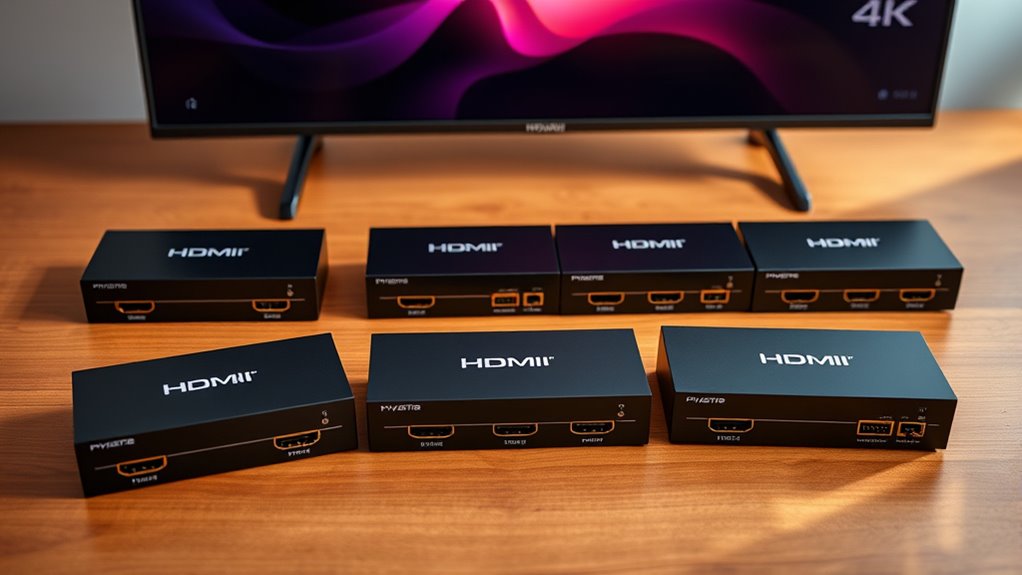

Among these high-end HDMI switchers for 4K 120Hz, I rank the avedia links 3-in-1 as the best overall for a straightforward gaming setup, while the OREI 4×4 matrix stands out for routing multiple sources to multiple displays and the StarTech.com 4-port for buyers prioritizing a known connectivity brand. The main tradeoff is simple: more inputs and audio features add flexibility, but also add setup complexity and more ways to run into compatibility limits. A 4K 120Hz label alone does not confirm that every console, display, cable, HDR format, or variable refresh rate feature will work together. I compare all 15 models by their switching needs, routing options, and listed capabilities below. Continue reading for the full breakdown and guidance on choosing a switch that fits your actual setup.

Get your wardrobe favorites delivered free — and shop member deals
- Fast, free delivery on millions of items
- Access to Prime Big Deal Days deals on October 6–7
- Prime Video, Amazon Music and more included
Key Takeaways
- Simple source switching and matrix routing are different jobs: most picks send several sources to one display, while the OREI 4×4 and 4×2 models can route sources across multiple outputs.
- Input count separates the practical picks: two- and three-input models suit smaller setups, while four- and five-input units reduce the need to unplug devices as a system grows.
- High refresh claims vary across this list: Tioleje and llano list 4K at 240Hz, StarTech.com lists 4K at 144Hz, and several other models specify 4K at 120Hz; check that the full signal path supports the mode you need.
- Audio extraction is a use-case feature, not a general upgrade: it may help connect separate audio equipment, but it adds setup considerations that a direct HDMI connection avoids.
- Remote and automatic switching solve different problems: a remote gives the user control over the active source, while auto-switching can reduce button presses but may not suit every multi-device routine.
| avedio links HDMI 2.1 Switch, 3 In 1 Out, 8K@60Hz and 4K@120Hz | 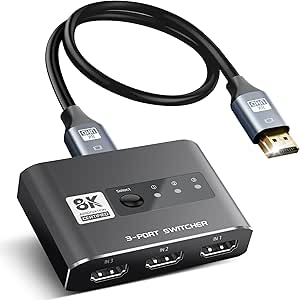 | Best for Simple, Power-Free Setup | Inputs / outputs: 3 HDMI inputs / 1 HDMI output | Maximum resolution: 8K@60Hz | Supported resolutions: 4K@120Hz; 1080p@240Hz | VIEW ON AMAZON | See Our Full Breakdown |
| UGREEN HDMI 2.1 Switch, 2-In-1-Out, 8K@60Hz |  | Best for High-Refresh Gaming Between Two Sources | Inputs / outputs: 2 HDMI inputs / 1 HDMI output | Maximum resolution: 8K@60Hz | Supported refresh rate: Up to 4K@240Hz | VIEW ON AMAZON | See Our Full Breakdown |
| OREI 4×4 8K HDMI 2.1 Matrix Switch with Audio Extraction |  | Best Premium Matrix for Multi-Display Systems | Inputs / outputs: 4 HDMI inputs / 4 HDMI outputs | Maximum resolution: 8K | Supported refresh rates: 4K at 120Hz; 2K at 60Hz | VIEW ON AMAZON | See Our Full Breakdown |
| UGREEN 8K HDMI 2.1 Switch, 3 Inputs to 1 Output, with Remote |  | Best for Convenient Three-Source Switching | Inputs / outputs: 3 HDMI inputs / 1 HDMI output | Maximum resolution: 8K@60Hz | Supported refresh rates: 4K@240Hz, 144Hz, or 120Hz; 1080p@240Hz | VIEW ON AMAZON | See Our Full Breakdown |
| HDMI 2.1 Switch, 4 Inputs to 1 Output, 8K at 60Hz and 4K at 120Hz |  | Best Overall for Four Sources and 4K/120Hz | Inputs / outputs: 4 HDMI inputs / 1 HDMI output | HDMI standard: HDMI 2.1 | Maximum resolution: 8K@60Hz | VIEW ON AMAZON | See Our Full Breakdown |
| OREI 8K 2-Port HDMI 2.1 Switch with Auto and Manual Switching |  | Best Compact Pick | Inputs / output: 2 HDMI inputs / 1 HDMI output | Maximum resolution: 8K at 60Hz | Other refresh rates: 4K at 120Hz; 1080p at 240Hz | VIEW ON AMAZON | See Our Full Breakdown |
| Tioleje 4-Port HDMI 2.1 Switch with Remote, 8K@60Hz and 4K@240Hz |  | Best for High-Refresh-Rate Source Variety | Inputs / output: 4 HDMI inputs / 1 HDMI output | Maximum resolution: 8K at 60Hz | Supported refresh rates: Up to 4K at 240Hz; also lists 4K at 120Hz and 1080p at 240Hz | VIEW ON AMAZON | See Our Full Breakdown |
| OREI 5-in-1 HDMI 2.1 Switch, 8K 60Hz, 4K 120Hz, 48Gbps, with Remote |  | Best for Five-Source Setups | Inputs / output: 5 HDMI inputs / 1 HDMI output | Maximum resolution: 8K at 60Hz | Refresh rates: 4K at 120Hz; up to 4K at 240Hz with DSC | VIEW ON AMAZON | See Our Full Breakdown |
| OREI 8K 4-Port HDMI 2.1 Switch |  | Best Four-Input Gaming Pick | Inputs / output: 4 HDMI inputs / 1 HDMI output | Maximum resolution: 8K at 60Hz | Gaming resolution: 4K at 120Hz | VIEW ON AMAZON | See Our Full Breakdown |
| OREI 8K 4-Port HDMI 2.1 Switch with Audio Extractor |  | Best for Audio Routing | Inputs / output: 4 HDMI sources / 1 HDMI output | Maximum resolution: 8K at 60Hz; 4K at 120Hz | Video bandwidth: Up to 48Gbps | VIEW ON AMAZON | See Our Full Breakdown |
| StarTech.com 4-Port HDMI 2.1 Switch, 8K 60Hz and 4K 144Hz |  | Best for a Flexible Gaming Setup | Inputs and output: 4 HDMI inputs, 1 HDMI output | Maximum resolution: 8K at 60Hz | Refresh rates: 4K at 120Hz or 144Hz; 1080p at 240Hz | VIEW ON AMAZON | See Our Full Breakdown |
| llano HDMI 2.1 Switch, 5 In 1 Out, 8K@60Hz, 4K@240Hz, Remote Control |  | Best for Five-Source High-Refresh Setups | Inputs and output: 5 HDMI inputs, 1 HDMI output | Maximum resolution: 8K at 60Hz | Maximum refresh rate: 4K at 240Hz | VIEW ON AMAZON | See Our Full Breakdown |
| OREI 4×2 HDMI 2.1 Matrix Switch with 8K Support, eARC, and Audio Extraction |  | Best for Two-Display Routing and Audio Extraction | Inputs and outputs: 4 HDMI inputs, 2 HDMI outputs | Maximum resolution: 8K at 60Hz | Bandwidth: 40Gbps | VIEW ON AMAZON | See Our Full Breakdown |
| UGREEN 5-in-1 HDMI 2.1 Switch with Remote, 8K@60Hz |  | Best for Simple Five-Device Switching | Inputs and output: 5 HDMI inputs, 1 HDMI output | Maximum resolution: 8K at 60Hz | Bandwidth: 40Gbps | VIEW ON AMAZON | See Our Full Breakdown |
| 4-Port HDMI 2.1 Switch with Audio Extractor, 4K 120Hz and 8K 60Hz |  | Best for Adding Audio to a Gaming Display | Inputs and output: 4 HDMI inputs, 1 HDMI output | Maximum resolution: 8K at 60Hz | Refresh rate support: 4K at 120Hz | VIEW ON AMAZON | See Our Full Breakdown |
| high end hdmi switchers 4k 120hz | Maximum resolution | Bandwidth |
|---|---|---|
| avedio links HDMI 2.1 Switch | 8K@60Hz | 48Gbps |
| UGREEN HDMI 2.1 Switch | 8K@60Hz | 48Gbps |
| OREI 4×4 8K HDMI 2.1 Matrix Sw | 8K | 48Gbps |
| UGREEN 8K HDMI 2.1 Switch | 8K@60Hz | 40Gbps |
| HDMI 2.1 Switch | 8K@60Hz | — |
| OREI 8K 2-Port HDMI 2.1 Switch | 8K at 60Hz | 48Gbps |
| Tioleje 4-Port HDMI 2.1 Switch | 8K at 60Hz | 48Gbps |
| OREI 5-in-1 HDMI 2.1 Switch | 8K at 60Hz | Up to 48Gbps |
| OREI 8K 4-Port HDMI 2.1 Switch | 8K at 60Hz | 48Gbps |
| OREI 8K 4-Port HDMI 2.1 Switch | 8K at 60Hz; 4K at 120Hz | — |
| StarTech.com 4-Port HDMI 2.1 S | 8K at 60Hz | 48Gbps |
| llano HDMI 2.1 Switch | 8K at 60Hz | 48Gbps |
| OREI 4×2 HDMI 2.1 Matrix Switc | 8K at 60Hz | 40Gbps |
| UGREEN 5-in-1 HDMI 2.1 Switch | 8K at 60Hz | 40Gbps |
| 4-Port HDMI 2.1 Switch with Au | 8K at 60Hz | — |
More Details on Our Top Picks
avedio links HDMI 2.1 Switch, 3 In 1 Out, 8K@60Hz and 4K@120Hz
The avedio links is a straightforward fit for someone who wants three HDMI 2.1 sources on one 4K/120Hz display without adding a power adapter to the setup. Its 48Gbps bandwidth supports the listed 4K@120Hz and 8K@60Hz modes, while the aluminum body gives it a sturdier feel than a bare plastic dongle. Compared with the UGREEN 3-input switch, it trades remote convenience for a no-extra-power design: switching here is button-operated, not remote-controlled. There is a setup caveat, too: the source description recommends keeping at least two connected devices powered on for stable operation. That makes it less suitable for a system where sources are usually asleep. I’d choose it for a compact console-and-PC arrangement, but not for hands-off switching or a larger AV rack.
Pros:- Connects three HDMI sources to one display
- Supports 4K@120Hz, 8K@60Hz, and 48Gbps bandwidth
- Aluminum alloy construction
- Draws power through connected HDMI ports, with no separate supply required
Cons:- Requires manual switching at the device
- At least two sources should remain powered on for stable operation
- Provides only one display output
Best for: Console and PC owners who need three 4K/120Hz-capable sources on one display and prefer to avoid a separate power supply.
Not ideal for: People who want remote or automatic switching, or who commonly leave all but the active source powered off.
- Inputs / outputs:3 HDMI inputs / 1 HDMI output
- Maximum resolution:8K@60Hz
- Supported resolutions:4K@120Hz; 1080p@240Hz
- Bandwidth:48Gbps
- Switching:Manual, button-operated
- Power:Draws power through HDMI ports; no extra power supply required
- Construction:Aluminum alloy
- Warranty:1 year
Our verdict“Choose the avedio links if you want three-source 4K/120Hz switching in a simple setup without a separate power adapter.”
UGREEN HDMI 2.1 Switch, 2-In-1-Out, 8K@60Hz
This UGREEN is the strongest fit here for a two-device gaming setup where refresh-rate headroom matters more than input count. It supports up to 4K@240Hz, along with VRR, FreeSync, and G-Sync, giving compatible gaming displays room to run beyond the 4K/120Hz target. The avedio links accepts three sources and avoids a separate power supply, but this model’s external power requirement supports a feature set that includes LED indicators and Dolby Atmos compatibility. Its two-input limit is the main constraint: buyers with a console, PC, and streaming box may prefer the three-port UGREEN 95521 instead. The lack of ARC/eARC also rules it out as a soundbar-routing solution. I’d shortlist it for a PC-and-console pair, provided the display and cables support the intended signal.
Pros:- Supports refresh rates up to 4K@240Hz
- Includes VRR, FreeSync, and G-Sync support
- 48Gbps bandwidth and 8K@60Hz maximum resolution
- Button switching with LED indicators
Cons:- Requires external power; the power adapter is not included
- HDMI cables are not included
- Does not support ARC/eARC or automatic switching
Best for: PC and console gamers with a compatible 4K high-refresh display who need to switch between exactly two sources.
Not ideal for: Households with three or more sources, or buyers who need ARC/eARC audio return or automatic source switching.
- Inputs / outputs:2 HDMI inputs / 1 HDMI output
- Maximum resolution:8K@60Hz
- Supported refresh rate:Up to 4K@240Hz
- Bandwidth:48Gbps
- Gaming and video features:VRR, FreeSync, G-Sync, Dynamic HDR, HDCP 2.3
- Audio support:Dolby Atmos
- Power:External power required; power cable included, adapter not included
- Not supported:ARC/eARC, automatic switching, 1-in-2-out mode
Our verdict“Pick this UGREEN for a powered two-source gaming setup that can take advantage of refresh rates above 4K/120Hz.”
OREI 4×4 8K HDMI 2.1 Matrix Switch with Audio Extraction
The OREI is a different class of device from the single-display switches in this roundup: its four inputs and four outputs can route sources across a multi-display system, while EDID management helps address compatibility mismatches between devices and screens. It supports 4K at 120Hz and up to 8K, with control by remote, front panel, or web GUI. That flexibility makes it far more capable than the JCHICI four-to-one switch, which is aimed at connecting several sources to just one display. The tradeoff is a larger, heavier installation and audio extraction that uses optical or analog connections—not HDMI. It also does not extract audio for Sonos ARC/eARC soundbars. I’d reserve it for an AV setup that genuinely needs multiple routing paths; it is excessive for a single gaming TV.
Pros:- Routes four HDMI inputs to four HDMI outputs
- Supports 4K at 120Hz, up to 8K, HDR formats, and Dolby Vision
- Offers EDID management and remote, front-panel, and web GUI control
- Extracts audio through optical or analog connections
Cons:- Audio extraction is not available over HDMI
- Does not extract audio for Sonos ARC/eARC soundbars
- Its 17.5-inch width and 6.1-pound weight call for more installation space than a compact switch
Best for: AV enthusiasts or integrators routing several HDMI sources to multiple displays who need EDID controls and non-HDMI audio extraction.
Not ideal for: Single-TV gamers who only need to switch between sources, or buyers whose soundbar setup depends on ARC/eARC audio extraction.
- Inputs / outputs:4 HDMI inputs / 4 HDMI outputs
- Maximum resolution:8K
- Supported refresh rates:4K at 120Hz; 2K at 60Hz
- Bandwidth:48Gbps
- Audio extraction:Optical or analog; not HDMI
- Control and signal management:EDID management; IR remote, front panel, and web GUI
- Dimensions / weight:8.25 × 17.5 × 2 inches; 6.1 pounds
- Warranty:1 year
Our verdict“Choose the OREI when multi-display routing and detailed signal management matter more than a compact, single-TV switch.”
UGREEN 8K HDMI 2.1 Switch, 3 Inputs to 1 Output, with Remote
For a setup with a console, computer, and streaming device, the UGREEN 95521 makes changing sources easier with three inputs plus both remote and front-button control. Its stated refresh-rate support reaches 4K@240Hz, and VRR, G-Sync, and FreeSync cover key gaming features. Compared with the avedio links, it is more convenient to operate from a sofa, but needs power during use and is rated at 40Gbps rather than 48Gbps. That bandwidth distinction makes it a less compelling choice for buyers whose priority is maximum HDMI 2.1 headroom, even though 4K@120Hz is listed. There is no automatic switching, ARC/eARC, or simultaneous multi-monitor output. I’d favor it over a button-only switch when remote access matters, while keeping the included USB power cable and a separate adapter in the setup plan.
Pros:- Connects three HDMI sources to one display
- Includes remote and device-button switching
- Supports 4K@120Hz and higher listed refresh rates up to 4K@240Hz
- Supports VRR, G-Sync, FreeSync, HDR10+, and Dolby Atmos
Cons:- Rated for 40Gbps bandwidth, below the 48Gbps options in this lineup
- Requires a separate power adapter, which is not included
- Does not support automatic switching, ARC/eARC, or simultaneous multi-monitor display
Best for: Living-room gamers and media users switching among three sources who want to select inputs from across the room.
Not ideal for: Buyers seeking 48Gbps bandwidth, automatic switching, ARC/eARC, or a device that can feed multiple displays simultaneously.
- Inputs / outputs:3 HDMI inputs / 1 HDMI output
- Maximum resolution:8K@60Hz
- Supported refresh rates:4K@240Hz, 144Hz, or 120Hz; 1080p@240Hz
- Bandwidth:40Gbps
- Features:VRR, G-Sync, FreeSync, HDR10+, Dolby Atmos, HDCP 2.3
- Switching:Remote control or device button; no automatic switching
- Power:USB-A to USB-C power cable included; power adapter not included
- Limitations:No simultaneous multi-monitor output or ARC/eARC
Our verdict“Choose the UGREEN 95521 if remote control for three sources matters more to you than maximum bandwidth or automatic switching.”
HDMI 2.1 Switch, 4 Inputs to 1 Output, 8K at 60Hz and 4K at 120Hz
The JCHICI earns the broadest single-display role here by combining four inputs, 48Gbps bandwidth, and 4K@120Hz support with both remote and automatic switching. That makes it more practical for a TV shared by a console, PC, streamer, and another HDMI source than the three-input avedio links or remote-controlled UGREEN 95521. Gaming features include VRR, ALLM, and QFT, while support for several surround formats covers a typical home theater chain. Automatic switching can be unreliable when devices remain in standby, though, so I would treat the remote as the dependable fallback rather than assume input detection will always behave. High-refresh modes also depend on compatible devices and HDMI 2.1 cables; the recommended cable length for 4K@120Hz is up to two meters. Its four-to-one design cannot route sources to multiple displays like the OREI matrix.
Pros:- Connects four HDMI sources to one display
- Supports 48Gbps bandwidth, 8K@60Hz, and 4K@120Hz
- Offers remote and automatic input switching
- Includes VRR, ALLM, and QFT gaming features
Cons:- Automatic switching may not work reliably with devices left in standby
- High-resolution, high-refresh modes require compatible devices and HDMI 2.1 cables
- Remote requires two AAA batteries, which are not included
Best for: Households with four HDMI 2.1 sources sharing one 4K/120Hz television, especially gaming setups that want remote selection and automatic switching.
Not ideal for: Buyers routing sources to several displays, or users unwilling to check cable and device compatibility for high-refresh modes.
- Inputs / outputs:4 HDMI inputs / 1 HDMI output
- HDMI standard:HDMI 2.1
- Maximum resolution:8K@60Hz
- Other supported resolutions:4K@120Hz; 2K@240Hz
- Maximum bandwidth:48Gbps
- Features:HDR, 3D, VRR, ALLM, QFT, HDCP 2.3
- Switching:Remote control and automatic input switching
- Power and included accessories:Power adapter and USB cable included; two AAA remote batteries required but not included
- Recommended cable length:Up to 2m for 8K@60Hz or 4K@120Hz
Our verdict“Choose the JCHICI if you need four sources on one 4K/120Hz display and want both remote control and automatic switching.”
OREI 8K 2-Port HDMI 2.1 Switch with Auto and Manual Switching
For a setup with just a console and a PC—or a console and a streaming device—this two-input OREI keeps the connection simple while retaining the headline HDMI 2.1 features: 4K at 120Hz, 48Gbps bandwidth, VRR, and ALLM. It is a better fit than the four- and five-input OREI switches when spare sources are not part of the plan; those models add room to grow but take up more of the setup’s switching capacity than this buyer needs. Automatic and manual selection give you a fallback when source detection is inconvenient. The catch is that automatic switching only works when the active source is fully powered off, so it may not suit devices left in standby. Long HDMI runs may also call for fiber-optic cable, adding complexity to an otherwise straightforward setup.
Pros:- Supports 4K at 120Hz and 48Gbps bandwidth
- Includes both automatic and manual source selection
- VRR, ALLM, QFT, HDR, and several surround audio formats suit gaming and home theater
- USB-powered design weighs just 2.8 ounces
Cons:- Only two HDMI inputs, fewer than the other OREI switches in this batch
- Automatic switching requires the active source to be completely powered off
- Long cable runs may require fiber-optic HDMI
Best for: Console and PC owners who need to share one 4K 120Hz display between two sources and value a small, simple switch.
Not ideal for: People with three or more HDMI sources, or users who expect automatic switching to work while the previous device remains in standby.
- Inputs / output:2 HDMI inputs / 1 HDMI output
- Maximum resolution:8K at 60Hz
- Other refresh rates:4K at 120Hz; 1080p at 240Hz
- Bandwidth:48Gbps
- Switching:Automatic and manual
- Gaming and video features:VRR, ALLM, QFT, HDR10+, HDR10, Dolby Vision, CEC, 3D
- Audio formats:LPCM, Dolby TrueHD, Dolby Atmos, DTS-HD Master Audio, DTS 7.1
- Power / weight / warranty:USB power; 2.8 ounces; 1 year
Our verdict“Choose this OREI when two sources are enough and you want 4K 120Hz gaming features without moving up to a higher-input switch.”
Tioleje 4-Port HDMI 2.1 Switch with Remote, 8K@60Hz and 4K@240Hz
The Tioleje gives a four-device setup a stated path to 4K at 240Hz, alongside 8K at 60Hz and 48Gbps bandwidth. That makes it a distinctive pick beside the OREI 8K 4-Port HDMI 2.1 Switch, which lists 4K at 120Hz and gaming features but not the same 240Hz mode. Buyers should match the claimed refresh rate to their source, display, cable, and settings rather than assume every connection will reach it. A remote and manual button make switching convenient from a desk or entertainment unit. The tradeoff is that the Tioleje must stay powered during use, and its listed formats do not include the VRR and ALLM features found on several OREI options. It suits buyers prioritizing high refresh-rate support and four inputs over those gaming-specific features.
Pros:- Four HDMI inputs accommodate a multi-device setup
- Lists support for 4K at 240Hz and 8K at 60Hz
- Remote control and manual button provide two ways to select a source
- Supports HDR10, Dolby Vision, HDCP 2.3, 3D video, and Dolby Audio
Cons:- Requires an external 5V DC adapter and continuous power during use
- Does not list VRR or ALLM support
- Reaching 8K requires compatible devices and HDMI 2.1 cables
Best for: PC and console owners with up to four sources and a compatible display who want a switch listing support for 4K at 240Hz.
Not ideal for: Buyers seeking listed VRR or ALLM support, or anyone who wants a switch that can operate without continuous external power.
- Inputs / output:4 HDMI inputs / 1 HDMI output
- Maximum resolution:8K at 60Hz
- Supported refresh rates:Up to 4K at 240Hz; also lists 4K at 120Hz and 1080p at 240Hz
- Bandwidth:48Gbps
- Switching:Remote control or manual button
- Video features:HDR10, Dolby Vision, HDCP 2.3, 3D video
- Audio:Dolby Audio
- Power / warranty:External 5V DC adapter; continuous power required; 1 year
Our verdict“Pick the Tioleje if four inputs and its listed 4K 240Hz support matter more to you than VRR, ALLM, or avoiding a continuously powered switch.”
OREI 5-in-1 HDMI 2.1 Switch, 8K 60Hz, 4K 120Hz, 48Gbps, with Remote
Among these picks, this OREI is the clearest choice for a system with five HDMI sources feeding one display. Its 48Gbps bandwidth and support for 4K at 120Hz, VRR, and ALLM cover the main needs of a high-end gaming setup, while an IR remote and front-panel controls make input changes practical from across the room or at the unit. Compared with the four-input OREI 8K switch, the extra port is useful if you have several consoles, a PC, and another source connected at once. It also lists 4K at 240Hz with DSC, but that mode depends on compatible source and display support; it is not a guaranteed upgrade for every setup. The five inputs and AC adapter make this a fuller, powered installation rather than the simplest compact switch.
Pros:- Five HDMI inputs reduce the need to unplug sources
- Supports 48Gbps bandwidth, 8K at 60Hz, and 4K at 120Hz
- VRR and ALLM suit compatible gaming systems
- IR remote, front-panel controls, and auto switching offer flexible operation
Cons:- 4K at 240Hz requires DSC-compatible source and display equipment
- Performance depends on connected devices, cables, and settings
- Uses an AC adapter rather than USB power
Best for: Home theater and gaming households with five sources, one shared display, and compatible equipment for HDMI 2.1 features.
Not ideal for: Buyers with only two or three sources, or anyone counting on 4K at 240Hz without a DSC-compatible source and display.
- Inputs / output:5 HDMI inputs / 1 HDMI output
- Maximum resolution:8K at 60Hz
- Refresh rates:4K at 120Hz; up to 4K at 240Hz with DSC
- Bandwidth:Up to 48Gbps
- Gaming and HDMI features:VRR, ALLM, QMS, QFT, SBTM, CEC, HDCP 2.3
- HDR support:HDR10+, Dolby Vision, HLG
- Audio support:Dolby Atmos, Dolby TrueHD, DTS:X, LPCM
- Controls / power / warranty:IR remote, front-panel controls, auto switching; AC adapter; 1 year
Our verdict“Choose this OREI when you need five inputs and 4K 120Hz gaming support on one display, and skip it if fewer ports would do.”
OREI 8K 4-Port HDMI 2.1 Switch
This four-input OREI focuses on the combination many buyers want from a high-end HDMI switch: 4K at 120Hz, 48Gbps bandwidth, and gaming features including VRR and ALLM. It gives a console, PC, and other sources space to stay connected, while automatic selection, a front button, and an included IR remote provide more ways to change inputs than the two-port OREI BK-21S. Compared with the five-input OREI, it gives up one source connection, but its listed feature set makes the choice straightforward for a four-device gaming setup. It supports up to 8K at 60Hz, HDR formats, and FVA as well. One limitation is shared across this type of switch: it connects several sources to one display, not several displays to several sources. Buyers needing display routing should look at a matrix switch instead.
Pros:- Four HDMI inputs support a multi-device setup
- Supports 4K at 120Hz, 8K at 60Hz, and 48Gbps bandwidth
- VRR, ALLM, and FVA support gaming-oriented features
- Offers automatic switching, a front button, and an IR remote
Cons:- Routes sources to one display only
- Has one fewer input than the five-port OREI option
- Audio extraction is not listed
Best for: Gamers with up to four HDMI sources who want 4K 120Hz, VRR, and ALLM on a single display.
Not ideal for: People who need to connect five sources, send sources to multiple displays, or extract audio through dedicated outputs.
- Inputs / output:4 HDMI inputs / 1 HDMI output
- Maximum resolution:8K at 60Hz
- Gaming resolution:4K at 120Hz
- Bandwidth:48Gbps
- Supported features:HDR10+, Dolby Vision, HLG, VRR, ALLM, FVA
- Switching:Automatic, front button, or included IR remote
- Included items:Power adapter and manual
- Warranty:1 year
Our verdict“For four sources sharing one gaming display, this OREI offers a useful balance of input capacity, 4K 120Hz support, and flexible switching.”
OREI 8K 4-Port HDMI 2.1 Switch with Audio Extractor
Video switching is only part of this OREI’s appeal: it connects four HDMI sources to one display and adds HDMI audio-only, optical, and 3.5mm outputs. Those connections give buyers more ways to feed a receiver, sound system, or analog audio gear than the standard four-input OREI switch, which is the better fit if video switching alone is the priority. The BK-4927 retains 4K at 120Hz, up to 48Gbps bandwidth, HDR passthrough, eARC, CEC, VRR, and ALLM, so its audio features do not replace its HDMI 2.1 focus. Format playback still depends on the source and connected audio equipment, and the advanced video and audio modes require compatible devices. At 12 ounces, it is also heavier than the compact two-input OREI, making it more suited to a settled AV setup than a minimal one.
Pros:- Four HDMI inputs connect several sources to one display
- Supports 8K at 60Hz, 4K at 120Hz, and up to 48Gbps
- HDMI audio-only, optical, and 3.5mm outputs offer multiple audio-routing choices
- Includes eARC, CEC, VRR, ALLM, and HDR passthrough
Cons:- Audio format support depends on the source and connected equipment
- Advanced video and audio features require compatible devices
- At 12 ounces, it is heavier than the two-input OREI switch
Best for: AV setups with up to four HDMI sources that need to route audio to optical, analog, or HDMI audio-only equipment.
Not ideal for: Buyers who only need basic source switching, or whose audio and video equipment cannot use the listed passthrough features.
- Inputs / output:4 HDMI sources / 1 HDMI output
- Maximum resolution:8K at 60Hz; 4K at 120Hz
- Video bandwidth:Up to 48Gbps
- HDR formats:HDR, HDR10, HDR10+, Dolby Vision, HLG
- Audio outputs:HDMI audio-only, SPDIF/Toslink optical, 3.5mm analog
- Audio formats:Dolby Atmos, DTS:X, DTS-HD Master Audio, Dolby TrueHD, LPCM 7.1CH
- Features and switching:eARC, CEC, VRR, ALLM, auto/manual switching, remote control
- Weight / warranty:12 ounces; 1 year
Our verdict“Choose this OREI over the standard four-input model when audio extraction is a real part of your setup, not just an unused extra.”
StarTech.com 4-Port HDMI 2.1 Switch, 8K 60Hz and 4K 144Hz
For a setup mixing consoles, a gaming PC, and another HDMI source, this four-input switch pairs useful capacity with clear switching choices. It supports 4K at 120Hz or 144Hz, plus VRR and ALLM, so compatible gaming gear can use high refresh rates and variable refresh without stepping down to a basic video switch. Automatic selection is available alongside buttons and a remote; compared with the UGREEN CM693, that gives you an automatic option instead of relying only on manual changes. Its 48Gbps bandwidth and broad audio support also suit a home theater chain. The tradeoff is that it has just one display output, unlike the OREI 4×2 matrix, and it does not extract audio. The metal housing and mounting kit help with placement, but separate HDMI cables are needed and the remote batteries are not included.
Pros:- Four HDMI inputs accommodate multiple consoles, a PC, and another source
- Supports 4K at 120Hz or 144Hz, with VRR and ALLM
- Offers automatic, button, and remote switching
- Metal housing, mounting kit, and rubber feet give flexible placement options
Cons:- A single HDMI output cannot route sources to two displays
- Does not provide separate audio extraction outputs
- Remote batteries and HDMI cables are not included
Best for: PC and console gamers who need four sources, 4K high-refresh support, and both automatic and remote switching on one display
Not ideal for: Buyers who need two independently routed displays or direct optical and analog audio extraction
- Inputs and output:4 HDMI inputs, 1 HDMI output
- Maximum resolution:8K at 60Hz
- Refresh rates:4K at 120Hz or 144Hz; 1080p at 240Hz
- Bandwidth:48Gbps
- Gaming and copy protection:VRR, ALLM, CEC, HDCP 2.3/2.2/1.4
- Audio support:Dolby TrueHD/Atmos, DTS-HD Master Audio/DTS:X, 7.1-channel audio
- Power:5V 1A USB; USB wall charger included
- Warranty:2 years
Our verdict“Choose this for a four-source gaming setup that needs high-refresh 4K and flexible switching, not multi-display routing or audio extraction.”
llano HDMI 2.1 Switch, 5 In 1 Out, 8K@60Hz, 4K@240Hz, Remote Control
The llano stands apart here by combining five inputs with a stated 4K at 240Hz ceiling, giving a high-refresh PC setup more headroom than the StarTech switch’s 4K at 144Hz limit. VRR and 48Gbps bandwidth add appeal for compatible gaming displays, while automatic detection, a remote, and an onboard button offer several ways to change sources. That makes it a stronger fit for crowded single-display rigs than the two-output OREI BK-402A, which is designed for routing rather than a single five-device lineup. There is a practical constraint: llano recommends keeping the combined HDMI cable run to 20 feet or less for high-resolution performance. The supplied information also does not confirm included HDMI cables, and its one-year warranty is shorter than StarTech’s two years.
Pros:- Five HDMI inputs reduce the need to swap connected devices
- Supports 4K at 240Hz and 8K at 60Hz with 48Gbps bandwidth
- VRR support suits compatible gaming displays
- Provides automatic detection, remote, and onboard-button switching
Cons:- High-resolution use is recommended with total HDMI cable length of 20 feet or less
- Included HDMI cables are not specified in the supplied product information
- One-year warranty is shorter than the StarTech switch’s two-year coverage
Best for: PC and console gamers with five HDMI sources, a compatible high-refresh 4K display, and short cable runs
Not ideal for: Buyers with long cable paths, a need for two display outputs, or a preference for a longer stated warranty
- Inputs and output:5 HDMI inputs, 1 HDMI output
- Maximum resolution:8K at 60Hz
- Maximum refresh rate:4K at 240Hz
- Bandwidth:48Gbps
- Supported features:VRR, HDR10+, Dolby Atmos, CEC
- Switching methods:Automatic detection, remote control, onboard button
- Recommended total HDMI cable length:20 ft (approximately 6 m) or less
- Warranty:1 year
Our verdict“Pick the llano for five sources and especially high 4K refresh-rate capability, provided your cable runs stay short.”
OREI 4×2 HDMI 2.1 Matrix Switch with 8K Support, eARC, and Audio Extraction
This OREI is the lineup’s routing specialist: its 4×2 matrix can send four sources to two displays independently, a job the single-output StarTech and llano switches cannot do. That makes it a better match for a TV-and-projector room or a setup that feeds separate viewing areas. Its eARC and audio extraction options also offer more audio-routing flexibility than those simpler switches, with optical and 3.5mm outputs available. The tradeoff is bandwidth: the listed 40Gbps is below the 48Gbps stated for the StarTech and llano models, and the product data does not specify 4K 120Hz support. I would not choose it on the assumption that it matches their high-refresh gaming headroom. eARC also depends on compatible support from both the TV and soundbar.
Pros:- Routes four HDMI sources independently to two displays
- Includes eARC support and optical and 3.5mm audio outputs
- Supports VRR, ALLM, and FVA
- Supports resolutions up to 8K at 60Hz
Cons:- Listed bandwidth is 40Gbps, below the 48Gbps specified for the StarTech and llano switches
- Product data does not specify 4K 120Hz support
- eARC requires compatible support from both the TV and soundbar
Best for: Home theater owners who need to route several sources to two displays and send audio to optical or analog equipment
Not ideal for: Gamers seeking a clearly specified 4K 120Hz or higher signal path, or users with no need for a second display or audio extraction
- Inputs and outputs:4 HDMI inputs, 2 HDMI outputs
- Maximum resolution:8K at 60Hz
- Bandwidth:40Gbps
- HDMI and copy protection:HDMI 2.1, HDCP 2.3
- Supported features:VRR, ALLM, FVA, eARC
- Audio outputs:Optical S/PDIF, analog 3.5mm
- Dimensions:8 x 3.5 x 1 inches
- Warranty:1 year
Our verdict“Choose this when two-display routing and audio connections matter more than documented 4K 120Hz gaming support.”
UGREEN 5-in-1 HDMI 2.1 Switch with Remote, 8K@60Hz
UGREEN’s CM693 is a straightforward way to connect five HDMI sources to one screen, with a remote, a physical button, and LED port indicators to make manual selection clear. It supports 8K at 60Hz, 40Gbps, VRR, and HDR10+, so it covers a range of modern display and gaming features. Compared with the llano five-input switch, however, UGREEN does not list automatic source selection or a 4K 240Hz ceiling; the llano is the more compelling choice for hands-off changes or a particularly high-refresh PC display. UGREEN’s included power adapter removes uncertainty about the power supply, but the switch needs continuous power and cannot automatically follow an active source. Its cable guidance is also tight for 8K: up to 1m at the input and 2m at the output.
Pros:- Five inputs accommodate a broad mix of consoles and media devices
- Includes both a remote and onboard button, with LED port indicators
- Supports 8K at 60Hz, 40Gbps, VRR, and HDR10+
- Power adapter is included
Cons:- Does not support automatic source switching, unlike the llano H15
- Requires continuous connection to a power source
- 8K cable guidance is limited to 1m at the input and 2m at the output
Best for: Console and media-device owners who want five connected sources, a remote, and clear manual port selection
Not ideal for: Buyers who want automatic source changes, 4K 240Hz support, or longer cable runs for 8K
- Inputs and output:5 HDMI inputs, 1 HDMI output
- Maximum resolution:8K at 60Hz
- Bandwidth:40Gbps
- Supported features:VRR, HDR10+, Dolby Atmos, HDCP 2.3, CEC
- Switching methods:Remote control, onboard button
- Remote range:Up to 33 ft
- 8K cable guidance:Up to 1m input cable and 2m output cable
- Warranty:24 months
Our verdict“Choose the UGREEN for five sources and simple remote-controlled selection if automatic switching and very high 4K refresh rates are not priorities.”
4-Port HDMI 2.1 Switch with Audio Extractor, 4K 120Hz and 8K 60Hz
For a setup where the display handles video but the sound system needs a separate feed, this switch’s main distinction is optical and 3.5mm audio extraction. It connects four sources to one display and explicitly lists 4K at 120Hz, making its high-refresh claim more directly aligned with this roundup than the OREI BK-402A, whose supplied data does not specify 4K 120Hz. The StarTech switch offers higher listed bandwidth and 4K at 144Hz, but it lacks these dedicated audio outputs; that makes this model more useful when connecting to optical or stereo analog equipment is the priority. The tradeoffs are a separate 5V/2A power requirement, no multi-output routing, and cable sensitivity: the product advises certified HDMI 2.1 cables under 10 feet. Audio format support also should not be mistaken for extra display outputs.
Pros:- Explicitly supports 4K at 120Hz and 8K at 60Hz
- Extracts audio through optical Toslink and 3.5mm outputs
- Supports multiple Dolby and DTS formats
- Includes IR remote control, CEC, and EDID features
Cons:- Has one HDMI output and cannot route one source to multiple displays
- Requires a separate 5V/2A power supply
- Performance may depend on certified HDMI 2.1 cables under 10 feet
Best for: Console gamers and home theater users who need four sources, 4K 120Hz video, and optical or stereo analog audio extraction
Not ideal for: Buyers needing two display outputs, 4K 144Hz or 240Hz support, or a listed included power supply
- Inputs and output:4 HDMI inputs, 1 HDMI output
- Maximum resolution:8K at 60Hz
- Refresh rate support:4K at 120Hz
- Audio outputs:Optical Toslink 5.1-channel, 3.5mm stereo
- Supported audio formats:Dolby Atmos, Dolby TrueHD, DTS:X, DTS-HD Master Audio
- Features:Audio extraction, CEC, IR remote control, EDID
- Power:5V/2A; separate power supply required
- Cable guidance:Certified HDMI 2.1 cable under 10 feet recommended
Our verdict“Pick this for a four-source 4K 120Hz setup that needs separate optical or analog audio, rather than higher refresh rates or multi-display routing.”
How We Picked
I compared the 15 listed products around the job implied by this roundup: switching HDMI 2.1 sources while preserving a high-refresh 4K signal. I looked at stated resolution and refresh support, input and output layouts, switching methods, audio features, and how clearly each product’s role fits a common setup. A specification is useful only when the connected console or PC, switch, cable, and display all support the same signal features, so I treat headline modes as claims to verify across the entire chain rather than guarantees.
The ranking gives priority to usefulness for a typical gaming or home-theater setup, then rewards added routing or audio flexibility when that complexity serves a clear need. Straightforward switches rank ahead of specialized matrix models for most buyers, while models with more inputs or remote control can make better sense for larger collections of sources. Products with little detail in the supplied name are judged cautiously; I do not infer unlisted functions or compatibility. No single feature makes a product best for everyone, so each pick’s role and tradeoffs should guide the choice.
Factors to Consider When Choosing High End Hdmi Switchers 4k 120hz
Before choosing a switch, map the connections you actually need rather than starting with the largest number on the box. A high-refresh signal depends on every link between source and screen, and added audio or matrix functions can change how the system is wired. These checks can help prevent buying a switch that has enough ports but cannot handle the way you use your display and sound equipment.
Match the refresh mode across the whole signal path
Write down the resolution and refresh rate you expect from each source, then check the display input and switch specifications against that mode. A switch listing 4K at 120Hz does not by itself confirm support for every combination of HDR, chroma format, VRR, or other gaming features. Cables matter too: a cable that works at a lower refresh rate may not carry the higher-bandwidth mode reliably. Avoid assuming that an 8K label automatically proves every 4K gaming feature is supported. When a specific console or PC mode matters, confirm that the manufacturer lists the relevant capabilities rather than relying on a broad resolution headline.
Choose input count for how your setup may grow
Count the sources you will connect at the same time, including a console, PC, streaming box, and any future device you already expect to add. Leave a spare input if you want room to grow without replacing the switch, but do not buy a larger unit just for unused capacity. More inputs can mean a larger footprint and more cables to manage, while compact two- or three-source setups can be easier to operate. Also check whether the switch has one output or multiple outputs: extra inputs do not let you send video to extra displays. A clear port map can prevent confusing a standard source selector with a matrix switch.
Decide whether you need a switch or a matrix
A standard HDMI switch selects one of several sources for a single display, which covers the most common living-room or gaming-desk setup. A matrix routes sources between multiple displays, making it useful when different screens serve different tasks or rooms. Matrix models offer more flexibility, but their controls and routing choices can add setup work that a one-display user gains little from. Check whether you need independent output selection or simply want to change the active console on one TV. Buying a matrix without a real multi-display use can add complexity without improving the core viewing experience.
Treat audio extraction and eARC as separate requirements
Audio extraction can help when a sound system needs an audio connection that differs from the display’s normal HDMI path. It is not automatically better than sending audio directly through the TV or receiver, and extra routing can make troubleshooting harder. eARC is a separate capability with its own compatibility requirements, so do not assume that a product with an audio extractor also provides the eARC behavior you want. Before choosing an audio-focused model, sketch the route from source to display and from display or switch to speakers. If your current system already passes audio correctly, a simpler switch may be the cleaner choice.
Pick a switching method that suits your habits
Manual buttons are direct, but they require access to the unit, which can be awkward if it sits behind a screen or inside a cabinet. A remote is useful when sources change often or the switch is out of reach; check how you will store and use it alongside other remotes. Automatic switching can reduce manual steps, though connected devices that wake or send HDMI signals may affect which source becomes active. If predictable control matters more than convenience, a clearly labeled manual option can be preferable. The right method depends less on feature count than on where the switch sits and how often you change sources.
Plan for power, placement, and troubleshooting
Check the product’s power arrangement and physical dimensions before placing it among other equipment. A switch tucked behind a TV may be harder to access for button presses, cable changes, or indicator checks. Keep source and display cables within practical lengths, and avoid tight bends that put strain on HDMI connectors. When diagnosing a signal problem, test one source and one display directly first, then add the switch back into the chain; this helps identify whether the issue comes from a cable, device setting, or routing choice. Accessible placement can save more frustration than a feature you rarely use.
Frequently Asked Questions
Will every switch listed for 4K 120Hz work with my console and TV?
Not automatically. The console or PC, switch, cables, and TV input must all support the same resolution and refresh mode, and features such as VRR or HDR may have separate compatibility requirements. Check the exact capabilities stated for the switch and the specific HDMI input on your display. If you cannot confirm a feature from the available product details, treat it as unverified rather than assuming the 4K 120Hz label covers it. Testing the source directly with the TV can help isolate issues before adding a switch.
Should I choose a 4K 240Hz model if my display is only 120Hz?
A higher listed refresh ceiling does not make a 120Hz display run at 240Hz. It may offer headroom for a future display, but only if the rest of your equipment can use that mode too. Compare the supported features you need today before paying for a higher headline figure. The Tioleje and llano listings specify 4K at 240Hz, while the avedio links listing specifies 4K at 120Hz; that difference is relevant only when your source and screen can take advantage of it. Verify the exact mode and gaming features in the manufacturer specifications.
When is an HDMI matrix switch worth choosing over a regular switch?
Choose a matrix when you need to route multiple sources to more than one display, or when separate outputs need different source selections. A regular switch is the simpler fit if you only want several devices to share one TV or monitor. The OREI 4×4 and 4×2 models are aimed at more involved routing, but extra outputs do not matter if your setup has just one screen. Before buying, draw the source-to-display combinations you expect to use and confirm the product supports those specific routes. That simple check can reveal whether matrix flexibility solves a real problem.
Do I need an audio extractor if my TV already connects to a soundbar or receiver?
Often, no: if your TV or receiver already handles audio from your sources as needed, a standard switch may be enough. An extractor can help when you need a separate audio output or a different connection path, but it introduces another point to configure. Do not assume that audio extraction means eARC support or guarantees a particular audio format. Check the audio connections and formats supported by both the switch and your sound equipment. Choose an extraction model only when you can identify the limitation it will solve.
Is a remote better than automatic switching for several connected consoles?
Neither method is best for every setup. A remote lets you choose the source deliberately, which can be useful when multiple devices are on or wake at different times. Automatic switching cuts down on button presses, but source activity can affect which input is selected. If the switch will be hidden, remote control can be more practical than reaching for a button; if you want simple, predictable selection, manual control may suit you better. Check whether the model offers the switching method you prefer rather than inferring it from the number of inputs.
Conclusion
For most buyers choosing among these high-end HDMI switchers for 4K 120Hz, I would start with the avedia links 3-in-1 as the best overall fit for a straightforward multi-source, single-display setup. My best value direction is a simple two- or three-input model when that is all your system needs, such as the UGREEN 2-in-1; fewer ports can mean less unused complexity. For a best premium-style feature set, I would look to the OREI 4×4 matrix when multiple displays and flexible routing are genuinely part of the plan. Beginners should favor a simple switch with a clear manual or remote selection method over matrix routing or audio features they do not need. For specific needs, choose an audio-extraction model only if your sound setup calls for it, and consider the Tioleje or llano listings with stated 4K 240Hz support only when your full system can use that mode. In every case, confirm the exact signal and audio features you need before choosing.
Halloween Picks
halloween
As an affiliate, we earn on qualifying purchases.