
Next-gen smart home gadgets can make routines easier, connect devices across platforms, and bring useful controls into more rooms. My best overall pick is Home Assistant Green for buyers who want flexible automation, while Google Nest Learning Thermostat stands out for adaptive climate control and TP-Link Tapo Matter Smart Plug Mini for straightforward multi-platform control. The main tradeoff is between a simple device that works out of the box and a more capable setup that may require extra configuration or a compatible ecosystem. Security, privacy, maintenance, and the way gadgets work together matter as much as headline features. Read on for the full breakdown and help matching each option to your home.

Get your wardrobe favorites delivered free with Prime
- Fast, free delivery on millions of items
- Prime Video, Amazon Music and more included
- Member-only deals all year
Key Takeaways
- Home Assistant Green is the roundup’s most flexible automation pick, but its broader control comes with more setup decisions than a plug-and-play speaker or thermostat.
- Matter support is not the same as universal compatibility: the amazon.com/dp/B089DR29T6?tag=aluxurylifestyle-20&ascsubtag=dc-604919″ target=”_blank” rel=”nofollow sponsored noopener”>amazon.com/dp/B09B93ZDG4?tag=aluxurylifestyle-20&ascsubtag=dc-604919″ target=”_blank” rel=”nofollow sponsored noopener”>amazon.com/dp/B0BFC7WQ6R?tag=aluxurylifestyle-20&ascsubtag=dc-604919″ target=”_blank” rel=”nofollow sponsored noopener”>amazon.com/dp/B0C5DPSW5Y?tag=aluxurylifestyle-20&ascsubtag=dc-604919″ target=”_blank” rel=”nofollow sponsored noopener”>amazon.com/dp/B0D6SX8VLQ?tag=aluxurylifestyle-20&ascsubtag=dc-604919″ target=”_blank” rel=”nofollow sponsored noopener”>amazon.com/dp/B0C36WXGP1?tag=aluxurylifestyle-20&ascsubtag=dc-604919″ target=”_blank” rel=”nofollow sponsored noopener”>Linkind and TP-Link plugs still need the right controller and network setup for the routines you want.
- Climate control has two distinct paths: the Nest Learning Thermostat prioritizes adaptive features and sensor support, while the simpler Nest Thermostat suits buyers who want core smart control.
- Amazon’s Echo options serve different rooms: the Echo Show 15 offers a large shared display, the Echo Dot models focus on audio and voice, and the Echo Spot is tailored to bedside use.
- Several picks solve specialized needs rather than whole-home control: SimpliSafe focuses on security, ECOSELF on air cleaning, and SwitchBot Hub 2 on room readings and infrared appliance control.
| Linkind Matter Smart Plug with Apple Home, Alexa, Siri, Google Home Compatibility |  | Best for Cross-Platform Plug Control | Power capacity: 1800W, 15A | Wi-Fi: 2.4GHz only | Network protocol: IPv6 | VIEW ON AMAZON | See Our Full Breakdown |
| Home Assistant Green – Smart Home Hub with Advanced Automation |  | Best for Local Automation Builders | Processor: Quad-core | RAM: 4GB | Storage: 32GB | VIEW ON AMAZON | See Our Full Breakdown |
| SwitchBot Hub 2 (2nd Gen) Wi-Fi Thermometer, Hygrometer, and IR Remote |  | Best for Climate-Aware IR Control | Temperature accuracy: ±0.36°F | Humidity accuracy: ±1.8% RH | Connectivity: 2.4GHz Wi-Fi and Bluetooth | VIEW ON AMAZON | See Our Full Breakdown |
| Amazon Echo Dot Max Smart Speaker with Alexa, Graphite |  | Best All-in-One Voice Hub | Dimensions: 4.27 × 4.27 × 3.9 inches | Weight: 17.82 oz (505.3 g) | Audio bandwidth: 53Hz–16kHz | VIEW ON AMAZON | See Our Full Breakdown |
| SimpliSafe 8-Piece Wireless Home Security System | 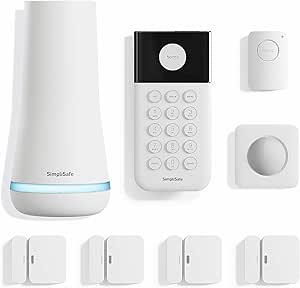 | Best for Straightforward Security | System type: Wireless home security system | Included components: Base station, keypad, 4 entry sensors, motion sensor, panic button | Power source: Battery powered | VIEW ON AMAZON | See Our Full Breakdown |
| Google Nest Learning Thermostat (4th Gen, 2024) with Nest Temperature Sensor, Polished Gold |  | Best for Room-by-Room Comfort | Generation: 4th Gen (2024) | Included sensor: Nest Temperature Sensor (2nd Gen) | System compatibility: Most 24V heating and cooling systems | VIEW ON AMAZON | See Our Full Breakdown |
| THIRDREALITY Smart Plug Gen3, 4-Pack |  | Best for Zigbee Power Monitoring | Pack size: 4 | Connectivity protocol: Zigbee 3.0 | Operating voltage: 110 volts | VIEW ON AMAZON | See Our Full Breakdown |
| ECOSELF HEPA Air Purifier for Large Rooms up to 1,800 sq. ft. |  | Best for Automatic Air Cleaning | Coverage area: Up to 1,800 sq. ft. | Filtration: Pre-filter, HEPA filter, activated carbon layer | Air intake: 360° | VIEW ON AMAZON | See Our Full Breakdown |
| Amazon Echo Show 15 (2nd Gen) 15.6-Inch Full HD Smart Display with Fire TV and Alexa |  | Best Smart Home Command Center | Display: 15.6-inch, 1920 x 1080 resolution | Dimensions: 16.1 x 10.1 x 1.4 inches | Weight: 4.96 lb | VIEW ON AMAZON | See Our Full Breakdown |
| Google Nest Smart Thermostat, Fog |  | Best for Simple Smart Scheduling | Color: Fog | Controller type: Android, Google Assistant, Vera, iOS, Nest | Additional feature: Programmable | VIEW ON AMAZON | See Our Full Breakdown |
| TP-Link Tapo Matter Smart Plug Mini, 15A/1800W, 3-Pack |  | Best for Cross-Platform Control | Model: Tapo P125M | Pack size: 3 plugs | Maximum current: 15 A | VIEW ON AMAZON | See Our Full Breakdown |
| Amazon Echo Spot Smart Alarm Clock with Alexa, Black |  | Best Smart Clock for the Nightstand | Display: 2.83-inch touchscreen, 240 × 320 px | Dimensions: 4.5 × 4.1 × 4.4 in | Weight: 14.3 oz | VIEW ON AMAZON | See Our Full Breakdown |
| Amazon Echo Dot (5th Gen) Smart Speaker, Deep Sea Blue |  | Best for Voice-Triggered Home Routines | Generation: 5th Gen | Dimensions: 3.9 × 3.9 × 3.5 in | Weight: 10.7 oz | VIEW ON AMAZON | See Our Full Breakdown |
| Amazon Smart Plug, Works with Alexa |  | Best for a Simple Alexa Setup | Dimensions: 3.2 × 1.5 × 2.2 in | Weight: 3.1 oz | Input: 120 VAC, 60 Hz, 15 A max | VIEW ON AMAZON | See Our Full Breakdown |
| Amazon Echo Spot (newest model), Smart Alarm Clock with Alexa, Ocean Blue |  | Best for a Personalized Alexa Clock | Color: Ocean Blue | Product type: Smart alarm clock | Voice assistant: Alexa | VIEW ON AMAZON | See Our Full Breakdown |
More Details on Our Top Picks
Linkind Matter Smart Plug with Apple Home, Alexa, Siri, Google Home Compatibility
The Linkind Matter Smart Plug is a practical next-gen upgrade for homes that mix voice assistants or may switch platforms later. Matter support lets it fit into Apple Home, Alexa, Google Home, and SmartThings setups, while offline LAN communication can keep local control available during an internet outage. That gives it a broader role than the Amazon Smart Plug, which is designed around Alexa. The tradeoff is that full platform integration requires a Matter-certified hub or controller, so this is not always a plug-and-play choice for a home without one. It also uses 2.4GHz Wi-Fi only. I’d choose it for flexible device control, not for advanced automation on its own; scheduling and voice commands are useful, but a hub may be needed to get the most from the wider smart home.
Pros:- Matter support spans Apple Home, Alexa, Google Home, and SmartThings
- Offline LAN communication can preserve local control without internet access
- Supports voice commands, remote app control, and scheduling
- Compact, with fire-resistance and overload-protection features
Cons:- Full platform integration requires a Matter-certified hub or controller
- Works only with 2.4GHz Wi-Fi
- Some features depend on additional devices or hubs
Best for: Households using more than one smart home platform, especially buyers who already have a Matter-compatible hub and want to control a basic appliance across ecosystems.
Not ideal for: Alexa-only households seeking the simplest setup, or homes without a Matter controller that do not want to add another device.
- Power capacity:1800W, 15A
- Wi-Fi:2.4GHz only
- Network protocol:IPv6
- Certification:FCC
- Smart home protocol:Matter
- Supported platforms:Apple Home, Alexa, Google Home, SmartThings
- Control:App, voice commands, and scheduling
Our verdict“Choose the Linkind plug for cross-platform flexibility and local control, provided your home has—or will add—a compatible Matter controller.”
Home Assistant Green – Smart Home Hub with Advanced Automation
Home Assistant Green is the most flexible control center in this group for buyers who want their smart home logic to live at home rather than depend on cloud services. It arrives with Home Assistant installed, and its local data handling and support for USB-connected Z-Wave, Zigbee, and Thread devices make it a strong base for building automations across different device families. Compared with the Amazon Echo Dot Max, which combines Alexa, audio, and built-in protocol support in one speaker, Green is more focused on customization than convenience. That flexibility has a learning curve: advanced automations can take technical know-how, and protocol support depends on adding compatible USB devices. It also needs Ethernet for the intended setup and has 32GB of storage, which may constrain larger data-heavy installations.
Pros:- Home Assistant comes pre-installed for a simpler start than a manual software setup
- Keeps smart home data and automation local
- USB expansion can add Z-Wave, Zigbee, and Thread device support
- Fanless, silent operation with low power consumption
Cons:- Advanced automation can require technical knowledge
- Ethernet is needed for the recommended setup
- 32GB internal storage may limit large data-heavy installations
Best for: Smart home enthusiasts who want local control, custom automations, and a central system for devices that use different protocols.
Not ideal for: Beginners seeking a voice-first hub that works without configuration, or buyers who need a wireless network connection or large internal storage.
- Processor:Quad-core
- RAM:4GB
- Storage:32GB
- Network connection:Ethernet
- Expansion:USB support for Z-Wave, Zigbee, and Thread devices
- Power consumption:Few watts
- Cooling:Fanless
Our verdict“Pick Home Assistant Green if you value local, customizable automation more than a hands-off setup or an all-in-one speaker hub.”
SwitchBot Hub 2 (2nd Gen) Wi-Fi Thermometer, Hygrometer, and IR Remote
SwitchBot Hub 2 earns its place by pairing temperature and humidity monitoring with infrared control, turning a phone or voice assistant into a remote for compatible appliances such as air conditioners. That combination is more useful for a room with older IR-controlled equipment than the Linkind Matter Smart Plug, which can switch power but cannot send appliance-specific remote commands. Hub 2 also tracks light and has two smart buttons for quick scene or device control. Its Matter support is limited to selected SwitchBot devices, so it should not be mistaken for a universal hub like Home Assistant Green or the Echo Dot Max. It also supports only 2.4GHz Wi-Fi and lists a maximum of six supported devices. This is a focused bridge and sensor, not the best pick for coordinating a large, mixed-brand system.
Pros:- Monitors temperature, humidity, and light remotely
- Controls compatible infrared appliances through the app or voice commands
- Supports automation scenes and selected SwitchBot Matter integrations
- Two smart buttons provide quick access to devices or scenes
Cons:- Matter connectivity is limited to selected SwitchBot devices
- Works only with 2.4GHz Wi-Fi
- Supports a maximum of six devices
Best for: Buyers who want room climate readings and app or voice control for an IR-operated air conditioner or other compatible appliance.
Not ideal for: Households looking for a broad, universal Matter hub or a central controller for many devices across multiple protocols.
- Temperature accuracy:±0.36°F
- Humidity accuracy:±1.8% RH
- Connectivity:2.4GHz Wi-Fi and Bluetooth
- Maximum supported devices:6
- Maximum range:10 meters
- Compatible appliance:Air conditioner
- Controller compatibility:Amazon Echo, Google Assistant, IFTTT, Siri Shortcuts, SmartThings
- Power:No batteries required
Our verdict“Choose Hub 2 when climate sensing and IR appliance control matter more than broad, system-wide device compatibility.”
Amazon Echo Dot Max Smart Speaker with Alexa, Graphite
The Echo Dot Max is the most convenient all-in-one option here for a home that wants a speaker and a capable smart home controller in one device. Its built-in Zigbee, Matter, and Thread Border Router support reduces the need for a separate hub, while Alexa routines bring compatible devices into voice-driven scenes. The larger woofer and room-adapting sound also give it a more substantial audio role than Home Assistant Green, which is a dedicated hub without speaker playback. The Echo Dot Max gives up some of Green’s customization and local-first emphasis in exchange for simpler Alexa-centered control. It can also extend a compatible eero network, but that feature depends on an eero setup and has device and speed limits. Buyers outside the Alexa ecosystem may get less value from its integrated approach.
Pros:- Built-in hub supports Zigbee, Matter, and Thread
- Room-adapting sound and a 2.5-inch woofer add stronger audio than a basic smart speaker
- Wi-Fi 6E and Alexa routines support connected-device control
- Includes privacy controls and a microphone disable button
Cons:- eero Built-in requires a compatible eero router, account linking, and setup
- eero extension is limited to 100 Mbps and 10 or fewer connected devices in the 5GHz band
- Hands-free voice control is not supported for Mac OS X devices
Best for: Alexa households that want a voice assistant, better-than-basic speaker, and support for multiple smart home protocols in one compact device.
Not ideal for: Buyers who prioritize open-ended local automation, do not use Alexa, or expect the eero extension to work without compatible eero equipment.
- Dimensions:4.27 × 4.27 × 3.9 inches
- Weight:17.82 oz (505.3 g)
- Audio bandwidth:53Hz–16kHz
- Drivers:0.8-inch tweeter and 2.5-inch woofer
- Wi-Fi:Wi-Fi 6E (IEEE 802.11ax)
- Bluetooth:Bluetooth Low Energy 5.3; A2DP and AVRCP
- Smart home hub:Zigbee, Matter, and Thread Border Router
- eero Built-in coverage:Up to 1,000 sq. ft. with a compatible eero network
Our verdict“Choose the Echo Dot Max for a convenient Alexa-centered speaker and multi-protocol hub, not for maximum automation flexibility.”
SimpliSafe 8-Piece Wireless Home Security System
SimpliSafe takes a different route from the automation-focused hubs in this roundup: its priority is a ready-to-place security kit, not broad smart home coordination. The box includes a base station, keypad, four entry sensors, motion sensor, and panic button, so buyers can cover doors, windows, and one room without wiring or drilling. That makes it more immediately useful for basic home security than the Echo Dot Max, which can control compatible devices but is not a sensor-rich security kit. The system supports app control and Alexa and Google Assistant, with optional professional monitoring and no long-term contract. The tradeoff is that some services, including emergency dispatch and network backup, require monitoring; professional monitoring is available only in the US. I’d choose it for a focused security setup, not as the central brain for a highly customized smart home.
Pros:- Setup requires no wiring or drilling
- Includes four entry sensors, a motion sensor, keypad, base station, and panic button
- App control plus Alexa and Google Assistant compatibility
- Optional professional monitoring has no long-term contract
Cons:- Emergency dispatch and network backup require professional monitoring
- Professional monitoring is available only in the US
- The kit is focused on security rather than broad smart home automation
Best for: Renters or homeowners who want a battery-powered entry and motion sensor kit with app control and an optional monitoring service.
Not ideal for: Buyers seeking a broad automation hub, people who need professional monitoring outside the US, or anyone who wants emergency dispatch without a monitoring plan.
- System type:Wireless home security system
- Included components:Base station, keypad, 4 entry sensors, motion sensor, panic button
- Power source:Battery powered
- Base station battery life:Up to 24 hours
- Siren:100 dB
- Motion sensor range:35 feet
- Motion sensor field of view:90 degrees
- Smart home compatibility:Amazon Alexa and Google Assistant
- Warranty:1-year limited manufacturer warranty
Our verdict“Choose SimpliSafe for a ready-made, wire-free security system, but look elsewhere if your main goal is coordinating a wide range of smart devices.”
Google Nest Learning Thermostat (4th Gen, 2024) with Nest Temperature Sensor, Polished Gold
The Nest Learning Thermostat is the most adaptive climate-control pick here: it learns temperature preferences and routines, then pairs that scheduling with an included Nest Temperature Sensor to address hot and cold spots. That room-level option gives it an advantage over the Google Nest Smart Thermostat, which offers app scheduling and away adjustments but does not include a sensor in the listed package. Support for Matter, Alexa, Siri, and Google Assistant also gives it broader smart-home flexibility than a thermostat tied to a narrower control setup.
The tradeoff is that its learning features cannot resolve HVAC compatibility on their own: buyers still need to check whether their system is supported before installation. A C wire is not required in most homes, but that is not a guarantee for every setup. I’d choose this model for homes with uneven room temperatures and changing routines; simpler schedules may not justify its extra capabilities.
Pros:- Learns temperature preferences and changing routines
- Includes a sensor to help manage room-to-room temperature differences
- Supports Matter, Alexa, Siri, and Google Assistant
- C wire is not required in most homes
Cons:- HVAC compatibility needs to be checked before installation
- Some systems may still require a C wire or other installation planning
Best for: Households with hot or cold rooms that want adaptive schedules, a room sensor, and flexible voice or smart-home control.
Not ideal for: Buyers with an incompatible or unverified HVAC system, or anyone who only needs basic scheduled temperature changes.
- Generation:4th Gen (2024)
- Included sensor:Nest Temperature Sensor (2nd Gen)
- System compatibility:Most 24V heating and cooling systems
- Smart home compatibility:Alexa, Siri, Google Assistant, Matter
- C wire:Not required for installation in most homes
- Display:Graphical LCD, IPS
- Control method:App, voice, buttons
- Finish:Polished Gold
Our verdict“Choose this Nest over the Google Nest Smart Thermostat if adaptive control and an included room sensor matter more than keeping climate control simple.”
THIRDREALITY Smart Plug Gen3, 4-Pack
This four-pack does more than switch appliances on and off: each Zigbee 3.0 plug monitors power use and can repeat the Zigbee signal, so it can help both track an appliance and extend a compatible mesh network. That makes it a more infrastructure-minded pick than the TP-Link Tapo Matter Smart Plug Mini listed elsewhere in this roundup: the THIRDREALITY set is aimed at a Zigbee setup, not buyers seeking a Matter-first plug. Its support for platforms such as Home Assistant and SmartThings suits people who already have a compatible hub and want several controlled outlets at once.
The main catch is right at setup: a Zigbee hub is required, so these are not a standalone route into smart-home control. Power-on state restoration also varies by platform, which can matter for devices that should resume automatically after an outage. I’d pick this set for an established Zigbee home; newcomers may find a hub-free plug easier.
Pros:- Real-time power monitoring with stated ±1% accuracy
- Zigbee repeating can help extend mesh coverage
- Works with Home Assistant, SmartThings, Hubitat, and compatible Echo devices
- Four plugs provide several points for control and monitoring
Cons:- Requires a compatible Zigbee hub
- Power-on status restoration is available only on select platforms
Best for: Smart-home owners with a compatible Zigbee hub who want to monitor appliance consumption and strengthen coverage across multiple outlets.
Not ideal for: Buyers without a Zigbee hub or people who want a Matter-first plug that works without adding hub-dependent setup.
- Pack size:4
- Connectivity protocol:Zigbee 3.0
- Operating voltage:110 volts
- Power monitoring accuracy:±1%
- Hub required:Yes
- Compatible platforms:Home Assistant, SmartThings, Hubitat, compatible Echo devices, and others
- Mounting type:Plug-in
- Warranty:1 year
Our verdict“Pick this four-pack over the Tapo Matter plug when you already run Zigbee and value power data and mesh repeating more than hub-free setup.”
ECOSELF HEPA Air Purifier for Large Rooms up to 1,800 sq. ft.
The ECOSELF brings sensor-led automation to air cleaning: its PM2.5 sensor adjusts fan speed as readings change, while a three-stage filter targets dust, lint, pet hair, and everyday odors. The stated coverage of up to 1,800 square feet makes it a better fit for larger open areas than a small-room purifier, and Sleep Mode is designed to run at 20 dB with the display lights off. Unlike the Echo Show 15, which centers on household controls and entertainment, this device has a narrower job: monitoring air and managing filtration with minimal manual fan changes.
That focus has limits. The listed features do not include smart-home platform integration or app control, so it should not be mistaken for a connected automation hub. Filter replacement is recommended every 3–6 months, and the manufacturer recommends genuine ECOSELF filters. I’d choose it for automatic air-quality response, not for buyers who want to control every household device from one screen.
Pros:- Designed for rooms up to 1,800 square feet
- PM2.5 sensor supports automatic fan adjustment
- Sleep Mode runs at 20 dB and turns off display lights
- Includes a timer, child/pet lock, and filter reminder
Cons:- Filters are recommended for replacement every 3–6 months
- Manufacturer recommends genuine ECOSELF replacement filters
- Listed features do not specify app or smart-home platform control
Best for: People with a large living area who want sensor-based fan adjustment, quiet overnight operation, and a filter reminder.
Not ideal for: Buyers seeking app or voice integration, or those unwilling to keep up with recurring filter replacement.
- Coverage area:Up to 1,800 sq. ft.
- Filtration:Pre-filter, HEPA filter, activated carbon layer
- Air intake:360°
- Air quality monitoring:PM2.5 sensor and 4-color indicator
- Sleep Mode noise level:20 dB
- Fan speeds:3
- Timer:1–24 hours
- Filter replacement interval:Every 3–6 months
Our verdict“Choose the ECOSELF if your priority is automatic air cleaning across a large room, rather than the broader household controls of the Echo Show 15.”
Amazon Echo Show 15 (2nd Gen) 15.6-Inch Full HD Smart Display with Fire TV and Alexa
The Echo Show 15 earns its place as the roundup’s largest shared-control surface: customizable widgets put household information on a 15.6-inch screen, while Alexa smart-home controls and Zigbee, Matter, and Thread Border Router support give it a broader connected-home role than a display built only for media. Built-in Fire TV adds entertainment, and the 13 MP camera with auto-framing and a privacy shutter makes video calls more capable than a screen without a dedicated camera. Compared with the Google Nest Learning Thermostat, this is a household-wide organizer and control point, not a specialized climate device.
Its size is both the draw and the compromise: at nearly five pounds and over 16 inches wide, it needs a deliberate wall or counter location. Some skills and services may involve extra fees, and it does not support ad-hoc Wi-Fi networks. I’d choose it for a busy household that will use the display daily; buyers wanting a discreet, compact assistant should look at a smaller Echo instead.
Pros:- Large Full HD screen supports customizable household widgets
- Built-in Fire TV adds streaming and entertainment use
- Zigbee, Matter, and Thread Border Router support
- 13 MP camera includes auto-framing and a privacy shutter
Cons:- Large, nearly five-pound design needs substantial placement space
- Some skills and services may require subscriptions or fees
- Does not support connecting to ad-hoc Wi-Fi networks
Best for: Families who want a shared wall display for schedules, smart-home controls, streaming, and video calls.
Not ideal for: People short on wall or counter space, or buyers who need ad-hoc Wi-Fi support or a compact smart display.
- Display:15.6-inch, 1920 x 1080 resolution
- Dimensions:16.1 x 10.1 x 1.4 inches
- Weight:4.96 lb
- Camera:13 MP with privacy shutter
- Audio:Two 2-inch woofers and two 0.6-inch tweeters
- Wi-Fi:Wi-Fi 6E; supports 802.11a/b/g/n/ac
- Smart home connectivity:Zigbee, Matter, and Thread Border Router
- Orientation:Landscape or portrait
Our verdict“Choose the Echo Show 15 over a small Echo speaker if your household will use a large, shared screen for both organization and smart-home control.”
Google Nest Smart Thermostat, Fog
The Google Nest Smart Thermostat is the more straightforward climate-control choice in this lineup: it supports schedules, remote temperature changes in the Google Home app, and adjustments when the home is empty. Its DIY installation is designed for 30 minutes or less, which suits buyers who want core connected thermostat functions without the learning-and-sensor emphasis of the Nest Learning Thermostat. It also works with compatible Google Assistant and Alexa devices, so routine voice adjustments need not depend on one assistant brand.
Compared with the 4th-gen Learning model, this one is less tailored to room-to-room temperature differences: the listed package does not include a Nest Temperature Sensor or describe adaptive learning. That simpler scope is its appeal, but power and connectivity can complicate setup. C-wire needs vary by HVAC system, and remote control and notifications depend on working Wi-Fi and internet. I’d favor it for schedule-focused buyers who have confirmed compatibility.
Pros:- Remote temperature control through the Google Home app
- Can reduce heating or cooling when the home is empty
- Works with compatible Google Assistant and Alexa devices
- Designed for DIY installation in 30 minutes or less
Cons:- Some HVAC systems require a C wire or compatible power accessory
- Remote control and notifications rely on working internet and Wi-Fi
- Does not include the room sensor listed with the Nest Learning Thermostat
Best for: Homeowners who want app-based scheduling, away adjustments, and DIY installation without needing an included room sensor or adaptive learning.
Not ideal for: Households with uneven room temperatures that need a sensor-based setup, or buyers whose HVAC system requires a C wire they cannot provide.
- Color:Fog
- Controller type:Android, Google Assistant, Vera, iOS, Nest
- Additional feature:Programmable
- Specific use:Heat pump
- Temperature control:Heating, cooling
- Connectivity:Wi-Fi
- Voice control:Compatible Google Assistant and Alexa devices
- Installation:Designed for DIY installation in 30 minutes or less
Our verdict“Choose this model over the Nest Learning Thermostat if you want basic connected scheduling and away control rather than adaptive learning and room sensing.”
TP-Link Tapo Matter Smart Plug Mini, 15A/1800W, 3-Pack
I rank the Tapo Matter Smart Plug Mini as the most flexible outlet pick here because it can join Apple Home, Alexa, Google Home, or SmartThings setups through Matter. That makes this three-pack a stronger fit for mixed-platform homes than the Amazon Smart Plug, which is limited to Alexa. App and voice control, plus schedules and timers, turn ordinary plug-in devices into routine-ready ones without adding a dedicated hub.
Its compact shape helps keep the neighboring outlet accessible, and local network control can preserve some functions during an internet outage when compatible Matter devices are set up. The tradeoff is that it still needs 2.4 GHz Wi-Fi; offline control is not automatic across every setup. I’d skip it if your home is Alexa-only and you want a single plug with the simplest possible setup.
Pros:- Matter support works with Apple Home, Alexa, Google Home, and SmartThings.
- Three plugs let buyers automate several lamps or small appliances at once.
- Compact design helps leave the neighboring outlet available.
- Schedules, timers, voice control, and supported local network control add flexible automation.
Cons:- Requires a 2.4 GHz Wi-Fi network.
- Local control during internet outages depends on compatible Matter devices and correct setup.
Best for: Households using more than one major smart home platform, or buyers who want a three-plug Matter starter set.
Not ideal for: Alexa-only households seeking one straightforward plug, or homes without a 2.4 GHz Wi-Fi network.
- Model:Tapo P125M
- Pack size:3 plugs
- Maximum current:15 A
- Maximum power:1800 W
- Operating voltage:120 V AC
- Wi-Fi:2.4 GHz
- Connectivity:Matter, Wi-Fi, Bluetooth
- Compatible platforms:Apple Home, Amazon Alexa, Google Home, Samsung SmartThings
- Safety certification:UL certified
Our verdict“Choose this three-pack if cross-platform Matter support matters more than the simpler Alexa-only setup of the Amazon Smart Plug.”
Amazon Echo Spot Smart Alarm Clock with Alexa, Black
The Echo Spot earns its place as a bedside-first smart home gadget: its 2.83-inch touchscreen puts the clock, weather, and playback information in view, while Alexa handles alarms and compatible device commands. Compared with the Echo Dot (5th Gen), this model makes more sense for someone who wants a visible clock face rather than a speaker that keeps its information mostly audio-based.
The built-in speaker covers music, podcasts, and audiobooks, though its small form is better suited to personal listening than room-filling sound. It can also extend Wi-Fi coverage by up to 1,000 square feet when paired with a compatible eero router, but that feature depends on extra hardware and setup. Buyers who want broad smart home compatibility beyond Alexa should look at the Tapo Matter Smart Plug Mini instead; the Spot’s control role is centered on Alexa.
Pros:- Touchscreen can show customizable clock faces and glanceable information.
- Alexa voice control handles alarms and compatible smart home commands.
- Built-in speaker plays music, podcasts, and audiobooks.
- Can extend a compatible eero network by up to 1,000 square feet.
Cons:- The eero extension feature requires a compatible router and account setup.
- Some Alexa skills and services may require subscriptions.
- Alexa-centered control is less flexible across platforms than the Tapo Matter plug.
Best for: Alexa households wanting an alarm clock with a screen, voice control, and basic smart home access on a nightstand.
Not ideal for: Buyers who need a platform-neutral smart display, strong room-filling audio, or eero extension without a compatible router.
- Display:2.83-inch touchscreen, 240 × 320 px
- Dimensions:4.5 × 4.1 × 4.4 in
- Weight:14.3 oz
- Camera:None
- Wi-Fi:Dual-band 2.4 and 5 GHz
- Speaker:1.73-inch full-range built-in speaker
- eero built-in:Up to 1,000 sq. ft. additional coverage with a compatible eero router
- Color:Black
Our verdict“Pick the Echo Spot if you want an Alexa alarm clock with a compact display, not a general-purpose smart home screen.”
Amazon Echo Dot (5th Gen) Smart Speaker, Deep Sea Blue
I’d choose the Echo Dot (5th Gen) for a room where voice control and routine triggers matter more than a screen. Alexa handles timers, alarms, audio, and compatible smart home devices, while its motion and temperature sensors can serve as inputs for routines. That gives it a more automation-focused role than the screen-led Echo Spot, which is better suited to displaying time and information on a nightstand.
The Dot also supports Matter and can extend a compatible eero network, giving it more connective duties than a basic speaker. Its single 1.6-inch driver and mono playback suit everyday listening, not buyers looking for a more expansive audio setup. Eero extension requires a compatible router and linked accounts, and some Alexa services may carry extra requirements. For homes built around Apple Home or Google Home, the Tapo Matter Smart Plug Mini offers a less Alexa-centered route to basic automation.
Pros:- Motion and temperature sensors can support automated routines.
- Alexa offers hands-free control for timers, alarms, audio, and compatible devices.
- Matter support adds smart home connectivity beyond Alexa-only accessories.
- Can extend a compatible eero network and pair with other Echo devices.
Cons:- Mono playback from one 1.6-inch driver limits its appeal as a primary music speaker.
- Eero extension requires a compatible router, linked accounts, and setup.
- Some Alexa skills and services may require subscriptions or additional fees.
Best for: Alexa users who want a compact voice assistant with sensor-based routine triggers in a bedroom, office, or common room.
Not ideal for: Listeners seeking stereo or room-filling sound, or households that avoid Alexa and its account-dependent features.
- Generation:5th Gen
- Dimensions:3.9 × 3.9 × 3.5 in
- Weight:10.7 oz
- Speaker driver:1.6-inch full-range driver
- Playback:Mono
- Wi-Fi:Dual-band 2.4 and 5 GHz
- Smart home compatibility:Wi-Fi, Bluetooth Low Energy Mesh, Matter
- eero built-in coverage:Up to 1,000 sq. ft. with a compatible eero network
- Color:Deep Sea Blue
Our verdict“Choose the Echo Dot when sensor-triggered Alexa routines matter more than the Echo Spot’s glanceable clock display.”
Amazon Smart Plug, Works with Alexa
The Amazon Smart Plug is the straightforward choice for Alexa homes that want to schedule a lamp or another compatible appliance without adding a hub. Its routines, timers, and voice commands cover the everyday jobs that make a plug feel smart, while its compact body leaves the second outlet free. It also reconnects to Alexa after power or Wi-Fi outages, a useful convenience compared with a more setup-dependent arrangement such as the Tapo Matter Smart Plug Mini.
That simplicity comes with a firm boundary: this plug works with Alexa only, unlike Tapo’s Matter support across several platforms. It also needs 2.4 GHz Wi-Fi and is for indoor use. The connected appliance must have a physical on/off switch, so it is not a universal way to control every device. I’d favor Tapo for mixed-platform homes or buyers wanting several plugs in one package.
Pros:- Works with Alexa without a separate smart home hub.
- Compact design leaves the second outlet free.
- Supports voice control, routines, timers, and schedules.
- Can reconnect to Alexa after power or Wi-Fi outages.
Cons:- Alexa-only compatibility excludes other major smart home platforms.
- Requires 2.4 GHz Wi-Fi and does not support 5 GHz.
- Indoor use only, and the connected device needs a physical on/off switch.
Best for: Alexa users automating one indoor lamp or compatible appliance who want a hub-free setup and a free neighboring outlet.
Not ideal for: Apple Home, Google Home, or SmartThings households, and buyers whose appliance cannot resume operation after power is restored.
- Dimensions:3.2 × 1.5 × 2.2 in
- Weight:3.1 oz
- Input:120 VAC, 60 Hz, 15 A max
- Output:15 A max
- Wi-Fi:2.4 GHz, 802.11 b/g/n; no 5 GHz support
- Use:Indoor only
- Compatibility:Alexa only; connected device must have a physical on/off switch
- In the box:Single-socket 3-prong Wi-Fi plug and Quick Start Guide
Our verdict“Choose this single plug for simple Alexa routines, but pick the Tapo Matter three-pack for broader platform support or multiple outlets.”
Amazon Echo Spot (newest model), Smart Alarm Clock with Alexa, Ocean Blue
This Ocean Blue Echo Spot is the more style- and routine-focused take on the smart bedside clock. Its customizable display, Alexa control, weather updates, and music playback suit buyers who want a small hub for everyday prompts rather than a full smart display. Compared with the Echo Dot (5th Gen), the Spot adds a screen for glanceable information; the Dot is the more sensible fit when sensor-triggered routines and a screen-free speaker are the priority.
The listed benefits also include eero Wi-Fi extension and privacy controls such as a microphone-off button, but full functionality depends on Wi-Fi, and extending coverage requires a compatible eero setup. Its smart home control is limited to Alexa-compatible devices, so it is less adaptable than the Tapo Matter Smart Plug Mini in a mixed-platform home. The product data does not specify screen dimensions or detailed connectivity, which makes direct feature comparison with the Black Echo Spot harder.
Pros:- Customizable display and routines support a personalized bedside setup.
- Alexa provides weather, music playback, and compatible smart home control.
- Listed eero built-in feature can extend coverage with compatible equipment.
- Includes a microphone-off privacy control and recycled materials.
Cons:- Full functionality requires Wi-Fi.
- Smart home control is limited to Alexa-compatible devices.
- eero extension depends on a compatible router, and detailed technical specifications are not provided.
Best for: Alexa users who want a customizable bedside clock with routines, music, privacy controls, and an existing compatible eero router.
Not ideal for: Mixed-platform smart home households, buyers without reliable Wi-Fi, or shoppers who need detailed display and audio specifications before choosing.
- Color:Ocean Blue
- Product type:Smart alarm clock
- Voice assistant:Alexa
- Display:Customizable display
- Smart home control:Alexa-compatible devices
- Network feature:eero built-in Wi-Fi extension
- Privacy control:Microphone-off button
- Materials:Includes recycled materials
Our verdict“Pick this Echo Spot for a customizable Alexa bedside clock if you already use Alexa and can make use of its eero feature.”

How We Picked
I compared these gadgets by the everyday problem they solve, how easily they fit into an existing home, and what a buyer gives up to gain their standout feature. I looked at platform compatibility, setup demands, control options, useful automation potential, build and room fit, and ongoing upkeep. Smart plugs and speakers can be accessible starting points, while hubs, security systems, and climate devices can have a wider effect on a home and deserve closer attention to compatibility and configuration.
The ranking favors products with a clear role and useful reach, not simply the longest feature list. Home Assistant Green leads for buyers who value flexible automation; practical Matter plugs rank well for affordable, low-friction expansion; and specialized devices rank according to how well they serve a defined need. Closely related Echo and Nest models are separated by their intended use, while tradeoffs such as platform limits, setup complexity, and device overlap keep any one pick from being right for everyone.
Factors to Consider When Choosing Next Gen Smart Home Gadgets
Choosing a next-gen gadget is less about collecting smart devices and more about building a system that remains useful as your needs change. I would start with the routines and rooms that matter most, then check what the device needs from your network, phone, and other smart-home equipment.
Check the ecosystem before the feature list
Write down which phones, speakers, displays, and home platforms you already use before choosing a new device. A compatibility label can cover basic controls without supporting every automation or advanced feature you expect. Matter can help devices work across ecosystems, but it does not remove the need for a compatible controller or a properly configured network. Buyers often mistake a supported platform for identical performance across every platform. Check the specific functions available in your preferred app, including setup, alerts, and routines. If a feature depends on a hub, sensor, or voice assistant, include that requirement in your plan.
Choose the right level of control
Some gadgets are designed for a quick setup and a small set of routines; others make sense when you want to connect devices in more detailed ways. A central hub can reduce dependence on separate apps, but it may ask you to spend more time configuring and maintaining the system. Simple control is a real benefit if you mainly want lights or appliances on a schedule. A more configurable setup is useful when routines must respond to several conditions or combine products from different brands. Avoid buying advanced automation hardware for a single task that a basic plug or speaker already handles. Decide how much ongoing tinkering you are willing to do, not just what the system can do on paper.
Plan for network limits and device placement
Smart-home reliability depends on more than the gadget: Wi-Fi coverage, router capacity, and the distance between devices can affect how quickly controls respond. Many small devices use a particular Wi-Fi band or need a strong signal during setup, so check their connection requirements before placing them around the home. Placement changes usefulness for temperature sensors, air purifiers, security sensors, and displays. A thermostat sensor in the wrong room may not reflect the temperature you want to manage, while a purifier needs suitable airflow around it. Start with the room where the device can do its job well, then expand after confirming the connection is stable.
Compare ownership work, not just setup
Every connected device adds some combination of app settings, firmware updates, cleaning, batteries, or alert management. A security system can be valuable only if its sensors remain maintained and notifications are configured sensibly. An air purifier also requires attention to filter replacement, while a thermostat may need compatible wiring or installation planning. Maintenance belongs in the buying decision, even when the initial setup sounds simple. Commonly, buyers focus on automation and overlook recurring chores that determine whether a device stays useful. Check what needs regular care and whether those tasks fit your household.
Pay for capability you will actually use
A higher-end gadget makes sense when its extra functions solve a recurring problem, such as managing a shared household display or adapting heating by room. It is harder to justify added complexity when you need only a timer, voice control, or a bedside clock. Match capability to the job rather than assuming the newest or most feature-rich option is automatically the better fit. Consider who will operate the device: a shared display may help a busy household, while a complex hub may suit the person willing to manage automations. Also check whether a specialized product duplicates something already built into your existing speaker, thermostat, or security setup. Choosing fewer, better-matched devices can produce a more dependable home than adding gadgets without a clear purpose.
Frequently Asked Questions
Will Matter smart plugs work with my existing smart-home setup?
They may, but the answer depends on your controller, app, network, and the features you want to use. Matter is intended to improve cross-platform compatibility, yet a plug still needs a compatible platform to join and control it. Check the manufacturer’s supported setup steps for your specific phone or hub before buying. Also confirm whether the plug’s energy, schedule, or automation features are available in that platform, since basic on/off control may be broader than advanced features. If you do not already have a compatible controller, factor that into the decision.
Should I start with a smart speaker or a home automation hub?
Choose a smart speaker if your first goal is voice control, audio, timers, or a few simple routines. A hub is a better starting point when you want to coordinate devices and build automations around conditions or products from multiple brands. The tradeoff is setup effort: a speaker is usually more approachable, while a hub can demand more planning and maintenance. Think about what you want to automate in the next few months, not only what you might add someday. If you are unsure, begin with a small, compatible set of devices and expand once you know where the limits are.
Is the Nest Learning Thermostat worth choosing over a basic smart thermostat?
It can make sense if adaptive climate features and room-sensor support match how your household uses different spaces. A simpler thermostat may be enough if you mainly want app access and scheduled temperature changes. Before choosing either, check heating and cooling system compatibility, wiring, and installation requirements; smart features cannot compensate for an unsuitable setup. Consider whether your household will use room-based sensing and automated adjustments or prefer direct control. Paying for added capability is most sensible when it addresses a real comfort or scheduling problem.
Can I use Amazon Echo devices alongside Google Home or Apple Home?
Some devices can connect to more than one platform, but the experience and available controls can differ by product. An Echo can remain useful for Alexa voice features even if other devices in the home use a different platform, though shared routines may require compatible hardware and setup. Do not assume every feature will appear in every app just because a device lists several assistants. Check which platform will be the main control point and which functions you need from each one. A clear primary system can make troubleshooting and household use easier.
What should I check before buying a connected security system or air purifier?
For a security system, review where sensors can be placed, how alerts reach household members, and what features depend on a subscription or internet connection. For an air purifier, check the room-size guidance, filter availability, replacement schedule, and where the unit can sit without blocked airflow. Both types have ongoing needs that can matter more than a quick initial setup. Consider who will respond to security notifications and who will keep up with filter care. If those responsibilities are unclear, choose a simpler setup or assign them before bringing the device home.
Conclusion
For a flexible system built around automation, I would choose Home Assistant Green as the best overall pick, provided you are comfortable with a more involved setup. The TP-Link Tapo Matter Smart Plug Mini is my best-value choice for expanding simple device control, while the Amazon Echo Show 15 is the best premium option for households that want a large shared screen with Alexa and Fire TV functions. For beginners, I would start with an Echo Dot or a straightforward smart plug rather than a hub that asks for more configuration. Choose the Nest Learning Thermostat for adaptive climate control, SimpliSafe for a dedicated security system, ECOSELF for large-room air cleaning, or SwitchBot Hub 2 when room readings and infrared control suit your setup. The right next-gen gadget is the one that fits your platforms, routine, and willingness to maintain it.