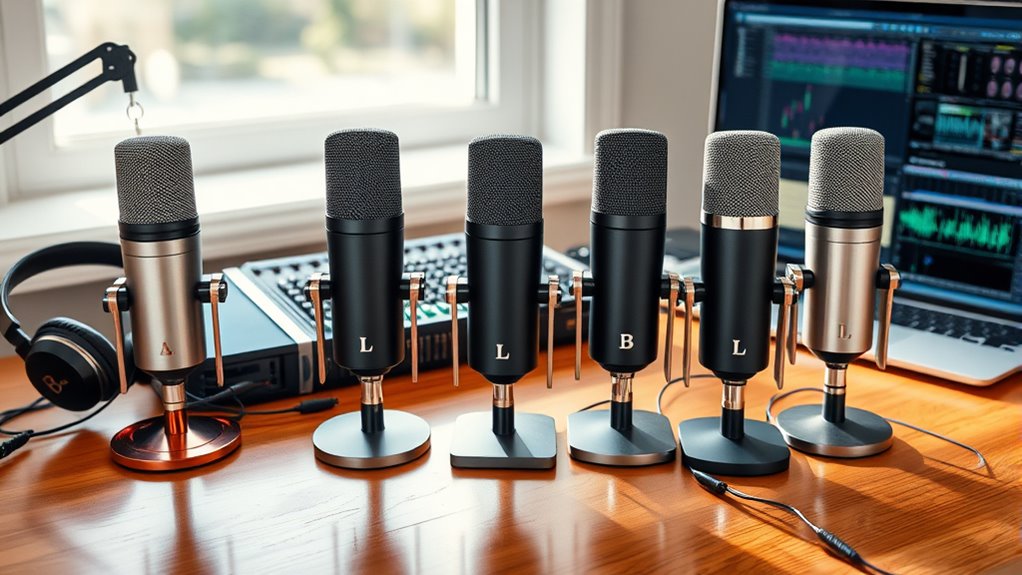

The best microphones for podcasters balance clear speech, manageable room noise, and a setup that suits your recording space. I rank the RØDE PodMic USB as the best overall for its USB-C and XLR connections, while the Zoom ZDM-1 Podcast Mic Pack stands out as a ready-to-start bundle and the FIFINE AmpliGame AM8 offers a practical USB-to-XLR upgrade path. The main tradeoff is convenience versus control: USB models connect directly to a computer, while XLR setups can support more gear but add equipment and setup steps. Condenser microphones can suit quieter, treated rooms, whereas dynamic models are often a more forgiving fit for everyday spaces. Read on for the full breakdown and guidance on choosing for your room, workflow, and budget priorities.

Get your wardrobe favorites delivered free — and shop member deals
- Fast, free delivery on millions of items
- Access to Prime Big Deal Days deals on October 6–7
- Prime Video, Amazon Music and more included
Complete the kit


Key Takeaways
- The RØDE PodMic USB ranks first for flexibility: USB-C supports a direct computer setup, while XLR leaves room to build a traditional studio chain.
- The Zoom ZDM-1 bundle reduces setup friction: its included dynamic microphone and headphones make it a useful starting point, though a bundle is less customizable than choosing each component separately.
- USB/XLR models are the clearest upgrade-path picks: the FIFINE AM8, RØDE PodMic USB, and FIFINE K688CT can serve both simpler computer setups and compatible XLR systems.
- Wireless convenience comes with workflow tradeoffs: the MAONO PD200W suits podcasters who need movement, while fixed-desk recording may be simpler with a wired mic.
- Condenser options need more attention to the room: the MAONO A04 and FIFINE K669B can suit quiet recording spaces, but room reflections and background sounds matter more than with a dynamic-first setup.
| Zoom ZDM-1 Podcast Mic Pack for Podcasters with Dynamic Mic & Headphones |  | Best Complete Starter Kit | Connectivity: XLR | Microphone type: Dynamic | Polar pattern: Supercardioid | VIEW ON AMAZON | See Our Full Breakdown |
| MAONO A04 USB Condenser Microphone Kit |  | Best for a Flexible USB Desk Setup | Connectivity: USB, USB Type-C | Microphone type: 16 mm electret condenser | Sampling rate: 192 kHz / 24-bit | VIEW ON AMAZON | See Our Full Breakdown |
| FIFINE AmpliGame AM8 USB/XLR Dynamic Microphone |  | Best for a USB-to-XLR Upgrade Path | Connectivity: USB, XLR | Microphone type: Dynamic | Polar pattern: Cardioid | VIEW ON AMAZON | See Our Full Breakdown |
| FIFINE K669B USB Condenser Microphone |  | Best Simple Desktop Pick | Connectivity: USB | Connectors: USB Type-A, USB Type-C | Polar pattern: Unidirectional | VIEW ON AMAZON | See Our Full Breakdown |
| RØDE PodMic Cardioid Dynamic Podcast Microphone | 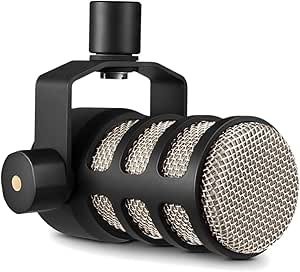 | Best Dedicated XLR Podcast Mic | Connectivity: XLR | Microphone type: Dynamic | Polar pattern: Unidirectional | VIEW ON AMAZON | See Our Full Breakdown |
| RØDE PodMic USB Dynamic Broadcast Microphone, XLR + USB-C |  | Best for Flexible Studio Upgrades | Microphone type: Dynamic | Connectivity: USB-C and XLR | Polar pattern: Unidirectional | VIEW ON AMAZON | See Our Full Breakdown |
| MAONO PD200W Hybrid Wireless Podcast Microphone for PC, Dynamic XLR USB Mic |  | Best for Wireless Interviews | Microphone type: Dynamic | Connectivity: Wireless, USB-C, and XLR | Polar pattern: Unidirectional | VIEW ON AMAZON | See Our Full Breakdown |
| FIFINE AmpliTank K688CT USB/XLR Dynamic Podcast Microphone Kit | 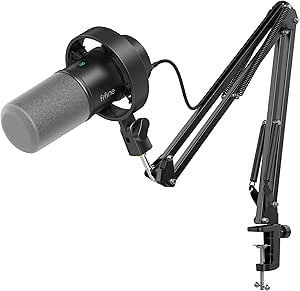 | Best Complete Desk Kit | Microphone type: Dynamic | Connectivity: USB and XLR | Polar pattern: Unidirectional (cardioid) | VIEW ON AMAZON | See Our Full Breakdown |
| microphones for podcaster | Connectivity | Polar pattern | Signal-to-noise ratio | Microphone type |
|---|---|---|---|---|
| Zoom ZDM-1 Podcast Mic Pack fo | XLR | Supercardioid | 78 dB | Dynamic |
| MAONO A04 USB Condenser Microp | USB, USB Type-C | Cardioid | 70 dB | 16 mm electret condenser |
| FIFINE AmpliGame AM8 USB/XLR D | USB, XLR | Cardioid | 80 dB | Dynamic |
| FIFINE K669B USB Condenser Mic | USB | Unidirectional | 78 dB | — |
| RØDE PodMic Cardioid Dynamic P | XLR | Unidirectional | 78 dB | Dynamic |
| RØDE PodMic USB Dynamic Broadc | USB-C and XLR | Unidirectional | 60 dB | Dynamic |
| MAONO PD200W Hybrid Wireless P | Wireless, USB-C, and XLR | Unidirectional | 82 dB | Dynamic |
| FIFINE AmpliTank K688CT USB/XL | USB and XLR | Unidirectional (cardioid) | 80 dB | Dynamic |
More Details on Our Top Picks
Zoom ZDM-1 Podcast Mic Pack for Podcasters with Dynamic Mic & Headphones
The Zoom ZDM-1 pack is my pick for a new podcaster who wants the recording essentials in one box. Along with its dynamic XLR microphone, it includes closed-back headphones, a tabletop tripod, windscreen, and XLR cable, so there is less gear to source separately than with the standalone RØDE PodMic. The supercardioid pattern is suited to a close, focused voice, while the headphones let you monitor as you record. The tradeoff is that this is still an XLR setup: you need an audio interface or mixer, which the pack does not list as included. Its tabletop stand also offers less positioning flexibility than the MAONO A04’s scissor arm. Choose this bundle for a ready-made set of basics, not for a complete interface-free recording system.
Pros:- Includes a dynamic XLR microphone and the cable needed to connect it
- Closed-back headphones support monitoring while recording
- Windscreen helps reduce breath noise and plosives
- Fold-flat tabletop tripod is easy to store or transport
Cons:- Requires a separate audio interface or mixer
- Tabletop tripod provides less reach and positioning flexibility than a boom arm
- A bundled set may include gear buyers who already own headphones or a stand
Best for: First-time podcasters who already have, or plan to buy, an XLR interface and want a mic, monitoring headphones, stand, and cable together
Not ideal for: Podcasters seeking a direct-to-computer setup or flexible boom-arm positioning; the pack uses XLR and includes a tabletop tripod instead
- Connectivity:XLR
- Microphone type:Dynamic
- Polar pattern:Supercardioid
- Impedance:200 ohm
- Frequency response:18,000 Hz
- Signal-to-noise ratio:78 dB
- Included accessories:Closed-back headphones, tabletop tripod, windscreen, and XLR cable
Our verdict“Choose the Zoom ZDM-1 pack if you want a coordinated set of podcast basics and are prepared to supply the XLR interface yourself.”
MAONO A04 USB Condenser Microphone Kit
The MAONO A04 suits podcasters who want a computer-connected setup with the positioning options of a boom arm. Its USB plug-and-play connection avoids the separate interface required by the XLR-only RØDE PodMic, and the kit adds a scissor arm, shock mount, pop filter, and foam windscreen. That makes it a more adjustable desk package than the Zoom ZDM-1, whose tabletop tripod keeps the mic closer to the surface. The A04 is a condenser microphone, though, so its recording setup and close-mic technique differ from the dynamic options here; its recommended distance is 2–6 inches. It supports several computers, consoles, and phones, but not Xbox, and the clamp only fits desks up to 2.1 inches thick. Buyers should check their desk before choosing it.
Pros:- USB connection supports a straightforward computer setup without a separate interface
- Scissor arm allows more flexible mic placement than a tabletop tripod
- Kit includes a shock mount, pop filter, and foam windscreen
- Supports PC, Mac, PlayStation consoles, and mobile phones
Cons:- Not compatible with Xbox
- Desk clamp is limited to surfaces no thicker than 2.1 inches
- Condenser design calls for close placement and may not suit every room or recording preference
Best for: Podcasters recording at a computer who want USB connection, adjustable boom-arm placement, and included pop and shock protection
Not ideal for: Xbox users, owners of desks thicker than 2.1 inches, or podcasters who prefer a dynamic microphone for their recording environment
- Connectivity:USB, USB Type-C
- Microphone type:16 mm electret condenser
- Sampling rate:192 kHz / 24-bit
- Polar pattern:Cardioid
- Frequency response:30 Hz–16 kHz
- Signal-to-noise ratio:70 dB
- Included accessories:Scissor arm, shock mount, pop filter, foam windscreen, and USB cables
- Compatibility:PC, laptop, Mac, PS4, PS5, and mobile phones; not Xbox
Our verdict“Pick the MAONO A04 if you want a USB condenser and an adjustable, accessory-rich desk setup, provided your device and desk are compatible.”
FIFINE AmpliGame AM8 USB/XLR Dynamic Microphone
The FIFINE AmpliGame AM8 is a practical bridge for podcasters who want to start on USB and keep an XLR route open. In USB mode, it offers a headphone jack, monitoring and gain controls, and tap-to-mute—handy for solo recording without reaching for software controls. When a show grows into an interface-based setup, the mic can connect by XLR, unlike the USB-only FIFINE K669B. That flexibility has limits: an XLR cable is not included, and the onboard controls and RGB lighting work only over USB. The AM8 is dynamic with cardioid pickup, making it a different fit from the condenser MAONO A04, which comes with a boom arm and more recording accessories. The AM8’s supplied details do not list a stand, so buyers may need to budget for mounting hardware.
Pros:- USB and XLR connectivity offer two ways to build a recording setup
- USB mode includes headphone monitoring, gain control, and tap-to-mute
- Cardioid dynamic design focuses on sound from in front of the microphone
- Built-in 3/8-inch and 5/8-inch threads fit common microphone stands
Cons:- XLR cable is not included
- RGB lighting and onboard controls are inactive in XLR mode
- A stand is not listed among the included items
Best for: Solo podcasters who want USB monitoring and mute controls now, with the option to connect the same dynamic mic to an XLR interface later
Not ideal for: Buyers who need a complete stand-and-cable kit or expect the USB controls and RGB lighting to remain available in XLR mode
- Connectivity:USB, XLR
- Microphone type:Dynamic
- Polar pattern:Cardioid
- Frequency response:50 Hz–16 kHz
- Signal-to-noise ratio:80 dB
- USB-mode features:Tap-to-mute, headphone monitoring, monitoring volume control, gain control, and RGB lighting
- Stand compatibility:Built-in 3/8-inch and 5/8-inch threads
Our verdict“Choose the AM8 if you want a dynamic mic with useful USB controls today and a straightforward path to XLR recording later.”
FIFINE K669B USB Condenser Microphone
The FIFINE K669B keeps a podcast desk setup simple: connect it by USB, set it on its included tripod, and use the built-in volume control to adjust the mic. That makes it more direct than the XLR-only RØDE PodMic, which needs an interface or mixer, and more compact in concept than the MAONO A04 kit with its arm and accessories. The K669B’s unidirectional pickup is intended to focus on sound from the front, but it is a condenser rather than a dynamic mic, so it is not the closest match for buyers specifically seeking the dynamic options elsewhere in this lineup. Compatibility is another dividing line: it works with computers and PS4/PS5, but not phones or Xbox. Some recording apps may also need automatic volume adjustment disabled for steadier levels.
Pros:- USB setup avoids the need for a separate audio interface
- Included desktop tripod provides a simple place to position the mic
- Built-in volume control allows quick level adjustments
- Metal body offers a sturdy alternative to lightweight plastic construction
Cons:- Not compatible with phones or Xbox
- USB-only connection offers no XLR upgrade path
- Some applications may require automatic volume adjustment to be disabled for consistent recording levels
Best for: Podcasters and remote interviewers who record at a compatible computer and want a basic USB microphone with a desk stand and direct volume control
Not ideal for: Phone or Xbox users, and podcasters who need an XLR upgrade path, boom-arm positioning, or a dynamic microphone
- Connectivity:USB
- Connectors:USB Type-A, USB Type-C
- Polar pattern:Unidirectional
- Frequency response:20 Hz–20 kHz
- Signal-to-noise ratio:78 dB
- Form factor:Desktop microphone with tripod stand
- Enclosure material:Metal
- Compatibility:Desktop computers, laptops, PS4, and PS5; not Xbox or phones
Our verdict“The K669B is a straightforward choice for computer-based podcasters who want a basic USB desktop mic and do not need phone or Xbox compatibility.”
RØDE PodMic Cardioid Dynamic Podcast Microphone
The RØDE PodMic is the most focused choice here for someone building an XLR-based speech setup around a purpose-made podcast microphone. Its dynamic design, internal pop filter, and shock mounting are intended to help manage plosives, room noise, and vibration, while the metal body suits a permanent studio position. Compared with the Zoom ZDM-1 pack, it is a standalone mic rather than a bundle: the Zoom includes headphones, a tripod, a windscreen, and an XLR cable, but the PodMic’s integrated swing mount gives it a more dedicated mounting arrangement. The tradeoff is that the PodMic has no USB connection and requires an interface or mixer, unlike the dual-connectivity FIFINE AM8. Choose it when XLR recording is already part of your plan, not when you need a plug-in-and-record starter kit.
Pros:- Dynamic microphone designed specifically for podcasting and speech
- Internal pop filter helps reduce plosive sounds
- Shock mounting helps limit vibration and handling noise
- All-metal construction and integrated swing mount
Cons:- Requires a separate audio interface or mixer
- XLR-only connection; no direct USB recording
- Standalone microphone does not include headphones or an XLR cable
Best for: Podcasters with an XLR interface or mixer who want a durable, speech-focused microphone with built-in pop and shock protection
Not ideal for: Beginners seeking direct USB recording or a bundled set of headphones, cables, and stand accessories
- Connectivity:XLR
- Microphone type:Dynamic
- Polar pattern:Unidirectional
- Impedance:150 ohm
- Frequency response:20 Hz–20 kHz
- Signal-to-noise ratio:78 dB
- Weight:937 g
- Included:PodMic with integrated swing mount
Our verdict“Choose the RØDE PodMic if you already have an XLR recording chain and want a durable mic built around spoken-word recording.”
RØDE PodMic USB Dynamic Broadcast Microphone, XLR + USB-C
The PodMic USB suits podcasters who want a polished desktop setup now and the option to move to an audio interface later. Its USB-C and XLR outputs let you record directly to a computer or connect it to traditional podcast gear; the original RØDE PodMic lacks that direct USB path. Over USB, onboard APHEX DSP offers compression and presence processing, while the headphone jack supports zero-latency monitoring. Its dynamic, unidirectional design is a practical fit for speech in rooms where keyboard noise or reflections are a concern. Compared with the more mobile MAONO PD200W, this is a wired, studio-focused choice rather than a wireless interview kit. The tradeoff is that USB convenience and processing come with less portability, and the mic is built around a close-up broadcast workflow.
Pros:- USB-C and XLR support both computer recording and interface-based setups
- APHEX DSP over USB provides onboard compression and presence processing
- Zero-latency headphone monitoring is built into the microphone
- Internal pop filter and shock mount help manage plosives and handling vibration
Cons:- Wired design is less suited to recording away from a desk than the MAONO PD200W
- USB processing is tied to the USB connection, so an XLR chain needs separate processing
- A close-mic broadcast style may not suit users who want a hands-off recording setup
Best for: Solo podcasters who record at a desk, want direct USB recording today, and may add an interface or mixer later
Not ideal for: Mobile interviewers or two-person shows needing wireless microphones and independent tracks
- Microphone type:Dynamic
- Connectivity:USB-C and XLR
- Polar pattern:Unidirectional
- Frequency range:20 Hz–20 kHz
- Signal-to-noise ratio:60 dB
- Monitoring:Zero-latency headphone output with level control
- USB processing:APHEX DSP
- Included accessories:Swing mount, USB-C cable, and pouch
Our verdict“Choose the PodMic USB if you want a speech-focused wired mic that can move from direct computer recording to an XLR studio chain.”
MAONO PD200W Hybrid Wireless Podcast Microphone for PC, Dynamic XLR USB Mic
The PD200W is the most flexible choice here for podcasters who record away from a fixed desk or host guests in different locations. It supports wireless, USB, and XLR connections, while one receiver can connect two wireless desktop mics and record them to separate tracks. That makes it more purpose-built for mobile interviews than the wired RØDE PodMic USB or the boom-arm-based FIFINE AmpliTank K688CT. Its 60 m wireless range, claimed battery life of up to 60 hours with RGB off, and three-stage noise cancellation add convenience for location work. The tradeoff is more equipment and setup complexity than a straightforward USB microphone. Camera and Lightning accessories are sold separately, and the wireless functions depend on battery power rather than a simple cable-only workflow.
Pros:- Wireless, USB, and XLR modes accommodate mobile, computer, and interface recording
- A single receiver can link two wireless mics with separate tracks
- Three-stage noise cancellation and cardioid pickup help focus on speech
- Up to 60 hours of stated battery life with RGB lighting off
Cons:- Wireless recording introduces battery management and receiver setup
- Camera and Lightning accessories are sold separately
- More involved than a direct USB setup such as the RØDE PodMic USB
Best for: Interview and duo-podcast hosts who need wireless movement, separate mic tracks, and the option to connect by USB or XLR
Not ideal for: Podcasters who want a simple wired desk mic or need camera and Lightning connections without buying additional accessories
- Microphone type:Dynamic
- Connectivity:Wireless, USB-C, and XLR
- Polar pattern:Unidirectional
- Signal-to-noise ratio:82 dB
- Maximum SPL:128 dB
- Wireless range:Up to 60 m
- Battery life:Up to 60 hours with RGB off
- Included accessories:Desktop stand, USB-C cable, receiver, and Type-C adapter cable
Our verdict“Pick the PD200W for interviews and two-person shows where wireless placement and separate tracks matter more than a minimal desk setup.”
FIFINE AmpliTank K688CT USB/XLR Dynamic Podcast Microphone Kit
The K688CT makes sense for a podcaster who wants the key pieces of a desk recording setup in one kit. Its USB/XLR dynamic mic can start on a computer and later join an interface-based setup, while the included metal boom arm, shock mount, and windscreen reduce the need to source mounting and basic plosive protection separately. USB users also get tap-to-mute, gain adjustment, and headphone monitoring. That gives it a more complete out-of-box desk package than the RØDE PodMic USB, which includes a swing mount but not a boom arm. Compared with the MAONO PD200W, it stays wired and simpler rather than offering wireless recording. The key constraints are practical: USB controls are unavailable over XLR, and the clamp only fits desks under two inches thick.
Pros:- USB and XLR connections support both direct computer recording and interface use
- Kit includes a metal boom arm, shock mount, and windscreen
- USB controls provide tap-to-mute, gain adjustment, and headphone monitoring
- Cardioid pickup and dynamic capsule suit close-miked spoken-word recording
Cons:- C-clamp fits desks under two inches thick, limiting placement options
- Microphone controls are unavailable when connected through XLR
- Wired-only setup lacks the placement freedom of the MAONO PD200W
Best for: New desk-based podcasters who want a boom arm, shock mount, and windscreen included with a USB/XLR dynamic mic
Not ideal for: Creators with thick desks, mobile recording needs, or an XLR setup that depends on controls located on the microphone
- Microphone type:Dynamic
- Connectivity:USB and XLR
- Polar pattern:Unidirectional (cardioid)
- Maximum SPL:130 dB
- Frequency range:50 Hz–16 kHz
- Signal-to-noise ratio:80 dB
- Enclosure material:Metal
- Desk clamp fit:Desks under 2 inches thick
Our verdict“Choose the K688CT if you want a wired podcast mic kit with its boom arm and basic recording accessories included.”

How We Picked
I ranked these microphones around the problems podcasters face most: getting intelligible speech, matching the mic to a real recording room, and building a setup that is not harder to use than necessary. I weighed connection options, microphone type, practical setup needs, included accessories, and the flexibility to change recording workflows. A feature mattered most when it changed how a buyer could record, not simply because it appeared on a specification sheet.
The order favors products that combine useful voice-focused design with straightforward setup and room to adapt. The RØDE PodMic USB leads because it offers both USB-C and XLR connections; the Zoom ZDM-1 Podcast Mic Pack earns a distinct place for its bundled essentials. Single-connection USB models rank lower for limited upgrade flexibility, while condenser, wireless, and kit options are positioned for buyers whose room, mobility, or accessory needs justify their particular tradeoffs. These rankings reflect fit for podcasting, not a claim that one microphone sounds best for every voice or room.
| microphones for podcaster | Polar pattern | Included accessories |
|---|---|---|
| Zoom ZDM-1 Podcast Mic Pack fo | Supercardioid | Closed-back headphones, tabletop tripod, windscreen, and XLR cable |
| MAONO A04 USB Condenser Microp | Cardioid | Scissor arm, shock mount, pop filter, foam windscreen, and USB cables |
| FIFINE AmpliGame AM8 USB/XLR D | Cardioid | — |
| FIFINE K669B USB Condenser Mic | Unidirectional | — |
| RØDE PodMic Cardioid Dynamic P | Unidirectional | — |
| RØDE PodMic USB Dynamic Broadc | Unidirectional | Swing mount, USB-C cable, and pouch |
| MAONO PD200W Hybrid Wireless P | Unidirectional | Desktop stand, USB-C cable, receiver, and Type-C adapter cable |
| FIFINE AmpliTank K688CT USB/XL | Unidirectional (cardioid) | — |
Factors to Consider When Choosing Microphones For Podcasters
Before choosing a microphone, I would match the recording setup to the space and workflow you actually have. A feature that sounds appealing on paper can add little value if it does not solve a real problem, while a small setup choice can affect every recording session.
Match the microphone type to your room
Your room affects recorded speech as much as the microphone choice. Condenser models can capture detailed voice, but they can also pick up reflections, computer fans, and nearby activity. Dynamic microphones are often a more forgiving starting point in untreated rooms, though microphone distance and speaking technique still matter. A common mistake is buying a sensitive mic to compensate for a noisy or echoing room. Try reducing reflections with soft furnishings and moving away from noise sources before spending on a different microphone. If your space is already quiet and controlled, a condenser may be a reasonable fit; for a shared or untreated room, a dynamic model is often easier to manage.
Choose USB, XLR, or a microphone with both
USB keeps a basic podcast setup simple by connecting the microphone directly to a computer. XLR usually requires an audio interface or mixer, adding cost and another device to configure, but it can fit a growing multi-mic setup. Dual-connection designs offer flexibility, but owning both connection types is not automatically useful if you expect to keep recording at one desk. Before paying for an upgrade path, decide whether you plan to add co-hosts, external processing, or a dedicated recording system. Also check that the connection and controls work with your intended device and software. The best choice is the one that supports your likely workflow without adding equipment you will not use.
Plan for microphone technique and desk space
Podcast microphones are not all equally forgiving of speaking distance and positioning. A mic that needs close placement can help prioritize your voice, but it may also require a boom arm or a stand that fits your desk. If you move around while talking, consistent volume can be harder to maintain with a fixed-position mic. Buyers sometimes focus on pickup patterns and forget to budget space for the microphone, cable, and any mount. Check where the mic will sit relative to your keyboard, monitor, and face before deciding on a setup. A stable, repeatable position can make recordings more consistent without relying on extra processing.
Treat bundles and accessories as workflow choices
A kit can remove guesswork when it includes items you would need from day one, such as headphones or a usable stand. But a bundle is not automatically the best value if its accessories do not fit your desk or recording habits. Compare what is included with what you already own, and check whether the microphone can be mounted the way you prefer. Headphones are useful for catching noise and monitoring a recording, but they do not improve the sound captured by the microphone. A package can be a convenient first setup, while a standalone mic may suit someone who already has compatible gear. Prioritize usable components over the number of items in the box.
Decide whether wireless freedom solves a real problem
Wireless recording can help when a host moves around, records away from a desk, or needs to avoid a cable across a shared space. For a stationary solo podcast, a wired USB or XLR connection is often a simpler path with fewer components to manage. Wireless setups add questions about charging, connection reliability, and how the receiver fits into the recording chain. Think through where the audio will be recorded and how often the microphone will travel before choosing wireless for convenience alone. A mobile format may make those extra steps worthwhile; a fixed studio routine may not. Keep a backup recording plan in mind if a session cannot be easily repeated.
Spend on the constraint you need to solve
Paying more can make sense when a microphone adds a capability you will use, such as dual USB/XLR connectivity or a kit that replaces several missing essentials. It is less useful to pay for flexibility that does not match your recording plans. For many new podcasters, room treatment, a reliable stand, and monitoring habits can matter more than moving to a more feature-rich mic. Avoid assuming a more expensive microphone will fix echo, poor placement, or inconsistent speaking distance. List the problem you want to solve, then compare which products address it directly. This keeps the decision focused on recording results and workflow rather than features for their own sake.
Frequently Asked Questions
Should I choose a dynamic or condenser microphone for a home podcast?
I would start with the room, not a general claim that one type is better. Dynamic microphones are often easier to manage in untreated spaces with everyday background noise, while condenser models can suit quieter rooms where reflections are controlled. Neither type can remove a noisy environment or replace careful positioning. If you record near a fan, street noise, or other people, first reduce those sounds and keep the mic close to your voice. If the room is quiet and you can control your distance, a condenser may be a suitable option.
Is a USB/XLR microphone worth choosing if I only record into a computer now?
It can be worthwhile if you have a realistic plan to move to an interface, mixer, or multi-microphone setup later. The RØDE PodMic USB, FIFINE AM8, and FIFINE K688CT illustrate the appeal of keeping both connection paths available. If you expect to record solo at the same computer for the foreseeable future, a straightforward USB mic may be easier and less complicated. XLR use also calls for compatible gear and more setup decisions. I would treat dual connectivity as useful flexibility, not a reason by itself to buy a particular model.
Do I need an audio interface to start podcasting?
No, a USB microphone can connect directly to a compatible computer, which is why several picks in this roundup work for simple setups. An interface becomes relevant when you choose an XLR microphone or need inputs for additional microphones and equipment. It adds control and connection options, but also another device, cables, and configuration steps. Check how many people you need to record at once before choosing an interface. For a solo beginner, direct USB can keep the first setup more manageable.
Is a podcast microphone bundle a better first purchase than a standalone mic?
A bundle makes sense when its included items fill genuine gaps in your setup. The Zoom ZDM-1 Podcast Mic Pack pairs a dynamic microphone with headphones, which can simplify assembling a starter recording station. A standalone mic may be the better fit if you already own monitoring headphones, a suitable stand, or other compatible gear. Check each accessory’s usefulness and mounting compatibility rather than judging a kit by how much it contains. The right choice depends on what you still need to record comfortably.
Will a microphone upgrade fix echo or background noise in my recordings?
Usually, changing microphones alone will not fix a reflective room or a persistent noise source. Microphone type and placement can affect how much unwanted sound reaches the recording, but they cannot make the room silent. Try recording closer to the microphone, moving away from computers or appliances, and adding soft furnishings to reduce reflections. Listen to a short test before committing to a new setup. If the room remains the main problem, addressing that space may help more than buying a more feature-rich microphone.
Conclusion
I would choose the RØDE PodMic USB as best overall for a podcaster who wants direct USB recording now and an XLR option later. The Zoom ZDM-1 Podcast Mic Pack is my best value in setup convenience for someone who still needs headphones alongside a dynamic mic, while the MAONO A04 USB Condenser Microphone Kit is a beginner-friendly fit for a quiet room and a direct computer connection. For a premium-minded buyer who values connection flexibility, the PodMic USB is the strongest fit in this lineup; for movement, consider the MAONO PD200W, and for a compact wired upgrade path, compare the FIFINE AM8 or K688CT. Choose the FIFINE K669B if a simple USB condenser suits your recording space, and skip it if room noise is your main concern. The right pick is the one that fits your room and recording routine, not the one with the longest feature list.
Fall Picks
fall essentials
As an affiliate, we earn on qualifying purchases.